
【高德地图API】JS高德地图实现点标连线,高德地图实现点跟点连线,高德地图实现连线
前言
高德地图API参考:https://lbs.amap.com/demo/javascript-api/example/marker/custom-icon
实现各个点标的经纬度连线,点击点标可查看内容(自定义的)
效果
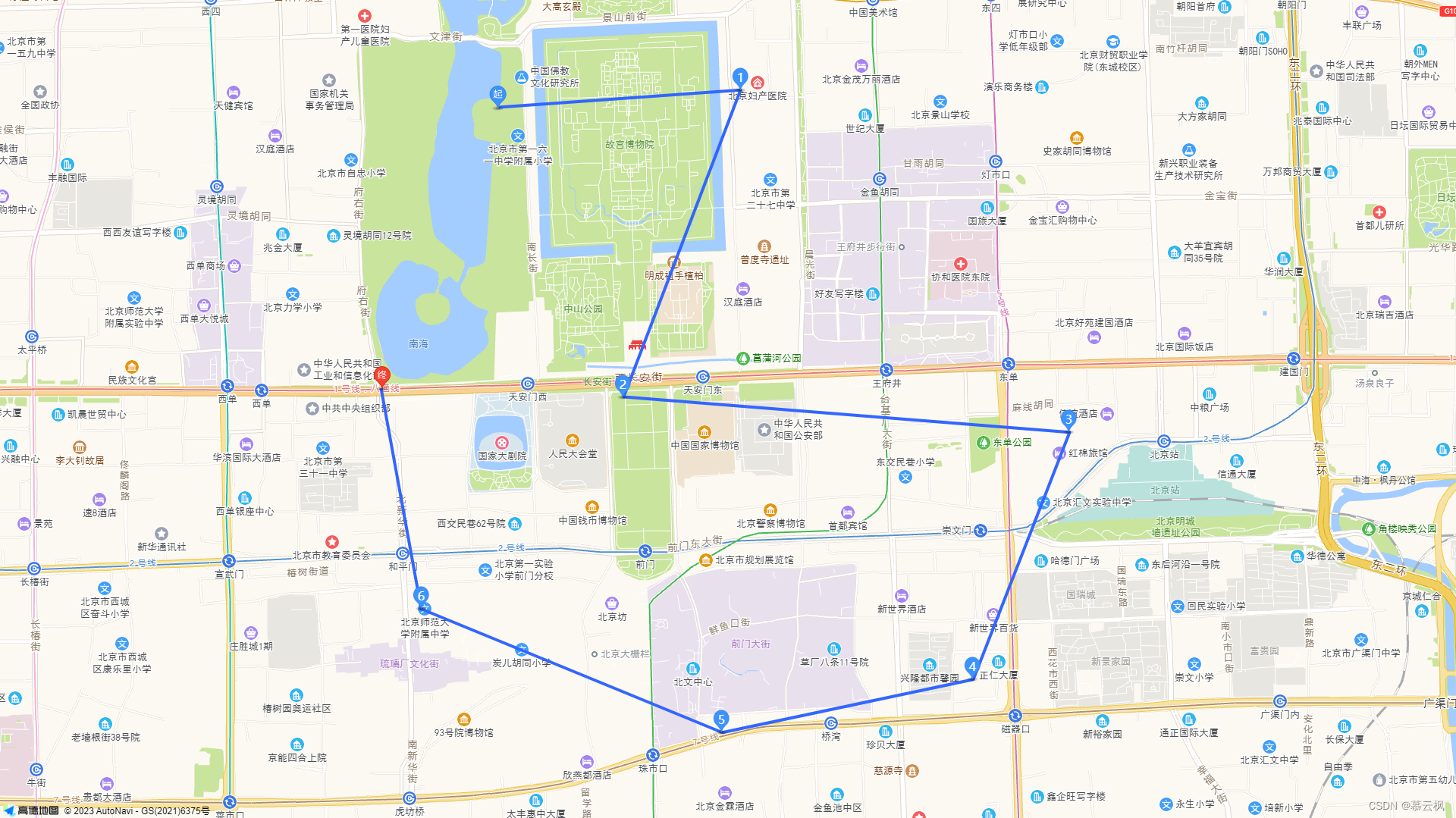
实现
案例实现,复制粘贴,将安全密钥和key替换成自己的即可使用
点跟点连线
html,
body,
#container {
height: 100%;
padding: 0;
margin: 0;
}
.custom-content-marker {
position: relative;
width: 25px;
height: 34px;
}
.custom-content-marker img {
width: 100%;
height: 100%;
}
.custom-content-marker span {
position: absolute;
left: 0;
top: 2px;
width: 100%;
text-align: center;
color: #fff;
}
.custom-content-text {
position: absolute;
left: 25px;
top: 2px;
color: #000000;
background: #fff;
padding: 4px;
min-width: 150px;
border-radius: 4px;
font-size: 12px;
display: none;
box-shadow: #00000020 0 2px 5px 0;
}
.custom-content-text .close-icon {
position: absolute;
right: -8px;
top: -10px;
border-radius: 50px;
width: 20px;
height: 20px;
line-height: 20px;
background: #fff;
text-align: center;
font-style: normal;
cursor: pointer;
}
.custom-content-text .close-icon:hover {
background: #b9b9b9;
color: #fff;
}
window._AMapSecurityConfig = {
securityJsCode: 'bf5*****************886',
}
// 创建多边形
var markers = [
[116.389632, 39.919505],
[116.403322, 39.920254],
[116.396713, 39.90693],
[116.421947, 39.905391],
[116.416497, 39.894658],
[116.402292, 39.892354],
[116.385255, 39.897721],
[116.382981, 39.907301]
];
//初始化地图对象,加载地图
var map = new AMap.Map("container", {
resizeEnable: true,
center: markers[0],
zoom: 14
});
// 添加点标(除了第一个和最后一个改了图标,其他都是设置自定义内容,也可以使用简单的默认点标无需这么麻烦)
for(var i = 0; i ';
markerContent += '  ';
markerContent += ' ' + i + '';
markerContent += '';
markerContent += ' + i + '">';
markerContent += ' 内容' + i + '';
markerContent += ' X';
markerContent += '';
var marker = new AMap.Marker({
position: markers[i],
content: markerContent,
// 以 icon 的 [center bottom] 为原点
offset: new AMap.Pixel(-13, -30)
});
map.add(marker);
}
}
// 绘画线条
var polyline = new AMap.Polyline({
path: markers,
strokeColor: "#3366FF",
strokeWeight: 4,
strokeOpacity: 1,
strokeStyle: "solid",
strokeDasharray: [10, 5],
lineJoin: "round"
});
polyline.setMap(map);
//map.setFitView();
/**
* 显示自定义标点的内容
* @param {Object} i
*/
function showContent(i) {
var text = document.getElementsByClassName('custom-content-text-' + i)[0];
text.style.display = 'block';
}
/**
* 隐藏显示的标点内容
* @param {Object} i
*/
function closeContent(i) {
var text = document.getElementsByClassName('custom-content-text-' + i)[0];
text.style.display = 'none';
}
';
markerContent += ' ' + i + '';
markerContent += '';
markerContent += ' + i + '">';
markerContent += ' 内容' + i + '';
markerContent += ' X';
markerContent += '';
var marker = new AMap.Marker({
position: markers[i],
content: markerContent,
// 以 icon 的 [center bottom] 为原点
offset: new AMap.Pixel(-13, -30)
});
map.add(marker);
}
}
// 绘画线条
var polyline = new AMap.Polyline({
path: markers,
strokeColor: "#3366FF",
strokeWeight: 4,
strokeOpacity: 1,
strokeStyle: "solid",
strokeDasharray: [10, 5],
lineJoin: "round"
});
polyline.setMap(map);
//map.setFitView();
/**
* 显示自定义标点的内容
* @param {Object} i
*/
function showContent(i) {
var text = document.getElementsByClassName('custom-content-text-' + i)[0];
text.style.display = 'block';
}
/**
* 隐藏显示的标点内容
* @param {Object} i
*/
function closeContent(i) {
var text = document.getElementsByClassName('custom-content-text-' + i)[0];
text.style.display = 'none';
}

免责声明:我们致力于保护作者版权,注重分享,被刊用文章因无法核实真实出处,未能及时与作者取得联系,或有版权异议的,请联系管理员,我们会立即处理! 部分文章是来自自研大数据AI进行生成,内容摘自(百度百科,百度知道,头条百科,中国民法典,刑法,牛津词典,新华词典,汉语词典,国家院校,科普平台)等数据,内容仅供学习参考,不准确地方联系删除处理! 图片声明:本站部分配图来自人工智能系统AI生成,觅知网授权图片,PxHere摄影无版权图库和百度,360,搜狗等多加搜索引擎自动关键词搜索配图,如有侵权的图片,请第一时间联系我们,邮箱:ciyunidc@ciyunshuju.com。本站只作为美观性配图使用,无任何非法侵犯第三方意图,一切解释权归图片著作权方,本站不承担任何责任。如有恶意碰瓷者,必当奉陪到底严惩不贷!


