oracle 监听配置
一 静态监听配置:
在配置文件中加入,需要添加sid监听的配置
(SID_DESC =
(SID_NAME = AIX)
(GLOBAL_DBNAME = AIX)
(ORACLE_HOME = /orabin/app/oracle/product/19c/db_1)
)
LISTENER =
  (DESCRIPTION_LIST =
    (DESCRIPTION =
      (ADDRESS = (PROTOCOL = TCP)(HOST = 10.216.x.xxx)(PORT = 1521))
      (ADDRESS = (PROTOCOL = IPC)(KEY = EXTPROC1521))
    )
  )
SID_LIST_LISTENER =
  (SID_LIST =
   (SID_DESC =
    (SID_NAME = AIX)
    (GLOBAL_DBNAME = AIX)
     (ORACLE_HOME = /orabin/app/oracle/product/19c/db_1)
    )
   )
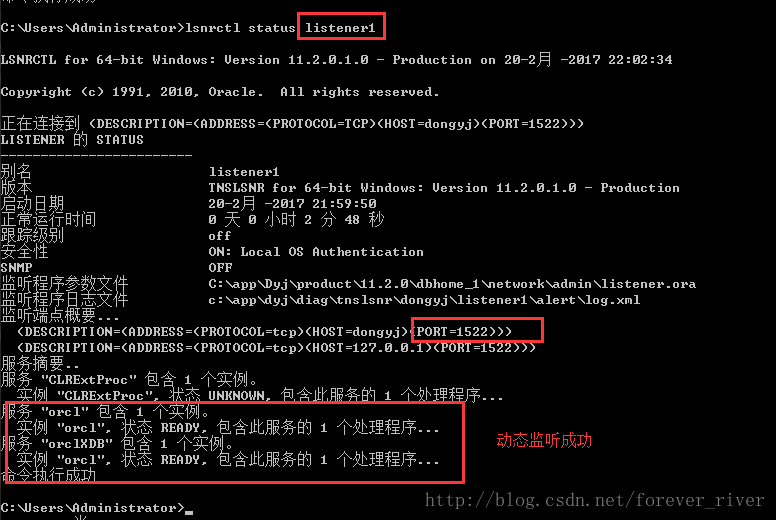
静态监听注册成功,下方出现unkown的标识(表示静态监听注册成功),静态注册时,listener.ora中的GLOBAL_DBNAME向外提供服务名,listener.ora中的SID_NAME提供注册的实例名,实例状态为UNKNOWN值时表明此服务是静态注册的设置。这时监听器用来表明它不知道关于该实例的任何信息,只有当客户发出连接请求时,它才检查该实例是否存在
二 动态监听配置:
动态注册默认只注册到默认的监听器上(名称是LISTENER、端口是1521、协议是TCP),因为pmon只会动态注册port等于1521的监听,否则pmon不能动态注册listener,如果需要向非默认监听注册,则需要配置local_listener参数!
- local_listener参数的使用
To have PMON register with a local listener that does not use TCP/IP, port 1521, configure the LOCAL_LISTENER parameter in the initialization parameter file to locate the local listener.
如果要使用PMON注册本地的监听,并且不适用TCP/IP,不使用默认端口1521,使用参数LOCAL_LISTENER来确定本地监听。
For a shared server environment, you can use the LISTENER attribute of the DISPATCHERS parameter in the initialization parameter file to register the dispatchers with a nondefault local listener. Because the LOCAL_LISTENER parameter and the LISTENER attribute enable PMON to register dispatcher information with the listener, it is not necessary to specify both the parameter and the attribute if the listener values are the same.
对于共享服务的环境下,你也可以使用初始化参数DISPATCHER参数的LISTENER参数属性,来给分发器注册一个非默认的端口,由于上述两个参数目的都是使PMON进程完成动态注册,当两个参数的值一样时,就不需要分别设置,只需要设置一个即可。
LOCAL_LISTENER is a comma-delimited list parameter. If a comma appears in the string, then the entire string must be enclosed in double quotation marks. Set the LOCAL_LISTENER parameter as follows:
ALTER SYSTEM SET LOCAL LISTENER=[“]listener_address[“][,…];
For example, if the listener address “ab,cd” is entered, then it resolves to one listener address. If the address is entered as ab,cd, then it resolves to two listener addresses, ab and cd.
For shared server connections, set the LISTENER attribute as follows:
ALTER SYSTEM SET DISPATCHERS=”(PROTOCOL=tcp)(LISTENER=listener_address)”;
In the preceding command, listener_address is resolved to the listener protocol addresses through a naming method, such as a tnsnames.ora file on the database server.
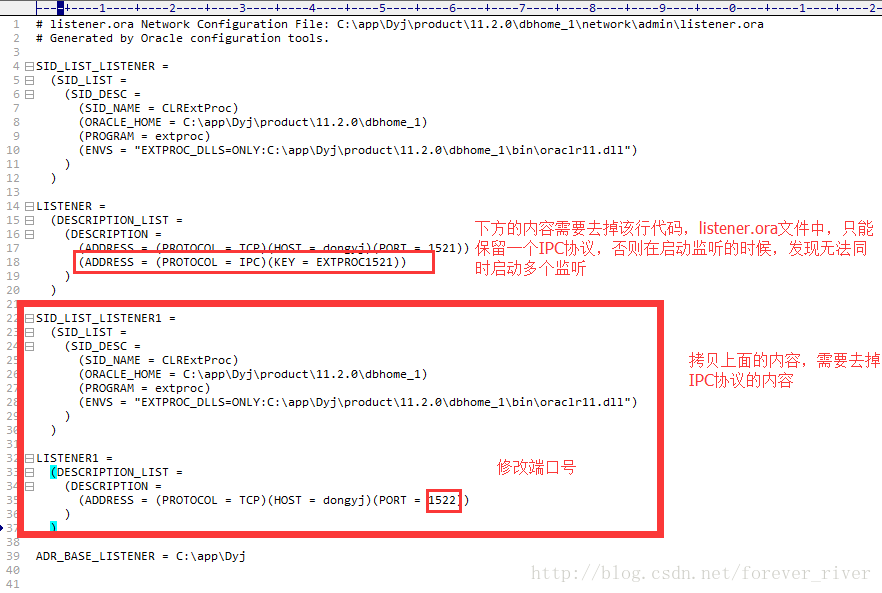
增加配置文件,此处一定要去掉上方拷贝的IPC协议,alter system set local_listener=LISTENER_ORCL,LISTENER_ORCL1, 其中LISTENER_ORCL,LISTENER_ORCL1的值必须在tnsnames.ora声明
SID_LIST_LISTENER1 =
  (SID_LIST =
    (SID_DESC =
      (SID_NAME = CLRExtProc)
      (ORACLE_HOME = C:\app\Dyj\product\11.2.0\dbhome_1)
      (PROGRAM = extproc)
      (ENVS = "EXTPROC_DLLS=ONLY:C:\app\Dyj\product\11.2.0\dbhome_1\bin\oraclr11.dll")
    )
  )
LISTENER1 =
  (DESCRIPTION_LIST =
    (DESCRIPTION =
      (ADDRESS = (PROTOCOL = TCP)(HOST = dongyj)(PORT = 1522))
    )
  )
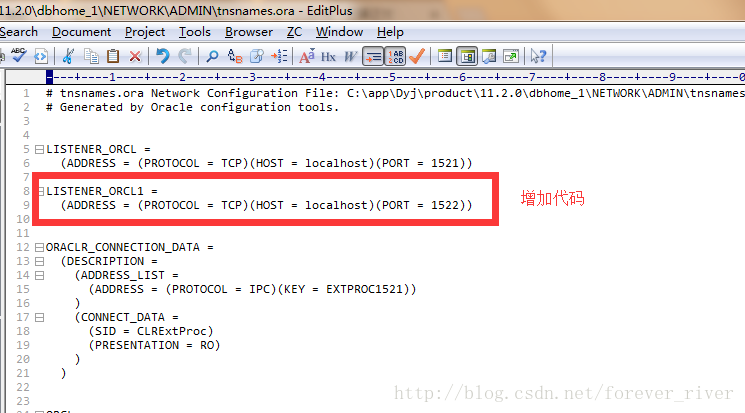
修改配置文件tnsnames.ora
LISTENER_ORCL1 =
  (ADDRESS = (PROTOCOL = TCP)(HOST = localhost)(PORT = 1522))
配置数据库参数值:local_listener
SQL> alter system set local_listener=LISTENER_ORCL,LISTENER_ORCL1;
系统已更改。
SQL> show parameters local_listener;
NAME                                 TYPE        VALUE
------------------------------------ ----------- ------------------------------
local_listener                       string      LISTENER_ORCL, LISTENER_ORCL1
启动监听,并完成动态注册
启动监听:listener

启动监听:listener1
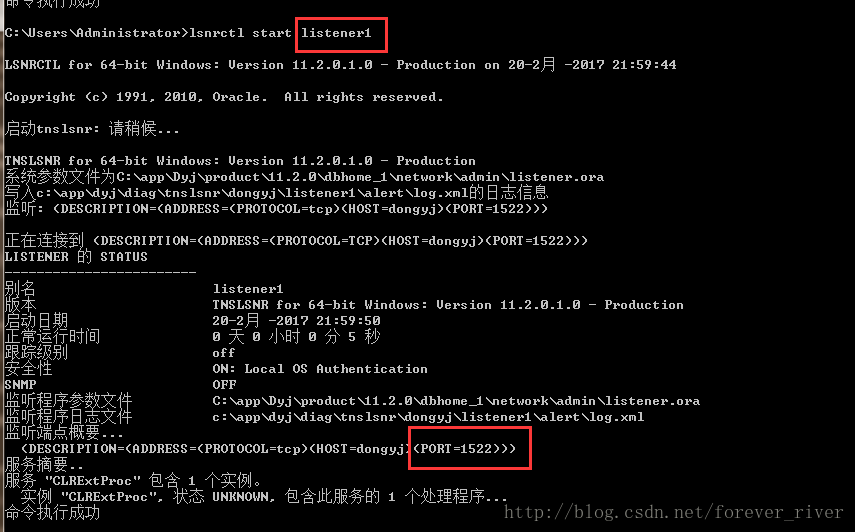
执行动态注册命令:alter system register
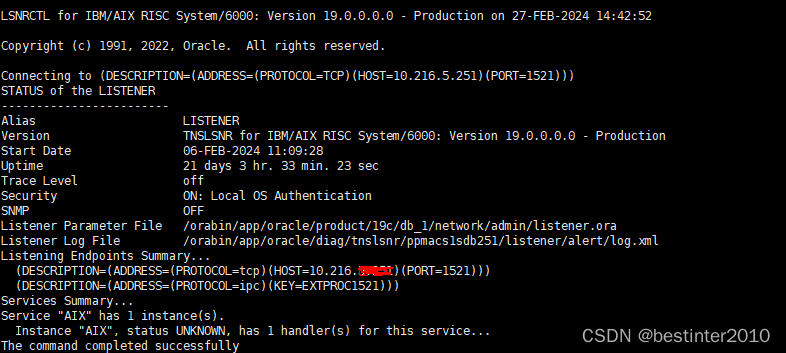
listener动态监听成功
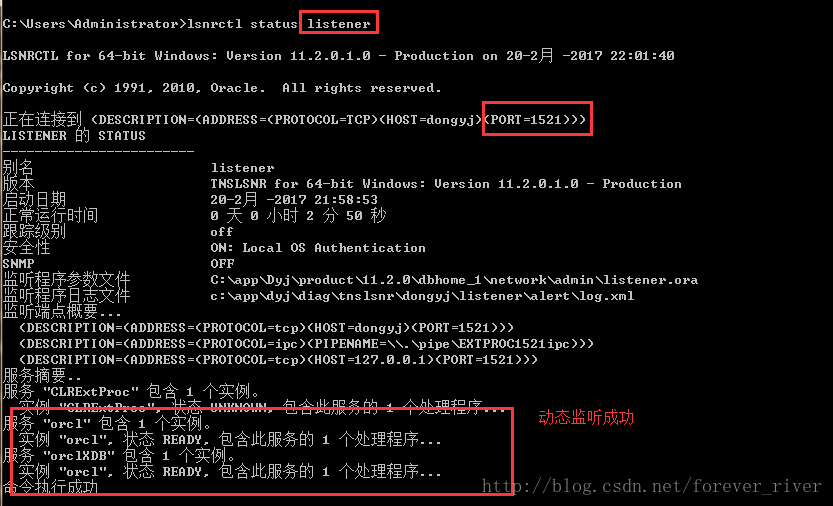
listener1动态监听成功