
Pytest自动化测试框架之Allure报告
Allure提供了一个清晰的全局,涵盖了所涵盖的功能,缺陷聚集的位置,执行时间表,以及许多其他方便的事情。
独特的模块化和可扩展性,确保你能够进行适当的微调,以使更适合你自己。
官方文档:Allure Framework
部署使用
Pytest作为一个高扩展性、功能强大的自动化测试框架,自身的测试结果是较为简单的,如果想要一份完整测试报告需要其他插件的支持。
如果你对测试报告要求没那么高,你可以使用 pytest-html 插件,基本覆盖了测试报告的常规内容。
但是如果你想查看清晰的测试过程、多维度的测试报告、自定义一些输出,以及与用例和缺陷系统集成等,那 allure-python 将是你的"不二人选"。
注意:allure-pytest 从1.7之后已弃用,从2.0版本开始迁移至 allure-python 项目(即使用allure2),另外要运行allure命令行也需要Java的支持。
1、安装:
(1)allure-pytest插件:
pip install -U allure-pytest
这将安装allure-pytest和allure-python-commons程序包,以生成与allure2兼容的报告数据。
(2)allure工具:
官方下载地址:https://github.com/allure-framework/allure2/releases
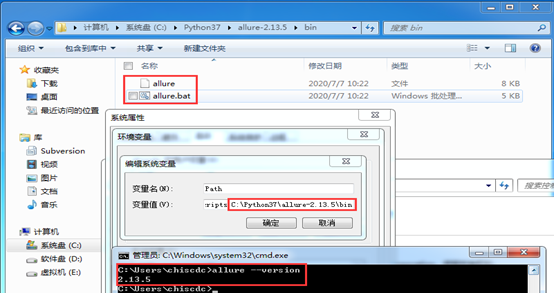
解压软件包(建议直接放到Python文件夹下),然后添加bin目录到环境变量中,最后使用 allure --version 验证是否安装成功。
2、基本使用
>>> 要使allure侦听器能够在测试执行过程中收集结果,只需添加 –alluredir选项并提供路径即可存储结果。
pytest --alluredir=
如果你运行后进行了用例更改,那么下次运行可能还是会查看到之前记录,可添加 –clean-alluredir 选项清除之前记录。
pytest --alluredir= --clean-alluredir
>>> 要在测试完成后查看实际报告,你需要使用allure命令行应用程序从结果生成报告。
(1)在默认浏览器中显示生成的报告
allure serve
(2)要从现有的Allure结果生成报告,可以使用以下命令:
allure generate
默认报告将生成到allure-report文件夹,你可以使用 -o标志更改目标文件夹:
allure generate -o
(3)生成报告后,可以在默认系统浏览器中将其打开,只需运行:
allure open
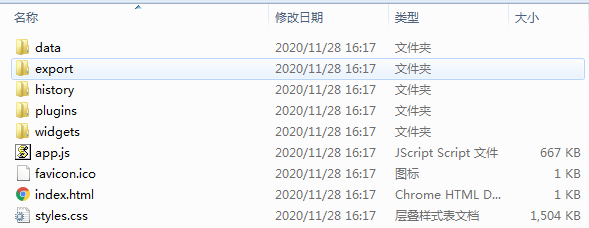
你也可以找到该目录,使用浏览器打开该目录下index.html。注意:有时打开会找不到数据或者乱码,如果你使用的是pycharm,请在pycharm中右击打开。
(4)如果要删除生成的报告数据,只需运行:
allure report clean
默认情况下,报告命令将在 allure-results文件夹中查找报告,如果要从其他位置使用报告,则可以使用 -o选项。
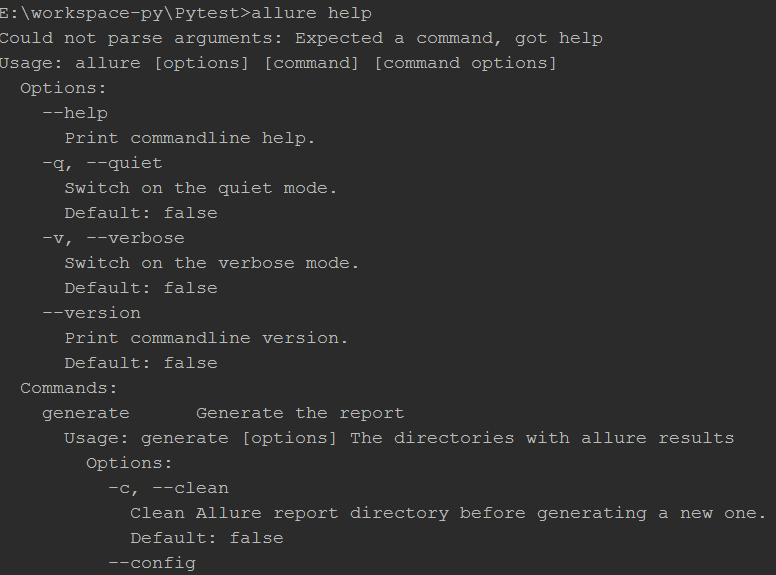
(5)你也可以使用allure help 命令查看更多帮助。
测试报告
你可以在allure报告中看到所有默认的pytest状态:只有由于一个断言错误而未成功进行的测试将被标记为失败,其他任何异常都将导致测试的状态为坏。
示例:
# test_sample.py
import pytest

# 被测功能
def add(x, y):
    return x + y

# 测试类
class TestAdd:

    # 跳过用例
    def test_first(self):
        pytest.skip('跳过')
        assert add(3, 4) == 7

    # 异常用例
    def test_second(self):
        assert add(-3, 4) == 1
        raise Exception('异常')

    # 成功用例
    def test_three(self):
        assert add(3, -4) == -1

    # 失败用例
    def test_four(self):
        assert add(-3, -4) == 7
# conftest.py
import pytest

@pytest.fixture(scope='session', autouse=True)
def db():
    print('start')
    yield
    print('closed')
运行:
E:\workspace-py\Pytest>pytest test_sample.py --alluredir=report --clean-alluredir
========================================================================== test session starts ==========================================================================
platform win32 -- Python 3.7.3, pytest-6.0.2, py-1.9.0, pluggy-0.13.0
rootdir: E:\workspace-py\Pytest
plugins: allure-pytest-2.8.18, assume-2.3.3, cov-2.10.1, html-3.0.0, rerunfailures-9.1.1, xdist-2.1.0
collected 4 items

test_sample.py sF.F   [100%]

=============================================================================== FAILURES ================================================================================
__________________________________________________________________________ TestAdd.test_second __________________________________________________________________________

self =

    def test_second(self):
        assert add(-3, 4) == 1
>       raise Exception('异常')
E       Exception: 异常

test_sample.py:21: Exception
___________________________________________________________________________ TestAdd.test_four ___________________________________________________________________________

self =

    def test_four(self):
>       assert add(-3, -4) == 7
E       assert -7 == 7
E        +  where -7 = add(-3, -4)

test_sample.py:29: AssertionError
======================================================================== short test summary info ========================================================================
FAILED test_sample.py::TestAdd::test_second - Exception: 异常
FAILED test_sample.py::TestAdd::test_four - assert -7 == 7
================================================================ 2 failed, 1 passed, 1 skipped in 0.14s =================================================================
生成报告:
E:\workspace-py\Pytest>allure generate --clean report
Report successfully generated to allure-report
查看目录:
E:\workspace-py\Pytest>tree 文件夹 PATH 列表 卷序列号为 B2C1-63D6 E:. ├─.idea ├─.pytest_cache │ └─v │ └─cache ├─allure-report │ ├─data │ │ ├─attachments │ │ └─test-cases │ ├─export │ ├─history │ ├─plugins │ │ ├─behaviors │ │ ├─jira │ │ ├─junit │ │ ├─packages    **既有适合小白学习的零基础资料,也有适合3年以上经验的小伙伴深入学习提升的进阶课程,涵盖了95%以上软件测试知识点,真正体系化!** ├─behaviors │ │ ├─jira │ │ ├─junit │ │ ├─packages [外链图片转存中...(img-pn6JAiPP-1719233859292)] [外链图片转存中...(img-qU3NnUTy-1719233859292)] [外链图片转存中...(img-9kRIcHRp-1719233859293)] **既有适合小白学习的零基础资料,也有适合3年以上经验的小伙伴深入学习提升的进阶课程,涵盖了95%以上软件测试知识点,真正体系化!**


