
WPF自定义控件,实现含有箭头的文本或内容控件
文章目录
- 背景
- 效果预览
- 方案设计
- 分析
- 基本布局
- 添加控件自定义属性
- 添加属性值监听
- 获取点数据
- 全部代码
- HorizontalLineContent.xaml
- HorizontalLineContent.xaml.cs
- DirectionAlignment.cs
- ContentDirectionAlignment.cs
- 使用方法
背景
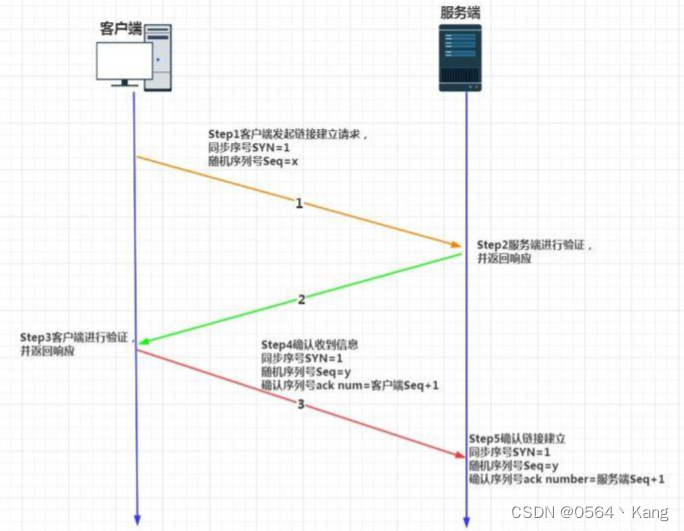
因为项目开发需要,要在WPF上绘制TCP的交互过程图,所以现在需要一个箭头控件,并且在箭头中间还可以加入文字,所以开发了这个HorizontalLineContent控件,后续可能还要开发垂直版本。😁
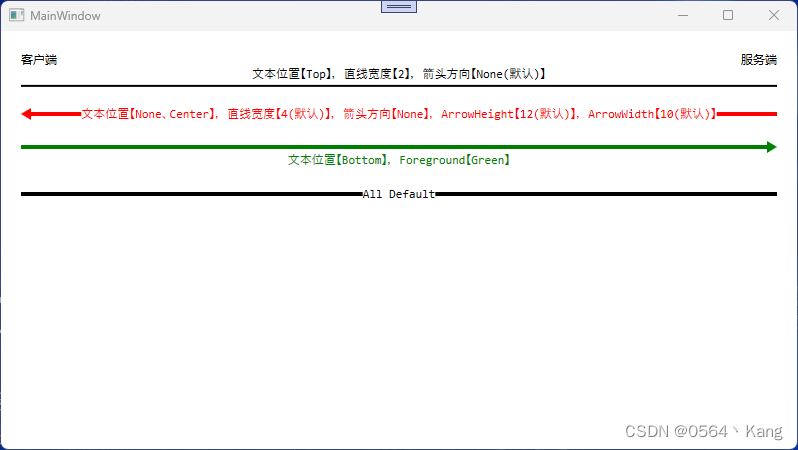
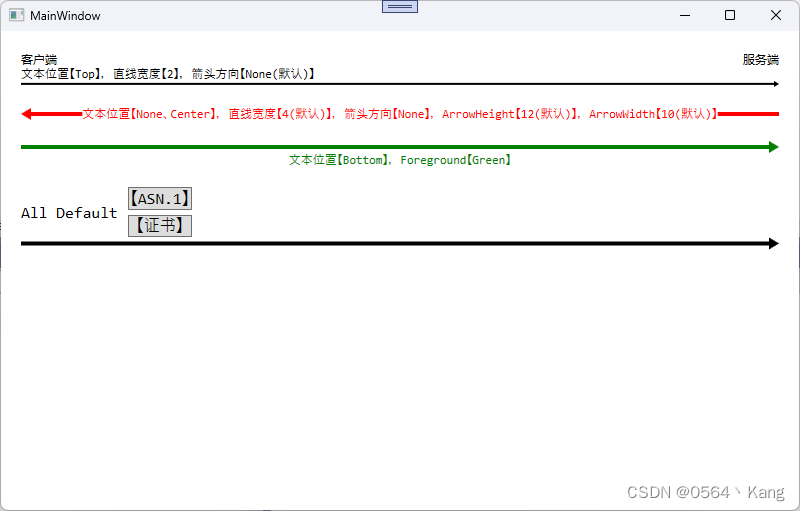
效果预览
方案设计
一开始设计的实现逻辑其实是有两种的:
-
Polygon x 1 + Label x 1
然后通过设置层级Index,让文本控件覆盖在图形上,但是有个致命的缺点,就是文本控件不能设置背景颜色为透明色,不然图形就会和文字重叠,所以没有采用该方案。
-
Polygon x 2 + Label x 1
通过计算Label的渲染宽度,然后计算两边图形的点数据,然后绘制图形,虽然该方案比上一个要繁琐一点,但是效果会好很多,后面也可以方便扩展其它的属性,比如:整体旋转、单独图形旋转、单独文字旋转等。
我这里目前只考虑了如下几个要素:
- 直线大小
- 控件颜色,这里没有做Text和箭头颜色的分开
- 文本位置
- 箭头方向
- 箭头宽度和高度
核心的几点逻辑是:
- 我分为了两个Polygon去绘制图形,一个在左边,一个在右边,通过设置箭头方向然后确定哪一个Polygon去绘制箭头,另一个去绘制直线。
- 文本控件在中间水平居中,通过监听自定义控件属性Text的变化,然后重新计算文本控件的宽度,然后绘制控件的点数据。
- 我这里将控件的Foreground属性绑定在了Polygon的Fill属性上,实现图形跟文字一起变色,如果需要单独控制文本和图形的颜色,可以拆开处理。
分析
基本布局
首先我们肯定是需要一个Label控件对文本内容进行显示,其次是需要一个能调整上中下位置的Grid,还需要两个Polygon去绘制图形。
所以基本样式就有了
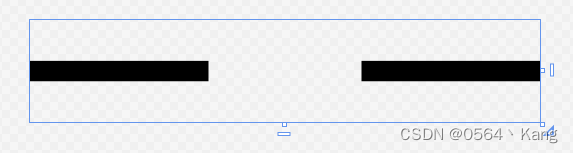
在设计器中的效果如下图:
添加控件自定义属性
// 内容
public new object Content
{
    get { return (string)GetValue(ContentProperty); }
    set { SetValue(ContentProperty, value); }
}
public static new readonly DependencyProperty ContentProperty =
    DependencyProperty.Register("Content", typeof(object), typeof(HorizontalLineContent), new PropertyMetadata(string.Empty));
// 箭头方向
public DirectionAlignment Direction
{
    get { return (DirectionAlignment)GetValue(DirectionProperty); }
    set { SetValue(DirectionProperty, value); }
}
public static readonly DependencyProperty DirectionProperty =
    DependencyProperty.Register("Direction", typeof(DirectionAlignment), typeof(HorizontalLineContent), new PropertyMetadata(DirectionAlignment.None));
// 文本位置
public ContentDirectionAlignment ContentDirection
{
    get { return (ContentDirectionAlignment)GetValue(ContentDirectionProperty); }
    set { SetValue(ContentDirectionProperty, value); }
}
public static readonly DependencyProperty ContentDirectionProperty =
    DependencyProperty.Register("ContentDirection", typeof(ContentDirectionAlignment), typeof(HorizontalLineContent), new PropertyMetadata(ContentDirectionAlignment.Center));
// 直线宽度
public double LineSize
{
    get { return (double)GetValue(LineSizeProperty); }
    set { SetValue(LineSizeProperty, value); }
}
public static readonly DependencyProperty LineSizeProperty =
    DependencyProperty.Register("LineSize", typeof(double), typeof(HorizontalLineContent), new PropertyMetadata(4.0));
// 箭头宽度
public double ArrowWidth
{
    get { return (double)GetValue(ArrowWidthProperty); }
    set { SetValue(ArrowWidthProperty, value); }
}
public static readonly DependencyProperty ArrowWidthProperty =
    DependencyProperty.Register("ArrowWidth", typeof(double), typeof(HorizontalLineContent), new PropertyMetadata(10.0));
// 箭头高度
public double ArrowHeight
{
    get { return (double)GetValue(ArrowHeightProperty); }
    set { SetValue(ArrowHeightProperty, value); }
}
public static readonly DependencyProperty ArrowHeightProperty =
    DependencyProperty.Register("ArrowHeight", typeof(double), typeof(HorizontalLineContent), new PropertyMetadata(12.0));
添加属性值监听
// 监听整体控件宽度属性变化
ActualWidthPropertyDescriptor = DependencyPropertyDescriptor.FromProperty(ActualWidthProperty, typeof(Label));
ActualWidthPropertyDescriptor.AddValueChanged(txt_text, (o, e) =>
{
    RefreshUI();
});
// 监听文本内容属性变化
ContentPropertyDescriptor = DependencyPropertyDescriptor.FromProperty(ContentProperty, typeof(HorizontalLineContent));
ContentPropertyDescriptor.AddValueChanged(this, (o, e) =>
{
    RefreshUI();
});
// 监听箭头方向属性变化
DirectionPropertyDescriptor = DependencyPropertyDescriptor.FromProperty(DirectionProperty, typeof(HorizontalLineContent));
DirectionPropertyDescriptor.AddValueChanged(this, (o, e) =>
{
    RefreshUI();
});
// 监听文本位置属性变化
ContentDirectionPropertyDescriptor = DependencyPropertyDescriptor.FromProperty(ContentDirectionProperty, typeof(HorizontalLineContent));
ContentDirectionPropertyDescriptor.AddValueChanged(this, (o, e) =>
{
    RefreshUI();
});
// 监听直线宽度属性变化
LineSizePropertyDescriptor = DependencyPropertyDescriptor.FromProperty(LineSizeProperty, typeof(HorizontalLineContent));
LineSizePropertyDescriptor.AddValueChanged(this, (o, e) =>
{
    RefreshUI();
});
// 监听箭头高度属性变化
ArrowHeightPropertyDescriptor = DependencyPropertyDescriptor.FromProperty(ArrowHeightProperty, typeof(HorizontalLineContent));
ArrowHeightPropertyDescriptor.AddValueChanged(this, (o, e) =>
{
    RefreshUI();
});
// 监听箭头宽度属性变化
ArrowWidthPropertyDescriptor = DependencyPropertyDescriptor.FromProperty(ArrowWidthProperty, typeof(HorizontalLineContent));
ArrowWidthPropertyDescriptor.AddValueChanged(this, (o, e) =>
{
    RefreshUI();
});
获取点数据
public List GetPoints(DirectionAlignment direction, double left, double mid_left, double mid_right, double right) { var points = new List(); if (ContentDirection != ContentDirectionAlignment.Center && ContentDirection != ContentDirectionAlignment.None) { mid_left = mid_right = this.ActualWidth / 2.0; } var mid_width = this.ActualWidth / 2.0; var lineSize = LineSize全部代码
共4个文件
HorizontalLineContent.xaml
HorizontalLineContent.xaml.cs
using System.Collections.Generic; using System.ComponentModel; using System.Windows; using System.Windows.Controls; using System.Windows.Data; using System.Windows.Shapes; #region 文件版本信息 /* * 创建者:Zekang Hao * 邮箱:admin@haozekang.com * 创建时间:2024/6/27 15:11:07 * 版本:1.0.0.0 * 描述:HorizontalLineContent.xaml 的交互逻辑 */ #endregion namespace WpfApp3 { public partial class HorizontalLineContent : UserControl { private DependencyPropertyDescriptor ActualWidthPropertyDescriptor; private DependencyPropertyDescriptor ContentPropertyDescriptor; private DependencyPropertyDescriptor DirectionPropertyDescriptor; private DependencyPropertyDescriptor ContentDirectionPropertyDescriptor; private DependencyPropertyDescriptor LineSizePropertyDescriptor; private DependencyPropertyDescriptor ArrowWidthPropertyDescriptor; private DependencyPropertyDescriptor ArrowHeightPropertyDescriptor; public new object Content { get { return (string)GetValue(ContentProperty); } set { SetValue(ContentProperty, value); } } public static new readonly DependencyProperty ContentProperty = DependencyProperty.Register("Content", typeof(object), typeof(HorizontalLineContent), new PropertyMetadata(string.Empty)); public DirectionAlignment Direction { get { return (DirectionAlignment)GetValue(DirectionProperty); } set { SetValue(DirectionProperty, value); } } // Using a DependencyProperty as the backing store for Direction. This enables animation, styling, binding, etc... public static readonly DependencyProperty DirectionProperty = DependencyProperty.Register("Direction", typeof(DirectionAlignment), typeof(HorizontalLineContent), new PropertyMetadata(DirectionAlignment.None)); public ContentDirectionAlignment ContentDirection { get { return (ContentDirectionAlignment)GetValue(ContentDirectionProperty); } set { SetValue(ContentDirectionProperty, value); } } // Using a DependencyProperty as the backing store for TextDirection. This enables animation, styling, binding, etc... public static readonly DependencyProperty ContentDirectionProperty = DependencyProperty.Register("ContentDirection", typeof(ContentDirectionAlignment), typeof(HorizontalLineContent), new PropertyMetadata(ContentDirectionAlignment.Center)); public double LineSize { get { return (double)GetValue(LineSizeProperty); } set { SetValue(LineSizeProperty, value); } } // Using a DependencyProperty as the backing store for LineSize. This enables animation, styling, binding, etc... public static readonly DependencyProperty LineSizeProperty = DependencyProperty.Register("LineSize", typeof(double), typeof(HorizontalLineContent), new PropertyMetadata(4.0)); public double ArrowWidth { get { return (double)GetValue(ArrowWidthProperty); } set { SetValue(ArrowWidthProperty, value); } } // Using a DependencyProperty as the backing store for ArrowWidth. This enables animation, styling, binding, etc... public static readonly DependencyProperty ArrowWidthProperty = DependencyProperty.Register("ArrowWidth", typeof(double), typeof(HorizontalLineContent), new PropertyMetadata(10.0)); public double ArrowHeight { get { return (double)GetValue(ArrowHeightProperty); } set { SetValue(ArrowHeightProperty, value); } } // Using a DependencyProperty as the backing store for ArrowHeight. This enables animation, styling, binding, etc... public static readonly DependencyProperty ArrowHeightProperty = DependencyProperty.Register("ArrowHeight", typeof(double), typeof(HorizontalLineContent), new PropertyMetadata(12.0)); public HorizontalLineContent() { this.DataContext = this; InitializeComponent(); txt_text.SetBinding( Label.ContentProperty, new Binding { Path = new PropertyPath(nameof(Content)), UpdateSourceTrigger = UpdateSourceTrigger.PropertyChanged, Mode = BindingMode.OneWay } ); txt_text.SetBinding( ForegroundProperty, new Binding { Path = new PropertyPath(nameof(Foreground)), UpdateSourceTrigger = UpdateSourceTrigger.PropertyChanged, Mode = BindingMode.OneWay } ); pol_left.SetBinding( Polygon.FillProperty, new Binding { Path = new PropertyPath(nameof(Foreground)), UpdateSourceTrigger = UpdateSourceTrigger.PropertyChanged, Mode = BindingMode.OneWay } ); pol_right.SetBinding( Polygon.FillProperty, new Binding { Path = new PropertyPath(nameof(Foreground)), UpdateSourceTrigger = UpdateSourceTrigger.PropertyChanged, Mode = BindingMode.OneWay } ); ActualWidthPropertyDescriptor = DependencyPropertyDescriptor.FromProperty(ActualWidthProperty, typeof(Label)); ActualWidthPropertyDescriptor.AddValueChanged(txt_text, (o, e) => { RefreshUI(); }); ContentPropertyDescriptor = DependencyPropertyDescriptor.FromProperty(ContentProperty, typeof(HorizontalLineContent)); ContentPropertyDescriptor.AddValueChanged(this, (o, e) => { RefreshUI(); }); DirectionPropertyDescriptor = DependencyPropertyDescriptor.FromProperty(DirectionProperty, typeof(HorizontalLineContent)); DirectionPropertyDescriptor.AddValueChanged(this, (o, e) => { RefreshUI(); }); ContentDirectionPropertyDescriptor = DependencyPropertyDescriptor.FromProperty(ContentDirectionProperty, typeof(HorizontalLineContent)); ContentDirectionPropertyDescriptor.AddValueChanged(this, (o, e) => { RefreshUI(); }); LineSizePropertyDescriptor = DependencyPropertyDescriptor.FromProperty(LineSizeProperty, typeof(HorizontalLineContent)); LineSizePropertyDescriptor.AddValueChanged(this, (o, e) => { RefreshUI(); }); ArrowHeightPropertyDescriptor = DependencyPropertyDescriptor.FromProperty(ArrowHeightProperty, typeof(HorizontalLineContent)); ArrowHeightPropertyDescriptor.AddValueChanged(this, (o, e) => { RefreshUI(); }); ArrowWidthPropertyDescriptor = DependencyPropertyDescriptor.FromProperty(ArrowWidthProperty, typeof(HorizontalLineContent)); ArrowWidthPropertyDescriptor.AddValueChanged(this, (o, e) => { RefreshUI(); }); } private void UserControl_SizeChanged(object sender, SizeChangedEventArgs e) { RefreshUI(); } private void RefreshUI() { if (pol_left == null || pol_right == null || txt_text == null) { return; } double control_middle = this.ActualWidth / 2.0; double txt_width_middle = txt_text.ActualWidth / 2.0; double mid_left = control_middle - txt_width_middle; double mid_right = control_middle + txt_width_middle; if (Direction != DirectionAlignment.None && ContentDirection == ContentDirectionAlignment.Center) { if (mid_leftDirectionAlignment.cs
#region 文件版本信息 /* * 创建者:Zekang Hao * 邮箱:admin@haozekang.com * 创建时间:2024/6/27 17:01:16 * 版本:1.0.0.0 * 描述: */ #endregion namespace WpfApp3 { /// /// 描述 /// public enum DirectionAlignment { None, Left, Right, } }ContentDirectionAlignment.cs
#region 文件版本信息 /* * 创建者:Zekang Hao * 邮箱:admin@haozekang.com * 创建时间:2024/6/28 11:17:07 * 版本:1.0.0.0 * 描述: */ #endregion namespace WpfApp3 { /// /// 描述 /// public enum ContentDirectionAlignment { None, Top, Center, Bottom, TopLeft, TopRight, BottomLeft, BottomRight, } }使用方法
-
免责声明:我们致力于保护作者版权,注重分享,被刊用文章因无法核实真实出处,未能及时与作者取得联系,或有版权异议的,请联系管理员,我们会立即处理! 部分文章是来自自研大数据AI进行生成,内容摘自(百度百科,百度知道,头条百科,中国民法典,刑法,牛津词典,新华词典,汉语词典,国家院校,科普平台)等数据,内容仅供学习参考,不准确地方联系删除处理! 图片声明:本站部分配图来自人工智能系统AI生成,觅知网授权图片,PxHere摄影无版权图库和百度,360,搜狗等多加搜索引擎自动关键词搜索配图,如有侵权的图片,请第一时间联系我们,邮箱:ciyunidc@ciyunshuju.com。本站只作为美观性配图使用,无任何非法侵犯第三方意图,一切解释权归图片著作权方,本站不承担任何责任。如有恶意碰瓷者,必当奉陪到底严惩不贷!


