【Unity3D赛车游戏】【四】在Unity中添加阿克曼转向,下压力,质心会让汽车更稳定

2024-06-27 1464阅读

!在这里插入图片描述


👨‍💻个人主页:@元宇宙-秩沅

👨‍💻 hallo 欢迎 点赞👍 收藏⭐ 留言📝 加关注✅!

👨‍💻 本文由 秩沅 原创

👨‍💻 专栏交流🧧
🟥✨Unity100个实战基础✨🟥🎁
🟦✨ Unity100个精华一记✨🟦🎁
🟩✨ Unity50个demo案例教程✨🟩🎁
🟨✨ Unity100个精华细节BUG✨🟨🎁

【Unity3D赛车游戏】【四】在Unity中添加阿克曼转向,下压力,质心会让汽车更稳定

【Unity3D赛车游戏】【四】在Unity中添加阿克曼转向,下压力,质心会让汽车更稳定


⭐🅰️Unity3D赛车游戏⭐


文章目录

    • ⭐🅰️Unity3D赛车游戏⭐
    • ⭐前言⭐
    • 🎶(==A==)车辆优化——阿克曼转向添加
        • 😶‍🌫️认识阿克曼转向
        • 😶‍🌫️区别:
        • 😶‍🌫️关键代码
        • 😶‍🌫️完整代码
        • 🎶(==B==)车辆优化——车身持续稳定的优化
            • 😶‍🌫️速度属性实时转换
            • 😶‍🌫️为车子添加下压力
            • 😶‍🌫️质心的添加centerMess
            • 😶‍🌫️轮胎的平滑度的显示
            • 🎶(==C==)脚本记录
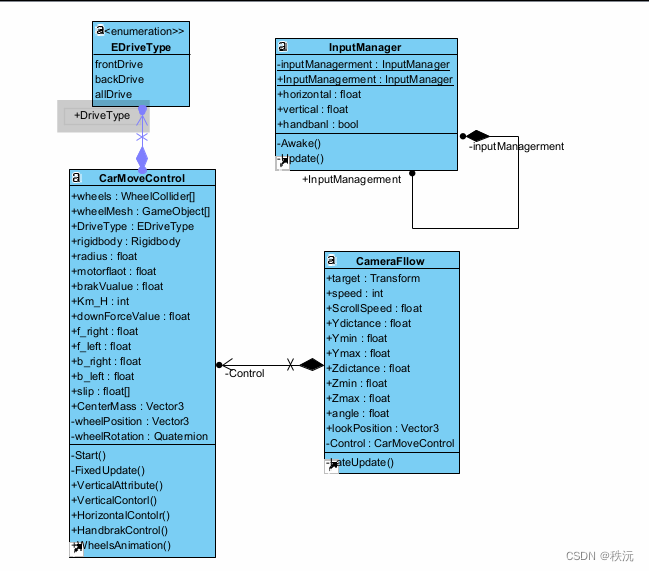
            • CarMoveContorl
            • CameraFllow
            • InputMana
            • ⭐🅰️⭐

              ⭐前言⭐

              😶‍🌫️版本: Unity2021

              😶‍🌫️适合人群:Unity初学者

              😶‍🌫️学习目标:3D赛车游戏的基础制作

              😶‍🌫️技能掌握:


              🎶(A)车辆优化——阿克曼转向添加


              😶‍🌫️认识阿克曼转向

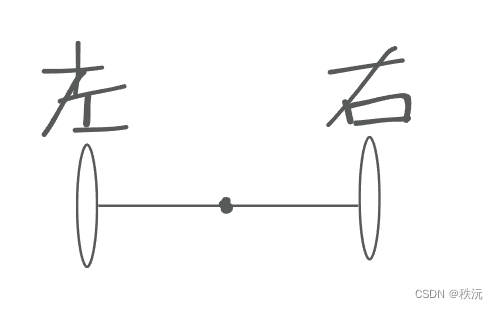
              引用:阿克曼转向是一种现代汽车的转向方式,也是移动机器人的一种运动模式,在汽车转弯的时候,内外轮转过的角度不一样,内侧轮胎转弯半径小于外侧轮胎

              原理图:

              _____________【Unity3D赛车游戏】【四】在Unity中添加阿克曼转向,下压力,质心会让汽车更稳定

              简单理解:一个杆子把左轮和右轮连接起来一起转。

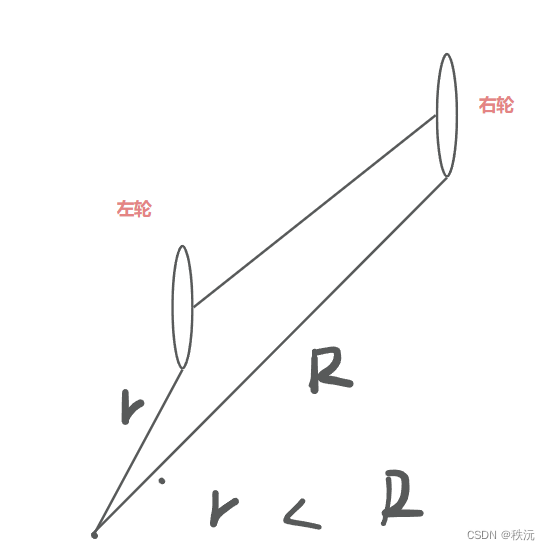
              【Unity3D赛车游戏】【四】在Unity中添加阿克曼转向,下压力,质心会让汽车更稳定

              左轮的旋转的半径小于右轮

              优点:大大减小了车轮转向需要的空间,转向更加稳定

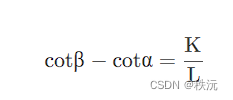
              • 阿克曼公式:

                【Unity3D赛车游戏】【四】在Unity中添加阿克曼转向,下压力,质心会让汽车更稳定

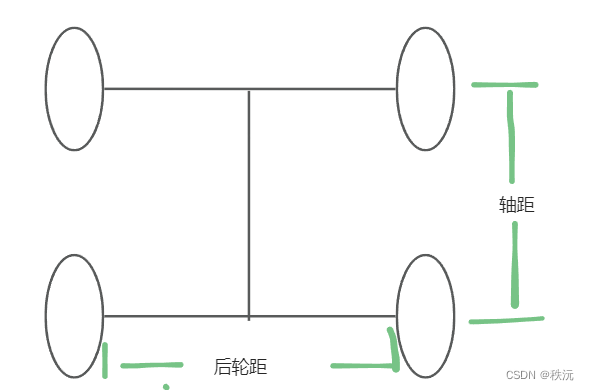
                β为汽车前外轮转角,α为汽车前内轮转角,K为两主销中心距,L为轴距。

                【Unity3D赛车游戏】【四】在Unity中添加阿克曼转向,下压力,质心会让汽车更稳定

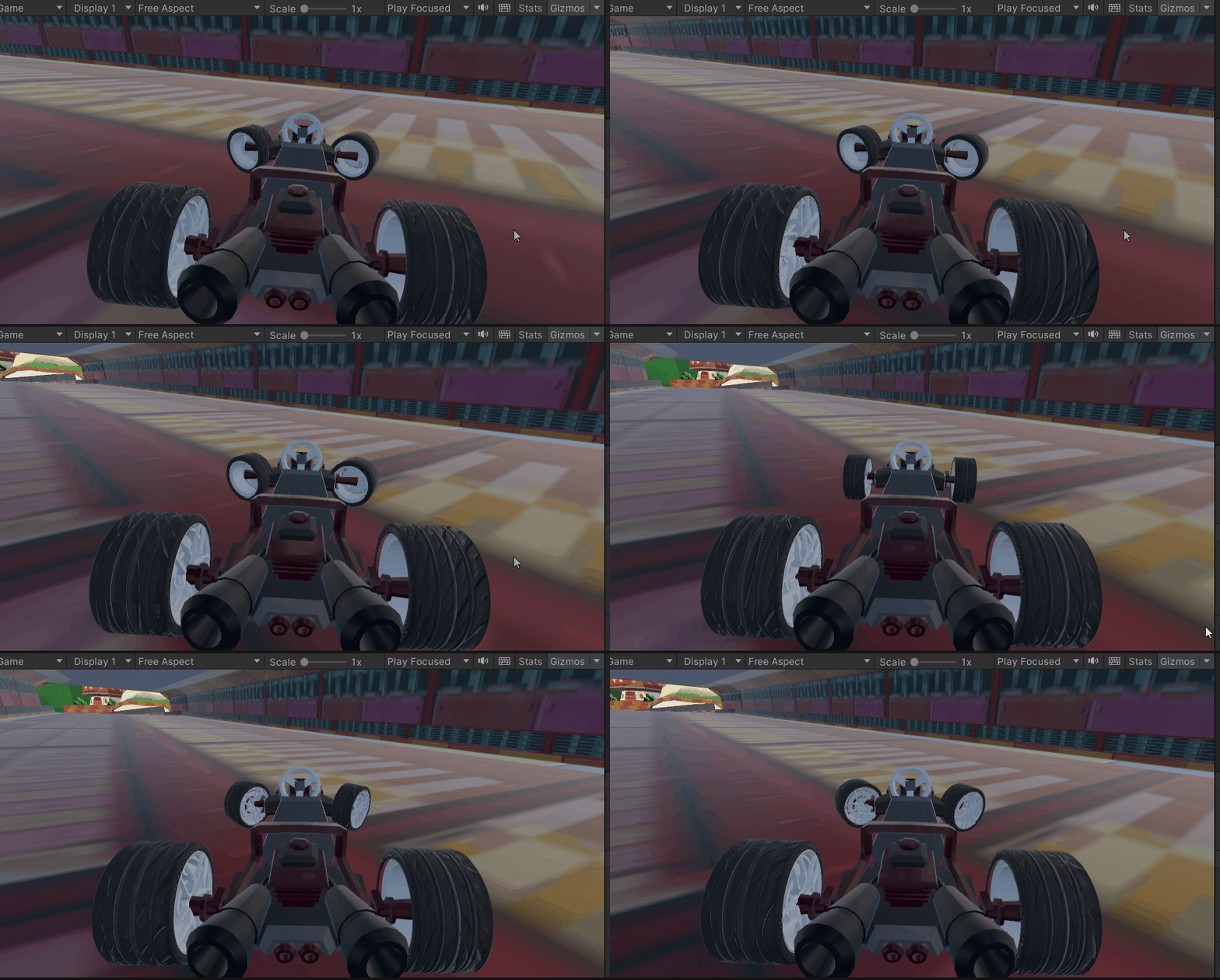
                😶‍🌫️区别:
                • 未添加阿克曼转向之前的原理:

                  通过控制轮子的最大转向范围来转向

                  【Unity3D赛车游戏】【四】在Unity中添加阿克曼转向,下压力,质心会让汽车更稳定

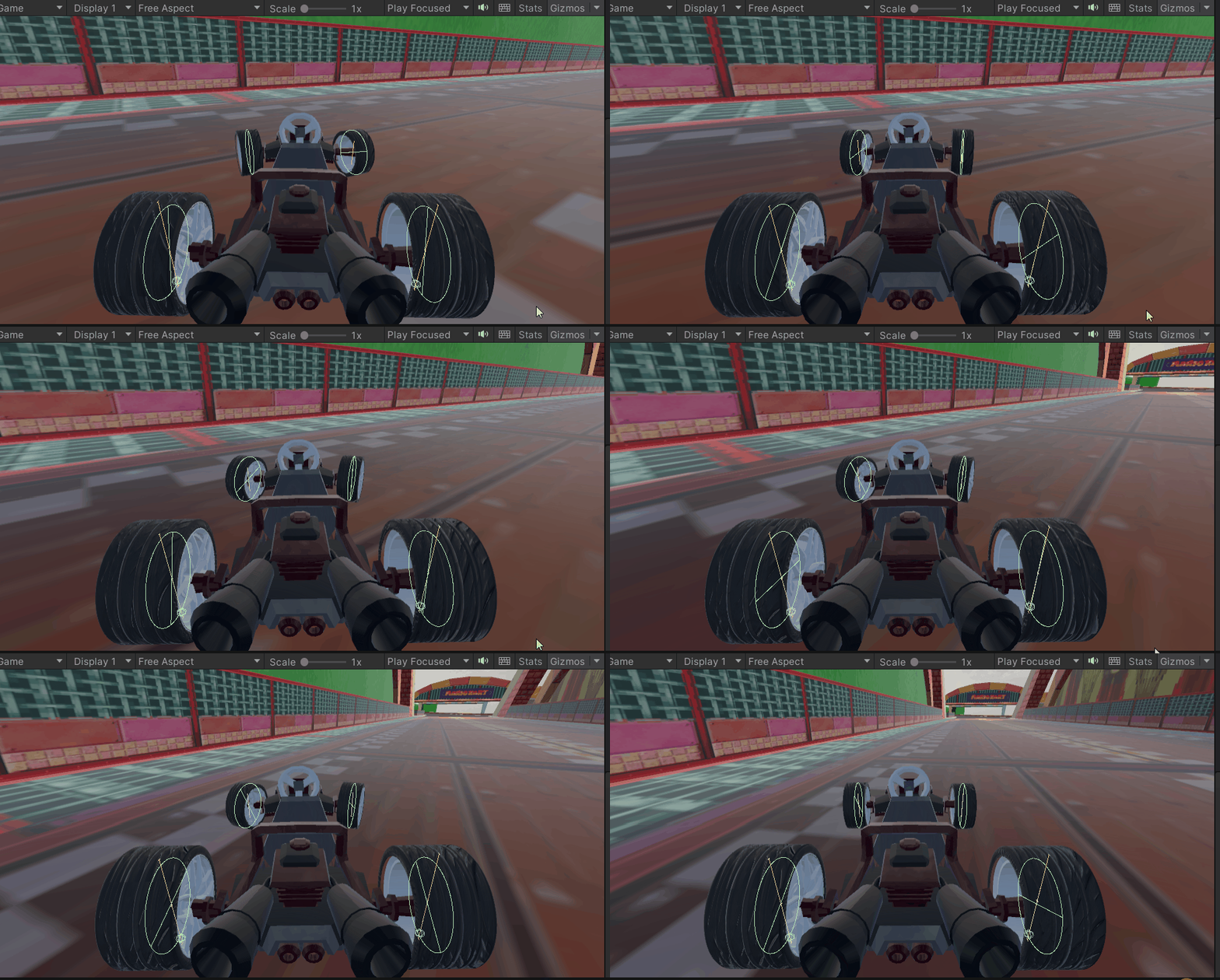
                  • 添加之后

                    更稳定,机动性更强

                    【Unity3D赛车游戏】【四】在Unity中添加阿克曼转向,下压力,质心会让汽车更稳定

                    😶‍🌫️关键代码
                    • 后轮距尺寸设置为1.5f ,轴距设置为2.55f ,radius 默认为6,radius 越大旋转的角度看起来越小
                       if (horizontal > 0 ) {
                      //后轮距尺寸设置为1.5f ,轴距设置为2.55f ,radius 默认为6,radius 越大旋转的角度看起来越小
                                  wheels[0].steerAngle = Mathf.Rad2Deg * Mathf.Atan(2.55f / (radius + (1.5f / 2))) * horizontal;
                                  wheels[1].steerAngle = Mathf.Rad2Deg * Mathf.Atan(2.55f / (radius - (1.5f / 2))) * horizontal;
                              } else if (horizontal  
                      
                      😶‍🌫️完整代码

                      【Unity3D赛车游戏】【四】在Unity中添加阿克曼转向,下压力,质心会让汽车更稳定

                      using System.Collections;
                      using System.Collections.Generic;
                      using UnityEngine;
                      //-------------------------------------
                      //—————————————————————————————————————
                      //___________项目:       ______________
                      //___________功能:  车轮的运动
                      //___________创建者:_______秩沅________
                      //_____________________________________
                      //-------------------------------------
                      //驱动模式的选择
                      public enum EDriveType
                      {
                          frontDrive,   //前轮驱动
                          backDrive,    //后轮驱动
                          allDrive      //四驱
                      }
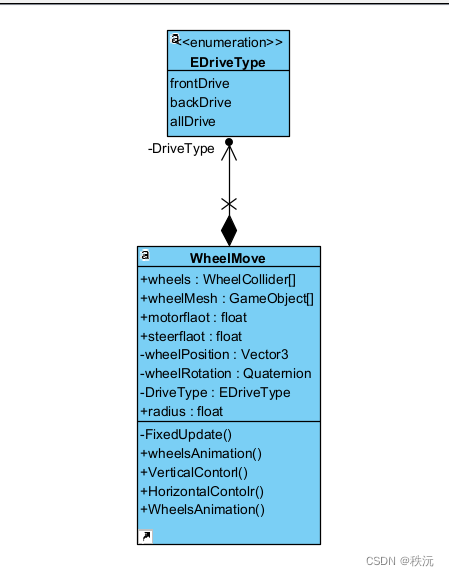
                      public class WheelMove : MonoBehaviour
                      {
                          //-------------------------------------------
                          //四个轮子的碰撞器
                          public WheelCollider[] wheels ;
                          //网格的获取
                          public GameObject[] wheelMesh;
                          //扭矩力度
                          public float motorflaot = 200f;
                        
                          //初始化三维向量和四元数
                          private Vector3 wheelPosition = Vector3.zero;
                          private Quaternion wheelRotation = Quaternion.identity;
                          //-------------------------------------------
                          //驱动模式选择 _默认前驱
                          public EDriveType DriveType = EDriveType.frontDrive;
                          //轮半径
                          public float radius = 0.25f;
                          private void FixedUpdate()
                          {
                              WheelsAnimation(); //车轮动画
                              VerticalContorl(); //驱动管理
                              HorizontalContolr(); //转向管理
                          }
                          //垂直轴方向管理(驱动管理)
                          public void VerticalContorl()
                          {
                              switch (DriveType)
                              {
                                  case EDriveType.frontDrive: 
                                      //选择前驱
                                      if (InputManager.InputManagerment.vertical != 0) //当按下WS键时生效
                                      {
                                          for (int i = 0; i  0)
                              {
                                  //后轮距尺寸设置为1.5f ,轴距设置为2.55f ,radius 默认为6,radius 越大旋转的角度看起来越小
                                  wheels[0].steerAngle = Mathf.Rad2Deg * Mathf.Atan(2.55f / (radius + (1.5f / 2))) * InputManager.InputManagerment.horizontal;
                                  wheels[1].steerAngle = Mathf.Rad2Deg * Mathf.Atan(2.55f / (radius - (1.5f / 2))) * InputManager.InputManagerment.horizontal;
                              }
                              else if (InputManager.InputManagerment.horizontal  
                      

                      🎶(B)车辆优化——车身持续稳定的优化


                      WheelMove脚本 ——> CarMoveControl脚本 更改脚本名


                      😶‍🌫️速度属性实时转换

                      • 每小时多少公里 和 每秒多少米的对应关系 ——1m/s = 3.6km/h

                        速度属性建议改成Int类型 ,float类型会上下浮动不准确

                         //1m/s = 3.6km/h
                                Km_H =(int)(rigidbody.velocity.magnitude * 3.6) ;
                                Km_H = Mathf.Clamp( Km_H,0, 200 );   //油门速度为 0 到 200 Km/H之间
                        
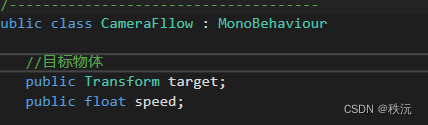
                        • 相机测速 m/s

                          【Unity3D赛车游戏】【四】在Unity中添加阿克曼转向,下压力,质心会让汽车更稳定

                            //相机监测实时速度
                                    Control = target.GetComponent();
                                    speed = (int )Control.Km_H / 4;
                                  
                                    speed = Mathf.Clamp(0, 55,speed );   //对应最大200公里每小时
                          
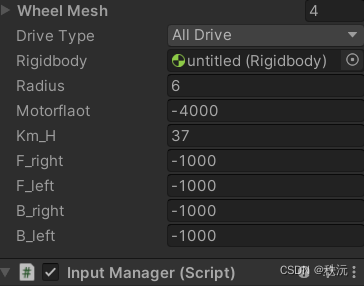
                          • 添加四个轮子的实时速度,对应虚度属性,可以明显的观察四驱和二驱的汽车动力

                            【Unity3D赛车游戏】【四】在Unity中添加阿克曼转向,下压力,质心会让汽车更稳定

                                //车辆物理属性相关
                                public void VerticalAttribute()
                                {
                                    //1m/s = 3.6km/h
                                    Km_H =(int)(rigidbody.velocity.magnitude * 3.6) ;
                                    Km_H = Mathf.Clamp( Km_H,0, 200 );   //油门速度为 0 到 200 Km/H之间
                                    //显示每个轮胎的扭矩
                                    f_right = wheels[0].motorTorque;
                                    f_left  = wheels[1].motorTorque;
                                    b_right = wheels[2].motorTorque;
                                    b_left  = wheels[3].motorTorque;
                                }
                            

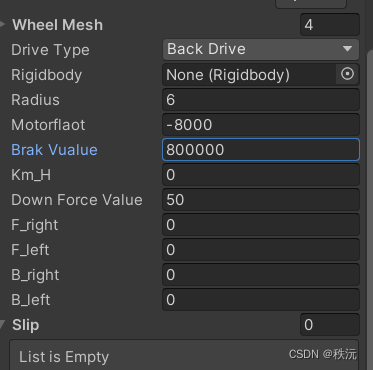
                            😶‍🌫️为车子添加下压力

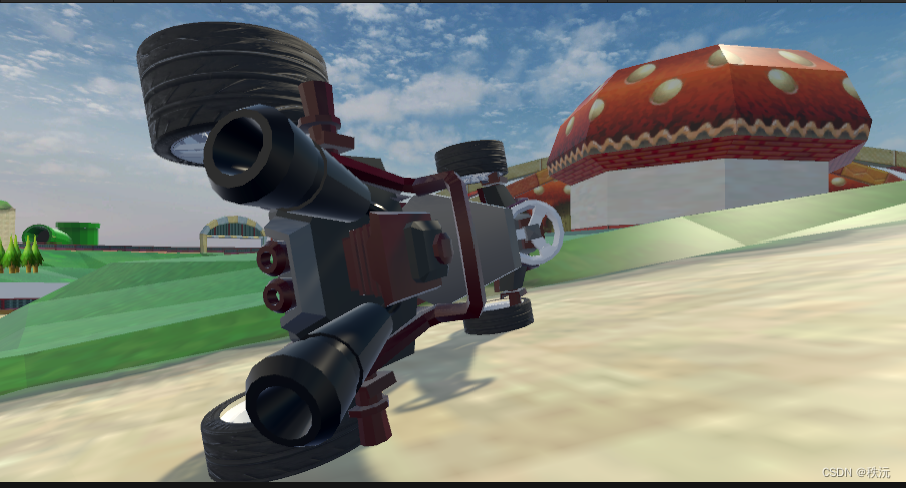
                            知识百科: 什么是下压力

                            下压力是车在行进中空气在车体上下流速不一产生的,使空气的总压力指向地面从而增加车的抓地力.

                            速度越大,下压力越大,抓地更强,越不易翻车
                            【Unity3D赛车游戏】【四】在Unity中添加阿克曼转向,下压力,质心会让汽车更稳定

                            • 关键代码
                                //-------------下压力添加-----------------
                                      //速度越大,下压力越大,抓地更强
                                      rigidbody.AddForce(-transform.up * downForceValue * rigidbody.velocity .magnitude );
                              

                              😶‍🌫️质心的添加centerMess

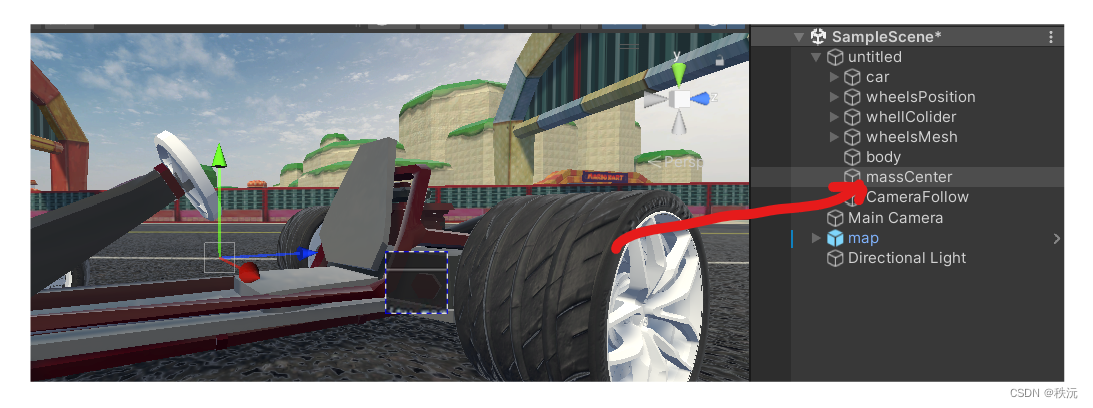
                              知识百科:什么是质心?——质量中心

                              汽车制造商在设计汽车时会考虑质心的位置和重心高度,以尽可能减小质心侧偏角。 一些高性能汽车甚至会采用主动悬挂系统来控制车身侧倾,从而减小质心侧偏角,提高车辆的稳定性和操控性。

                              质量中心越贴下,越不容易翻
                              【Unity3D赛车游戏】【四】在Unity中添加阿克曼转向,下压力,质心会让汽车更稳定

                                      //-------------质量中心同步----------------
                                      //质量中心越贴下,越不容易翻
                                      rigidbody.centerOfMass = CenterMass;
                              
                              • 手刹的添加
                                        //手刹管理
                                    public void HandbrakControl()
                                    {
                                        if(InputManager.InputManagerment .handbanl )
                                        {     
                                            //后轮刹车
                                            wheels[2].brakeTorque  = brakVualue;
                                            wheels[3].brakeTorque  = brakVualue;
                                        }
                                        else
                                        {
                                            wheels[2].brakeTorque = 0;
                                            wheels[3].brakeTorque = 0;
                                        }
                                    }
                                

                                😶‍🌫️轮胎的平滑度的显示

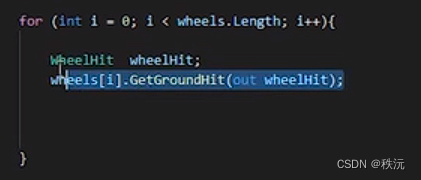
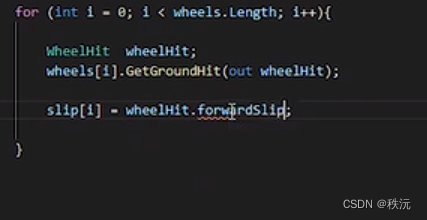
                                wheelhit.forwardSlip;用来观看刹车轮胎在滚动方向上打滑。加速滑移为负,制动滑为正

                                _______【Unity3D赛车游戏】【四】在Unity中添加阿克曼转向,下压力,质心会让汽车更稳定

                                    for (int i = 0; i  
                                

                                【Unity3D赛车游戏】【四】在Unity中添加阿克曼转向,下压力,质心会让汽车更稳定

                                【Unity3D赛车游戏】【四】在Unity中添加阿克曼转向,下压力,质心会让汽车更稳定


                                🎶(C)脚本记录


                                【Unity3D赛车游戏】【四】在Unity中添加阿克曼转向,下压力,质心会让汽车更稳定

                                CarMoveContorl

                                using System.Collections;
                                using System.Collections.Generic;
                                using UnityEngine;
                                //-------------------------------------
                                //—————————————————————————————————————
                                //___________项目:       ______________
                                //___________功能:  车轮的运动
                                //___________创建者:_______秩沅________
                                //_____________________________________
                                //-------------------------------------
                                //驱动模式的选择
                                public enum EDriveType
                                {
                                    frontDrive,   //前轮驱动
                                    backDrive,    //后轮驱动
                                    allDrive      //四驱
                                }
                                public class CarMoveControl : MonoBehaviour
                                {
                                    //-------------------------------------------
                                    //四个轮子的碰撞器
                                    public WheelCollider[] wheels ;
                                    //网格的获取
                                    public GameObject[] wheelMesh;
                                 
                                    //初始化三维向量和四元数
                                    private Vector3 wheelPosition = Vector3.zero;
                                    private Quaternion wheelRotation = Quaternion.identity;
                                    //-------------------------------------------
                                    //驱动模式选择 _默认前驱
                                    public EDriveType DriveType = EDriveType.frontDrive;
                                    //----------车辆属性特征-----------------------
                                    //车刚体
                                    public Rigidbody rigidbody;
                                    //轮半径
                                    public float radius = 0.25f;
                                    //扭矩力度
                                    public float motorflaot = 8000f;
                                    //刹车力
                                    public float brakVualue = 800000f;
                                    //速度:每小时多少公里
                                    public int Km_H;
                                    //下压力
                                    public float downForceValue = 1000f; 
                                    //四个轮胎扭矩力的大小
                                    public float f_right;
                                    public float f_left;
                                    public float b_right;
                                    public float b_left;
                                    //车轮打滑参数识别
                                    public float[] slip ;
                                    //质心
                                    public Vector3 CenterMass;
                                    //一些属性的初始化
                                    private void Start()
                                    {
                                        rigidbody = GetComponent();
                                        slip = new float[4];
                                     }
                                    private void FixedUpdate()
                                    {
                                        VerticalAttribute();//车辆物理属性管理
                                        WheelsAnimation(); //车轮动画
                                        VerticalContorl(); //驱动管理
                                        HorizontalContolr(); //转向管理
                                        HandbrakControl(); //手刹管理
                                    }
                                    //车辆物理属性相关
                                    public void VerticalAttribute()
                                    {
                                        //---------------速度实时---------------
                                        //1m/s = 3.6km/h
                                        Km_H =(int)(rigidbody.velocity.magnitude * 3.6) ;
                                        Km_H = Mathf.Clamp( Km_H,0, 200 );   //油门速度为 0 到 200 Km/H之间
                                        //--------------扭矩力实时---------------
                                        //显示每个轮胎的扭矩
                                        f_right = wheels[0].motorTorque;
                                        f_left  = wheels[1].motorTorque;
                                        b_right = wheels[2].motorTorque;
                                        b_left  = wheels[3].motorTorque;
                                        //-------------下压力添加-----------------
                                        //速度越大,下压力越大,抓地更强
                                        rigidbody.AddForce(-transform.up * downForceValue * rigidbody.velocity .magnitude );
                                        //-------------质量中心同步----------------
                                        //质量中心越贴下,越不容易翻
                                        rigidbody.centerOfMass = CenterMass;
                                    }
                                    //垂直轴方向运动管理(驱动管理)
                                    public void VerticalContorl()
                                    {
                                        switch (DriveType)
                                        {
                                            case EDriveType.frontDrive: 
                                                //选择前驱
                                                if (InputManager.InputManagerment.vertical != 0) //当按下WS键时生效
                                                {
                                                    for (int i = 0; i  
                                

                                CameraFllow

                                using System.Collections;
                                using System.Collections.Generic;
                                using UnityEngine;
                                //-------------------------------------
                                //—————————————————————————————————————
                                //___________项目:       ______________
                                //___________功能: 相机的跟随
                                //___________创建者:秩沅_______________
                                //_____________________________________
                                //-------------------------------------
                                public class CameraFllow : MonoBehaviour
                                {
                                    //目标物体
                                    public Transform target;
                                    private CarMoveControl Control;
                                    public int  speed;
                                    //鼠标滑轮的速度
                                    public float ScrollSpeed = 45f;
                                    //Y轴差距参数
                                    public float Ydictance = 0f; 
                                    public float  Ymin = 0f;
                                    public float  Ymax  = 4f;
                                    //Z轴差距参数
                                    public float Zdictance = 4f;
                                    public float Zmin = 4f;
                                    public float Zmax = 8f;
                                    //相机看向的角度 和最終位置
                                    public float angle = -25 ;
                                    public Vector3 lookPosition;
                                    void LateUpdate()
                                    {
                                        //Z轴和Y轴的距离和鼠标滑轮联系
                                        Ydictance += Input.GetAxis("Mouse ScrollWheel") * ScrollSpeed * Time.deltaTime;//平滑效果
                                        Zdictance += Input.GetAxis("Mouse ScrollWheel") * ScrollSpeed * Time.deltaTime;
                                        //設置Y軸和x轴的滚轮滑动范围 
                                        Ydictance = Mathf.Clamp(Ydictance , Ymin ,Ymax )  ; 
                                        Zdictance = Mathf.Clamp(Zdictance , Zmin, Zmax )  ;
                                        //确定好角度,四元数 * 三维向量 = 三维向量
                                        lookPosition = Quaternion.AngleAxis(angle, target .right) * -target.forward ;
                                        //更新位置
                                        transform.position = target.position + Vector3.up * Ydictance - lookPosition  * Zdictance  ;
                                        //更新角度
                                        transform.rotation = Quaternion.LookRotation(lookPosition);
                                        //实时速度
                                          Control = target.GetComponent();
                                          speed = (int )Control.Km_H / 4;
                                        
                                          speed = Mathf.Clamp(speed,0, 55 );   //对应最大200公里每小时
                                    }
                                }
                                

                                InputMana

                                using System.Collections;
                                using System.Collections.Generic;
                                using UnityEngine;
                                //-------------------------------------
                                //—————————————————————————————————————
                                //___________项目:       ______________
                                //___________功能: 输入控制管理器
                                //___________创建者:秩沅_______________
                                //_____________________________________
                                //-------------------------------------
                                public class InputManager : MonoBehaviour
                                {
                                    //单例模式管理
                                    static private InputManager inputManagerment;
                                    static public InputManager InputManagerment => inputManagerment;
                                    public float horizontal;  //水平方向动力值
                                    public float vertical;    //垂直方向动力值
                                    public bool  handbanl;    //手刹动力值
                                    void Awake()
                                    {
                                        inputManagerment = this;
                                    }
                                    void Update()
                                    {
                                        //与Unity中输入管理器的值相互对应
                                        horizontal = Input.GetAxis("Horizontal");
                                          vertical = Input.GetAxis("Vertical");
                                          handbanl = Input.GetAxis("Jump")!= 0 ? true :false ; //按下空格键时就是1,否则为0
                                    }
                                }
                                

                                ⭐🅰️⭐

                                ⭐【Unityc#专题篇】之c#进阶篇】

                                ⭐【Unityc#专题篇】之c#核心篇】

                                ⭐【Unityc#专题篇】之c#基础篇】

                                ⭐【Unity-c#专题篇】之c#入门篇】

                                ⭐【Unityc#专题篇】—进阶章题单实践练习

                                ⭐【Unityc#专题篇】—基础章题单实践练习

                                ⭐【Unityc#专题篇】—核心章题单实践练习


                                你们的点赞👍 收藏⭐ 留言📝 关注✅是我持续创作,输出优质内容的最大动力!、

                                【Unity3D赛车游戏】【四】在Unity中添加阿克曼转向,下压力,质心会让汽车更稳定


VPS购买请点击我

免责声明:我们致力于保护作者版权,注重分享,被刊用文章因无法核实真实出处,未能及时与作者取得联系,或有版权异议的,请联系管理员,我们会立即处理! 部分文章是来自自研大数据AI进行生成,内容摘自(百度百科,百度知道,头条百科,中国民法典,刑法,牛津词典,新华词典,汉语词典,国家院校,科普平台)等数据,内容仅供学习参考,不准确地方联系删除处理! 图片声明:本站部分配图来自人工智能系统AI生成,觅知网授权图片,PxHere摄影无版权图库和百度,360,搜狗等多加搜索引擎自动关键词搜索配图,如有侵权的图片,请第一时间联系我们,邮箱:ciyunidc@ciyunshuju.com。本站只作为美观性配图使用,无任何非法侵犯第三方意图,一切解释权归图片著作权方,本站不承担任何责任。如有恶意碰瓷者,必当奉陪到底严惩不贷!

目录[+]