
QT5.12+VS2019 自定义QLabel ROI Mask绘制生成工具
目录
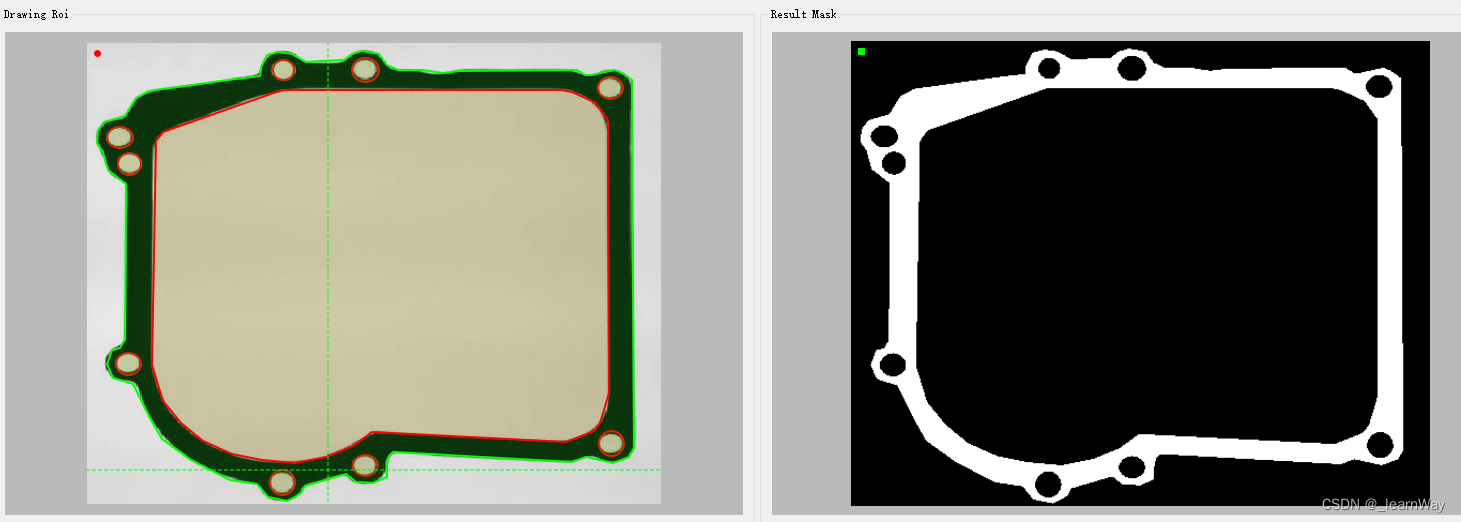
一、工具功能
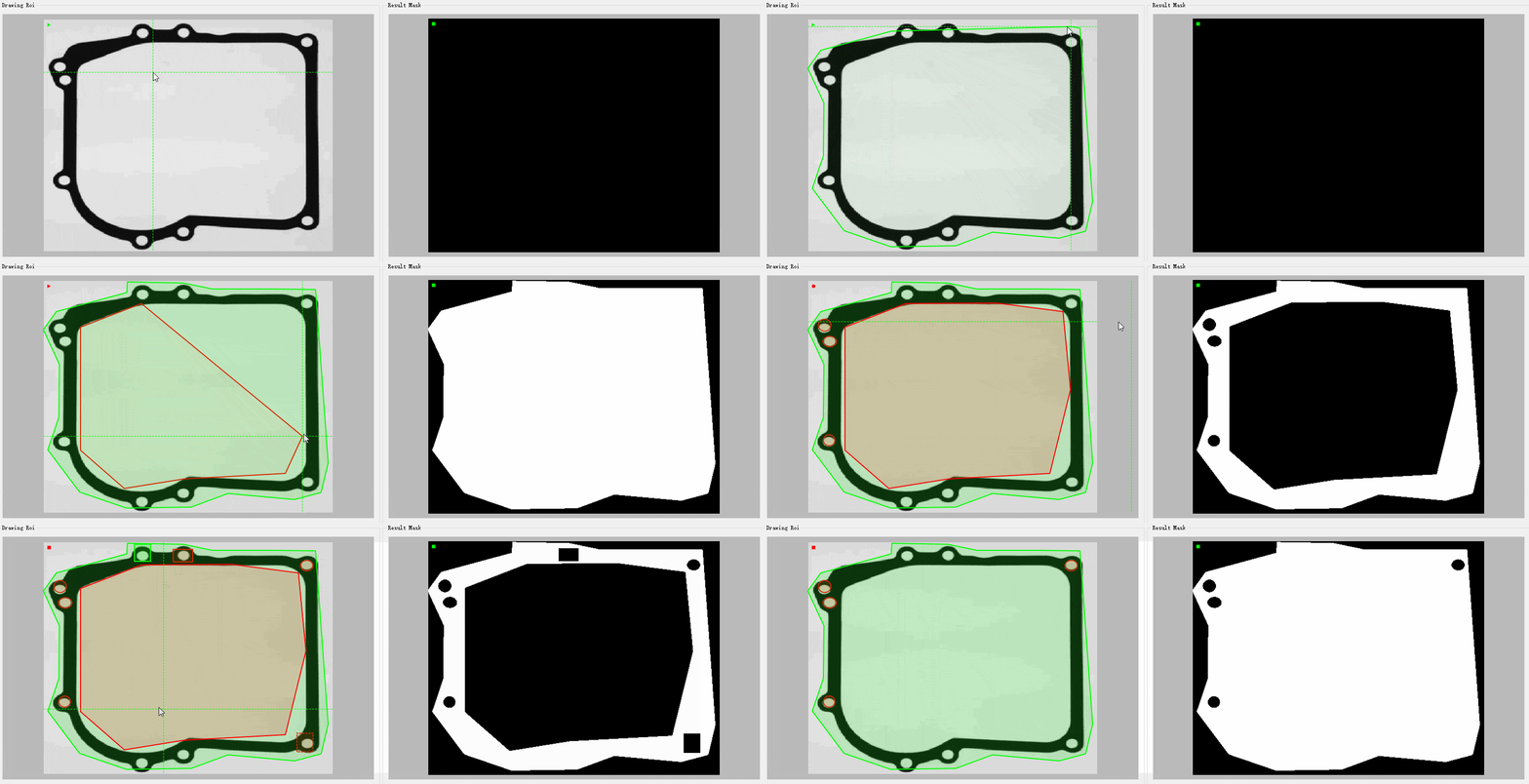
二、实现效果
三、关键代码
四、模块集成
一、工具功能
1、支持矩形、圆(椭圆)、多边形基础图形绘制工具;
2、支持各图形工具正选(填充)、反选(抠除)属性绘制;
3、支持绘制对象选中、移动操作(双击选中后右键拖拽移动);
4、支持绘制对象选中删除操作(双击选中、Del键删除);
5、支持绘制对象正选、反选极性切换(Space键);
6、支持对已选中的绘制对象进行键盘方向键微调操作(← ↑ ↓ →键);
7、支持ESC键退出选中或退出多边形绘制状态(ESC键);
8、显示绘制标尺(方便绘制时边界对齐,特别是椭圆绘制);
9、生成与输入图像同分辨率的二值Mask图像;
二、实现效果
三、关键代码
从QLabel派生自定义类:RoiTools
class RoiTools : public QLabel {
    Q_OBJECT
public:
    explicit RoiTools(QWidget* parent = nullptr);
    ...
protected:
    ...
private:
    ...
signals:
    ...
private slots:
    ...
};
重写mousePressEvent事件函数,捕获鼠标左右键,左键绘制捕获,右键移动捕获。
void RoiTools::mousePressEvent(QMouseEvent* event) {
	if (pix.isNull())
	{
		return;
	}
	if (!this->allow_drawing) return;
    this->allow_moving = false;
	if (event->button() == Qt::LeftButton) {
		start = event->pos();
		end = start;
		drawing = true;
		if (shapeType == ShapeType::Polygon) {
            polygon_drawing = true;
			//polygon button() == Qt::RightButton)
	{
        right_btn_press = event->pos();
        this->allow_moving = true;
        if (rect_sel_index != -1)
        {
            selected_rect = roi_rects.at(rect_sel_index).rect;
        }
        if (ellipse_sel_index != -1)
        {
            selected_ellipse = roi_ellipses.at(ellipse_sel_index).rect;
        }
        if (polygon_sel_index != -1)
        {
            selected_polygon = roi_polygons.at(polygon_sel_index).polygon;
        }
	}
}
重写mouseMoveEvent事件函数。绘制多边形时最后一个点实时跟随鼠标当前位置,绘制对象选中状态检测鼠标右键移动。
void RoiTools::mouseMoveEvent(QMouseEvent* event) {
	if (!this->allow_drawing) return;
	if (drawing && !moving) {
		end = event->pos();
	}
    mouse_point = event->pos();
	if (shapeType == ShapeType::Polygon && polygon_drawing)
    {
		int p_cnt = polygon.count();
		//绘制多边形时跟随当前鼠标,当前鼠标坐标替换按键按下时添加的占位坐标
		if (p_cnt > 1)
		{
			polygon[p_cnt - 1] = event->pos();
		}
	}
	if (rect_sel_index != -1 && allow_moving)
	{
		qreal dx = (static_cast(right_btn_press.x()) - event->pos().x()) / scaledSize.width();
		qreal dy = (static_cast(right_btn_press.y()) - event->pos().y()) / scaledSize.height();
		roi_rects[rect_sel_index].rect.setLeft(selected_rect.left() - dx);
		roi_rects[rect_sel_index].rect.setRight(selected_rect.right() - dx);
		roi_rects[rect_sel_index].rect.setTop(selected_rect.top() - dy);
		roi_rects[rect_sel_index].rect.setBottom(selected_rect.bottom() - dy);
	}
    if (ellipse_sel_index != -1 && allow_moving)
    {
        qreal dx = (static_cast(right_btn_press.x()) - event->pos().x()) / scaledSize.width();
        qreal dy = (static_cast(right_btn_press.y()) - event->pos().y()) / scaledSize.height();
        roi_ellipses[ellipse_sel_index].rect.setLeft(selected_ellipse.left() - dx);
        roi_ellipses[ellipse_sel_index].rect.setRight(selected_ellipse.right() - dx);
        roi_ellipses[ellipse_sel_index].rect.setTop(selected_ellipse.top() - dy);
        roi_ellipses[ellipse_sel_index].rect.setBottom(selected_ellipse.bottom() - dy);
    }
	if (polygon_sel_index != -1 && allow_moving)
	{
		qreal dx = (static_cast(right_btn_press.x()) - event->pos().x()) / scaledSize.width();
		qreal dy = (static_cast(right_btn_press.y()) - event->pos().y()) / scaledSize.height();
		QPolygonF t_polygon;
		for (int i = 0; i update();
}
重写mouseReleaseEvent事件函数。左键抬起时结束矩形、圆绘制,右键抬起时move动作结束。
void RoiTools::mouseReleaseEvent(QMouseEvent* event) {
    if (!this->allow_drawing) return;

    if ((shapeType == ShapeType::Rectangle || shapeType == ShapeType::Ellipse) &&
        (abs(start.x() - event->pos().x()) pos().y()) start = QPoint(-1,-1);
        this->end = QPoint(-1, -1);
        return;
    }
    if (event->button() == Qt::LeftButton)
    {
        if (shapeType == ShapeType::Polygon && drawing) {
            //删除最后一个move时的坐标
            if (polygon.count() > 1)
            {
                polygon.removeLast();
            }
            polygon pos();
            //添加两次,第二次给move时鼠标跟随占位
            polygon pos();
        }
        drawing = false;
        if (shapeType == ShapeType::Rectangle)
        {
            Roi_Rect rect;
            rect.rect.setLeft(static_cast(start.x() - display_offset.x()) / scaledSize.width());
            rect.rect.setTop(static_cast(start.y() - display_offset.y()) / scaledSize.height());
            rect.rect.setRight(static_cast(end.x() - display_offset.x()) / scaledSize.width());
            rect.rect.setBottom(static_cast(end.y() - display_offset.y()) / scaledSize.height());
            rect.polarity = this->polarity;
            roi_rects.append(rect);
            //rect_stack.push(roi_rects.last().rect);
        }
        else if (shapeType == ShapeType::Ellipse)
        {
            Roi_Ellipse ellp;
            ellp.rect.setLeft(static_cast(start.x() - display_offset.x()) / scaledSize.width());
            ellp.rect.setTop(static_cast(start.y() - display_offset.y()) / scaledSize.height());
            ellp.rect.setRight(static_cast(end.x() - display_offset.x()) / scaledSize.width());
            ellp.rect.setBottom(static_cast(end.y() - display_offset.y()) / scaledSize.height());
            ellp.polarity = this->polarity;
            roi_ellipses.append(ellp);
        }
        else if (shapeType == ShapeType::Polygon)
        {
        }
        //清除动态显示
        this->start = QPointF(-1, -1);
        this->end = QPointF(-1, -1);
        this->allow_moving = false;
    }
    else if (event->button() == Qt::RightButton)
    {
        allow_moving = false;
    }
    this->genMask();

    update();
}
重写mouseDoubleClickEvent事件函数。多边形绘制时鼠标双击结束绘制,非多边形绘制模式,鼠标双击检测鼠标位置是否包含绘制对象,若是,则进行选中。
选中捕获时,优先捕获反选对象,再捕获正选对象。
void RoiTools::mouseDoubleClickEvent(QMouseEvent* event)
{
    if (!this->allow_drawing) return;
    if (event->button() == Qt::LeftButton)
    {
        if (shapeType == ShapeType::Rectangle || shapeType == ShapeType::Ellipse)
        {
            start = event->pos();
            end = event->pos();
            this->update();
        }
        if (shapeType == ShapeType::Polygon)
        {//双击事件必定产生前两点,寻址无越界风险
            //polygon pos();
            int dx = abs(polygon.at(0).x() - polygon.at(1).x());
            int dy = abs(polygon.at(0).y() - polygon.at(1).y());
            //多边形前两点相距过短 舍弃
            if (dx  0)
            {
                Roi_Polygon po;
                for (int i = 0; i polarity;
                }
                roi_polygons.append(po);
                polygon_drawing = false;
                polygon.clear();
                //及时返回 打断绘制结束后立即触发选中检测
                return;
            }
        }
        //清除选中状态
        //若未被任意roi捕获,默认取消选择
        this->clearSelectState();
        //优先捕获反极性Rect
        for (int i = 0; i pos()))
            {
                rect_sel_index = i;
                selected_rect = roi_rects.at(i).rect;
                roi_rects[i].is_selected = true;
                this->update();
                return;
            }
            else
            {
                qDebug() pos(), re))
            //if (re.contains(event->pos()))
            {
                ellipse_sel_index = i;
                selected_ellipse = roi_ellipses.at(i).rect;
                roi_ellipses[i].is_selected = true;
                this->update();
                return;
            }
            else
            {
                qDebug() pos(), t_polygon))
            {
                polygon_sel_index = i;
                selected_polygon = roi_polygons.at(i).polygon;
                roi_polygons[i].is_selected = true;
                this->update();
                return;
            }
            else
            {
                //qDebug() pos()))
            {
                rect_sel_index = i;
                selected_rect = roi_rects.at(i).rect;
                roi_rects[i].is_selected = true;
                this->update();
                return;
            }
            else
            {
                //qDebug() pos(), re))
            //if (re.contains(event->pos()))
            {
                ellipse_sel_index = i;
                selected_ellipse = roi_ellipses.at(i).rect;
                roi_ellipses[i].is_selected = true;
                this->update();
                return;
            }
            else
            {
                //qDebug() pos(), t1_polygon))
            {
                polygon_sel_index = i;
                selected_polygon = roi_polygons.at(i).polygon;
                roi_polygons[i].is_selected = true;
                this->update();
                return;
            }
            else
            {
                qDebug() update();
}
重写paintEvent函数。实现绘制图形静态动态刷新。
void RoiTools::paintEvent(QPaintEvent*)
{
    if (pix.isNull())
    {
        return;
    }
    QPainter painter(this);
    painter.setRenderHint(QPainter::Antialiasing);
    if (state_visible)
    {
        QFont font(QString::fromLocal8Bit("微软雅黑"), 12); // 使用微软雅黑字体,字号为12
        painter.setFont(font);
        painter.drawText(QPoint(8, 16), state_str);
    }
    // 获取label大小
    QSize size = this->size();
    // 计算label和image的横纵比
    qreal labelAspectRatio = qreal(size.width()) / qreal(size.height());
    qreal imageAspectRatio = qreal(pix.width()) / qreal(pix.height());
    // 如果标签的纵横比大于图像的纵横比,则以标签的高度为准缩放图像
    if (labelAspectRatio > imageAspectRatio) {
        scaledSize.setHeight(size.height());
        scaledSize.setWidth(size.height() * imageAspectRatio);
    }
    // 否则以标签的宽度为准缩放图像
    else {
        scaledSize.setWidth(size.width());
        scaledSize.setHeight(size.width() / imageAspectRatio);
    }
    // 缩放图像
    QPixmap scaledPixmap = pix.scaled(scaledSize, Qt::KeepAspectRatio, Qt::SmoothTransformation);
    // 图像居中显示
    qreal offset_x = (size.width() - scaledPixmap.width()) / 2.0f;
    qreal offset_y = (size.height() - scaledPixmap.height()) / 2.0f;
	painter.drawPixmap(offset_x, offset_y, scaledPixmap);
    if (this->shapeType == ShapeType::Rectangle)
    {
        if(this->polarity == Polarity::Positive)
        {
            painter.setPen(QColor(0,255,0,0));
            painter.setBrush(QColor(Qt::green));
            painter.drawRect(QRect(offset_x + TIP_SIZE, offset_y + TIP_SIZE, TIP_SIZE, TIP_SIZE));
        }
        else if (this->polarity == Polarity::Negative)
        {
            painter.setPen(QColor(255, 0, 0, 0));
            painter.setBrush(QColor(Qt::red));
            painter.drawRect(QRect(offset_x + TIP_SIZE, offset_y + TIP_SIZE, TIP_SIZE, TIP_SIZE));
        }
    }
    else if (this->shapeType == ShapeType::Ellipse)
    {
        if (this->polarity == Polarity::Positive)
        {
            painter.setPen(QColor(0, 255, 0, 0));
            painter.setBrush(QColor(Qt::green));
            painter.drawEllipse(QRect(offset_x + TIP_SIZE, offset_y + TIP_SIZE, TIP_SIZE, TIP_SIZE));
        }
        else if (this->polarity == Polarity::Negative)
        {
            painter.setPen(QColor(255, 0, 0, 0));
            painter.setBrush(QColor(Qt::red));
            painter.drawEllipse(QRect(offset_x + TIP_SIZE, offset_y + TIP_SIZE, TIP_SIZE, TIP_SIZE));
        }
    }
    else if (this->shapeType == ShapeType::Polygon)
    {
        if (this->polarity == Polarity::Positive)
        {
            painter.setPen(QColor(0, 255, 0, 0));
            painter.setBrush(QColor(Qt::green));
            QPolygonF p;
            p
免责声明:我们致力于保护作者版权,注重分享,被刊用文章因无法核实真实出处,未能及时与作者取得联系,或有版权异议的,请联系管理员,我们会立即处理! 部分文章是来自自研大数据AI进行生成,内容摘自(百度百科,百度知道,头条百科,中国民法典,刑法,牛津词典,新华词典,汉语词典,国家院校,科普平台)等数据,内容仅供学习参考,不准确地方联系删除处理! 图片声明:本站部分配图来自人工智能系统AI生成,觅知网授权图片,PxHere摄影无版权图库和百度,360,搜狗等多加搜索引擎自动关键词搜索配图,如有侵权的图片,请第一时间联系我们,邮箱:ciyunidc@ciyunshuju.com。本站只作为美观性配图使用,无任何非法侵犯第三方意图,一切解释权归图片著作权方,本站不承担任何责任。如有恶意碰瓷者,必当奉陪到底严惩不贷!


