
前端虚拟滚动列表 vue虚拟列表
文章目录
- 前端虚拟滚动列表(方法一:利用IntersectionObserver api 简单)
- 前端虚拟滚动列表(方法二:监听滚动计算 麻烦)
- 实现效果:
- 实现思路:
- 具体代码
- 替代方案
- vue-virtual-scroller
- vue-virt-list
- vue-draggable-virtual-scroll-list
- virtual-list
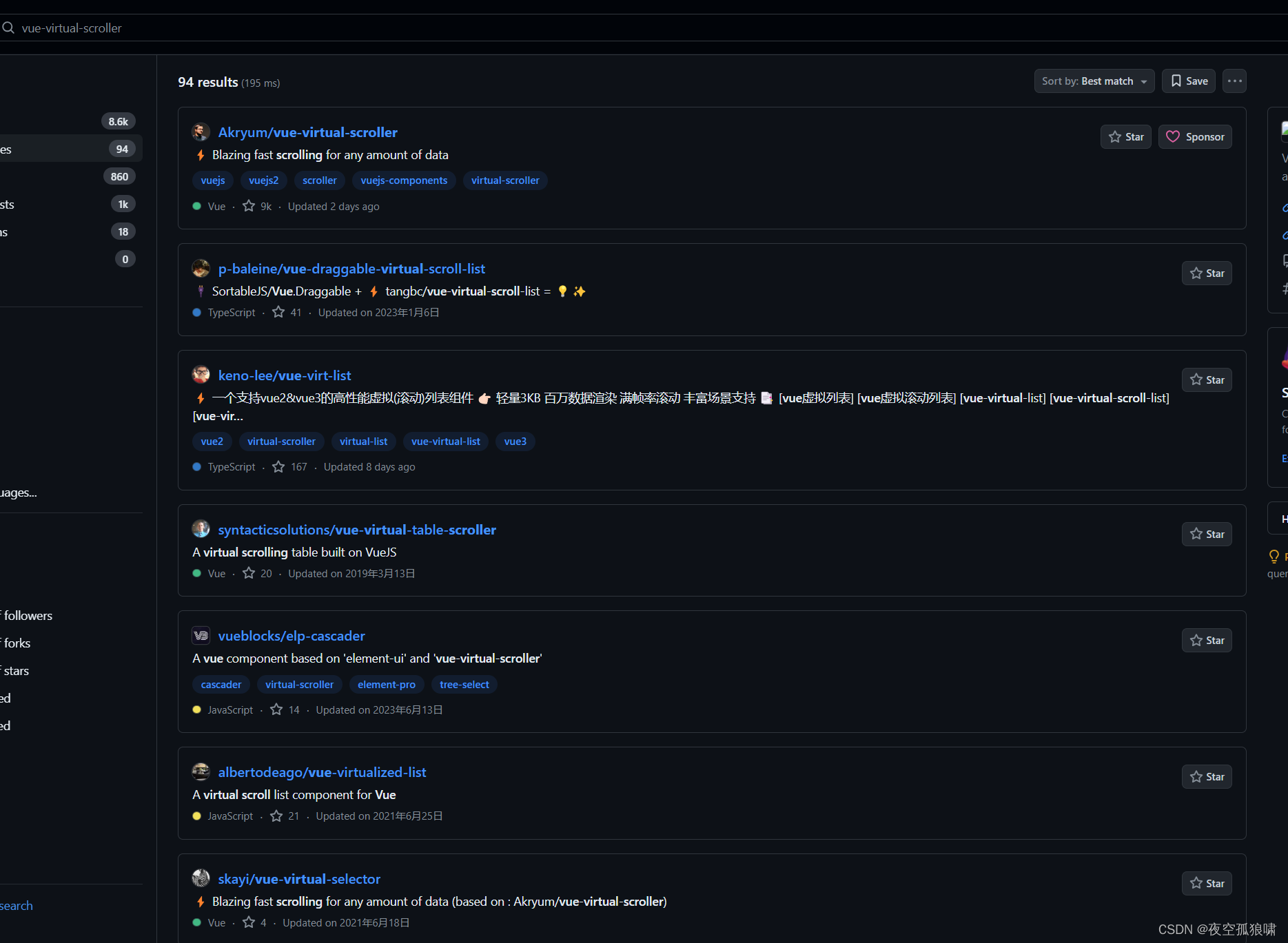
- 自己找吧,我就不一一列举了,看图
方法一利用浏览器原生api去实现,可以实现不等高的列表虚拟滚动,intersectionObserver 多用于图片懒加载,虚拟滚动列表
方法二通过监听滚动条的位置,去计算显示的内容,这里需要列表等高,当然不等高也可以计算,稍微改改
前端虚拟滚动列表(方法一:利用IntersectionObserver api 简单)
- IntersectionObserver可以用来自动监听元素是否进入了设备的可视区域之内,而不需要频繁的计算来做这个判断。由于可见(visible)的本质是,目标元素与视口产生一个交叉区,所以这个 API 叫做"交叉观察器"
IntersectionObserver 方案多用于图片懒加载或者列表虚拟滚动
IntersectionObserver 是浏览器原生提供的构造函数,接受两个参数: callback:可见性发现变化时的回调函数 option:配置对象(可选)。
构造函数的返回值是一个观察器实例。实例一共有4个方法:
-
observe:开始监听特定元素
-
unobserve:停止监听特定元素
-
disconnect:关闭监听工作
-
takeRecords:返回所有观察目标的对象数组
-
callback 参数
目标元素的可见性变化时,就会调用观察器的回调函数callback。
callback一般会触发两次。一次是目标元素刚刚进入视口,另一次是完全离开视口。
const io = new IntersectionObserver((changes, observer) => { console.log(changes); console.log(observer); });- options
- threshold: 决定了什么时候触发回调函数。它是一个数组,每个成员都是一个门槛值,默认为[0],即交叉比例(intersectionRatio)达到0时触发回调函数。用户可以自定义这个数组。比如,[0, 0.25, 0.5, 0.75, 1]就表示当目标元素 0%、25%、50%、75%、100% 可见时,会触发回调函数。
- root: 用于观察的根元素,默认是浏览器的视口,也可以指定具体元素,指定元素的时候用于观察的元素必须是指定元素的子元素
- rootMargin: 用来扩大或者缩小视窗的的大小,使用css的定义方法,10px 10px 30px 20px表示top、right、bottom 和 left的值
————————————————
这里是后面补充的简单还原了下面方法二的例子,重点在60行,从哪儿看就可以
import { watch, onMounted, PropType, reactive, ref } from 'vue'; import SearchBox from '/@/components/SearchBox/index.vue'; import { message } from 'ant-design-vue'; const props = defineProps({ collapsed: { type: Boolean, default: true, }, seqText: { type: Array as PropType, default: [''], }, }); let width = 100; const geneTexts: Array = []; const data = reactive({ geneTexts, }); const calLine = (item: any, index: number) => { return width * (index - 1) + 1; }; const endRow = (item: any, index: number) => { return width * index; }; // 这里是核心要点 const io = new IntersectionObserver( (entries) => { console.log(entries); for (const entry of entries) { if (entry.isIntersecting) { const elTxt = entry.target; // console.log(elTxt.getAttribute('data')); elTxt.innerHTML = elTxt.getAttribute('data'); io.unobserve(elTxt); } } }, { root: document.getElementById('scrollable-div'), // rootMargin: 0, threshold: 0.5, }, ); setTimeout(() => { const elList = document.querySelectorAll('.text-box'); console.log(elList); elList.forEach((element) => { io.observe(element); }); }, 1000); const againFind = ref(1); let start = ref(0); // @import '/@/assets/styles/views/medaka.less'; .big-box { background: #282c34; padding: 30px 20px; height: 870px; } .download-box { width: 100%; // padding: 0px 20px; // outline: 1px solid rgb(17, 0, 255); overflow: hidden; .line-box { .flex-type(flex-start); height: 30px; } &.txt { background: #282c34; color: #fff; height: 810px; overflow: auto; .el-row { display: flex; align-items: center; margin-bottom: 10px; margin: auto; font-size: 22px; } } } @media screen and (min-width: 1842px) { .text-box-samll { letter-spacing: 1.5px; font-size: 15px; } .text-number-samll { min-width: 60px; font-size: 15px; } .text-number2-samll { margin-left: 20px; min-width: 60px; font-size: 15px; } .text-title-samll { font-size: 15px; } .text-box { font-size: 22px; // letter-spacing: 3px; } .text-number { min-width: 100px; font-size: 22px; } .text-number2 { margin-left: 20px; min-width: 100px; font-size: 22px; } .text-title { font-size: 22px; } } @media screen and (min-width: 1600px) and (max-width: 1841px) { .text-box-samll { font-size: 15px; } .text-number-samll { min-width: 40px; font-size: 15px; } .text-number2-samll { margin-left: 20px; min-width: 40px; font-size: 15px; } .text-title-samll { font-size: 15px; } .text-box { font-size: 20px; // letter-spacing: 1.2px; } .text-number { min-width: 60px; font-size: 20px; } .text-number2 { margin-left: 20px; min-width: 60px; font-size: 20px; } .text-title { font-size: 20px; } } @media screen and (min-width: 1443px) and (max-width: 1599px) { .text-box-samll { font-size: 13px; } .text-number-samll { min-width: 40px; font-size: 13px; } .text-number2-samll { margin-left: 20px; min-width: 40px; font-size: 13px; } .text-title-samll { font-size: 13px; } .text-box { font-size: 18px; // letter-spacing: 1.2px; } .text-number { min-width: 60px; font-size: 15px; } .text-number2 { margin-left: 20px; min-width: 60px; font-size: 18px; } .text-title { font-size: 18px; } } @media screen and (max-width: 1442px) { .text-box-samll { font-size: 11px; } .text-number-samll { min-width: 40px; font-size: 11px; } .text-number2-samll { margin-left: 20px; min-width: 40px; font-size: 11px; } .text-title-samll { font-size: 11px; } .text-box { font-size: 16px; // letter-spacing: 1.2px; } .text-number { min-width: 60px; font-size: 15px; } .text-number2 { margin-left: 20px; min-width: 60px; font-size: 16px; } .text-title { font-size: 16px; } }{{ item }}{{ calLine(item, index + start) }}''{{ endRow(item, index + start) }}前端虚拟滚动列表(方法二:监听滚动计算 麻烦)
在大型的企业级项目中经常要渲染大量的数据,这种长列表是一个很普遍的场景,当列表内容越来越多就会导致页面滑动卡顿、白屏、数据渲染较慢的问题;大数据量列表性能优化,减少真实dom的渲染
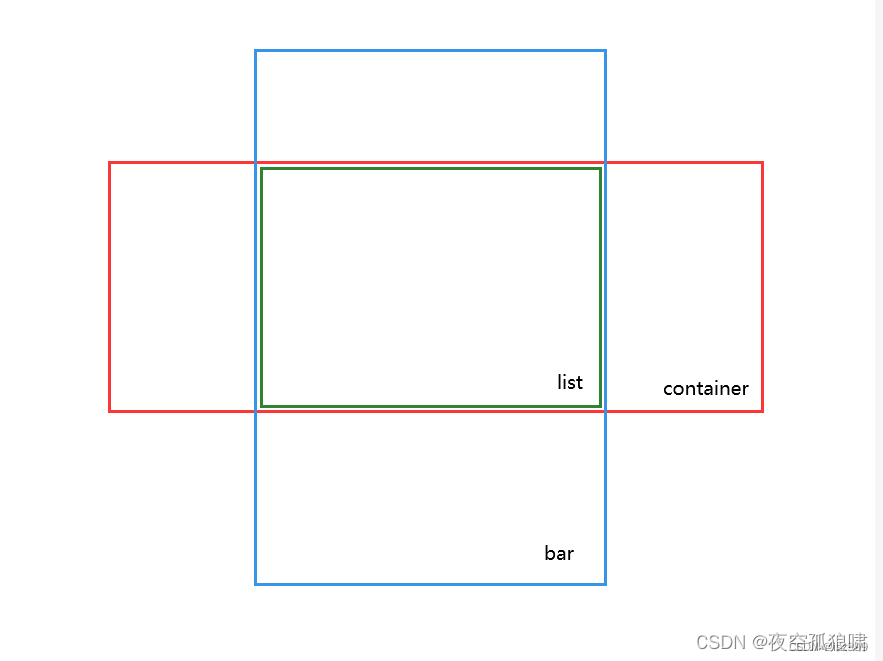
看图:绿色是显示区域,绿色和蓝色中间属于预加载:解决滚动闪屏问题;大致了解了流程在往下看;
实现效果:
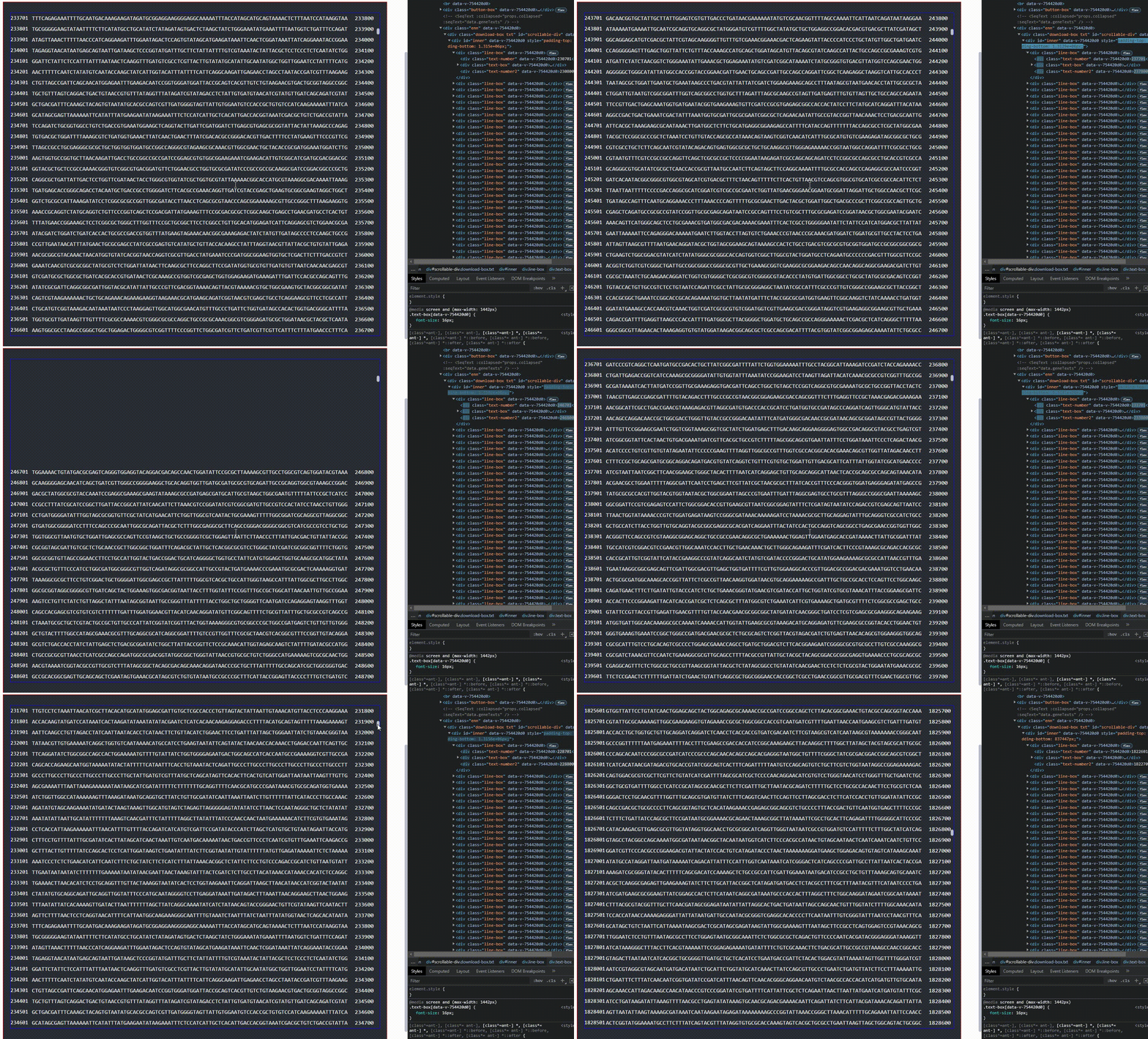
先说一下你看到这么多真实dom节点是因为做了预加载,减少滚动闪屏现象,这里写了300行,可以根据实际情况进行截取
实现思路:
虚拟列表滚动大致思路:两个div容器
  外层:外部容器用来固定列表容器的高度,同时生成滚动条
  内层:内部容器用来装元素,高度是所有元素高度的和
  外层容器鼠标滚动事件  dom.scrollTop 获取滚动条的位置
  根据每行列表的高以及当前滚动条的位置,利用slice() 去截取当前需要显示的内容
  重点:滚动条的高度是有内层容器的paddingBottom 和 paddingTop 属性顶起来了,确保滚动条位置的准确性
  这里鼠标上下滚动会出现闪屏问题:解决方案如下:
      方案一:  预加载:
                    向下预加载:
                        比如div滚动区域显示30行,就预加载 300行( 即这里 slice(startIndex,startIndex + 300) ),
                    向上预加载:
                        在滚动监听事件函数中(computeRow)判断inner的paddingTop和paddingBottom即可
                    当然这里的download-box的padding有30px像素,在加一个div,overflow:hidded就解决了
      方案二:缩小滚动范围或者节流时间缩短,这里写的500ms
具体代码
    class="enn">
      class="download-box txt" id="scrollable-div" @scroll="handleScroll">
        "inner">
          for="(item, index) in data2" :key="index" class="line-box">
            class="{ 'text-box': props.collapsed, 'text-box-samll': !props.collapsed }">
              {{ item }}


  import { onMounted, PropType, ref } from 'vue';
  import { useText } from './hooks/useText';
  const props = defineProps({
    baseData: {
      type: Object as PropType
        taskId: string;
        barcodeName: string;
      },
      default: {},
    },
    collapsed: {
      type: Boolean,
      default: true,
    },
    type: {
      type: Boolean,
      default: false,
    },
  });
  const { data } = useText(props.type);
  //  这里大数据量数组是  data.geneTexts
  /**
   * 虚拟列表滚动大致思路:两个div容器
   *
   *    外层:外部容器用来固定列表容器的高度,同时生成滚动条
   *
   *    内层:内部容器用来装元素,高度是所有元素高度的和
   *
   *    外层容器鼠标滚动事件  dom.scrollTop 获取滚动条的位置
   *
   *    根据每行列表的高以及当前滚动条的位置,利用slice() 去截取当前需要显示的内容
   *
   *    重点:滚动条的高度是有内层容器的paddingBottom 和 paddingTop 属性顶起来了,确保滚动条位置的准确性
   *
   *    这里鼠标上下滚动会出现闪屏问题:解决方案如下:
   *
   *        方案一:  预加载:
   *
   *                      向下预加载:
   *                          比如div滚动区域显示30行,就预加载 300行( 即这里 slice(startIndex,startIndex + 300) ),
   *
   *                      向上预加载:
   *                          在滚动监听事件函数中(computeRow)判断inner的paddingTop和paddingBottom即可
   *
   *                      当然这里的download-box的padding有30px像素,在加一个div,overflow:hidded就解决了
   *
   *        方案二:缩小滚动范围或者节流时间缩短,这里写的500ms
   *
   *
   */
  let timer_throttle: any;
  const throttle = (func: Function, wait?: number) => {
    wait = wait || 500;
    if (!timer_throttle) {
      timer_throttle = setTimeout(() => {
        func.apply(this);
        timer_throttle = null;
      }, wait);
    }
  };
  // 鼠标滚动事件
  const handleScroll = (event: any) => throttle(computeRow, 100);
  // 计算当前显示tab
  const computeRow = () => {
    // console.log('距离顶部距离', window.scrollY, geneTexts);
    let scrollableDiv = document.getElementById('scrollable-div');
    let topPosition = scrollableDiv.scrollTop;
    let leftPosition = scrollableDiv.scrollLeft;
    console.log('垂直滚动位置:', topPosition, '水平滚动位置:', leftPosition);
    const startIndex = Math.max(0, Math.floor(topPosition / 30));

    const endIndex = startIndex + 300;
    data2.value = data.geneTexts.slice(startIndex, endIndex);
    let inner = document.getElementById('inner');
    if (topPosition = data.geneTexts.length * 30) {
      // 这里 9000 是 内层div的高度 30 * 300   理解div高度是 padding+div内容高度
      inner.style.paddingTop = topPosition - 900 + 'px'; //900 是div的高度
      inner.style.paddingBottom = 0 + 'px';
    } else {
      inner.style.paddingTop = topPosition - 2700 + 'px';
      inner.style.paddingBottom = (data.geneTexts.length + 2) * 30 + 2700 - topPosition + 'px';
    }
  };
  const data2 = ref([]);
  const init = () => {
    data2.value = data.geneTexts.slice(0, 300);
    let inner = document.getElementById('inner');
    inner.style.paddingTop = 0 + 'px';
    inner.style.paddingBottom = (data.geneTexts.length + 2) * 30 - 900 + 'px';
  };


  .button-box {
    margin-bottom: 25px;
    .flex-type(flex-end);
    :deep(.ant-btn) {
      margin-left: 10px;
    }
  }
  .enn {
    background: #282c34;
    outline: 1px solid red;
    padding: 30px 20px;
    height: 960px;
  }
  .download-box {
    width: 100%;
    // padding: 30px 20px;
    outline: 1px solid rgb(17, 0, 255);
    background-color: #fff;
    overflow: hidden;
    .line-box {
      .flex-type(flex-start);
      height: 30px;
    }
    &.txt {
      background: #282c34;
      color: #fff;
      height: 900px;
      overflow: auto;
    }
  }
替代方案
上面是自己写的,github上面还有好多插件可以用,但各有优劣,根据自己需求选择
如:
vue-virtual-scroller
https://github.com/Akryum/vue-virtual-scroller/tree/0f2e36248421ad69f41c9a08b8dcf7839527b8c2
vue-virt-list
vue-draggable-virtual-scroll-list
virtual-list
自己找吧,我就不一一列举了,看图
{{ item }}{{ calLine(item, index + start) }}{{ item }}{{ endRow(item, index + start) }}import { defineComponent, onMounted, PropType, ref } from 'vue'; import Table from '/@/components/table/sTable.vue'; import SeqText from '/@/components/SeqText/index.vue'; import { useText, useTable } from './hooks/useText'; import { useModal } from './hooks/useModal'; import { serverAddress } from '/@/serve/index'; import { download, downloadTxt } from '/@/libs/utils/download'; const props = defineProps({ /** * 基础数据 */ baseData: { type: Object as PropType taskId: string; barcodeName: string; }, default: {}, }, collapsed: { type: Boolean, default: true, }, type: { type: Boolean, default: false, }, }); let width = 100; const { taskId, barcodeName } = props.baseData; const { data, getMedaka, getAvailableSeq, handleChangeSeq, seqOptions, selection } = useText( props.type, ); const { tableConfig, getTable } = useTable(props.type); const VITE_APP_URL = serverAddress(); const { modalConfig, handleExport } = useModal(); const handleClickExport = () => { let path = ''; if (props.type) { path = VITE_APP_URL + `outputs/${taskId}/fastq_analysis/${barcodeName}/ragtag.fasta`; } else { path = VITE_APP_URL + `outputs/${taskId}/fastq_analysis/${barcodeName}/${barcodeName}.final.fasta`; } download(path, '.fasta'); }; const calLine = (item: any, index: number) => { return width * (index - 1) + 1; }; const endRow = (item: any, index: number) => { return width * index; }; onMounted(() => { getAvailableSeq(taskId, barcodeName).then(() => { if (seqOptions.value.length > 0) { getMedaka(taskId, barcodeName, width, seqOptions.value[0].value).then(() => init()); // getMedaka(taskId, barcodeName, width); } }); getTable(taskId, barcodeName); }); /** * 虚拟列表滚动大致思路:两个div容器 * * 外层:外部容器用来固定列表容器的高度,同时生成滚动条 * * 内层:内部容器用来装元素,高度是所有元素高度的和 * * 外层容器鼠标滚动事件 dom.scrollTop 获取滚动条的位置 * * 根据每行列表的高以及当前滚动条的位置,利用slice() 去截取当前需要显示的内容 * * 重点:滚动条的高度是有内层容器的paddingBottom 和 paddingTop 属性顶起来了,确保滚动条位置的准确性 * * 这里鼠标上下滚动会出现闪屏问题:解决方案如下: * * 方案一: 预加载: * * 向下预加载: * 比如div滚动区域显示30行,就预加载 300行( 即这里 slice(startIndex,startIndex + 300) ), * * 向上预加载: * 在滚动监听事件函数中(computeRow)判断inner的paddingTop和paddingBottom即可 * * 当然这里的download-box的padding有30px像素,在加一个div,overflow:hidded就解决了 * * 方案二:缩小滚动范围或者节流时间缩短,这里写的500ms * * */ let timer_throttle: any; const throttle = (func: Function, wait?: number) => { wait = wait || 500; if (!timer_throttle) { timer_throttle = setTimeout(() => { func.apply(this); timer_throttle = null; }, wait); } }; let start = ref(0); // 鼠标滚动事件 const handleScroll = (event: any) => throttle(computeRow, 100); // 计算当前显示tab const computeRow = () => { // console.log('距离顶部距离', window.scrollY, geneTexts); let scrollableDiv = document.getElementById('scrollable-div'); let topPosition = scrollableDiv.scrollTop; let leftPosition = scrollableDiv.scrollLeft; console.log('垂直滚动位置:', topPosition, '水平滚动位置:', leftPosition); const startIndex = Math.max(0, Math.floor(topPosition / 30)); start.value = startIndex; const endIndex = startIndex + 300; data2.value = data.geneTexts.slice(startIndex, endIndex); let inner = document.getElementById('inner'); if (topPosition = data.geneTexts.length * 30) { // 这里 9000 是 内层div的高度 30 * 300 inner.style.paddingTop = topPosition - 900 + 'px'; //900 是div的高度 inner.style.paddingBottom = 0 + 'px'; } else { inner.style.paddingTop = topPosition - 2700 + 'px'; inner.style.paddingBottom = (data.geneTexts.length + 2) * 30 + 2700 - topPosition + 'px'; } }; const data2 = ref([]); const init = () => { data2.value = data.geneTexts.slice(0, 300); let inner = document.getElementById('inner'); inner.style.paddingTop = 0 + 'px'; inner.style.paddingBottom = (data.geneTexts.length + 2) * 30 - 900 + 'px'; }; // @import '../../../../assets/styles/views/medaka.less'; .button-box { margin-bottom: 25px; .flex-type(flex-end); :deep(.ant-btn) { margin-left: 10px; } } .enn { background: #282c34; outline: 1px solid red; padding: 30px 20px; height: 960px; } .download-box { width: 100%; // padding: 30px 20px; outline: 1px solid rgb(17, 0, 255); background-color: #fff; overflow: hidden; .line-box { .flex-type(flex-start); height: 30px; } &.txt { background: #282c34; color: #fff; height: 900px; overflow: auto; .el-row { display: flex; align-items: center; margin-bottom: 10px; margin: auto; font-size: 22px; } } } .form-box { .flex-type(center); } :deep(.ant-select-selector) { min-width: 120px; } @media screen and (min-width: 1842px) { .text-box-samll { letter-spacing: 1.5px; font-size: 15px; } .text-number-samll { min-width: 60px; font-size: 15px; } .text-number2-samll { margin-left: 20px; min-width: 60px; font-size: 15px; } .text-title-samll { font-size: 15px; } .text-box { font-size: 22px; // letter-spacing: 3px; } .text-number { min-width: 100px; font-size: 22px; } .text-number2 { margin-left: 20px; min-width: 100px; font-size: 22px; } .text-title { font-size: 22px; } } @media screen and (min-width: 1600px) and (max-width: 1841px) { .text-box-samll { font-size: 15px; } .text-number-samll { min-width: 40px; font-size: 15px; } .text-number2-samll { margin-left: 20px; min-width: 40px; font-size: 15px; } .text-title-samll { font-size: 15px; } .text-box { font-size: 20px; // letter-spacing: 1.2px; } .text-number { min-width: 60px; font-size: 15px; } .text-number2 { margin-left: 20px; min-width: 60px; font-size: 20px; } .text-title { font-size: 20px; } } @media screen and (min-width: 1443px) and (max-width: 1599px) { .text-box-samll { font-size: 13px; } .text-number-samll { min-width: 40px; font-size: 13px; } .text-number2-samll { margin-left: 20px; min-width: 40px; font-size: 13px; } .text-title-samll { font-size: 13px; } .text-box { font-size: 18px; // letter-spacing: 1.2px; } .text-number { min-width: 60px; font-size: 15px; } .text-number2 { margin-left: 20px; min-width: 60px; font-size: 18px; } .text-title { font-size: 18px; } } @media screen and (max-width: 1442px) { .text-box-samll { font-size: 11px; } .text-number-samll { min-width: 40px; font-size: 11px; } .text-number2-samll { margin-left: 20px; min-width: 40px; font-size: 11px; } .text-title-samll { font-size: 11px; } .text-box { font-size: 16px; // letter-spacing: 1.2px; } .text-number { min-width: 60px; font-size: 15px; } .text-number2 { margin-left: 20px; min-width: 60px; font-size: 16px; } .text-title { font-size: 16px; } }
- options
-
- IntersectionObserver可以用来自动监听元素是否进入了设备的可视区域之内,而不需要频繁的计算来做这个判断。由于可见(visible)的本质是,目标元素与视口产生一个交叉区,所以这个 API 叫做"交叉观察器"


