
HarmonyOS Next 纯血星河版【六】【ArkTS语法】:数组的增删改查操作、判断和循环以及算元语句、条件渲染(淘宝购物车案例)、数组的遍历和数组对象的定义使用、ForEach遍历渲染的使用
文章目录
- HarmonyOS Next AtkTS语法
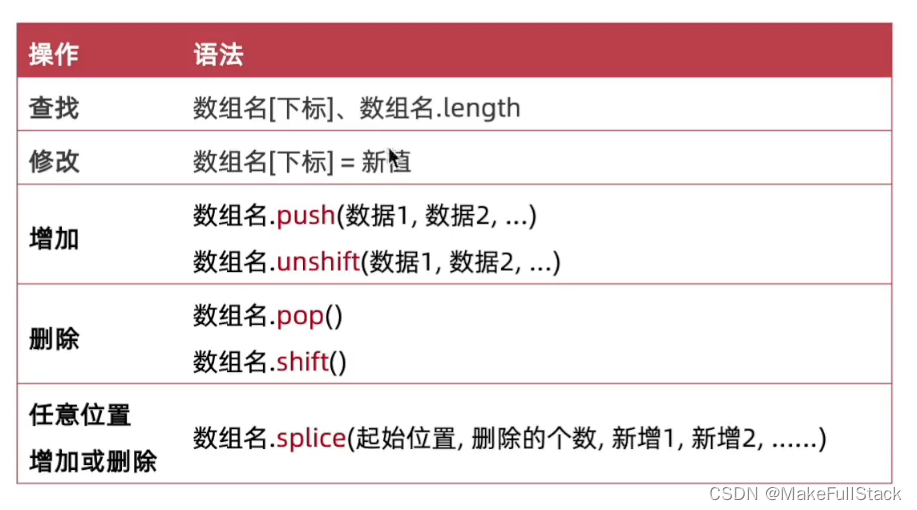
- 一、数组的操作
- 1. 数组 - 定义、查找、修改
- 1.1 定义一个数组
- 1.2 通过索引查找数组元素
- 1.3 通过索引修改 数组元素
- 2. 数组 - 添加元素
- 3. 数组 - 删除元素
- 4. 数组 - 任意位置添加、删除
- 6. 数组操作 -- 总结
- 二、ArkTS 中的 语句 - 判断
- 1. if - 判断语句
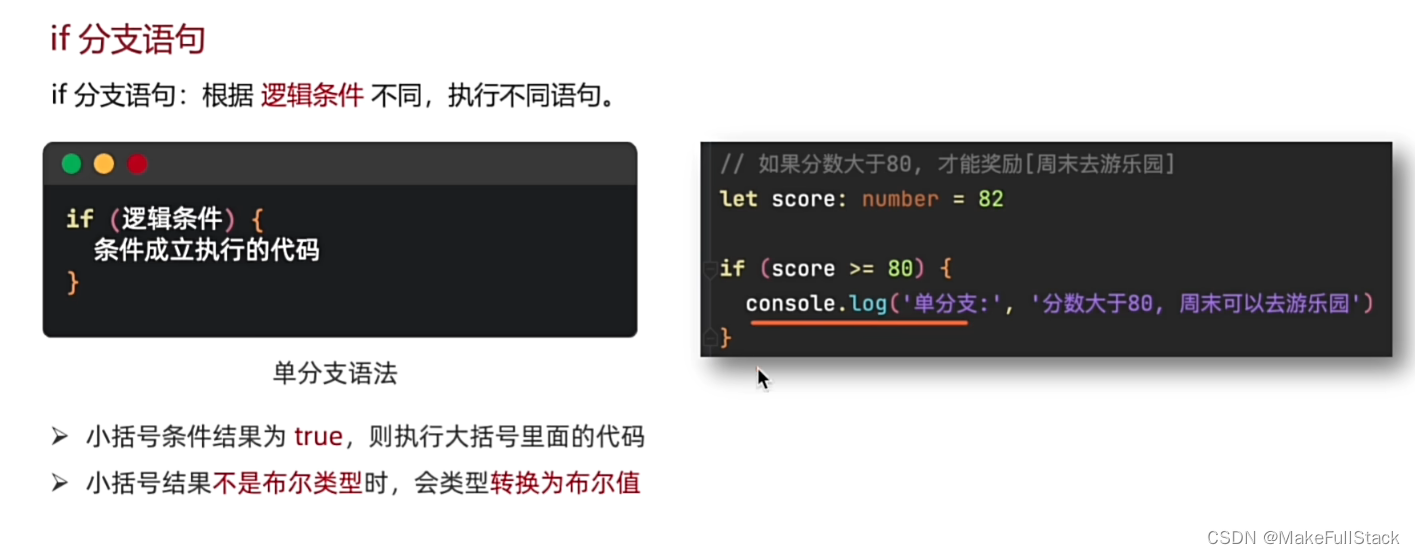
- 1.1 if 分支
- 单分支
- 双分支
- 代码演示:
- 1.2 判断语句 小结:
- 1.3 . 实际开发案例的使用
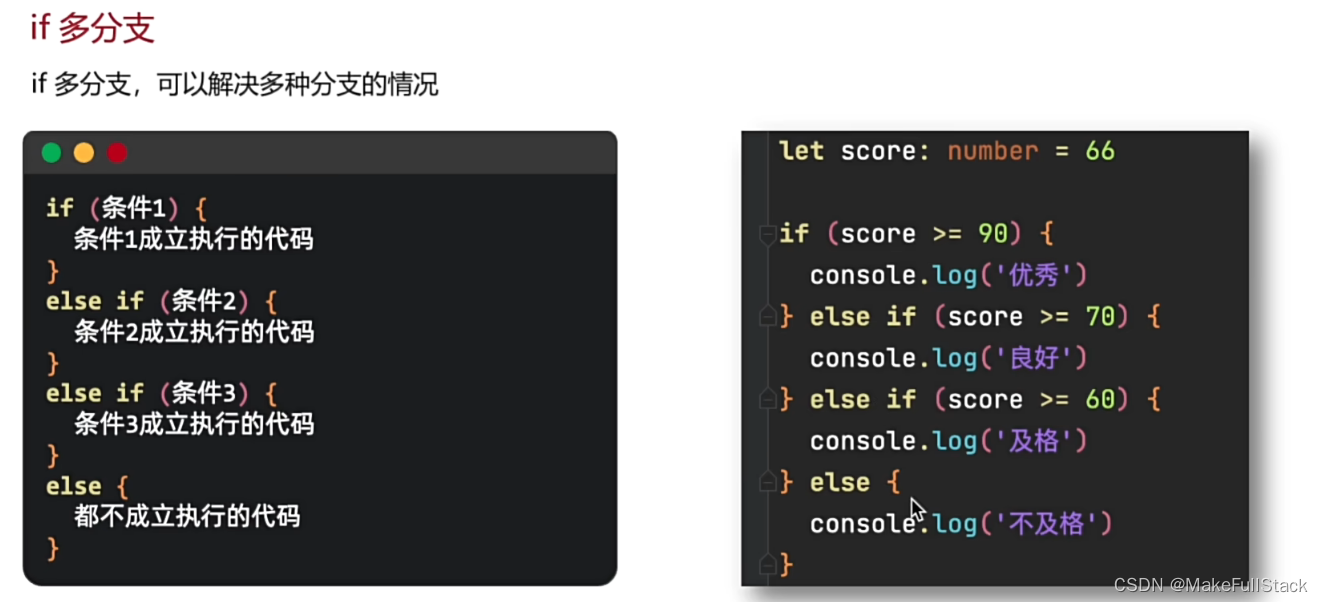
- 1. 4 if判断 多分支语句
- 2. switch - 判断分支语句
- 3. 三元运算符
- 三 、条件渲染
- 1. 淘宝购物车案例
- 代码示例:
- 四、ArkTS - 循环语句
- while循环
- 2. while - 练习题
- for 循环
- 代码示例
- for循环练习
- 五、退出循环
- 六、遍历数组
- 1. for 循环遍历
- 数组中的 - length方法
- 2. for of 遍历
- 3. 遍历数组练习
- 七、对象数组
- 八、 ForEach - 遍历控制渲染
HarmonyOS Next AtkTS语法
一、数组的操作

1. 数组 - 定义、查找、修改
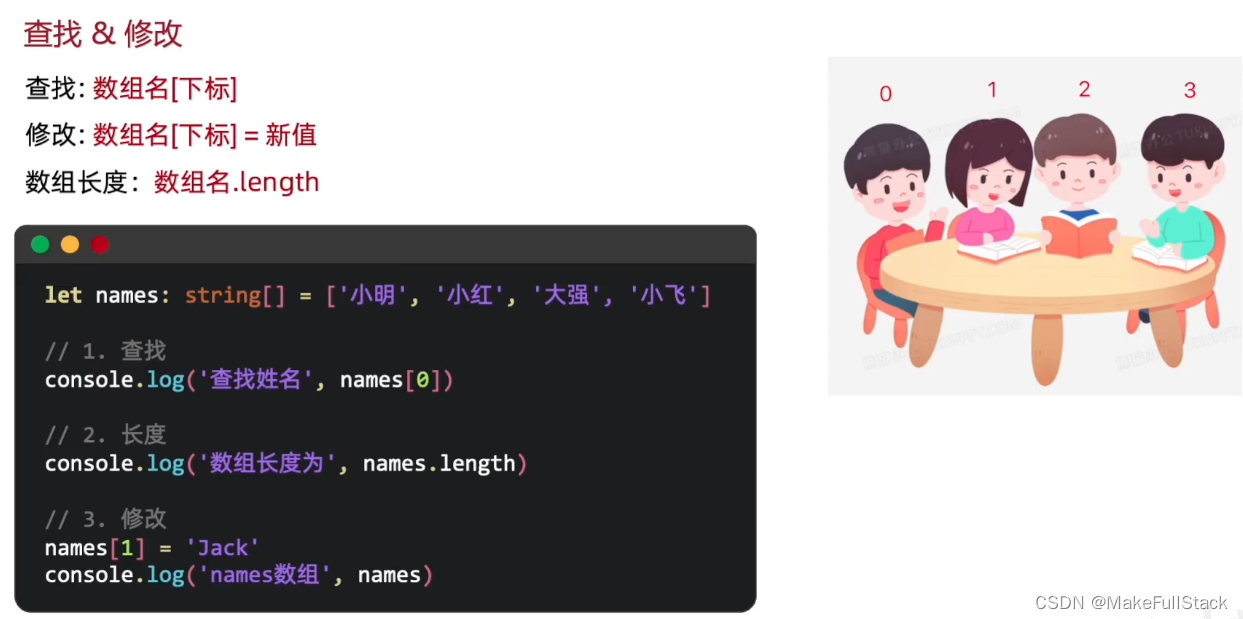
1.1 定义一个数组
// 定义一个数组 let arr : string[] = ['张三', '李四', '王五', '赵六'] console.log('整个数组内容为;', arr)- 需要注意,类型可以根据自己的需求来定,你可以写成:number[]。
运行效果如下:

1.2 通过索引查找数组元素
// 2. 通过下标访问指定的数组元素
console.log(arr[1])  // 李四   (注意,索引 从 0  开始)
1.3 通过索引修改 数组元素
// 3. 修改数组下标指定的元素
arr[0] = '数组'
console.log('修改后的数组内容为:', arr)
2. 数组 - 添加元素
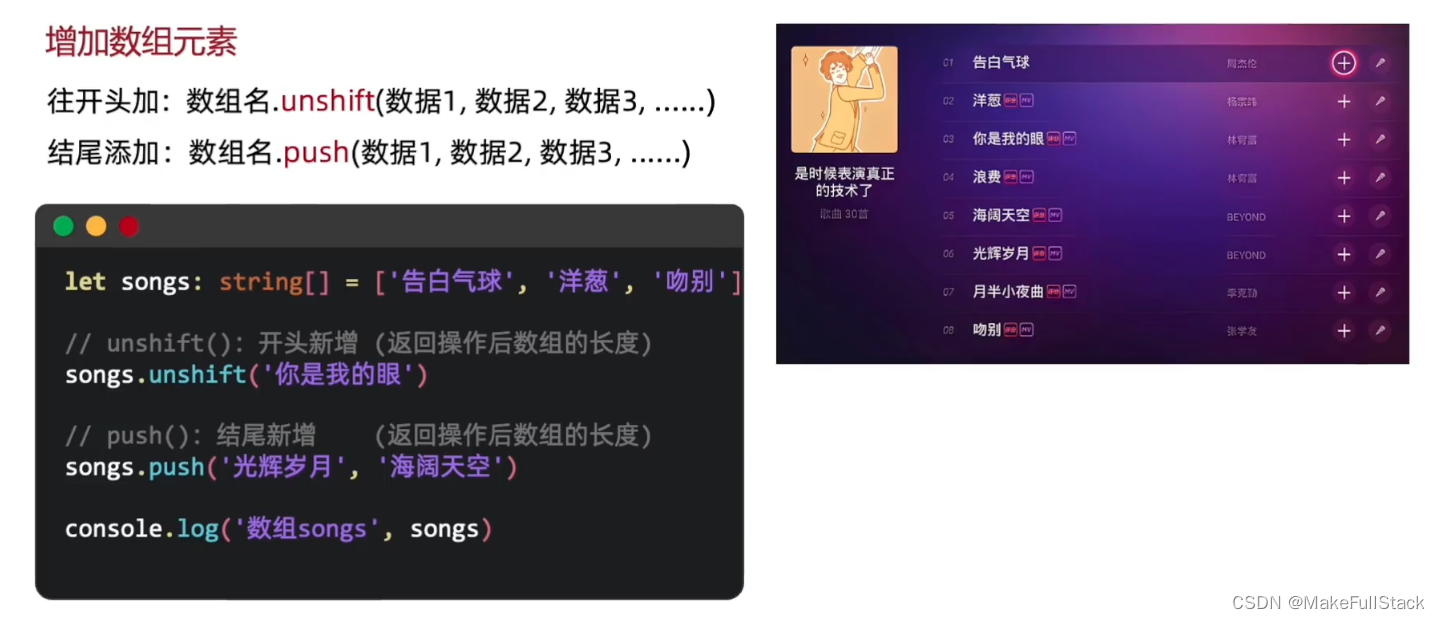
3. 数组 - 删除元素
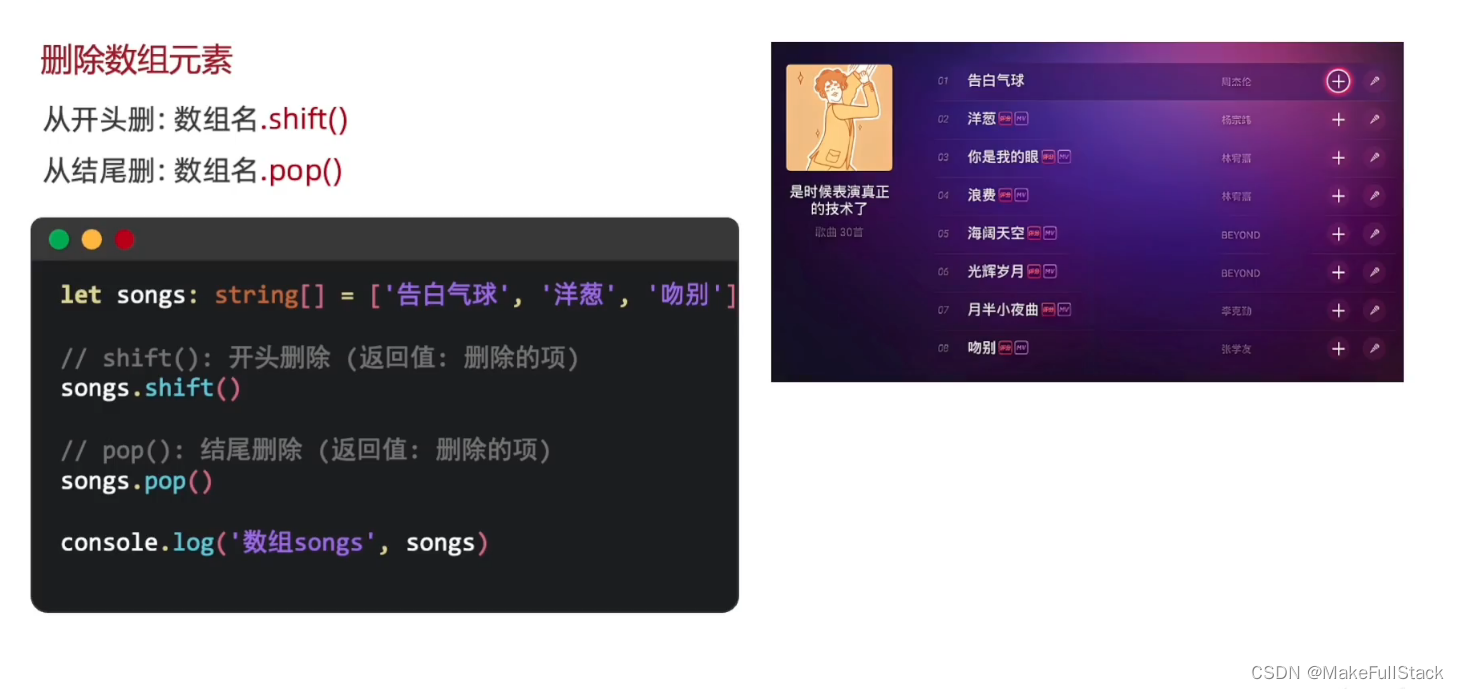
- 注意,删除后方法返回删除后的元素
4. 数组 - 任意位置添加、删除
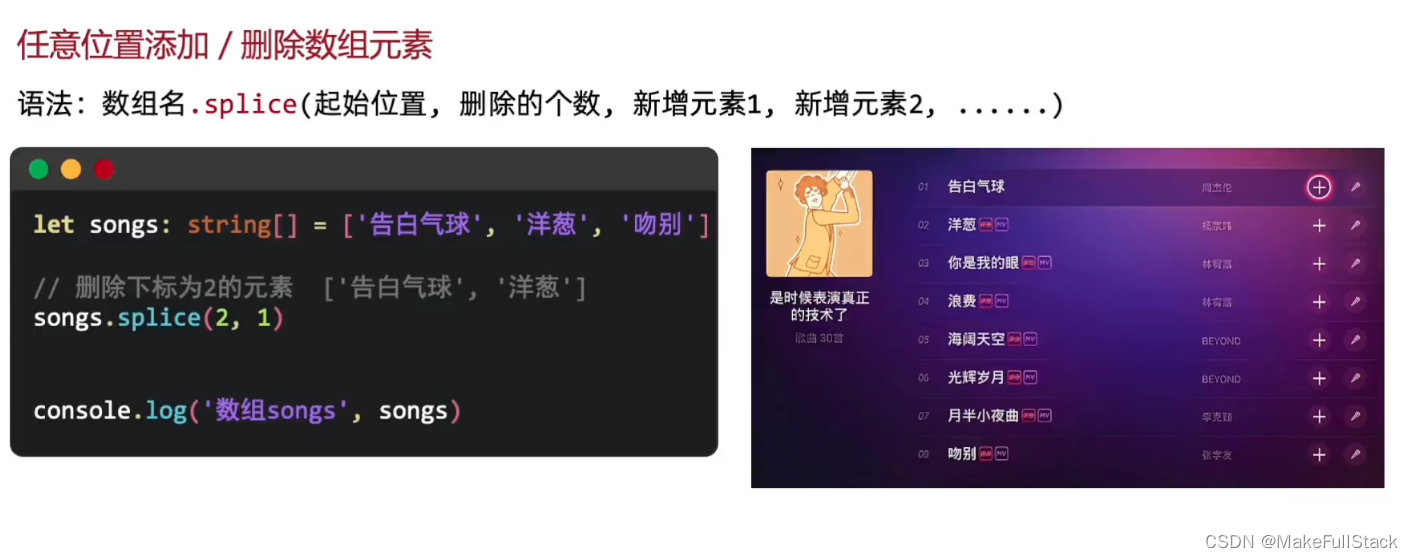
// splice方法,任意位置:删除
let arr1 : string[] = ['张三', '李四', '王五', '赵六']
arr1.splice(3, 1) // 从索引为 3 的元素处,开始删除,个数为 1
console.log('数组:',arr1)  //  张三,李四,王五
// splice方法,任意位置 :新增
arr1.splice(1, 0, '添加', '元素')  // 参数一: 起始索引   参数二: 操作的个   参数三: 添加的元素
console.log('arr1:', arr1)
6. 数组操作 – 总结
二、ArkTS 中的 语句 - 判断

1. if - 判断语句
1.1 if 分支
单分支
双分支

代码演示:
// if 语句的基本使用 (大家不考试,不需要分清楚单分支双分支,知道怎么执行,怎么用就好了) let age : number = 19 // 现在十九了,以前 18 天天 写 十八岁 if (age > 18) { console.log('年龄分段', `年龄为:${age} , 您已成年!`) } else { console.log('年龄分段', `年龄为:${age} , 您未成年!`) } // 运行结果:年龄分段 年龄为:19 , 您已成年!-
只要记住,if成立else就不执行,反之,else就一定执行。
-
大家学过 JavaScript、Typescript、Java、c其实都只需要知道有没有差异,可以无缝衔接。
1.2 判断语句 小结:

1.3 . 实际开发案例的使用
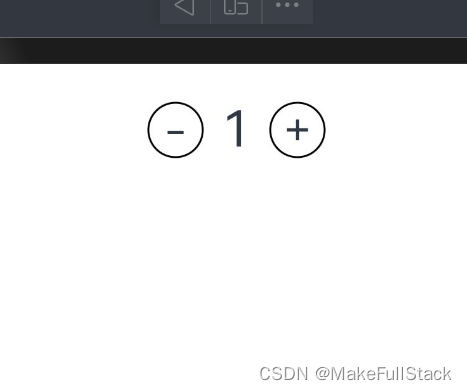
@Entry @Component struct ArrayDemoCode { // 状态变量 @State number : number = 1 build() { Column() { Row({ space: 10}) { Text('-').width(30).height(30).border({ width: 1, color: Color.Black}).fontSize(24).textAlign(TextAlign.Center).borderRadius(15) .onClick( () => { // 如果 this.number 小于 1 ,不允许操作数据,否则允许 if (this.number > 1) { this.number-- } else { console.log('this.number(-)', '操作已经达到上限!!!') } }) Text(this.number.toString()).fontSize(26) Text('+').width(30).height(30).border({ width: 1, color: Color.Black}).fontSize(24).textAlign(TextAlign.Center).borderRadius(15) .onClick( () => { // 如果 this.number 小于 1000 ,允许操作数据,否则禁止 if (this.number1. 4 if判断 多分支语句
-
其实这里学会了单分支和双分支,能看懂就可以。实际开发都是一样的。
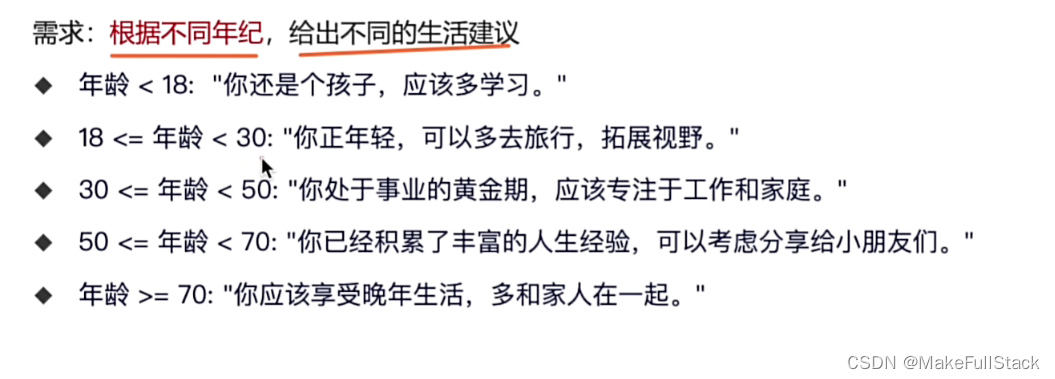
-
这个就是往上面替换文字和条件就可以了哦!
2. switch - 判断分支语句
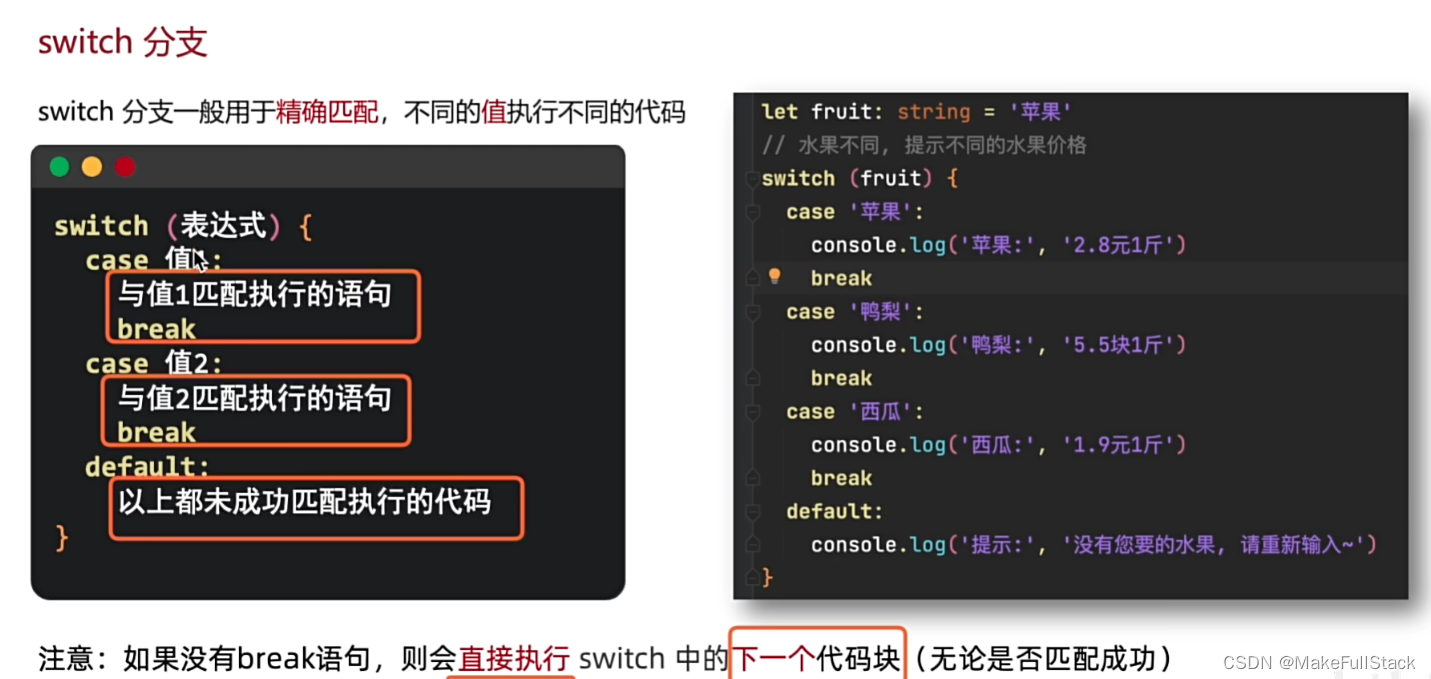
- 这里千万注意 break。执行完毕当前的case 分支,不跳出。后面的代码块就会执行。
3. 三元运算符

// 三目运算符 let number : number = 10 console.log('结果为:', number > 20 ? 'true' : 'false') // 结果为: false- 问号前面的成立, 执行 冒号 前面的, 不成立: 执行 冒号后面的
三 、条件渲染
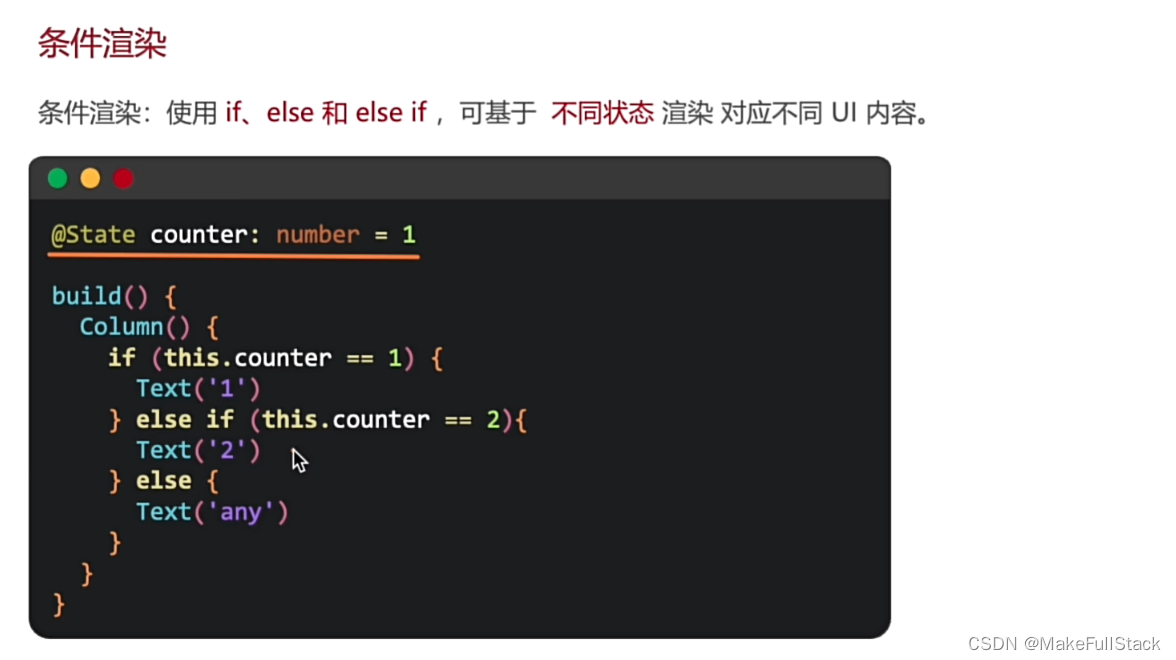
1. 淘宝购物车案例
需求:商品购买完毕了,我们及时渲染对应的组件。
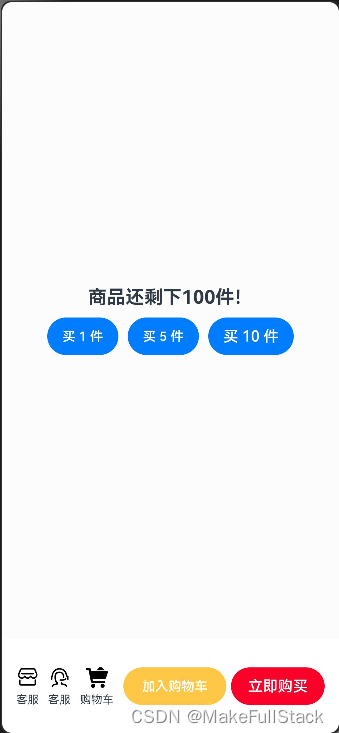
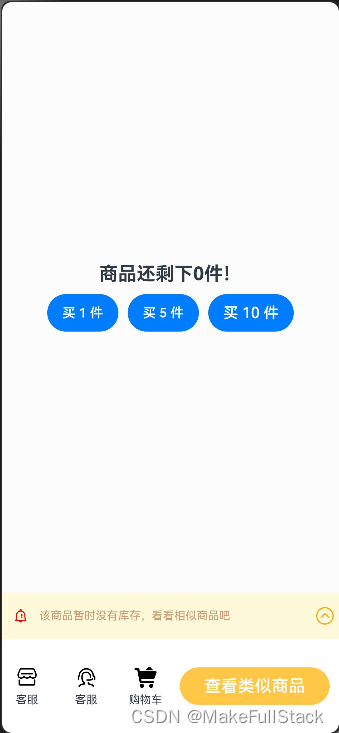
代码示例:
import { AlertDialog } from '@ohos.arkui.advanced.Dialog'
@Entry
@Component
struct TaoBaoShoppingCartTest {
  @State total : number = 100
  build() {
    Column() {
      Column () {
        Text(`商品还剩下${this.total}件!`).textAlign(TextAlign.Center).fontWeight(700).fontSize(20)
        Row({ space: 10}) {
          Button('买 1 件')
            .fontSize(14)
            .onClick( () => {
              if (this.total > 0) {
                this.total--
              }
            })
          Button('买 5 件')
            .fontSize(14)
            .onClick( () => {
               if (this.total >= 5) {
                   this.total -= 5
               }
            })
          Button('买 10 件').onClick(() => { if (this.total >= 10) {this.total -= 10} })
        }
        .margin({ top: 10})
      }
      .width('100%')
      .layoutWeight(1)
      .backgroundColor('#fcfcfc')
      .justifyContent(FlexAlign.Center)
        if (this.total > 0) {
          Row(){
            Row({space: 10}) {
              Column({space: 5}) {
                Image($r('app.media.dianpu')).width(24).height(24).fillColor(Color.Black)
                Text('客服').fontSize(12)
              }
              Column({space: 5}) {
                Image($r('app.media.kefu')).width(24).height(24).fillColor(Color.Black)
                Text('客服').fontSize(12)
              }
              Column({space: 5}) {
                Image($r('app.media.gouwucheman')).width(24).height(24).fillColor(Color.Black)
                Text('购物车').fontSize(12)
              }
            }
            Row() {
              Button('加入购物车').fontSize(14).fontColor(Color.White).backgroundColor('#ffc745')
                .width(110).margin({left: 5, right: 5})
              Button('立即购买').fontSize(16).fontColor(Color.White).backgroundColor('#fb0029').width(100)
            }.width(220)
        }
        .width('100%').height(100).padding(10).justifyContent(FlexAlign.SpaceEvenly)
        } else {
          Column() {
            Row() {
              Row() {
                Image($r('app.media.tongzhi')).width(20).height(20).fillColor(Color.Red).margin({left: 5, right: 10})
                Text('该商品暂时没有库存,看看相似商品吧').fontSize(12).fontColor('#cf9a6d')
              }
              Image($r('app.media.zhedie')).width(20).height(20).fillColor(Color.Orange)
            }
            .width('100%')
            .height(50)
            .justifyContent(FlexAlign.SpaceBetween)
            .backgroundColor('#fff9dc')
            .padding(5)
            Row() {
              Row({space: 10}) {
                Column({space: 5}) {
                  Image($r('app.media.dianpu')).width(24).height(24).fillColor(Color.Black)
                  Text('客服').fontSize(12)
                }.layoutWeight(1)
                Column({space: 5}) {
                  Image($r('app.media.kefu')).width(24).height(24).fillColor(Color.Black)
                  Text('客服').fontSize(12)
                }.layoutWeight(1)
                Column({space: 5}) {
                  Image($r('app.media.gouwucheman')).width(24).height(24).fillColor(Color.Black)
                  Text('购物车').fontSize(12)
                }.layoutWeight(1)
              }
              .layoutWeight(1)
              Button('查看类似商品')
                .width(160).margin(10).backgroundColor('#ffc745').fontSize(18)
            }
            .width('100%')
            .height(100)
          }.width('100%').height(150)
        }
    }
    .width('100%').height('100%')
    .justifyContent(FlexAlign.SpaceEvenly)
    }
}
四、ArkTS - 循环语句
while循环
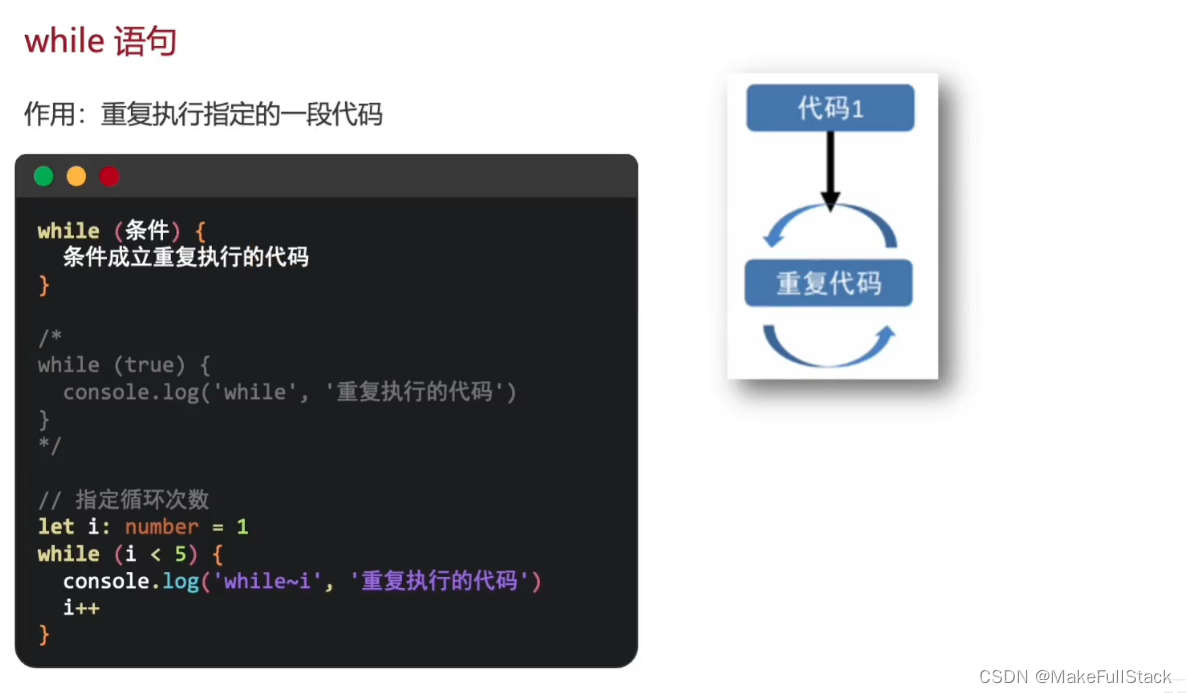
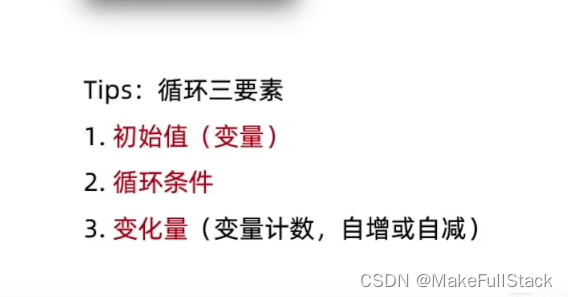
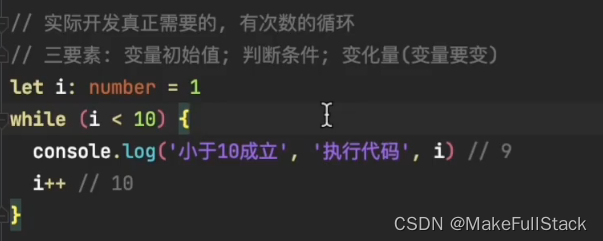
2. while - 练习题
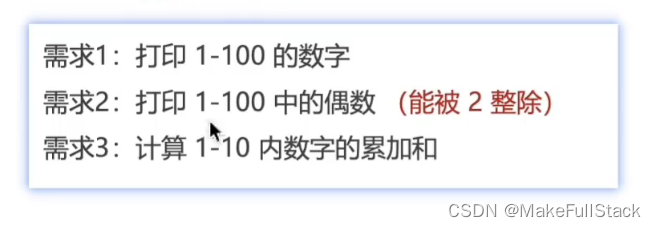
// 需求1: 打印 1 - 100 的数字
let i : number = 1;
while (i
  console.log("需求1:", i)
  i++
}
console.log("-------------------------------------------")
// 需求2:打印 1 - 100 之间的偶数
let z : number = 1;
while (z
  if (z % 2 == 0) {
    console.log("需求2:", z)
  }
  z++
}
console.log("-------------------------------------------")
// 需求3:计算 1 - 10 内数字的累加和
let k : number = 1
let sum : number = 0
while (k
  sum += k
  k++
}
console.log("需求三:", sum)

  sum2 += i
}
console.log("sum2: ", sum2)

  sum1 += item
}
console.log('需求1:', sum1)  // 204
console.log('------------------------------------------')
// 需求2:筛选数组中大于 10 的元素 ,将其收集到新的数组中并打印出来 [22, 3, 44, 55, 80]
let arr2 : number[] = [22, 3, 44, 55, 80]
let newArr : number[] = []
for (let item  of arr2) {
  if (item  10 ) {
    newArr.push(item)
  }
}
console.log('newArr', newArr) // 22,44,55,80
console.log('------------------------------------------')
// 需求3:将数组中 不是 0 的元素 收集到新的数组中 [22, 3, 0, 55, 0, 0, 11, 5, 0]
let arr3 : number[] = [22, 3, 0, 55, 0, 0, 11, 5, 0]
let newArr2 : number[] = []
for (let item of arr3) {
  if (item != 0) {
    newArr2.push(item)
  }
}
console.log('newArr2', newArr2)    // 2 22,3,55,11,5

  id : string,
  name : string,
  gender : string
  age : number
}
// 2. 遵循接口类型规范,创建对象
let studentArray : Student[] = [
  {id: '001', name: '张三', gender: '男', age: 23},
  {id: '002', name: '李四', gender: '男', age: 24}
]
// 3. 使用数组对象,和 普通对象一样
// console.log('查看张三:', studentArray[0])  引用数据类型打印只能看到类型哦
console.log('查看张三', JSON.stringify(studentArray[0]))
// 4. 遍历数组对象,也是一样的,就是需要注意使用,需要调用方法转换数据处理哦
for (let item  of studentArray) {
  console.log('数据对象', JSON.stringify(item))
}

  // 准备数据源,数据列表
  @State titles : string[] = ['电子产品','精品服饰','母婴产品','影音娱乐','海外旅游']
  build() {
    Column() {
      // 使用 ForEach 遍历数组渲染
      ForEach(this.titles, (item : string, index) = {
          Text(item).fontSize(18).fontColor('#FFCCAA').fontWeight(700).width('100%').padding(10).textAlign(TextAlign.Center)
      })
    } .width('100%').height('100%').padding(10)
  }
}
- 问号前面的成立, 执行 冒号 前面的, 不成立: 执行 冒号后面的
- 这里千万注意 break。执行完毕当前的case 分支,不跳出。后面的代码块就会执行。
-
-
- 注意,删除后方法返回删除后的元素
- 需要注意,类型可以根据自己的需求来定,你可以写成:number[]。
免责声明:我们致力于保护作者版权,注重分享,被刊用文章因无法核实真实出处,未能及时与作者取得联系,或有版权异议的,请联系管理员,我们会立即处理! 部分文章是来自自研大数据AI进行生成,内容摘自(百度百科,百度知道,头条百科,中国民法典,刑法,牛津词典,新华词典,汉语词典,国家院校,科普平台)等数据,内容仅供学习参考,不准确地方联系删除处理! 图片声明:本站部分配图来自人工智能系统AI生成,觅知网授权图片,PxHere摄影无版权图库和百度,360,搜狗等多加搜索引擎自动关键词搜索配图,如有侵权的图片,请第一时间联系我们,邮箱:ciyunidc@ciyunshuju.com。本站只作为美观性配图使用,无任何非法侵犯第三方意图,一切解释权归图片著作权方,本站不承担任何责任。如有恶意碰瓷者,必当奉陪到底严惩不贷!


