
docker学习
1、前提条件
首先买了个阿里云的服务器,,,安装了centos 7的服务器一台,,也可以使用虚拟机直接操作也是可以的没有什么太大的差别,反正就是要有一台linux系统
# 查看内核版本 3.10以上
[root@izbp1efwmmyvd8928gef4lz ~]# uname -r
3.10.0-514.26.2.el7.x86_64
# 查看系统版本是centos 7
[root@izbp1efwmmyvd8928gef4lz ~]# cat /etc/os-release
NAME="CentOS Linux"
VERSION="7 (Core)"
ID="centos"
ID_LIKE="rhel fedora"
VERSION_ID="7"
PRETTY_NAME="CentOS Linux 7 (Core)"
ANSI_COLOR="0;31"
CPE_NAME="cpe:/o:centos:centos:7"
HOME_URL="https://www.centos.org/"
BUG_REPORT_URL="https://bugs.centos.org/"
CENTOS_MANTISBT_PROJECT="CentOS-7"
CENTOS_MANTISBT_PROJECT_VERSION="7"
REDHAT_SUPPORT_PRODUCT="centos"
REDHAT_SUPPORT_PRODUCT_VERSION="7"
官网:https://www.docker.com
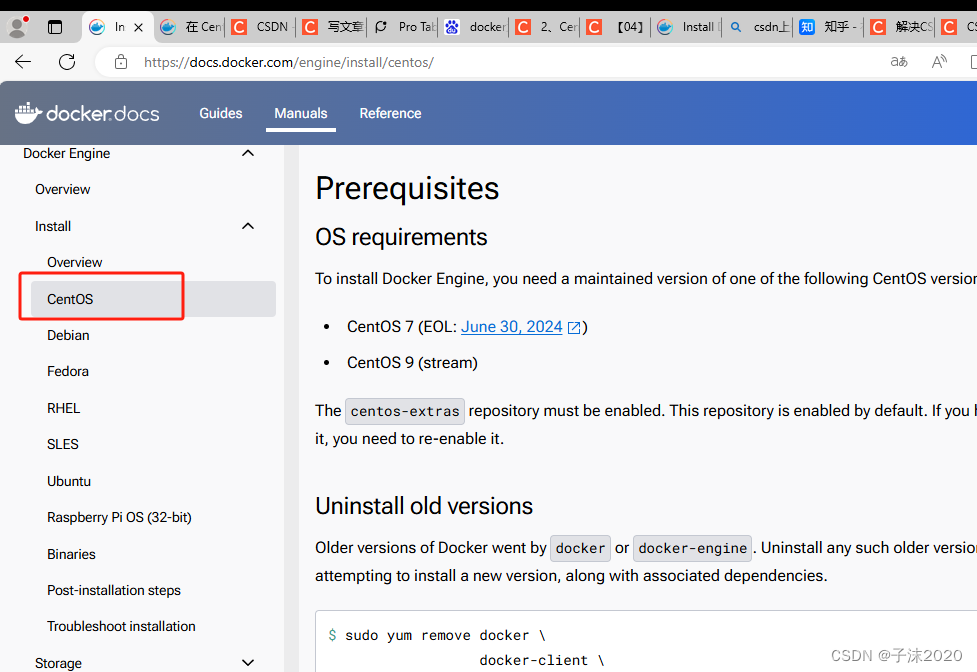
centos安装docker引擎文档:https://docs.docker.com/engine/install/centos/
2、docker安装
官网地址:https://docs.docker.com/engine/install/centos/
2.1、卸载旧的版本
yum remove docker \
                  docker-client \
                  docker-client-latest \
                  docker-common \
                  docker-latest \
                  docker-latest-logrotate \
                  docker-logrotate \
                  docker-engine
2.2、使用 rpm 存储库安装
需要的安装包
yum install -y yum-utils
2.3、设置安装镜像的仓库:这里默认使用的是国外的仓库,需要调整到国内的阿里云仓库
yum-config-manager --add-repo https://download.docker.com/linux/centos/docker-ce.repo
推荐下面国内的
yum-config-manager --add-repo http://mirrors.aliyun.com/docker-ce/linux/centos/docker-ce.repo
安装之前更新下软件包索引
# 更新软件包的索引
yum makecache fast
2.4、安装 Docker 引擎
docker-ce 社区版 ee企业版
yum install docker-ce docker-ce-cli containerd.io docker-buildx-plugin docker-compose-plugin
2.5、启动 Docker
systemctl start docker
2.6、查看是否安装成功
docker version

2.7、通过运行映像来验证 Docker 引擎安装是否成功。hello-world
docker run hello-world
2.7.1、我出现了下面的问题
[root@izbp1efwmmyvd8928gef4lz /]# docker run hello-world
Unable to find image 'hello-world:latest' locally
latest: Pulling from library/hello-world
c1ec31eb5944: Retrying in 1 second
docker: error pulling image configuration: download failed after attempts=6: dial tcp 108.160.166.49:443: i/o timeout.
See 'docker run --help'.
[root@izbp1efwmmyvd8928gef4lz /]#
2.7.2、解决具体方法
2.7.2.1、寻找自己的添加阿里云的加速器,在阿里云控制台查找自己的镜像加速器地址,这里我是直接分开执行的,也可以直接copy直接进行执行也可以的


sudo mkdir -p /etc/docker
sudo tee /etc/docker/daemon.json
  "registry-mirrors": ["https://5vkph6n7.mirror.aliyuncs.com"]
}
EOF
sudo systemctl daemon-reload
sudo systemctl restart docker

 "registry-mirrors":["https://5vkph6n7.mirror.aliyuncs.com"]
}
免责声明:我们致力于保护作者版权,注重分享,被刊用文章因无法核实真实出处,未能及时与作者取得联系,或有版权异议的,请联系管理员,我们会立即处理! 部分文章是来自自研大数据AI进行生成,内容摘自(百度百科,百度知道,头条百科,中国民法典,刑法,牛津词典,新华词典,汉语词典,国家院校,科普平台)等数据,内容仅供学习参考,不准确地方联系删除处理! 图片声明:本站部分配图来自人工智能系统AI生成,觅知网授权图片,PxHere摄影无版权图库和百度,360,搜狗等多加搜索引擎自动关键词搜索配图,如有侵权的图片,请第一时间联系我们,邮箱:ciyunidc@ciyunshuju.com。本站只作为美观性配图使用,无任何非法侵犯第三方意图,一切解释权归图片著作权方,本站不承担任何责任。如有恶意碰瓷者,必当奉陪到底严惩不贷!


