
现代X86汇编-C和ASM混合编程举例
端午假期安装好了vs c++2022,并写了个简单的汇编代码,证明MASM真的可以运行。今天需要搞一个实实在在的C++和ASM混合编程的例子,因为用纯汇编的求伯君写WPS的时代一去不复返了。个别关键函数用汇编,充分发挥CPU的特色功能,偶尔还是需要的。
昨天找的随书代码的位置在github上:GitHub - Apress/modern-x86-assembly-language-programming-3e: Source Code for 'Modern X86 Assembly Language Programming' by Daniel Kusswurm
这是第三版,最新的书。又从z-liabrary上下载了这本英文书,导入微信读书,自动翻译为中文,z-libary加微信读书,使我实现了读书ziyou(啥时候财务ziyou,还远)。
这本书的附录A就举了怎样在vs2022环境建立一个C++加ASM的例子,今天咱们就逐步跟着书上学这个例子。
首先创建project
• Create a C++ project• Enable MASM support• Add an assembly language file• Set project properties•Edit the source code• Build and run the project
- 启动VS
- New Project
- Select Console App
- Project name:Example1
- Solution name:TestSolution
- Create
- Build>Configuration Manager,choose
- select X86, Remove--我的环境是Win32


其次,配置ASM环境的步骤:
- View>Solution Explorer
- rigtht-click Example1 and select Build Denpendencies>Build Customizations
- check masm
- Add New Item
- select .cpp for the file style
- Example1_fasm.asm Add

第三步是设置project属性
- Example1 and select Properties
- All Configurations All Platforms
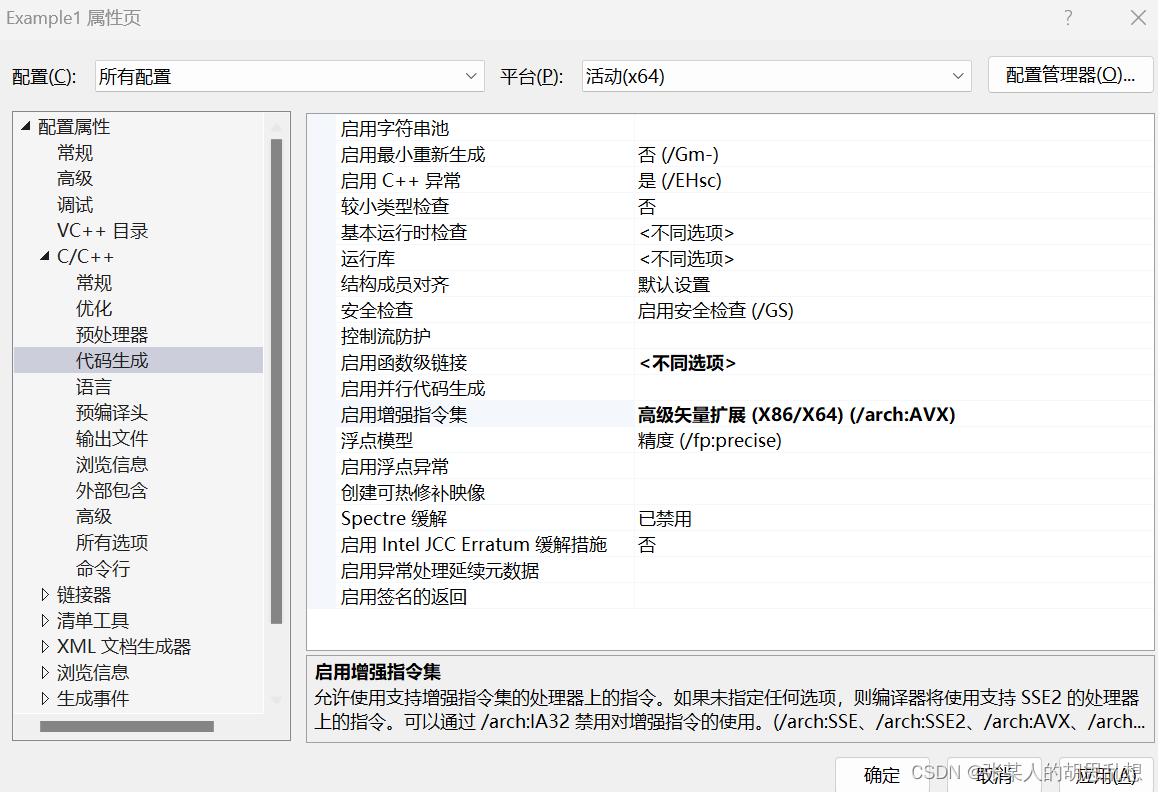
- C/C++>Code Generation Set to Advanced Vector Extentions(/arch:AVX) or AVX2 or AVX512
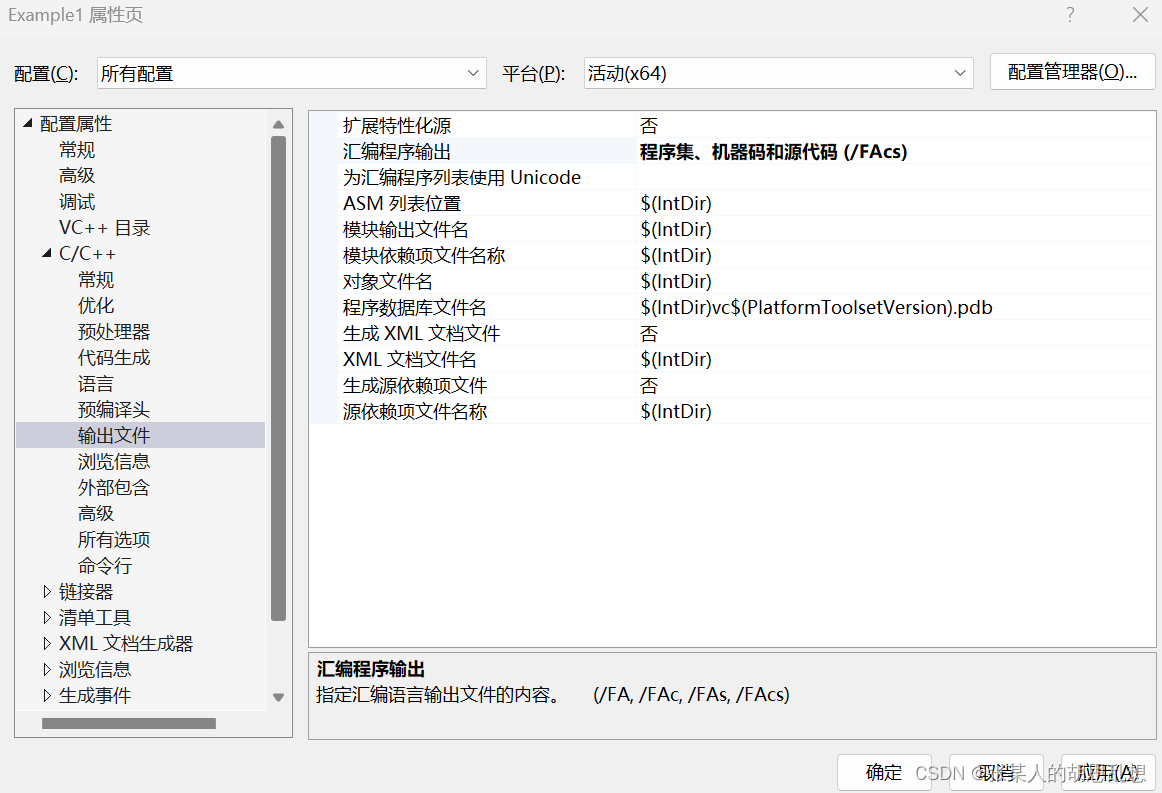
- C/C++>Output change to Files Assembly Machine and Source Code(/FAcs)
- Microsoft Macro Assembler>Listing File Enable Assembly Generated Code Listing to Yes(/Sg)
- Change the Assembled Code Listing File text filed to $(IntDir)\%(filename).lst
- Click OK
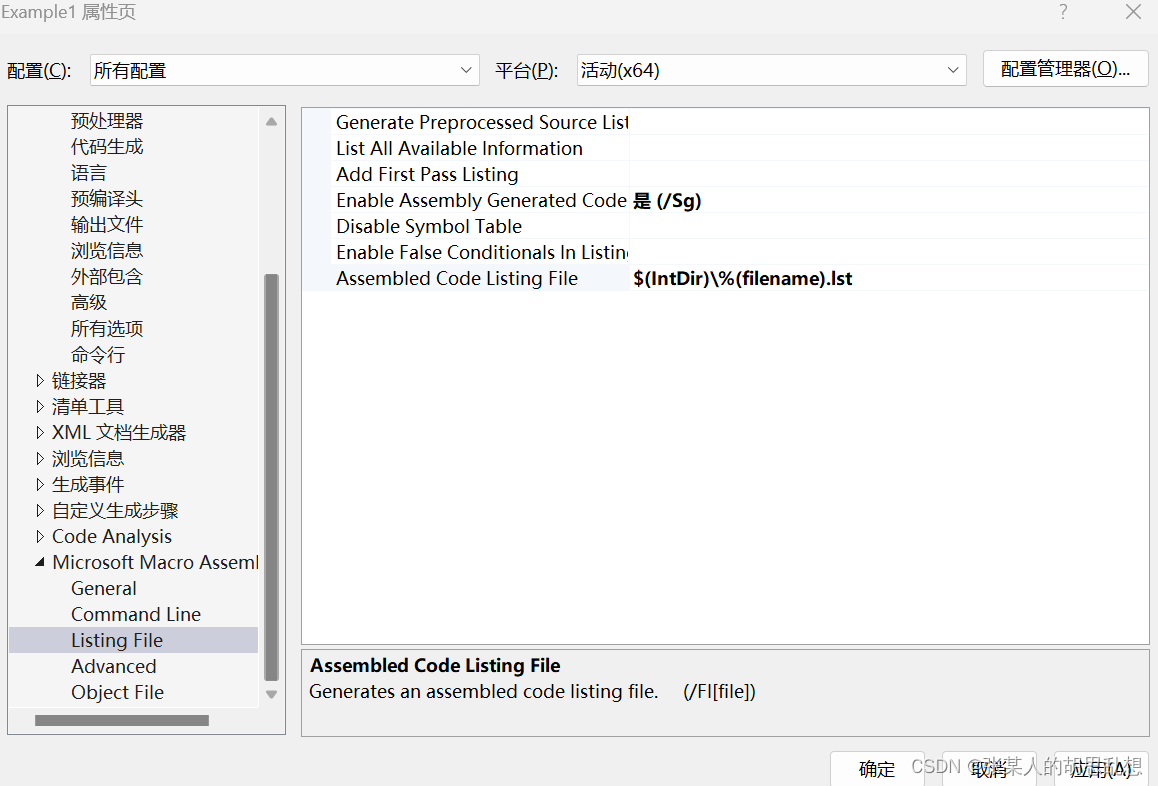
$(IntDir)\%(filename).lst --这是1还是L?
最后一步就是写源码了
- AppendixA\TestSolution\Example1\Example1.cpp
- AppendixA\TestSolution\Example1\Example1_fasm.asm
Example1.cpp
#include
#include
#include
#include
extern "C" void CalcZ_avx(float* z, const float* x, const float* y, size_t n);
static void CalcZ_cpp(float* z, const float* x, const float* y, size_t n)
{
    for (size_t i = 0; i
免责声明:我们致力于保护作者版权,注重分享,被刊用文章因无法核实真实出处,未能及时与作者取得联系,或有版权异议的,请联系管理员,我们会立即处理! 部分文章是来自自研大数据AI进行生成,内容摘自(百度百科,百度知道,头条百科,中国民法典,刑法,牛津词典,新华词典,汉语词典,国家院校,科普平台)等数据,内容仅供学习参考,不准确地方联系删除处理! 图片声明:本站部分配图来自人工智能系统AI生成,觅知网授权图片,PxHere摄影无版权图库和百度,360,搜狗等多加搜索引擎自动关键词搜索配图,如有侵权的图片,请第一时间联系我们,邮箱:ciyunidc@ciyunshuju.com。本站只作为美观性配图使用,无任何非法侵犯第三方意图,一切解释权归图片著作权方,本站不承担任何责任。如有恶意碰瓷者,必当奉陪到底严惩不贷!


