
uni-app uni-swipe-action 滑动操作状态恢复
按照uni-app官方文档的写法 当前一条滑动确认之后 页面列表刷新 但是滑动的状态还在 入下图所示:
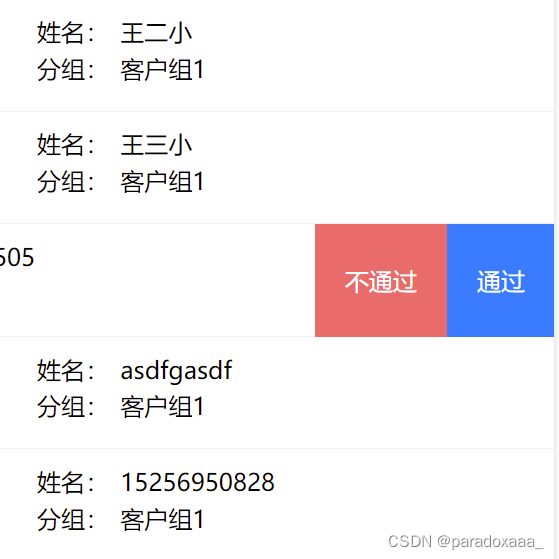
我们需要在滑动确认之后 页面刷新 滑动状态恢复 那么我们就来写一下这部分的逻辑:
首先,配置一下:show="isOpened[item.id]" @change="change(index)"
注意:isOpened一定要定位到你当前点击的内容,我这里是用id区分的, 不然会出现所有列表都同步滑开或者关闭
							姓名:{{item.userName}}
							分组:{{item.groupName}}
data() {
			return {
				isOpened: {},
				tempOpened: null,  // 临时状态
      }
},
mounted() {
			// 初始化 userList 中每个item的 isOpened 状态
			this.userList.forEach(item => {
				this.$set(this.isOpened, item.id, false);
			});
		},
methods: {
			change(index) {
				// 使用tempOpened记录当前滑动状态,而不是直接改变isOpened
				this.tempOpened = !this.isOpened[this.userList[index].id];
			},
	bindClick(e, item) {
				const that = this
				console.log(e);
				console.log('item', item);
				const id = item.id
				if (e.content.text === '通过') {
					uni.showModal({
						title: '提交确认',
						content: `确认审核通过?`,
						success: (res) => {
							if (res.confirm) {
								that.isPass = true
								this.isOpened[item.id] = this.tempOpened;
								that.tempOpened = null; // 清理临时状态
								that.makeRequst(id) // 调用后台接口
							} else if (res.cancel) {
								that.isPass = false
								that.isOpened[item.id] = that.tempOpened;
								that.tempOpened = null; // 清理临时状态
								console.log('用户取消操作');
							}
						}
					});
				}
}
这样就可以实现及时恢复滑动状态
官方文档uni-app官网
免责声明:我们致力于保护作者版权,注重分享,被刊用文章因无法核实真实出处,未能及时与作者取得联系,或有版权异议的,请联系管理员,我们会立即处理! 部分文章是来自自研大数据AI进行生成,内容摘自(百度百科,百度知道,头条百科,中国民法典,刑法,牛津词典,新华词典,汉语词典,国家院校,科普平台)等数据,内容仅供学习参考,不准确地方联系删除处理! 图片声明:本站部分配图来自人工智能系统AI生成,觅知网授权图片,PxHere摄影无版权图库和百度,360,搜狗等多加搜索引擎自动关键词搜索配图,如有侵权的图片,请第一时间联系我们,邮箱:ciyunidc@ciyunshuju.com。本站只作为美观性配图使用,无任何非法侵犯第三方意图,一切解释权归图片著作权方,本站不承担任何责任。如有恶意碰瓷者,必当奉陪到底严惩不贷!


