
How to: Add and Customize the Ribbon Skin List and Skin Gallery
皮肤列表和皮肤库允许用户选择皮肤。本文介绍如何在功能区中显示“皮肤列表”或“皮肤库”并对其进行自定义。
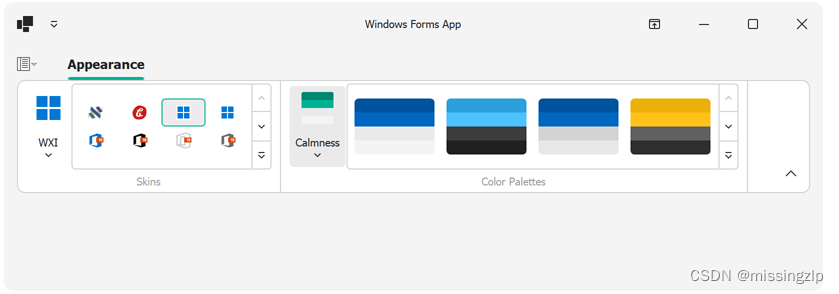
DevExpress演示中心中的大多数应用程序都允许您选择皮肤。例如,运行XtraGrid演示并导航到皮肤功能区页面以更改当前皮肤。
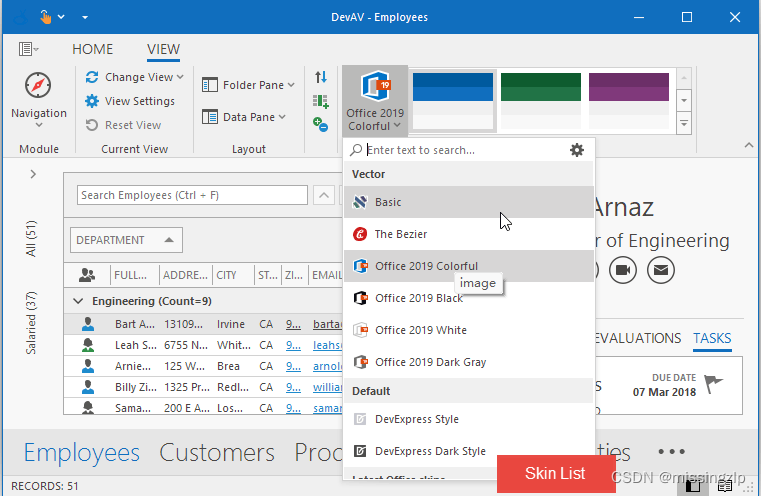
在功能区UI中显示皮肤列表或皮肤库
使用以下栏项将相应的UI元素添加到功能区UI:“Skin List, Skin Gallery”、“Skin Palette List”和“Skin Palette Gallery”。在RibbonPageGroup上单击鼠标右键,然后调用相应的命令在设计时添加“ Skin List ”或“Skin Gallery”。
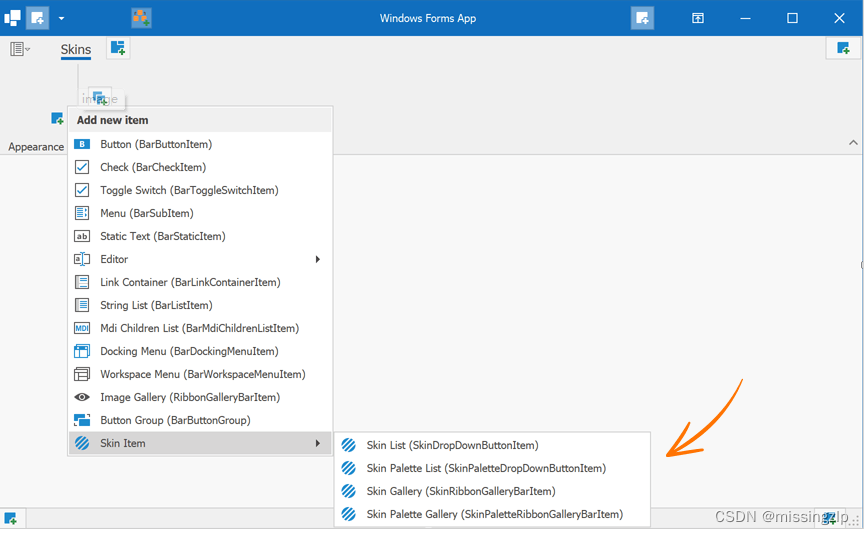
Skin List
A Skin List (SkinDropDownButtonItem) is a drop-down menu that displays application skins.

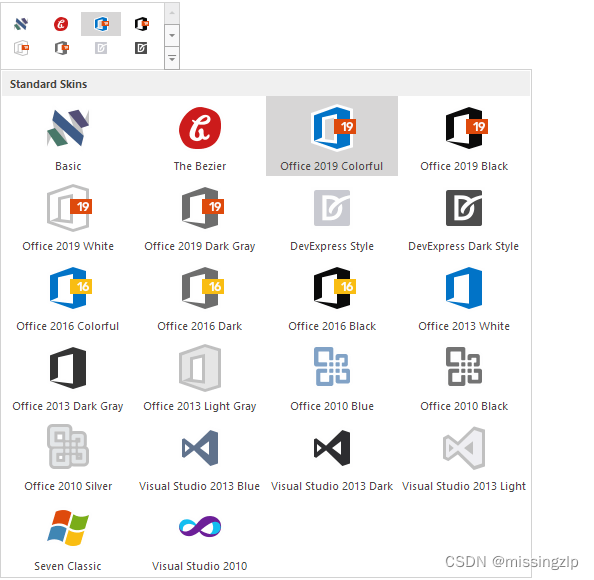
Skin Gallery
A Skin Gallery (SkinRibbonGalleryBarItem) is an in-ribbon gallery that displays skins. Skins in the gallery are grouped into categories.
Skin Palette List
A Skin Palette List (SkinPaletteDropDownButtonItem) allows users to select a color palette for a vector skin.
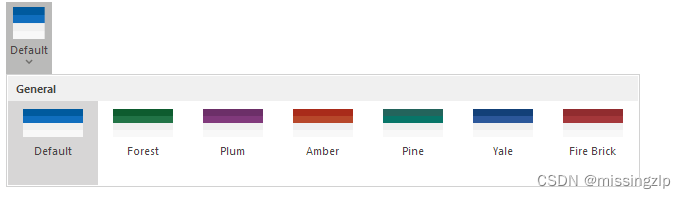
Skin Palette Gallery
A Skin Palette Gallery (SkinPaletteRibbonGalleryBarItem) allows users to select a color palette in an embedded or dropdown gallery.
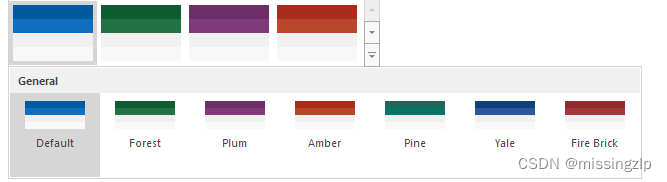
Example
using DevExpress.XtraBars;
using DevExpress.XtraBars.Ribbon;
namespace DXApplication20 {
    public partial class Form1 : RibbonForm {
        public Form1() {
            InitializeComponent();
            skinPageGroup.ItemLinks.Add(new SkinDropDownButtonItem());
            skinPageGroup.ItemLinks.Add(new SkinRibbonGalleryBarItem());
            colorPalettePageGroup.ItemLinks.Add(new SkinPaletteDropDownButtonItem());
            colorPalettePageGroup.ItemLinks.Add(new SkinPaletteRibbonGalleryBarItem());
        }
    }
}
Display Advanced Skin Options
显示高级skin选项
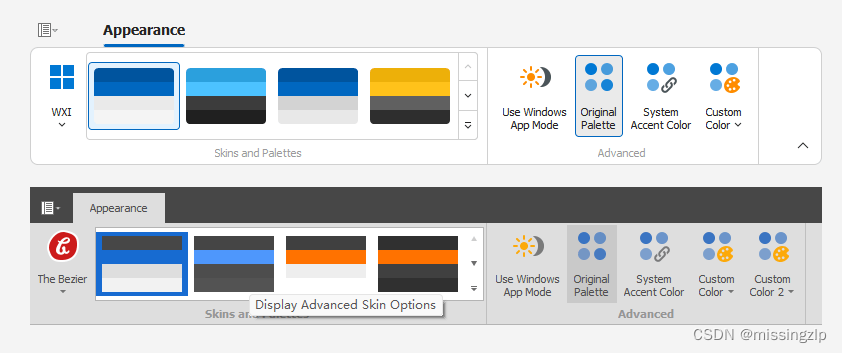
以下示例演示如何显示与高级皮肤设置相对应的预先设计的功能区UI命令:
using DevExpress.XtraBars;
using DevExpress.XtraBars.Helpers;
namespace DXRibbonSkinSekector {
    public partial class Form1 : DevExpress.XtraBars.Ribbon.RibbonForm {
        BarCheckItem bciTrackWindowsAppMode, bciOriginalPalette, bciTrackWindowsAccentColor;
        BarButtonItem bbiSystemAccentColor, bbiAccentCustomColor2;
        public Form1() {
            InitializeComponent();
            bciTrackWindowsAppMode = new BarCheckItem();
            bciOriginalPalette = new BarCheckItem();
            bciTrackWindowsAccentColor = new BarCheckItem();
            bbiSystemAccentColor = new BarButtonItem();
            bbiAccentCustomColor2 = new BarButtonItem();
            advancedOptionsGroup.ItemLinks.Add(bciTrackWindowsAppMode);
            advancedOptionsGroup.ItemLinks.Add(bciOriginalPalette);
            advancedOptionsGroup.ItemLinks.Add(bciTrackWindowsAccentColor);
            advancedOptionsGroup.ItemLinks.Add(bbiSystemAccentColor);
            /*
             * "The Bezier" skin supports the second accent color.
             * Other skins do not support the second accent color.
             */
            advancedOptionsGroup.ItemLinks.Add(bbiAccentCustomColor2);
            // Initializes corresponding skin settings/selectors.
            SkinHelper.InitTrackWindowsAppMode(bciTrackWindowsAppMode);
            SkinHelper.InitResetToOriginalPalette(bciOriginalPalette);
            SkinHelper.InitTrackWindowsAccentColor(bciTrackWindowsAccentColor);
            SkinHelper.InitCustomAccentColor(Ribbon.Manager, bbiSystemAccentColor);
            SkinHelper.InitCustomAccentColor2(Ribbon.Manager, bbiAccentCustomColor2);
        }
    }
}
Hide Specific Items And Groups
隐藏特定项目和组
下面的步骤描述了如何隐藏单个皮肤。
- Create a string array that contains unwanted skin names. These names can be full (e.g., “Office 2016 Colorful”) or partial (e.g., “2007”).
string[] skinsToHide = { "Seven Classic", "DevExpress Style", "Dark", "2010", "2007", "Sharp" };- Define a custom method that will iterate through skin items and hide unwanted ones.
private void HideGalleryItemsByCaptions(RibbonGalleryBarItem galleryItem, string[] skinsToHide) { var allItems = galleryItem.Gallery.GetAllItems(); foreach (GalleryItem item in allItems) { if (skinsToHide.Contains(item.Caption)) item.Visible = false; } }- Use the form or UserControl Load event handler to call your method.
this.Load += ucRibbon_Load;
void ucRibbon_Load(object sender, EventArgs e) {
    HideGalleryItemsByCaptions(skinRibbonGalleryBarItem1, skinsToHide);
}
To hide an entire skin group, use the code sample below.
要隐藏整个皮肤组,请使用下面的代码示例。
void ucRibbon_Load(object sender, EventArgs e) {
    skinRibbonGalleryBarItem1.Gallery.Groups.Remove(skinRibbonGalleryBarItem1.Gallery.Groups.OfType()
            .First(x => String.Equals(x.Caption, "Bonus Skins")));
}
The following example demonstrates how to rename and hide gallery groups in SkinDropDownButtonItem:
以下示例演示如何在SkinDropDownButtonItem中重命名和隐藏图库组:
using System.Linq;
using DevExpress.XtraBars;
using DevExpress.XtraBars.Ribbon;
using DevExpress.XtraBars.Ribbon.Gallery;
using DevExpress.XtraBars.Helpers;
namespace DXApplication20 {
    public partial class Form1 : RibbonForm {
        SkinDropDownButtonItem skinDropDownButtonItem;
        public Form1() {
            InitializeComponent();
            skinDropDownButtonItem = new SkinDropDownButtonItem(ribbonControl1.Manager);
            skinPageGroup.ItemLinks.Add(skinDropDownButtonItem);
        }
        private void Form1_Load(object sender, System.EventArgs e) {
            HideItems(skinDropDownButtonItem);
        }
        void HideItems(SkinDropDownButtonItem skinItem) {
            GalleryControlGallery gallery = ((skinItem.DropDownControl as SkinPopupControlContainer).Controls.OfType().FirstOrDefault()).Gallery;
            gallery.Groups[0].Caption = "My Custom Caption";
            gallery.Groups[1].Visible = false;
            gallery.Groups[2].Visible = false;
        }
    }
}
The following example demonstrates how to hide the specified groups from SkinPaletteDropDownButtonItem:
以下示例演示如何从SkinPartiteDropDownButtonItem中隐藏指定的组:
void HideSkins2(SkinPaletteDropDownButtonItem skinItem, string[] palettesToHide) { var groups = (skinItem.DropDownControl as GalleryDropDown).Gallery.Groups; for(var i = 0; iRemove Item Grouping
To remove item grouping, add a new gallery group and populate it with all existing gallery items. Then, you can remove all gallery groups except for your new custom group – as illustrated in the code sample below.
若要删除项目分组,请添加一个新的库组,并用所有现有库项目填充该组。然后,您可以删除除新的自定义组之外的所有库组,如下面的代码示例所示。
void ucRibbon_Load(object sender, EventArgs e) { RemoveGrouping(); } void RemoveGrouping() { GalleryItemGroup group = new GalleryItemGroup() { Caption = "Available Skins" }; skinRibbonGalleryBarItem1.Gallery.Groups.Insert(0, group); foreach(var item in skinRibbonGalleryBarItem1.Gallery.GetAllItems()) { skinRibbonGalleryBarItem1.Gallery.Groups[0].Items.Add(item); } while(skinRibbonGalleryBarItem1.Gallery.Groups.Count > 1) skinRibbonGalleryBarItem1.Gallery.Groups.Remove(skinRibbonGalleryBarItem1.Gallery.Groups.Last()); }Change Captions and Icons Manually
手动更改标题和图标
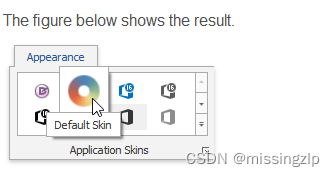
To change captions and glyphs of items within a Ribbon skin gallery, iterate through gallery items and modify the following properties:
要更改功能区皮肤库中项目的标题和图示符,请遍历库项目并修改以下属性:
- GalleryItem.Caption — Gets or sets the item’s caption. 获取或设置项的标题
- GalleryItem.Hint — Gets a hint associated with the gallery item. 获取与库项目关联的提示。
- GalleryItem.Description — Gets or sets the item’s description.获取或设置项的描述。
- GalleryItem.ImageOptions.SvgImage — Gets or sets a vector image. The vector image has priority over the raster image.获取或设置矢量图像。矢量图像的优先级高于光栅图像。
- GalleryItem.ImageOptions.Image — Gets or sets a raster image. To display a custom raster image, nullify the default vector image. 获取或设置光栅图像。若要显示自定义光栅图像,请使默认矢量图像无效。
- GalleryItem.ImageOptions.HoverImage — Gets or sets a raster image displayed when the mouse pointer hovers the item. 获取或设置鼠标指针悬停项目时显示的光栅图像。
void ucRibbon_Load(object sender, EventArgs e) {
    CustomizeItems(skinRibbonGalleryBarItem1);
}
void CustomizeItems(SkinRibbonGalleryBarItem target) {
    foreach(var item in target.Gallery.GetAllItems()) {
        if(item.Caption == "DevExpress Dark Style") {
            item.Caption = item.Hint = "Default Skin";
            item.Description = "The default skin";
            // We recommend that you use vector images.
            item.ImageOptions.SvgImage = SvgImage.FromResources("DXApplication1.Resources.Driving.svg", typeof(Form1).Assembly);
            // The vector image has priority over the raster image.
            // To assign a raster image, nullify the default vector image.
            item.ImageOptions.SvgImage = null;
            item.ImageOptions.Image = DevExpress.Images.ImageResourceCache.Default.GetImage("office2013/miscellaneous/colors_16x16.png");
            item.ImageOptions.HoverImage = DevExpress.Images.ImageResourceCache.Default.GetImage("office2013/miscellaneous/colors_32x32.png");
        }
    }
}
Obtain Active Skin
The following example demonstrates how to get the active skin name:
string activeSkinName = DevExpress.UserLookAndFeel.Default.ActiveSkinName;
- Use the form or UserControl Load event handler to call your method.
- Define a custom method that will iterate through skin items and hide unwanted ones.


