计网仿真综合实验 实验十二

2024-06-08 1900阅读
  • 实验十二 综合网络实验
    • 实验过程
      • IP配置说明
      • 参考连线
      • 配置OSPF使公司内部联通
        • 路由器R1的OSPF配置
        • 路由器R2的OSPF配置
        • 路由器R3的OSPF配置
        • R1、R2、R3的相关解释
        • 路由器R4的OSPF配置
        • 路由器R5的OSPF配置
        • 路由器R6的OSPF配置
        • R4、R5、R6解释:
        • 路由器R2的RIP配置
        • 路由器R7的RIP配置
          • 总结
          • OSPF Cost配置简要说明

            - 分公司

            • 代码配置和截图
            • 总公司与分公司跑BGP
            • 流量控制使 A 流走 R2->R4 B 流走 R3->R5
            • 路由引入,这里没有做过滤,需要注意的是一个邻居的一个方向只能调用一个路由策略,所有在过滤是使用过滤技术。
            • 过滤不让办事处的 B 流与分公司的 B 流互通
            • 静默接口不允许出现协议报文
            • 只传递本 AS 的路由
            • 按照实验指导书上面的内容就做完了,现在我们来检查各部分的情况进行截图。
            • 拓扑汇总
            • 实验踩坑说明和额外说明

              实验十二 综合网络实验

              实验过程

              IP配置说明

              [R1-GigabitEthernet0/0]ip address 10.0.0.1 255.255.255.252
              [R1-GigabitEthernet0/1]ip address 10.0.0.5 255.255.255.252
              [R2-GigabitEthernet0/0]ip address 10.0.0.2 255.255.255.252
              [R2-GigabitEthernet0/1]ip address 10.0.0.9 255.255.255.252
              [R2-GigabitEthernet0/2]ip address 10.0.0.13 255.255.255.252
              [R2-GigabitEthernet5/0]ip address 10.0.0.34 255.255.255.252
              [R3-GigabitEthernet0/0]ip address 10.0.0.10 255.255.255.252
              [R3-GigabitEthernet0/1]ip address 10.0.0.10 255.255.255.252
              [R3-GigabitEthernet0/2]ip address 10.0.0.17 255.255.255.252
              [R4-GigabitEthernet0/2]ip address 10.0.0.14 255.255.255.252
              [R4-GigabitEthernet0/1]ip address 10.0.0.21 255.255.255.252
              [R4-GigabitEthernet0/0]ip address 10.0.0.25 255.255.255.252
              [R5-GigabitEthernet0/2]ip address 10.0.0.18 255.255.255.252
              [R5-GigabitEthernet0/0]ip address 10.0.0.29 255.255.255.252
              [R5-GigabitEthernet0/1]ip address 10.0.0.22 255.255.255.252
              [R6-GigabitEthernet0/0]ip address 10.0.0.26 255.255.255.252
              [R6-GigabitEthernet0/1]ip address 10.0.0.30 255.255.255.252
              ip address 10.0.0.33 255.255.255.252
              

              参考连线
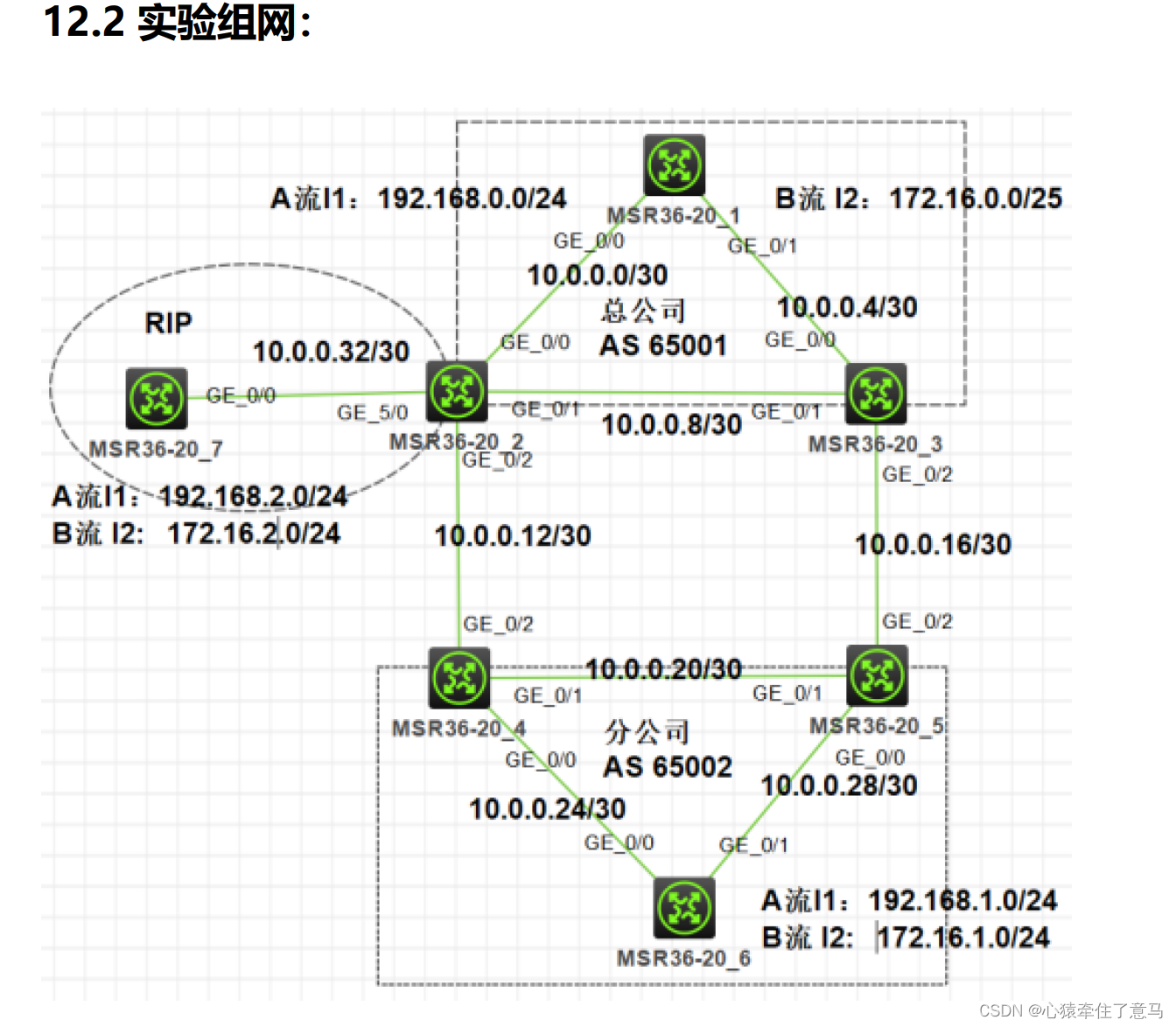
              计网仿真综合实验 实验十二

              下面是我们实际的连线,一比一复刻

              计网仿真综合实验 实验十二

              配置OSPF使公司内部联通

              对三个路由器R1、R2、R3进行分析,展示它们在配置OSPF(Open Shortest Path First)协议时的细节。这些配置主要用于在公司内部实现网络互通。以下是对每个路由器配置的详细分析:

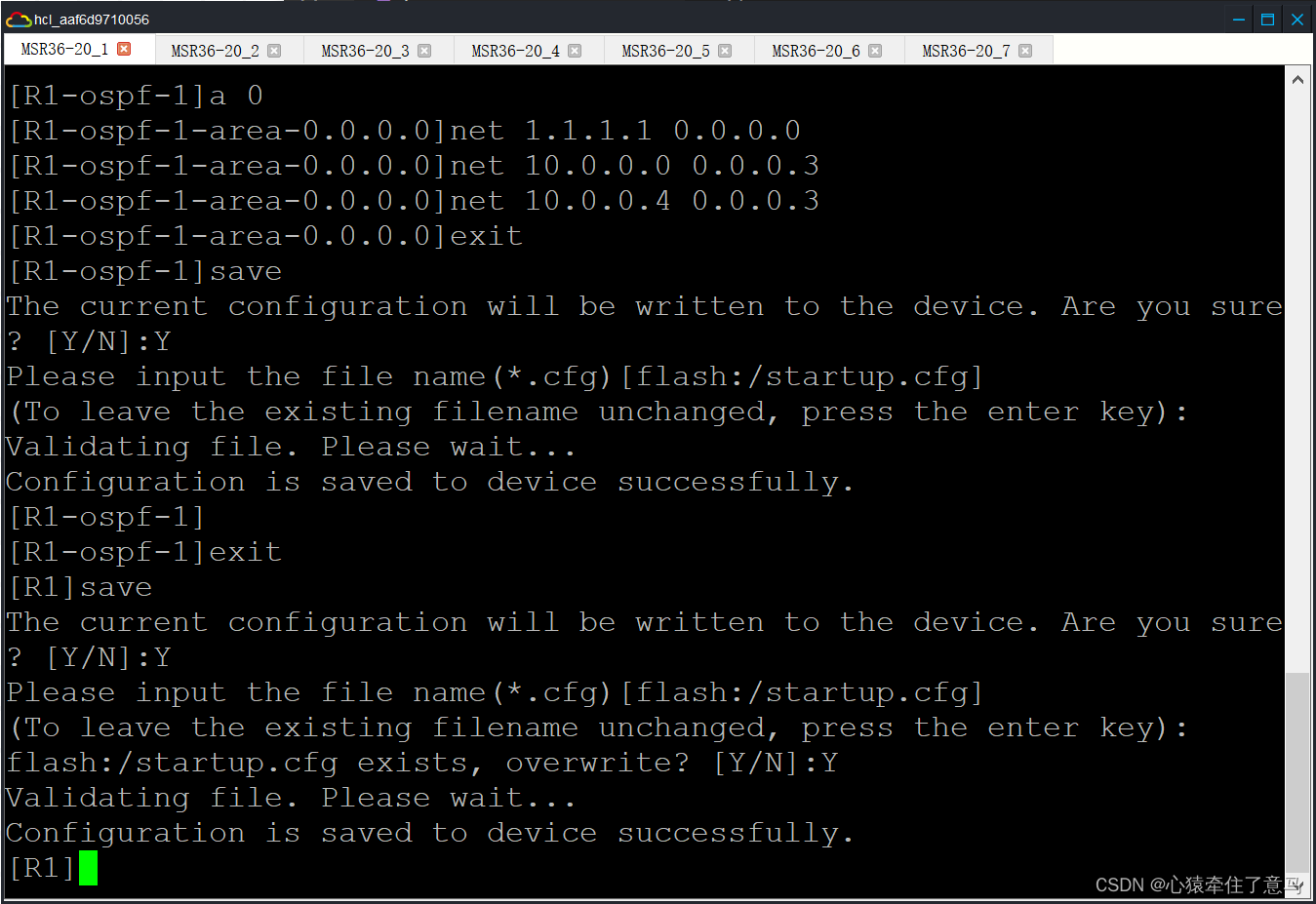
              路由器R1的OSPF配置
              sys
              sysname R1
              ospf r 1.1.1.1
              a 0
              net 1.1.1.1 0.0.0.0
              net 10.0.0.0 0.0.0.3
              net 10.0.0.4 0.0.0.3
              

              计网仿真综合实验 实验十二

              路由器R2的OSPF配置
              sys
              sysname R2
              ospf r 2.2.2.2
              a 0
              net 2.2.2.2 0.0.0.0
              net 10.0.0.0 0.0.0.3
              net 10.0.0.8 0.0.0.3
              

              计网仿真综合实验 实验十二

              路由器R3的OSPF配置
              sys
              sysname R3
              ospf r 3.3.3.3
              a 0
              net 3.3.3.3 0.0.0.0
              net 10.0.0.4 0.0.0.3
              net 10.0.0.8 0.0.0.3
              
              R1、R2、R3的相关解释
              • R1和R2通过网络10.0.0.0/30连接。
              • R1和R3通过网络10.0.0.4/30连接。
              • R2和R3通过网络10.0.0.8/30连接。
              • a 0的意思是进入area 0,进入区域0
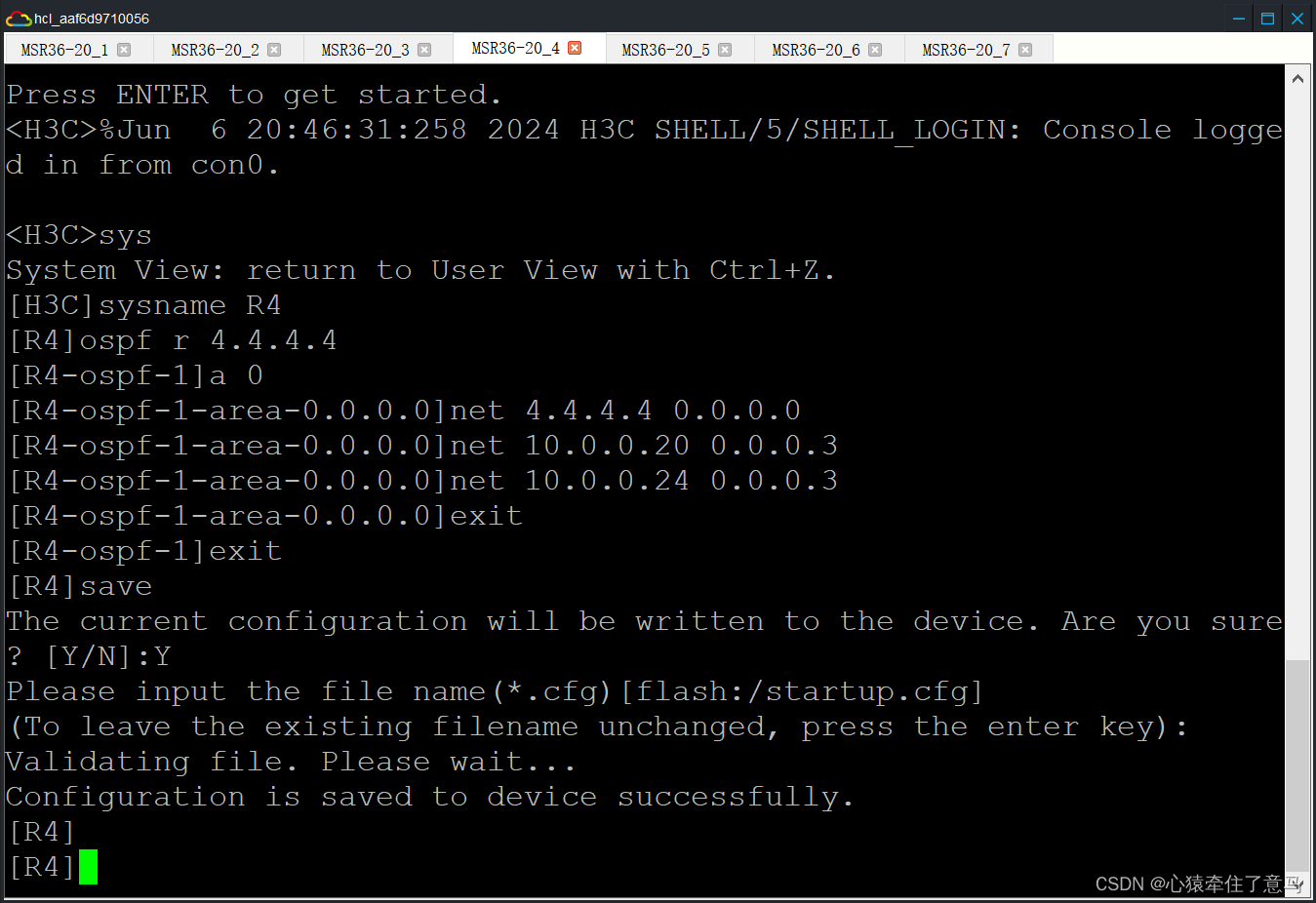
                路由器R4的OSPF配置
                sys
                sysname R4
                ospf r 4.4.4.4
                a 0
                net 4.4.4.4 0.0.0.0
                net 10.0.0.20 0.0.0.3
                net 10.0.0.24 0.0.0.3
                

                计网仿真综合实验 实验十二

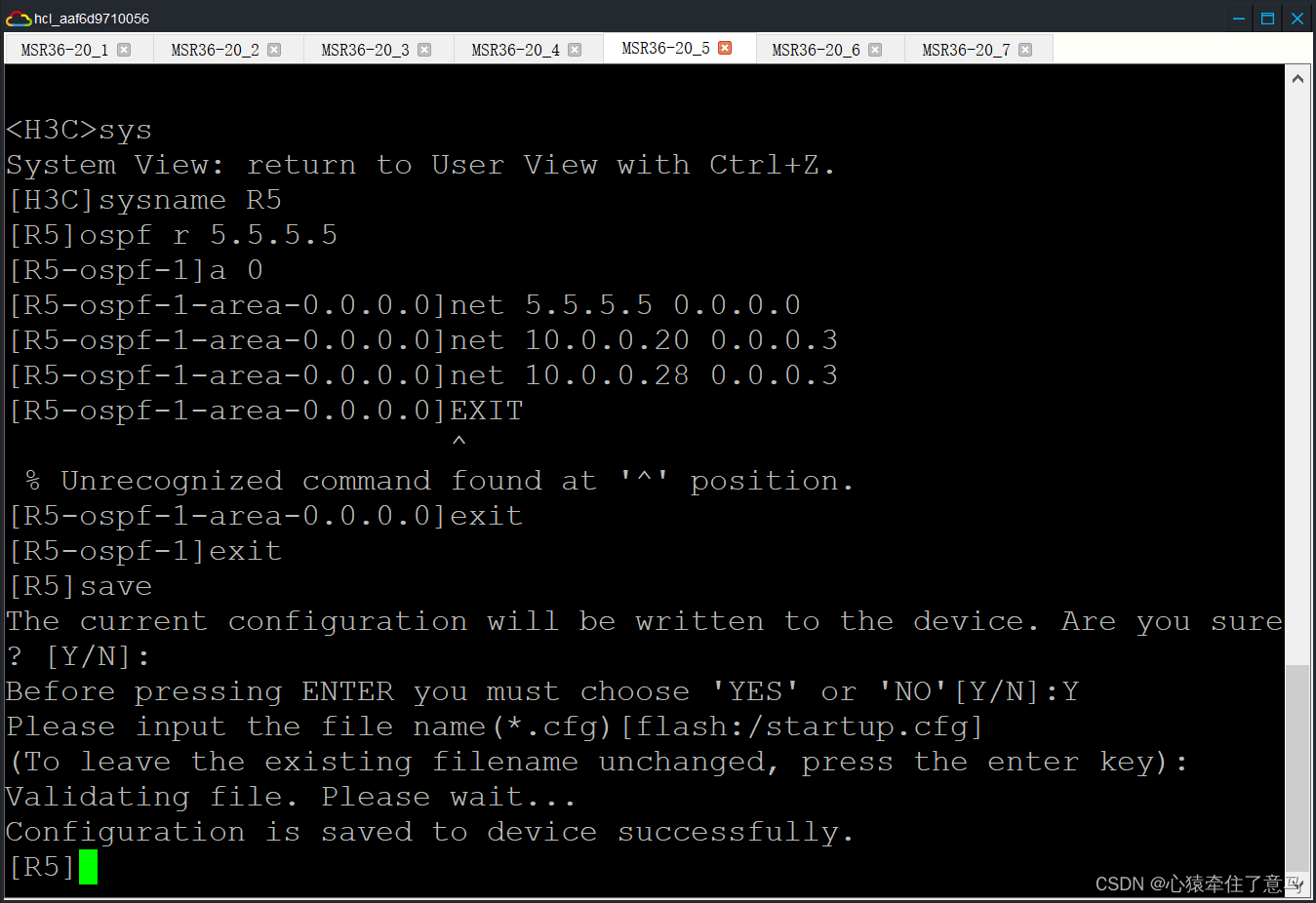
                路由器R5的OSPF配置
                sys
                sysname R5
                ospf r 5.5.5.5
                a 0
                net 5.5.5.5 0.0.0.0
                net 10.0.0.20 0.0.0.3
                net 10.0.0.28 0.0.0.3
                

                计网仿真综合实验 实验十二

                路由器R6的OSPF配置
                sys
                sysname R6
                ospf r 6.6.6.6
                a 0
                net 6.6.6.6 0.0.0.0
                net 10.0.0.24 0.0.0.3
                net 10.0.0.28 0.0.0.3
                

                计网仿真综合实验 实验十二

                R4、R5、R6解释:
                • R4和R5通过网络10.0.0.20/30连接。
                • R4和R6通过网络10.0.0.24/30连接。
                • R5和R6通过网络10.0.0.28/30连接。

                  路由器R2的RIP配置

                  注意要在系统视图下面实现,即[ R2 ]而不是

                  rip
                  v 2 
                  un summary
                  net 10.0.0.32
                  

                  路由器R7的RIP配置

                  rip
                  v 2
                  un s
                  un summary
                  net 10.0.0.32 
                  net 192.168.2.0
                  net 172.16.2.0
                  
                  总结
                  • R2:
                    • 启用RIP协议,使用版本2。
                    • 禁用路由汇总。
                    • 发布网络10.0.0.32。
                    • R7:
                      • 启用RIP协议,使用版本2。
                      • 禁用路由汇总。
                      • 发布网络10.0.0.32、192.168.2.0和172.16.2.0。。

                        OSPF Cost配置简要说明

                        • R1

                          • GigabitEthernet0/1接口的OSPF cost设为10。
                          • GigabitEthernet0/0接口的OSPF cost设为20。
                          • R2

                            • GigabitEthernet0/0接口的OSPF cost设为20。
                            • R3

                              • GigabitEthernet0/0接口的OSPF cost设为10。
                                分公司
                                • R4

                                  • GigabitEthernet0/1接口的OSPF cost设为20。
                                  • R5

                                    • GigabitEthernet0/0接口的OSPF cost设为10。
                                    • GigabitEthernet0/1接口的OSPF cost设为20。
                                    • R6

                                      • GigabitEthernet0/1接口的OSPF cost设为10。

                                        代码配置和截图

                                        # 总公司
                                        [R1]interface g0/1
                                        [R1-GigabitEthernet0/1]ospf cost 10
                                        [R1-GigabitEthernet0/1]exit
                                        [R1]interface g0/0
                                        [R1-GigabitEthernet0/0]ospf cost 20
                                        [R1-GigabitEthernet0/0]exit
                                        [R2]interface g0/0
                                        [R2-GigabitEthernet0/0]ospf cost 20
                                        [R2-GigabitEthernet0/0]exit
                                        [R3]interface g0/0
                                        [R3-GigabitEthernet0/0]ospf cost 10
                                        [R3-GigabitEthernet0/0]exit
                                        分公司:
                                        [R5]interface g0/0
                                        [R5-GigabitEthernet0/0]ospf cost 10
                                        [R5-GigabitEthernet0/0]exit
                                        [R5]interface g0/1
                                        [R5-GigabitEthernet0/1]ospf cost 20
                                        [R5-GigabitEthernet0/1]exit
                                        [R4]interface g0/1
                                        [R4-GigabitEthernet0/1]ospf cost 20
                                        [R4-GigabitEthernet0/1]exit
                                        [R6]interface g0/1
                                        [R6-GigabitEthernet0/1]ospf cost 10
                                        [R6-GigabitEthernet0/1]exit
                                        

                                        计网仿真综合实验 实验十二

                                        计网仿真综合实验 实验十二

                                        计网仿真综合实验 实验十二

                                        计网仿真综合实验 实验十二

                                        计网仿真综合实验 实验十二

                                        计网仿真综合实验 实验十二

                                        总公司与分公司跑BGP

                                        # [R1输入]
                                        bgp 65001
                                        router-id 1.1.1.1
                                        peer 2.2.2.2 as 65001
                                        peer 3.3.3.3 as 65001
                                        peer 2.2.2.2 connect-interface GigabitEthernet0/0
                                        peer 3.3.3.3 connect-interface GigabitEthernet0/1
                                        address-family ipv4 unicast
                                        peer 2.2.2.2 enable
                                        peer 3.3.3.3 enable
                                        peer 2.2.2.2 ne
                                        peer 3.3.3.3 ne
                                        

                                        计网仿真综合实验 实验十二

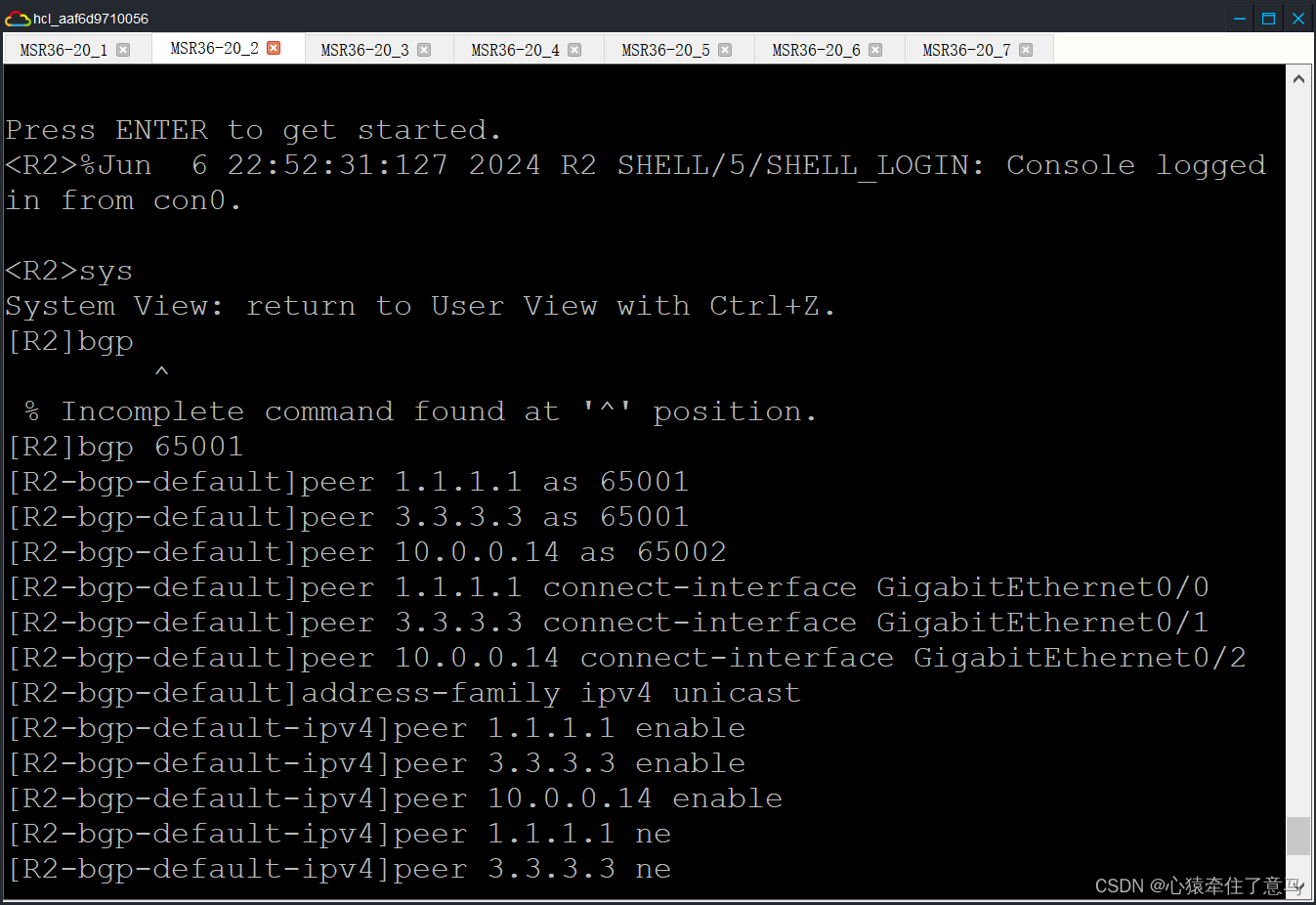
                                        # [R2输入]
                                        bgp 65001
                                        router-id 2.2.2.2
                                        peer 1.1.1.1 as 65001
                                        peer 3.3.3.3 as 65001
                                        peer 10.0.0.14 as 65002
                                        peer 1.1.1.1 connect-interface GigabitEthernet0/0
                                        peer 3.3.3.3 connect-interface GigabitEthernet0/1
                                        peer 10.0.0.14 connect-interface GigabitEthernet0/2
                                        address-family ipv4 unicast
                                        peer 1.1.1.1 enable
                                        peer 3.3.3.3 enable
                                        peer 10.0.0.14 enable
                                        peer 1.1.1.1 ne
                                        peer 3.3.3.3 ne
                                        

                                        计网仿真综合实验 实验十二

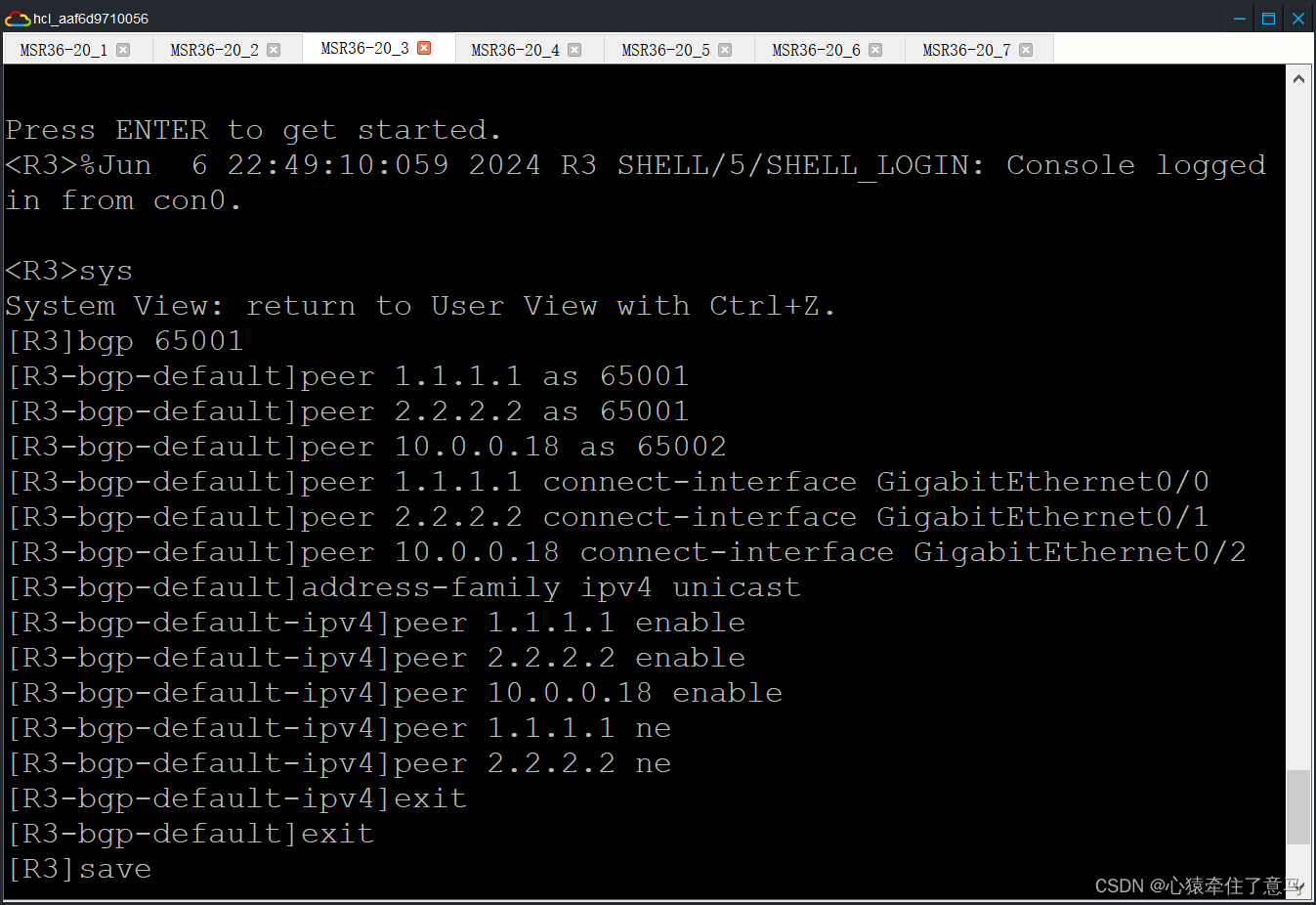
                                        # R3
                                        bgp 65001
                                        router-id 3.3.3.3
                                        peer 1.1.1.1 as 65001
                                        peer 2.2.2.2 as 65001
                                        peer 10.0.0.18 as 65002
                                        peer 1.1.1.1 connect-interface GigabitEthernet0/0
                                        peer 2.2.2.2 connect-interface GigabitEthernet0/1
                                        peer 10.0.0.18 connect-interface GigabitEthernet0/2
                                        address-family ipv4 unicast
                                        peer 1.1.1.1 enable
                                        peer 2.2.2.2 enable
                                        peer 10.0.0.18 enable
                                        peer 1.1.1.1 ne
                                        peer 2.2.2.2 ne
                                        

                                        计网仿真综合实验 实验十二

                                        # R4
                                        bgp 65002
                                        router-id 4.4.4.4
                                        peer 5.5.5.5 as 65002
                                        peer 6.6.6.6 as 65002
                                        peer 10.0.0.13 as 65001
                                        peer 5.5.5.5 connect-interface GigabitEthernet0/1
                                        peer 6.6.6.6 connect-interface GigabitEthernet0/0
                                        peer 10.0.0.13 connect-interface GigabitEthernet0/2
                                        address-family ipv4 unicast
                                        peer 5.5.5.5 enable
                                        peer 6.6.6.6 enable
                                        peer 10.0.0.13 enable
                                        peer 5.5.5.5 ne
                                        peer 6.6.6.6 ne
                                        

                                        计网仿真综合实验 实验十二

                                        # R5
                                        bgp 65002
                                        router-id 5.5.5.5
                                        peer 5.5.5.5 as 65002
                                        peer 6.6.6.6 as 65002
                                        peer 10.0.0.17 as 65001
                                        peer 4.4.4.4 connect-interface GigabitEthernet0/1
                                        peer 6.6.6.6 connect-interface GigabitEthernet0/0
                                        peer 10.0.0.17 connect-interface GigabitEthernet0/2
                                        address-family ipv4 unicast
                                        peer 4.4.4.4 enable
                                        peer 6.6.6.6 enable
                                        peer 10.0.0.17 enable
                                        peer 4.4.4.4 ne
                                        peer 6.6.6.6 ne
                                        

                                        计网仿真综合实验 实验十二

                                        # R6
                                        bgp 65002
                                        router-id 6.6.6.6
                                        peer 4.4.4.4 as 65002
                                        peer 5.5.5.5 as 65002
                                        peer 4.4.4.4 connect-interface GigabitEthernet0/0
                                        peer 5.5.5.5 connect-interface GigabitEthernet0/1
                                        address-family ipv4 unicast
                                        peer 4.4.4.4 enable
                                        peer 5.5.5.5 enable
                                        peer 4.4.4.4 ne
                                        peer 5.5.5.5 ne
                                        

                                        计网仿真综合实验 实验十二

                                        流量控制使 A 流走 R2->R4 B 流走 R3->R5

                                        [R2]acl ba 2000
                                        [R2-acl-ipv4-basic-2000]ru per s 172.16.0.0 0.0.0.255
                                        The rule already exists.
                                        [R2-acl-ipv4-basic-2000]exit
                                        [R2]route-policy bl per node 10
                                        You are modifying an existing routing policy node.
                                        [R2-route-policy-bl-10]if-match ip add acl 2000
                                        [R2-route-policy-bl-10]apply as-path 200
                                        [R2-route-policy-bl-10]exit
                                        [R2]route-policy bl per node 20
                                        You are modifying an existing routing policy node.
                                        [R2-route-policy-bl-20]exit
                                        [R2]bgp 65001
                                        [R2-bgp-default]address-family ipv4 unicast
                                        [R2-bgp-default-ipv4]peer 10.0.0.14 route-policy bl ex
                                        [R2-bgp-default-ipv4]quit
                                        

                                        计网仿真综合实验 实验十二

                                        [R4]acl ba 2000
                                        [R4-acl-ipv4-basic-2000]ru per s 172.16.0.0 0.0.0.255
                                        [R4-acl-ipv4-basic-2000]exit
                                        [R4]route-policy bl per node 10
                                        Routing policy node created.
                                        [R4-route-policy-bl-10]if-match ip add acl 2000
                                        [R4-route-policy-bl-10]apply as-path 200
                                        [R4-route-policy-bl-10]exit
                                        [R4]route-policy bl per node 20
                                        Routing policy node created.
                                        [R4-route-policy-bl-20]exit
                                        [R4]bgp 65002
                                        [R4-bgp-default]address-family ipv4 unicast
                                        [R4-bgp-default-ipv4]peer 10.0.0.13 route-policy bl ex
                                        [R4-bgp-default-ipv4]quit
                                        
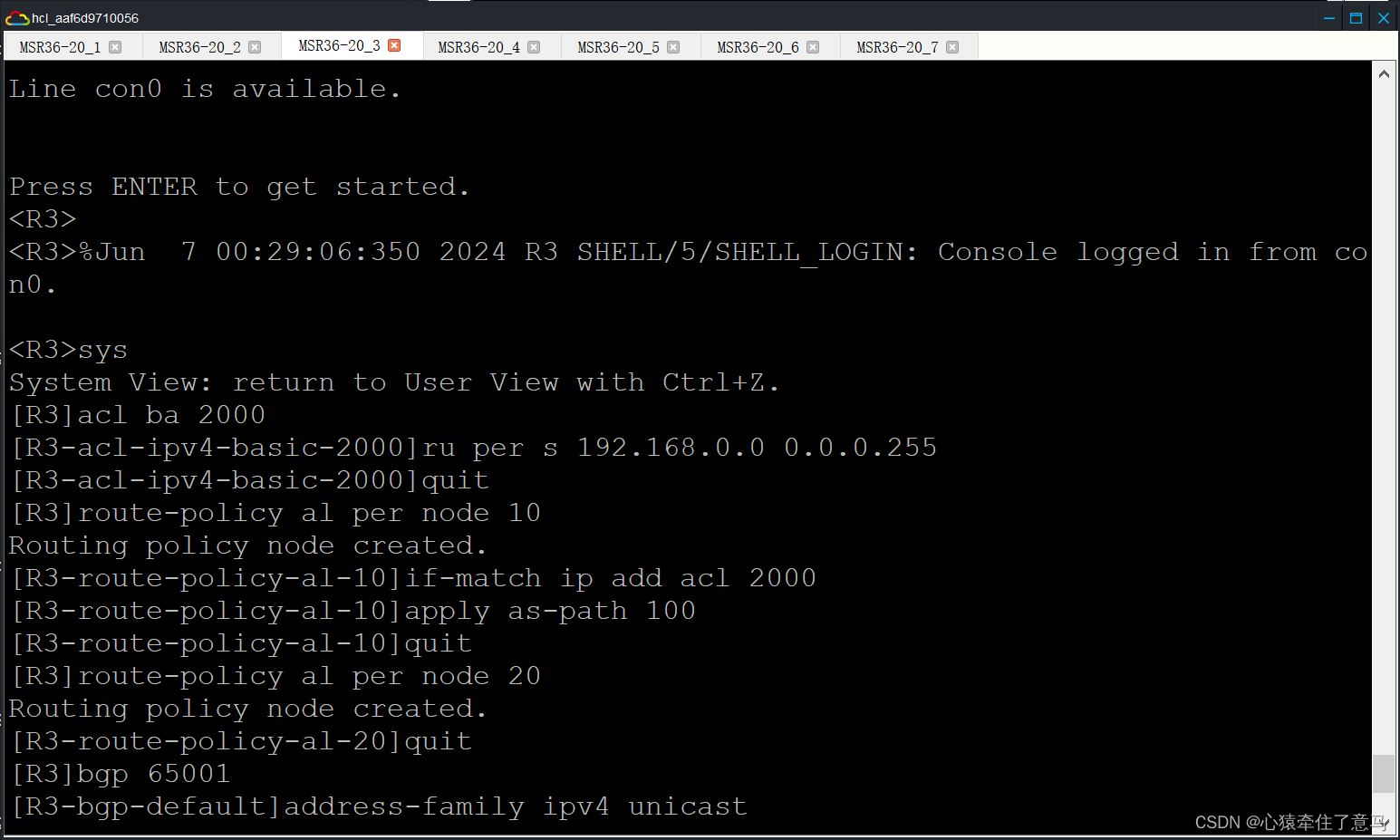
                                        [R3]acl ba 2000
                                        [R3-acl-ipv4-basic-2000]ru per s 192.168.0.0 0.0.0.255
                                        [R3-acl-ipv4-basic-2000]quit
                                        [R3]route-policy al per node 10
                                        Routing policy node created.
                                        [R3-route-policy-al-10]if-match ip add acl 2000
                                        [R3-route-policy-al-10]apply as-path 100
                                        [R3-route-policy-al-10]quit
                                        [R3]route-policy al per node 20
                                        Routing policy node created.
                                        [R3-route-policy-al-20]quit
                                        [R3]bgp 65001
                                        [R3-bgp-default]address-family ipv4 unicast
                                        [R3-bgp-default-ipv4]peer 10.0.0.18 route-policy bl ex
                                        [R3-bgp-default-ipv4]quit
                                        [R3-bgp-default]quit
                                        

                                        计网仿真综合实验 实验十二

                                        acl ba 2000
                                        ru per s 192.168.0.0 0.0.0.255
                                        quit
                                        route-policy al per node 10
                                        if-match ip add acl 2000
                                        apply as-path 100
                                        quit
                                        route-policy al per node 20
                                        quit
                                        bgp 65001
                                        address-family ipv4 unicast
                                        peer 10.0.0.18 route-policy bl ex
                                        

                                        计网仿真综合实验 实验十二

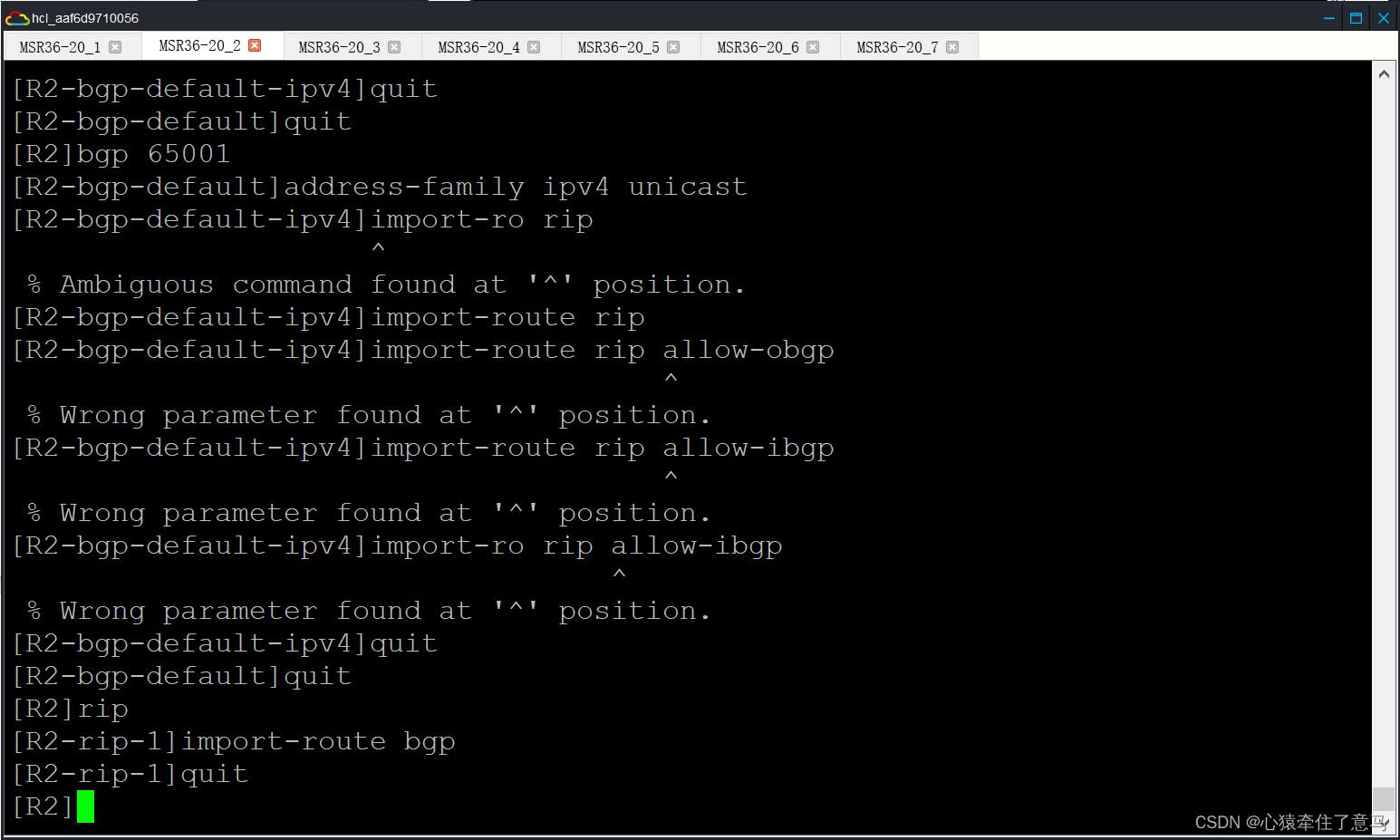
                                        路由引入,这里没有做过滤,需要注意的是一个邻居的一个方向只能调用一个路由策略,所有在过滤是使用过滤技术。

                                        [R2-bgp-default-ipv4]import-route rip
                                        [R2]rip
                                        [R2-rip-1]import-route bgp
                                        [R2-rip-1]quit
                                        

                                        计网仿真综合实验 实验十二

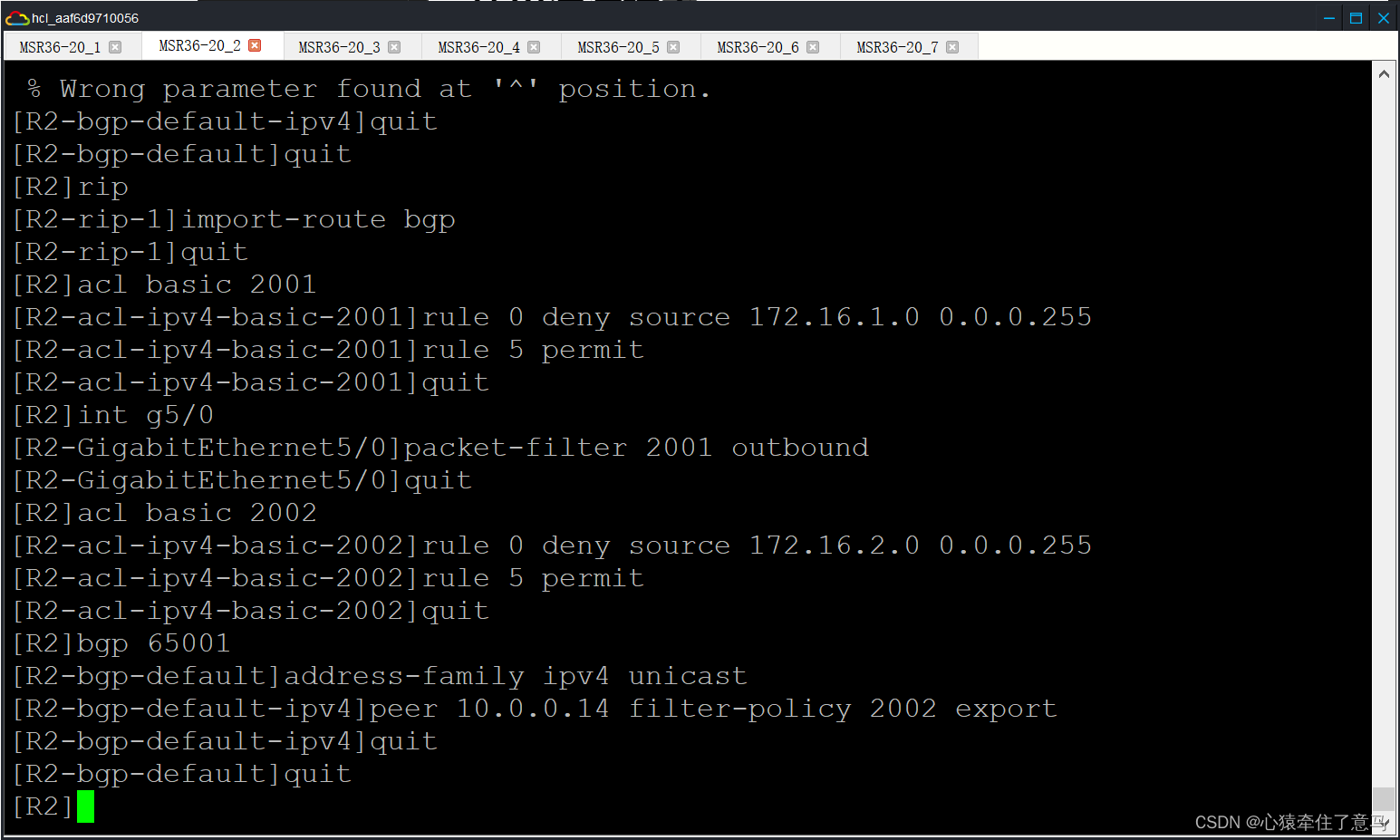
                                        过滤不让办事处的 B 流与分公司的 B 流互通

                                        [R2]acl basic 2001
                                        [R2-acl-ipv4-basic-2001]rule 0 deny source 172.16.1.0 0.0.0.255
                                        [R2-acl-ipv4-basic-2001]rule 5 permit
                                        [R2]int g5/0
                                        [R2-GigabitEthernet5/0]packet-filter 2001 outbound
                                        [R2]acl basic 2002
                                        [R2-acl-ipv4-basic-2002]rule 0 deny source 172.16.2.0 0.0.0.255
                                        [R2-acl-ipv4-basic-2002]rule 5 permit
                                        [R2-acl-ipv4-basic-2002]quit
                                        

                                        计网仿真综合实验 实验十二

                                        sys
                                        System View: return to User View with Ctrl+Z.
                                        [R3]acl basic 2001
                                        [R3-acl-ipv4-basic-2001]rule 0 deny source 172.16.2.0 0.0.0.255
                                        [R3-acl-ipv4-basic-2001]rule 5 permit
                                        [R3-acl-ipv4-basic-2001]quit
                                        [R3]bgp 65001
                                        [R3-bgp-default]address-family ipv4 unicast
                                        [R3-bgp-default-ipv4]peer 10.0.0.18 filter-policy 2001 export
                                        [R3-bgp-default-ipv4]quit
                                        [R3-bgp-default]quit
                                        

                                        计网仿真综合实验 实验十二

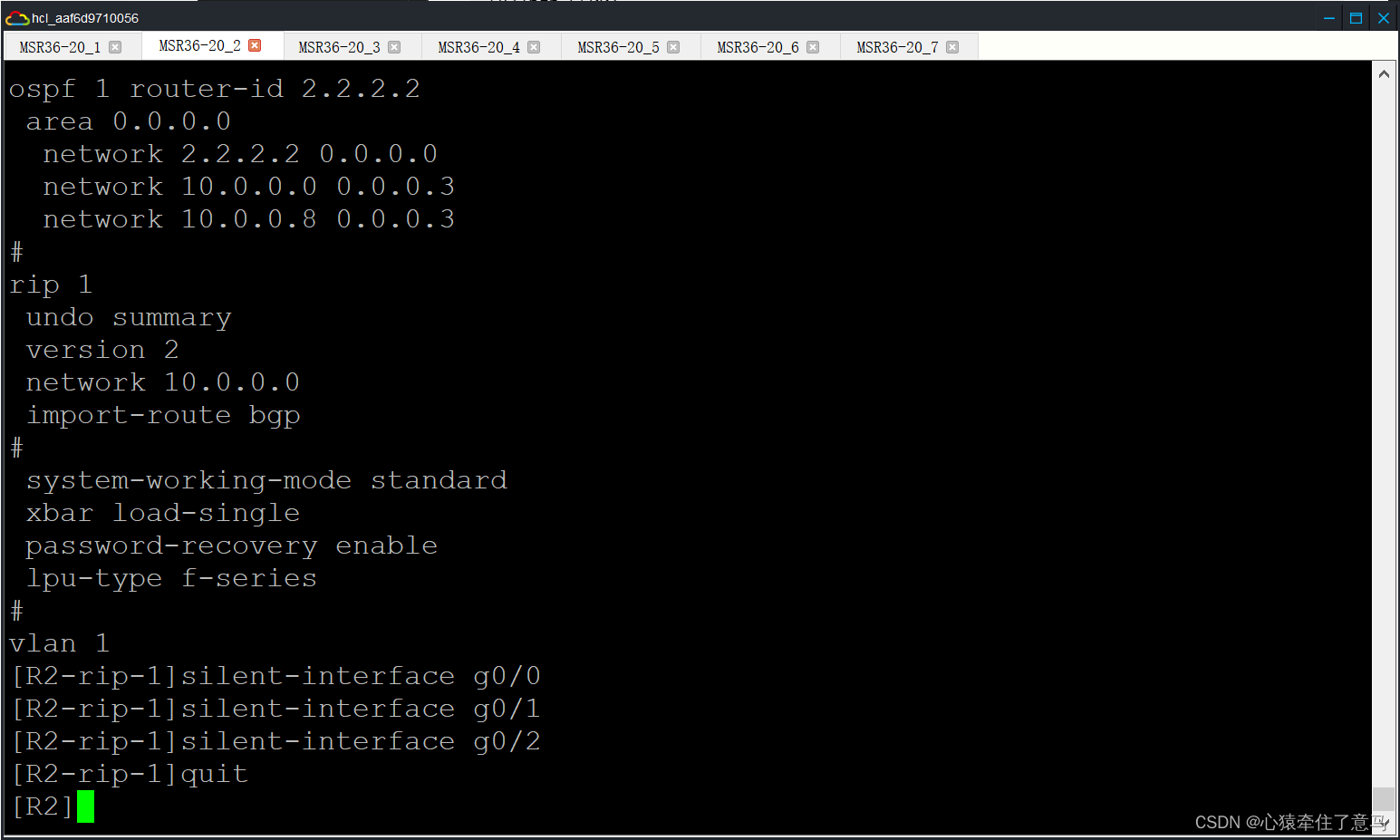
                                        静默接口不允许出现协议报文

                                        ···

                                        [R2-rip-1]silent-interface g0/0

                                        [R2-rip-1]silent-interface g0/1

                                        [R2-rip-1]silent-interface g0/2

                                        ···
                                        计网仿真综合实验 实验十二

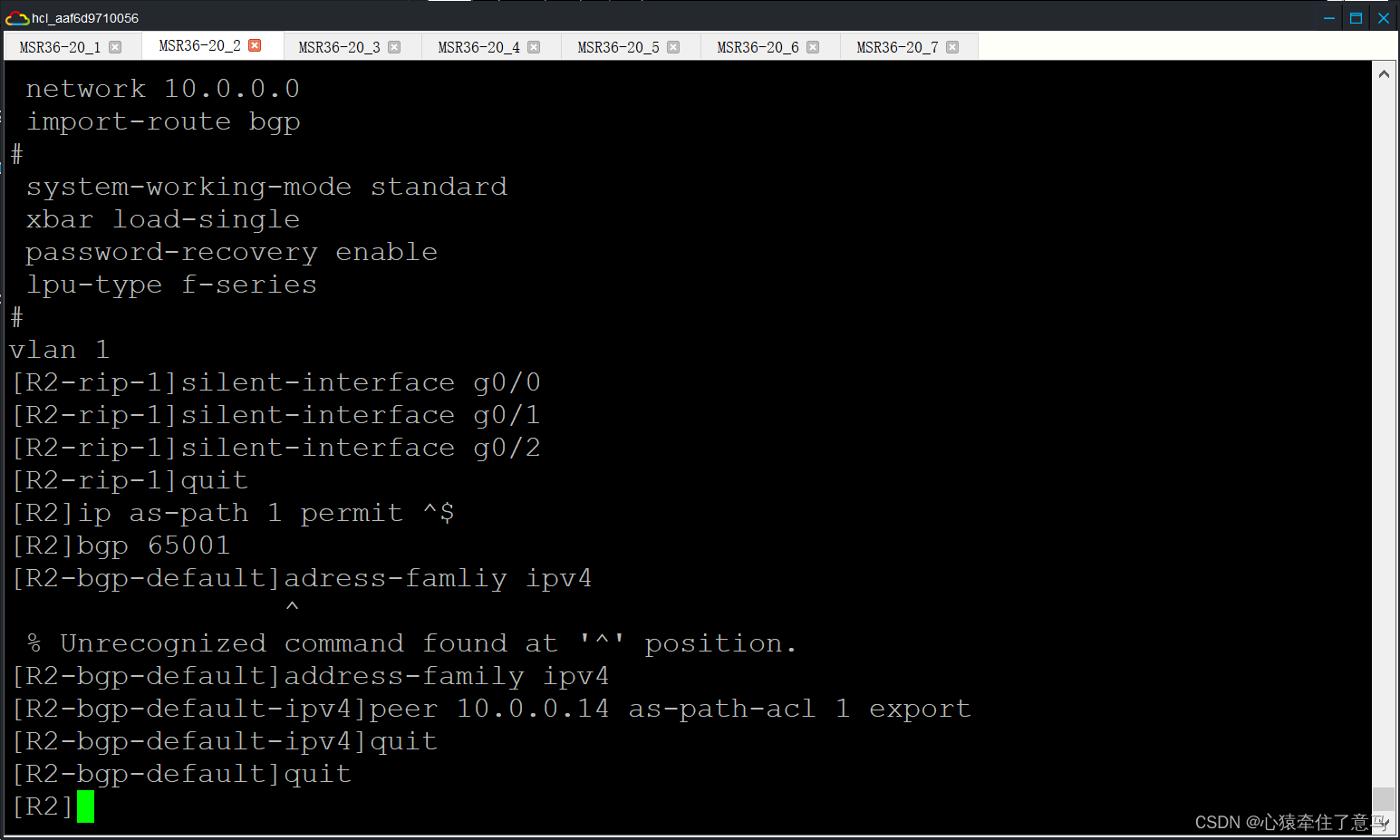
                                        只传递本 AS 的路由

                                        ···

                                        [R2]ip as-path 1 permit ^$

                                        [R2]bgp 65001

                                        [R2-bgp-default]address-family ipv4

                                        [R2-bgp-default-ipv4]peer 10.0.0.14 as-path-acl 1 export

                                        [R2-bgp-default-ipv4]quit

                                        [R2-bgp-default]quit

                                        [R3]ip as-path 1 permit ^$

                                        [R3]bgp 65001

                                        [R3-bgp-default]address-family ipv4

                                        [R3-bgp-default-ipv4]peer 10.0.0.18 as-path-acl 1 export

                                        [R3-bgp-default-ipv4]quit

                                        [R3-bgp-default]quit

                                        ···计网仿真综合实验 实验十二

                                        计网仿真综合实验 实验十二

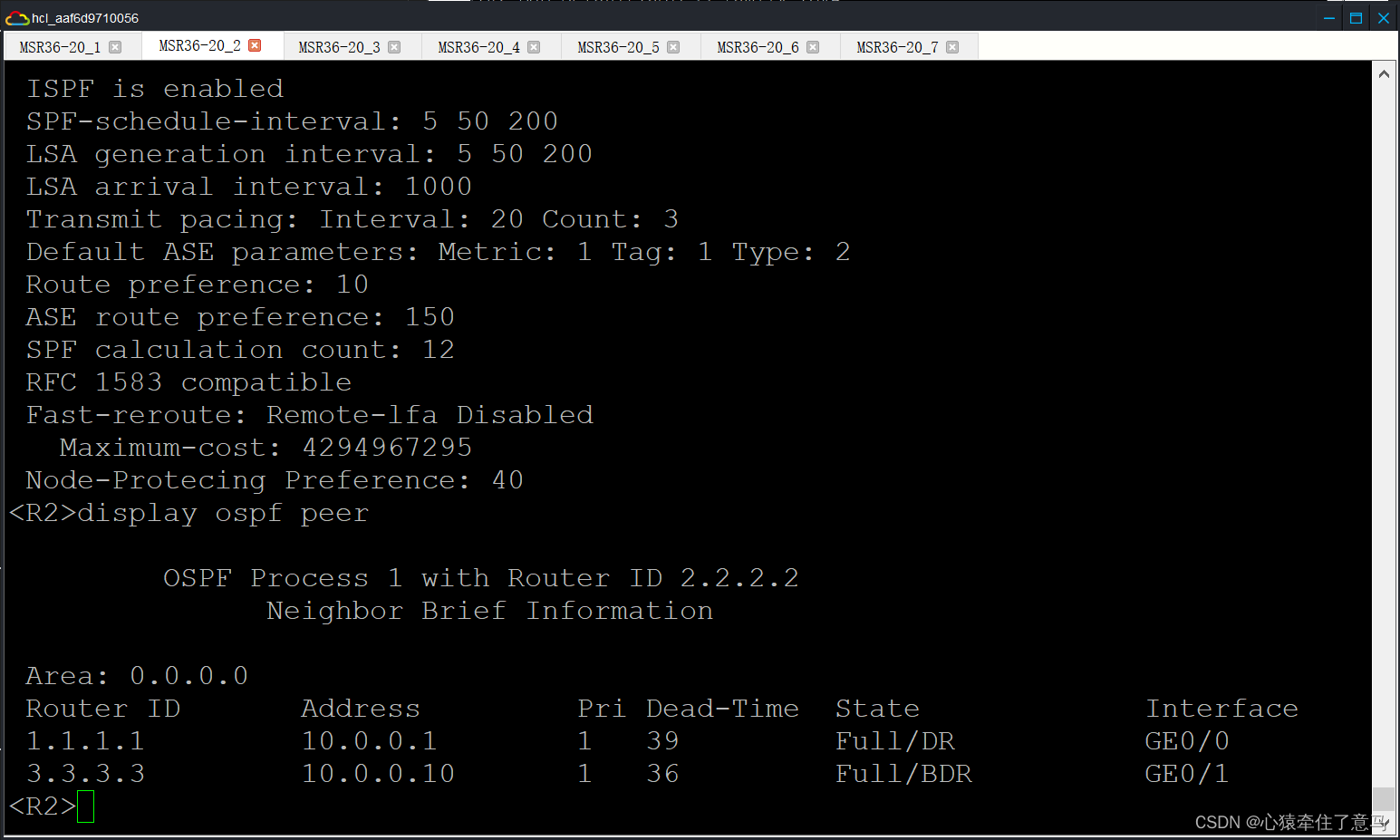
                                        按照实验指导书上面的内容就做完了,现在我们来检查各部分的情况进行截图。

                                        检查OSPF PEER(R2&R6):

                                        计网仿真综合实验 实验十二

                                        计网仿真综合实验 实验十二

                                        一切正常!

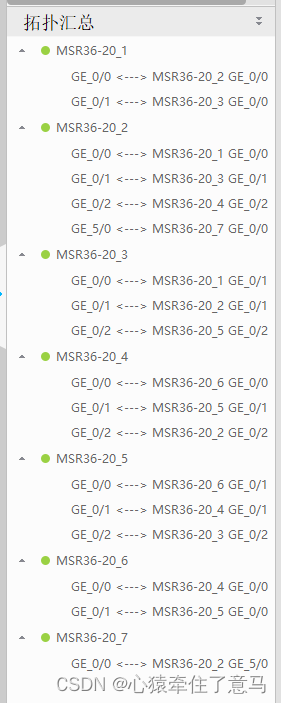
                                        拓扑汇总

                                        计网仿真综合实验 实验十二

                                        实验踩坑说明和额外说明

                                        在实验过程中经常出现指导书的指令输入进去虚拟机但是经常报错的时候,有可能是以下三个原因造成的:

                                        • 它给的指令就是错误的,这个分几种情况讨论
                                          • 指令简写了
                                          • 指令扩写了
                                          • 指令压根不存在,没有更新
                                          • 我们的IP地址没有配,比如我是做到陪完BGP的时候感到非常奇怪,为什么一直没有连接上?后来我发现我没有把每一个接口都分配地址,我直接略过了流程的第一步,导致我的网络在后面不起反应
                                          • 在错误的街口下操作。比如原本要在[R2-XXX-XXX]操作的,但是我们一直在[R2]下操作,当然会一直报错了。
                                          • 通过这次实验,我极大程度上掌握了H3C的路由器配置,这对我来说虽然痛苦但是很有收获。

                                            46903)]

                                            按照实验指导书上面的内容就做完了,现在我们来检查各部分的情况进行截图。

                                            检查OSPF PEER(R2&R6):
                                            [外链图片转存中…(img-SwIzoGlw-1717695746903)]

                                            [外链图片转存中…(img-MiHZC6XW-1717695746903)]

                                            一切正常!

                                            拓扑汇总

                                            [外链图片转存中…(img-A0NZleeK-1717695746903)]

                                            实验踩坑说明和额外说明

                                            在实验过程中经常出现指导书的指令输入进去虚拟机但是经常报错的时候,有可能是以下三个原因造成的:

                                            • 它给的指令就是错误的,这个分几种情况讨论
                                              • 指令简写了
                                              • 指令扩写了
                                              • 指令压根不存在,没有更新
                                              • 我们的IP地址没有配,比如我是做到陪完BGP的时候感到非常奇怪,为什么一直没有连接上?后来我发现我没有把每一个接口都分配地址,我直接略过了流程的第一步,导致我的网络在后面不起反应
                                              • 在错误的街口下操作。比如原本要在[R2-XXX-XXX]操作的,但是我们一直在[R2]下操作,当然会一直报错了。
                                              • 通过这次实验,我极大程度上掌握了H3C的路由器配置,这对我来说虽然痛苦但是很有收获。
VPS购买请点击我

免责声明:我们致力于保护作者版权,注重分享,被刊用文章因无法核实真实出处,未能及时与作者取得联系,或有版权异议的,请联系管理员,我们会立即处理! 部分文章是来自自研大数据AI进行生成,内容摘自(百度百科,百度知道,头条百科,中国民法典,刑法,牛津词典,新华词典,汉语词典,国家院校,科普平台)等数据,内容仅供学习参考,不准确地方联系删除处理! 图片声明:本站部分配图来自人工智能系统AI生成,觅知网授权图片,PxHere摄影无版权图库和百度,360,搜狗等多加搜索引擎自动关键词搜索配图,如有侵权的图片,请第一时间联系我们,邮箱:ciyunidc@ciyunshuju.com。本站只作为美观性配图使用,无任何非法侵犯第三方意图,一切解释权归图片著作权方,本站不承担任何责任。如有恶意碰瓷者,必当奉陪到底严惩不贷!

目录[+]