
vue3,下载预览的四种方法之responseType-blob、fileName、a标签下载& axios之post请求写法& 引入js方法文件写法& try和catch、async和await用法
vue3,下载预览的四种方法之responseType-blob、fileName、a标签下载& axios之post请求写法& 引入js方法文件写法& try和catch、async和await用法
页面
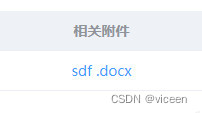
1.1、按钮下载页面
index.vue
    下载预览

import axios from "axios";
import { downLoadxls } from "@/utils/utils.js";
// 下载预览
const handelDowload = () => {
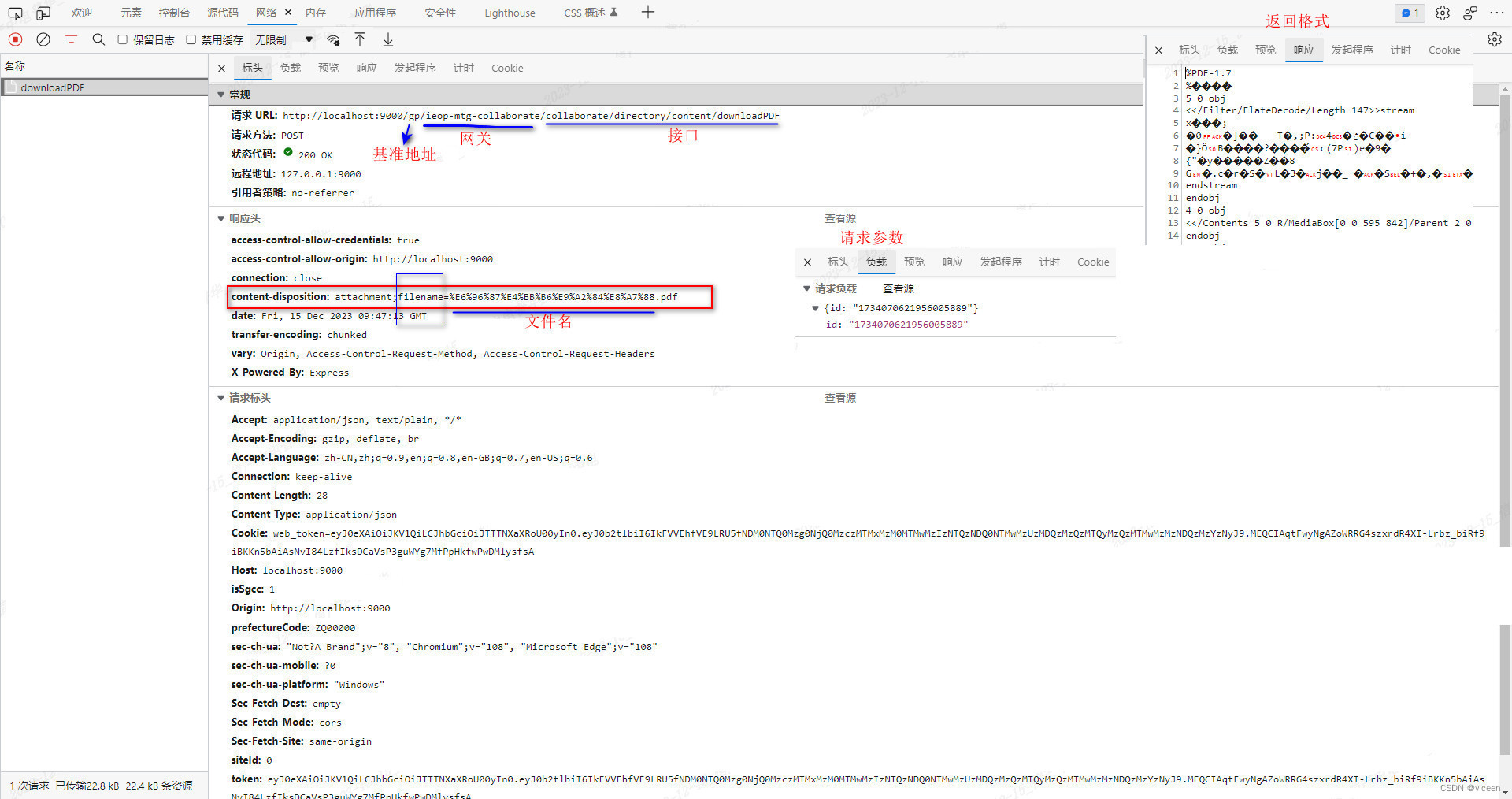
    axios({ method: 'POST', url: process.env.VUE_APP_API_HOST + constant.ieopCollaborate + '/collaborate/directory/content/downloadPDF', data: { id: directoryId }, responseType: 'blob' }).then((res) => {
        if (res.data?.code) {
            ElMessage.error(res.data.message)
        } else {
            downLoadxls(res)
            setTimeout(function () {
                ElMessage.success("下载成功")
            }, 1000)
        }
    })
}
包含4个参数:
- 请求方式method:POST
- 请求地址url:url
- 请求参数data:data
- 定义类型responseType
浏览器下载效果图
1.2、表格附件下载页面
index.vue
{{scope.row.fileName}}1.3、引入的方法文件
src\utils\utils.js
//文件流导出数据处理 方式一
export function downLoadxls(res, fileName) {
  let name;
  if (fileName) {
    name = fileName;
  } else {
    if (res.headers["content-disposition"]) {
      const contentDisposition = res.headers["content-disposition"].split("=");
      name = (contentDisposition && decodeURI(contentDisposition[1])) || "";
    }
  }
  const file = new File([res.data], res.data);
  const href = URL.createObjectURL(file);
  const aTag = document.createElement("a");
  aTag.download = name;
  aTag.target = "_blank";
  aTag.href = href;
  aTag.click();
  URL.revokeObjectURL(href);
}
//文件流导出数据处理 方式二
export function downLoad(res, fileName) {
  let name;
  if (fileName) {
    name = fileName;
  } else {
    if (res.headers["content-disposition"]) {
      const contentDisposition = res.headers["content-disposition"].split("=");
      name = (contentDisposition && decodeURI(contentDisposition[1])) || "";
    }
  }
  const content = res.data
  const blob = new Blob([content])
  const elink = document.createElement('a')
  elink.download = name
  elink.style.display = 'none'
  elink.href= URL.createObjectURL(blob)
  document.body.appendChild(elink)
  elink.click()
  URL.revokeObjectURL(elink.href)
  document.body.removeChild(elink)
}
2、直接使用接口下载的页面
index.vue
                            {{scope.row.fileName}}


import axios from '@/utils/request'
// import axios from 'axios'
const handelDowload = (row: any) => {
    console.log(row);
 	axios({ method: 'POST', url: process.env.VUE_APP_API_HOST + constant.fileUpload + '/download?id=' + file.fileId, responseType: 'blob' })
    .then(result => {
        const content = result.data
        const blob = new Blob([content])
        const fileName = file.fileName
        if ('download' in document.createElement('a')) {
            const elink = document.createElement('a')
            elink.download = fileName
            elink.style.display = 'none'
            elink.href = URL.createObjectURL(blob)
            document.body.appendChild(elink)
            elink.click()
            URL.revokeObjectURL(elink.href)
            document.body.removeChild(elink)
        } else {
            navigator.msSaveBlob(blob, fileName)
        }
    })
}
3、a标签下载文件
index.vue
  附件:

    {{ item.fileName }}

    资质文件:


            {{
                item.fileName }}


生成交易函

import { downloadFileApi,downloadFileWaterApi,wordTemplateExportApi } from "@/api/file";
import { uploadFileByA } from "@/utils/tool";

// 点击下载附件
async downloadFile(fileId,fileName){
  try {
      let result = await downloadFileApi(fileId)
      if(result.data.size){
        uploadFileByA(result.data,fileName)
      }else{
        this.message.error('下载合同失败,请重试')
      }
  } catch (error) {
      console.log(error)
  }
},

// 下载水印附件
const _downloadFileWater=async (id,fileName)=>{
    try {
        let params = {id:id}
        let result = await downloadFileWaterApi(params)
        if (result.status == 200) {
            uploadFileByA(result.data,fileName)
        }
    } catch (error) {
        console.log(error)
    }
}
// 模板文件下载
async docDownload(row){
    try {
        let params = {
            projNo:this.projNo,
            patentProjectId:row.id,
            exportType:1
        }
        console.log(params)
        let result = await wordTemplateExportApi(params)
        if(result.data.size){
            uploadFileByA(result.data,`交易函模板.docx`)
        }else{
            this.message.error('交易函模板下载失败,请重试')
        }
    } catch (error) {
        console.log(error)
    }
},


.info_file{
  display: flex;
  .title_file{
    width: 70px;
    flex-shrink: 0;
    display: inline-block;
    text-align: right;
    vertical-align: top;
  }
  .text_file{
    display: inline-block;
    .fileName{
      display: block;
      cursor: pointer;
    }
  }
}

.info {
    width: 100%;
    margin-bottom: 20px;
    display: flex;
    color: #666;
    .title {
        width: 15%;
        text-align: right;
        font-weight: bold;
    }
    .text {
        font-size: 14px;
        width: 85%;
        text-align: left;
        white-space: pre-wrap;
        color: #535353;
    }
}

.span-btn {
    font-size: 12px;
    display: block;
    color: #409EFF;
    cursor: pointer;
}
src\utils\tool.js
// a标签下载文件
/**
 * @param {content} 文件流信息
 * @param {fileName} 附件名称
 */
export function uploadFileByA(content,fileName){
  const blob = new Blob([content])
  if('download' in document.createElement('a')){
      const elink = document.createElement('a')
      elink.download = fileName
      elink.style.display = 'none'
      elink.href= URL.createObjectURL(blob)
      document.body.appendChild(elink)
      elink.click()
      URL.revokeObjectURL(elink.href)
      document.body.removeChild(elink)
  }else{
      navigator.msSaveBlob(blob,fileName)
  }
}
src\api\file.js
import axios from '@/utils/request'
import { getApiUrl } from "@/utils/tool";
import  constant  from "@/components/constant";
const baseUrl = getApiUrl();
// 下载附件
export const downloadFileApi = (id)=>{
    return axios({
        method:'get',
        url:baseUrl + constant.fileUpload + '/download?id=' + id,
        responseType:'blob'
    })
}
// 下载水印附件
export const downloadFileWaterApi = (params)=>{
    return axios({
        method:'post',
        url:baseUrl + constant.publicCoop + '/mark/file/download',
        data:params,
        responseType:'blob'
    })
}
// 合同模板下载
/**
 *
 * @param {projNo:项目编号;exportType:0、交易方案  1、交易鉴证函   2、交易通知书} data
 * @returns
 */
export const wordTemplateExportApi = (data)=>{
    return axios({
        method:'post',
        // url:'http://27.196.111.34:18080/ieop-pri-property1/word/export',
        url:baseUrl + constant.intellectual + '/word/export',
        responseType:'blob',
        data
    })
}
src\utils\tool.js
export function getApiUrl(v) {
  return process.env.VUE_APP_API_HOST
}
src\components\constant.js
/**
 * Created by author on 2023/12/18.
 */
export default {
  intellectual:'/ieop-pri-property', //3知识产权网关标识
  fileUpload:'/yundu-file-wjm', //1知识产权上传文件网关
  publicCoop: "/ieop-mtg-coop", // 2公共网关标识
  ieopCollaborate: "/ieop-mtg-collaborate", // 在线协作网关标识
}
免责声明:我们致力于保护作者版权,注重分享,被刊用文章因无法核实真实出处,未能及时与作者取得联系,或有版权异议的,请联系管理员,我们会立即处理! 部分文章是来自自研大数据AI进行生成,内容摘自(百度百科,百度知道,头条百科,中国民法典,刑法,牛津词典,新华词典,汉语词典,国家院校,科普平台)等数据,内容仅供学习参考,不准确地方联系删除处理! 图片声明:本站部分配图来自人工智能系统AI生成,觅知网授权图片,PxHere摄影无版权图库和百度,360,搜狗等多加搜索引擎自动关键词搜索配图,如有侵权的图片,请第一时间联系我们,邮箱:ciyunidc@ciyunshuju.com。本站只作为美观性配图使用,无任何非法侵犯第三方意图,一切解释权归图片著作权方,本站不承担任何责任。如有恶意碰瓷者,必当奉陪到底严惩不贷!


