
Android进阶之路 - StaticLayout 绘制文本自动换行
最近在修改 WheelView 自定义控件,因为原始效果单行效果,现在需要支持换行效果,故接触到了 StaticLayout ,先行记录
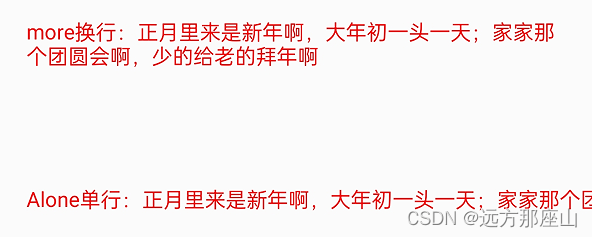
在 Android自定义控件中,当我们调用 drawText 绘制 Text 时,假设 Text 为超长字符串(文本宽度超过屏幕宽度)也只会显示一行,超出部分会隐藏在屏幕之外…
而 Google 为了适配多行 Text 显示效果,早已提供了 StaticLayout 工具类用于处理文字换行的问题,现在开始一起来看我写个Demo吧!
- 基础认知
- 单行控件
- 多行控件
- 使用方式
- 单点技能
- 设置控件宽、高
- 根据内容动态调整控件高度
效果(Demo下载地址)
基础认知
很多人可能会想到TextView为何支持换行?嗯… 有没有可能TextView内部也使用了 StaticLayout?
在自定义控件中关于单行显示的 drawText 场景很常见,以下是一些构造方法
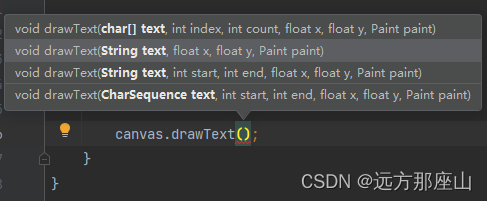
重点我们来看一下换行显示内容的方式,不清楚大家对于StaticLayout了解的多不多,我们直接通过其构造参数来学一些就行
- StaticLayout 相关构造参数

- 具体函数
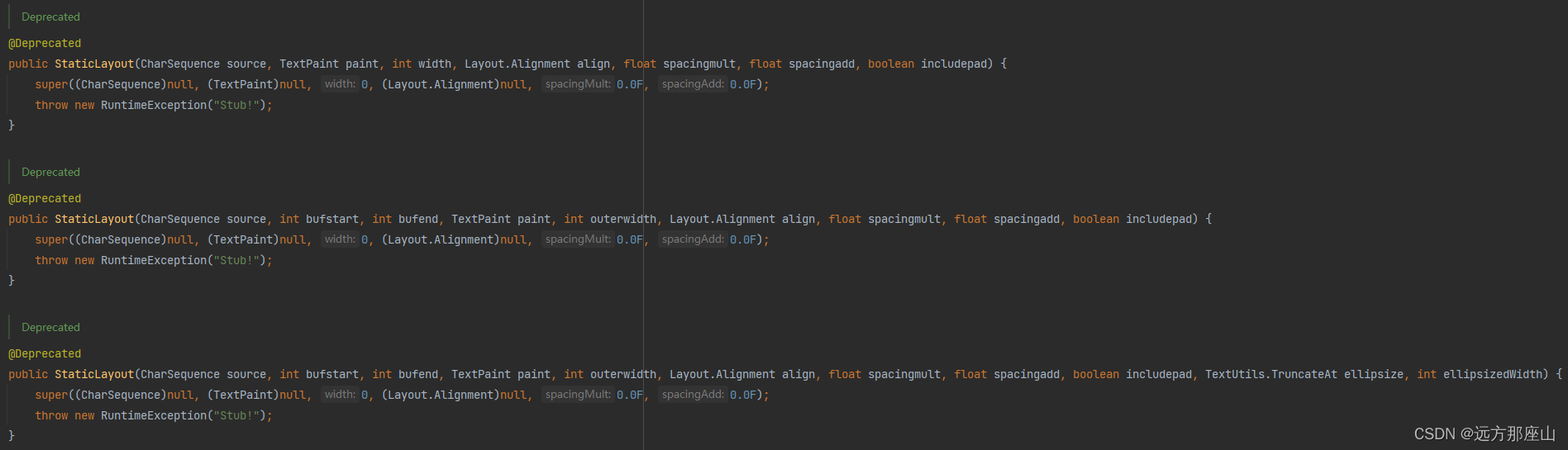
StaticLayout 参数解释
@Deprecated public StaticLayout(CharSequence source, int bufstart, int bufend, TextPaint paint, int outerwidth, Layout.Alignment align, float spacingmult, float spacingadd, boolean includepad, TextUtils.TruncateAt ellipsize, int ellipsizedWidth) { super((CharSequence)null, (TextPaint)null, 0, (Layout.Alignment)null, 0.0F, 0.0F); throw new RuntimeException("Stub!"); }- CharSequence source: 需要分行的字符串
- int bufstart: 需要分行的字符串从第几的位置开始
- int bufend :需要分行的字符串到哪里结束
- TextPaint paint: 画笔对象(必须为TextPaint,不同于drawText)
- int outerwidth: layout的宽度,超出时换行
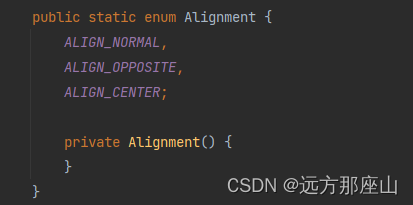
- Alignment align layout 对其方式:ALIGN_CENTER, ALIGN_NORMAL, ALIGN_OPPOSITE
位于 Layout 源码
- float spacingmult: 相对行间距,相对字体大小,1.5f表示行间距为1.5倍的字体高度。
- float spacingadd: 在基础行距上添加多少
- boolean includepad:是否有包含其他的layout(个人感觉),一般设置为false
- TextUtils.TruncateAt ellipsize: 从什么位置开始省略
- int ellipsizedWidth: 超过多少开始省略
单行控件
AloneLineTextView
package com.example.staticlayoutdemo;
import android.content.Context;
import android.graphics.Canvas;
import android.graphics.Color;
import android.graphics.Paint;
import android.graphics.Rect;
import android.text.StaticLayout;
import android.util.AttributeSet;
import android.util.Log;
import android.view.View;
import androidx.annotation.Nullable;
public class AloneLineTextView extends View {
    private Paint paint;
    private String contentText;
    private int measureWidth;
    public AloneLineTextView(Context context) {
        super(context);
        init();
    }
    public AloneLineTextView(Context context, @Nullable AttributeSet attrs) {
        super(context, attrs);
        init();
    }
    public AloneLineTextView(Context context, @Nullable AttributeSet attrs, int defStyleAttr) {
        super(context, attrs, defStyleAttr);
        init();
    }
    private void init() {
        paint = new Paint();
        paint.setAntiAlias(true);
        paint.setColor(Color.RED);
        paint.setStrokeWidth(10f);
        paint.setTextSize(38f);
        paint.setStyle(Paint.Style.FILL);
    }
    @Override
    protected void onMeasure(int widthMeasureSpec, int heightMeasureSpec) {
        super.onMeasure(widthMeasureSpec, heightMeasureSpec);
        measureWidth = MeasureSpec.getSize(widthMeasureSpec);
    }
    @Override
    protected void onDraw(Canvas canvas) {
        super.onDraw(canvas);
        if (contentText == null || contentText.isEmpty()) {
            contentText = "AloneLineTextView 首次绘制";
        }
        //测量文本宽度
        Rect rect = new Rect();
        paint.getTextBounds(contentText, 0, contentText.length(), rect);
        int contentSize = rect.width();
        Log.e("tag", "屏幕宽度:" + measureWidth);
        Log.e("tag", "文本宽度:" + contentSize);
        canvas.drawText(contentText, 50, 200, paint);
    }
    void setContextText(String content) {
        contentText = content;
        postInvalidate();
    }
}
多行控件
当内容宽度超过屏幕宽度时,使用 StaticLayout让 View自动换行
MoreLinesTextView
package com.example.staticlayoutdemo;
import android.content.Context;
import android.graphics.Canvas;
import android.graphics.Color;
import android.graphics.Paint;
import android.graphics.Rect;
import android.text.Layout;
import android.text.StaticLayout;
import android.text.TextPaint;
import android.util.AttributeSet;
import android.util.Log;
import android.view.View;
import androidx.annotation.Nullable;
public class MoreLinesTextView extends View {
    private TextPaint textPaint;
    private String contentText;
    private int widthSize, heightSize;//控件宽、高
    private int widthMode, heightMode;//控件宽、高
    private int paddingLeft, paddingTop, paddingRight, paddingBottom; //内边距(通过外部的xml中设置居中,内部尚未做出具体逻辑处理)
    private int afterWidthSize, afterHeightSize; //减去内边距后的宽高
    private int currentHeight;//控件高度
    public MoreLinesTextView(Context context) {
        super(context);
        init();
    }
    public MoreLinesTextView(Context context, @Nullable AttributeSet attrs) {
        super(context, attrs);
        init();
    }
    public MoreLinesTextView(Context context, @Nullable AttributeSet attrs, int defStyleAttr) {
        super(context, attrs, defStyleAttr);
        init();
    }
    /**
     * 初始化画笔相关配置
     */
    private void init() {
        textPaint = new TextPaint();
        textPaint.setAntiAlias(true);
        textPaint.setColor(Color.RED);
        textPaint.setStrokeWidth(10f);
        textPaint.setTextSize(38f);
        textPaint.setStyle(Paint.Style.FILL);
    }
    @Override
    protected void onMeasure(int widthMeasureSpec, int heightMeasureSpec) {
//        super.onMeasure(widthMeasureSpec, heightMeasureSpec);
        //原始Size
        widthSize = MeasureSpec.getSize(widthMeasureSpec);
        widthMode = MeasureSpec.getMode(widthMeasureSpec);
        heightSize = MeasureSpec.getSize(heightMeasureSpec);
        heightMode = MeasureSpec.getMode(heightMeasureSpec);
        //去除内边距的Size
        afterWidthSize = widthSize - paddingRight - paddingLeft;
        afterHeightSize = heightSize - paddingTop - paddingBottom;
        // 调试时用到的一些Log
//        Log.e("tag", "widthSize:" + widthSize + "--" + "afterWidthSize:" + afterWidthSize);
//        Log.e("tag", "heightSize:" + heightSize + "--" + "afterHeightSize:" + afterHeightSize);
        //告知父布局,当前View的部分属性
        super.onMeasure(MeasureSpec.makeMeasureSpec(afterWidthSize, widthMode),
                MeasureSpec.makeMeasureSpec(afterHeightSize, heightMode));
        setViewHeight(currentHeight);
/*         // 根据测量模式设置控件的高度
        if (heightMode == MeasureSpec.EXACTLY) {
            // 如果测量模式为EXACTLY(精确),高度为测量大小
            setMeasuredDimension(afterWidthSize, heightSize);
            Log.e("tag", "MeasureSpec-Height:MeasureSpec.EXACTLY");
        } else if (heightMode == MeasureSpec.AT_MOST) {
            // 如果测量模式为AT_MOST(至多),高度为自定义的高度
            int desiredHeight = 200; // 自定义高度
            setMeasuredDimension(afterWidthSize, Math.min(desiredHeight, heightSize));
            Log.e("tag", "MeasureSpec-Height:AT_MOST");
        } else {
            // 如果测量模式为UNSPECIFIED(未指定),高度为自定义的高度
            int desiredHeight = 200; // 自定义高度
            setMeasuredDimension(afterWidthSize, desiredHeight);
            Log.e("tag", "MeasureSpec-Height:如果测量模式为UNSPECIFIED");
        }*/
//        setViewHeight(200);
    }
    @Override
    protected void onDraw(Canvas canvas) {
        super.onDraw(canvas);
        //给一些顶部内边距(偏移量),
        canvas.translate(0, 50);
        if (contentText == null || contentText.isEmpty()) {
            contentText = "MoreLinesTextView 首次绘制";
        }
        //测量文本宽度
        Rect rect = new Rect();
        textPaint.getTextBounds(contentText, 0, contentText.length(), rect);
      /*   //调试时用到的一些方法
        canvas.drawColor(Color.RED); //通过设置View背景,可以更便捷看出View大小
        int contentWidthSize = rect.width();
        int contentHeightSize = rect.height();
        Log.e("tag", "屏幕宽度:" + afterWidthSize);
        Log.e("tag", "屏幕高度:" + afterHeightSize);
        Log.e("tag", "文本宽度:" + contentWidthSize);
        Log.e("tag", "文本高度&canvas.getHeight():" + contentHeightSize);
        Log.e("tag", "StaticLayout :getWidth()&afterWidthSize()" + getWidth());*/
        StaticLayout staticLayout = new StaticLayout(contentText, textPaint, getWidth(), Layout.Alignment.ALIGN_NORMAL, 1.0f, 0.0f, false);
        staticLayout.draw(canvas);
    }
    /**
     * 设置该View显示内容
     * 当需要换行时,动态设置控件高度
     */
    void setContextText(String content) {
        contentText = content;
        //测量文本宽度
        Rect rect = new Rect();
        textPaint.getTextBounds(contentText, 0, contentText.length(), rect);
        int contentWidthSize = rect.width();
        int contentHeightSize = rect.height();
        if (contentWidthSize > afterWidthSize) {
            currentHeight = contentHeightSize * 5;
        } else {
            currentHeight = afterHeightSize;
        }
        requestLayout();
        postInvalidate();
    }
    /**
     * 设置该View宽、高
     *
     * @deprecated 自定义高度
     * 宽度目前采用的是固定
     */
    void setViewHeight(int desiredHeight) {
        if (heightMode == MeasureSpec.EXACTLY) {
            // 如果测量模式为EXACTLY(精确),高度为测量大小
            setMeasuredDimension(afterWidthSize, heightSize);
            Log.e("tag", "MeasureSpec-Height:MeasureSpec.EXACTLY");
        } else if (heightMode == MeasureSpec.AT_MOST) {
            // 如果测量模式为AT_MOST(至多),高度为自定义的高度
            setMeasuredDimension(afterWidthSize, Math.min(desiredHeight, heightSize));
            Log.e("tag", "MeasureSpec-Height:AT_MOST");
        } else {
            // 如果测量模式为UNSPECIFIED(未指定),高度为自定义的高度
            setMeasuredDimension(afterWidthSize, desiredHeight);
            Log.e("tag", "MeasureSpec-Height:如果测量模式为UNSPECIFIED");
        }
    }
    void setSelfPadding(int padding) {
        paddingLeft = padding;
        paddingTop = padding;
        paddingRight = padding;
        paddingBottom = padding;
        postInvalidate();
    }
    void setSelfPadding(int left, int top, int right, int bottom) {
        paddingLeft = left;
        paddingTop = top;
        paddingRight = right;
        paddingBottom = bottom;
        postInvalidate();
    }
}
使用方式
MainActivity
package com.example.staticlayoutdemo
import android.annotation.SuppressLint
import androidx.appcompat.app.AppCompatActivity
import android.os.Bundle
class MainActivity : AppCompatActivity() {
    @SuppressLint("MissingInflatedId")
    override fun onCreate(savedInstanceState: Bundle?) {
        super.onCreate(savedInstanceState)
        setContentView(R.layout.activity_main)
        val more = findViewById(R.id.tv_more)
        more.setContextText("more换行:正月里来是新年啊,大年初一头一天;家家那个团圆会啊,少的给老的拜年啊")
        more.setSelfPadding(50)
        val aLone = findViewById(R.id.tv_alone)
        aLone.setContextText("Alone单行:正月里来是新年啊,大年初一头一天;家家那个团圆会啊,少的给老的拜年啊")
    }
}
activity_main
单点技能
其实是我在写Demo时做的一些调试和学到的一些东西
设置控件宽、高
onMeasure 中 super.onMeasure 后调用下方设置方式即可
    @Override
    protected void onMeasure(int widthMeasureSpec, int heightMeasureSpec) {
       super.onMeasure(widthMeasureSpec, heightMeasureSpec);
       // 根据测量模式设置控件的高度
        if (heightMode == MeasureSpec.EXACTLY) {
            // 如果测量模式为EXACTLY(精确),高度为测量大小
            setMeasuredDimension(afterWidthSize, heightSize);
            Log.e("tag", "MeasureSpec-Height:MeasureSpec.EXACTLY");
        } else if (heightMode == MeasureSpec.AT_MOST) {
            // 如果测量模式为AT_MOST(至多),高度为自定义的高度
            int desiredHeight = 200; // 自定义高度
            setMeasuredDimension(afterWidthSize, Math.min(desiredHeight, heightSize));
            Log.e("tag", "MeasureSpec-Height:AT_MOST");
        } else {
            // 如果测量模式为UNSPECIFIED(未指定),高度为自定义的高度
            int desiredHeight = 200; // 自定义高度
            setMeasuredDimension(afterWidthSize, desiredHeight);
            Log.e("tag", "MeasureSpec-Height:如果测量模式为UNSPECIFIED");
        }
    }
根据内容动态调整控件高度
这部分其实属于优化部分,建议结合Demo查看(虽不完美,但应该可以凑乎使用)
    /**
     * 设置该View显示内容
     * 当需要换行时,动态设置控件高度
     */
    void setContextText(String content) {
        contentText = content;
        //测量文本宽度
        Rect rect = new Rect();
        textPaint.getTextBounds(contentText, 0, contentText.length(), rect);
        int contentWidthSize = rect.width();
        int contentHeightSize = rect.height();
        if (contentWidthSize > afterWidthSize) {
            currentHeight = contentHeightSize * 5;
        } else {
            currentHeight = afterHeightSize;
        }
        requestLayout();
        postInvalidate();
    }
- 具体函数
- StaticLayout 相关构造参数
免责声明:我们致力于保护作者版权,注重分享,被刊用文章因无法核实真实出处,未能及时与作者取得联系,或有版权异议的,请联系管理员,我们会立即处理! 部分文章是来自自研大数据AI进行生成,内容摘自(百度百科,百度知道,头条百科,中国民法典,刑法,牛津词典,新华词典,汉语词典,国家院校,科普平台)等数据,内容仅供学习参考,不准确地方联系删除处理! 图片声明:本站部分配图来自人工智能系统AI生成,觅知网授权图片,PxHere摄影无版权图库和百度,360,搜狗等多加搜索引擎自动关键词搜索配图,如有侵权的图片,请第一时间联系我们,邮箱:ciyunidc@ciyunshuju.com。本站只作为美观性配图使用,无任何非法侵犯第三方意图,一切解释权归图片著作权方,本站不承担任何责任。如有恶意碰瓷者,必当奉陪到底严惩不贷!


