
uniapp 小程序端长按录音、保存、播放录音功能实现和问题记录
背景
使用 uniapp 开发小程序,使用 Vue3 + uview-plus ,做一个长按录音的功能,分享一下实现过程
开发环境
- NodeJs:14.18.3
- uni-app Vue3 版本
- uview-plus:^3.1.41
主要功能:
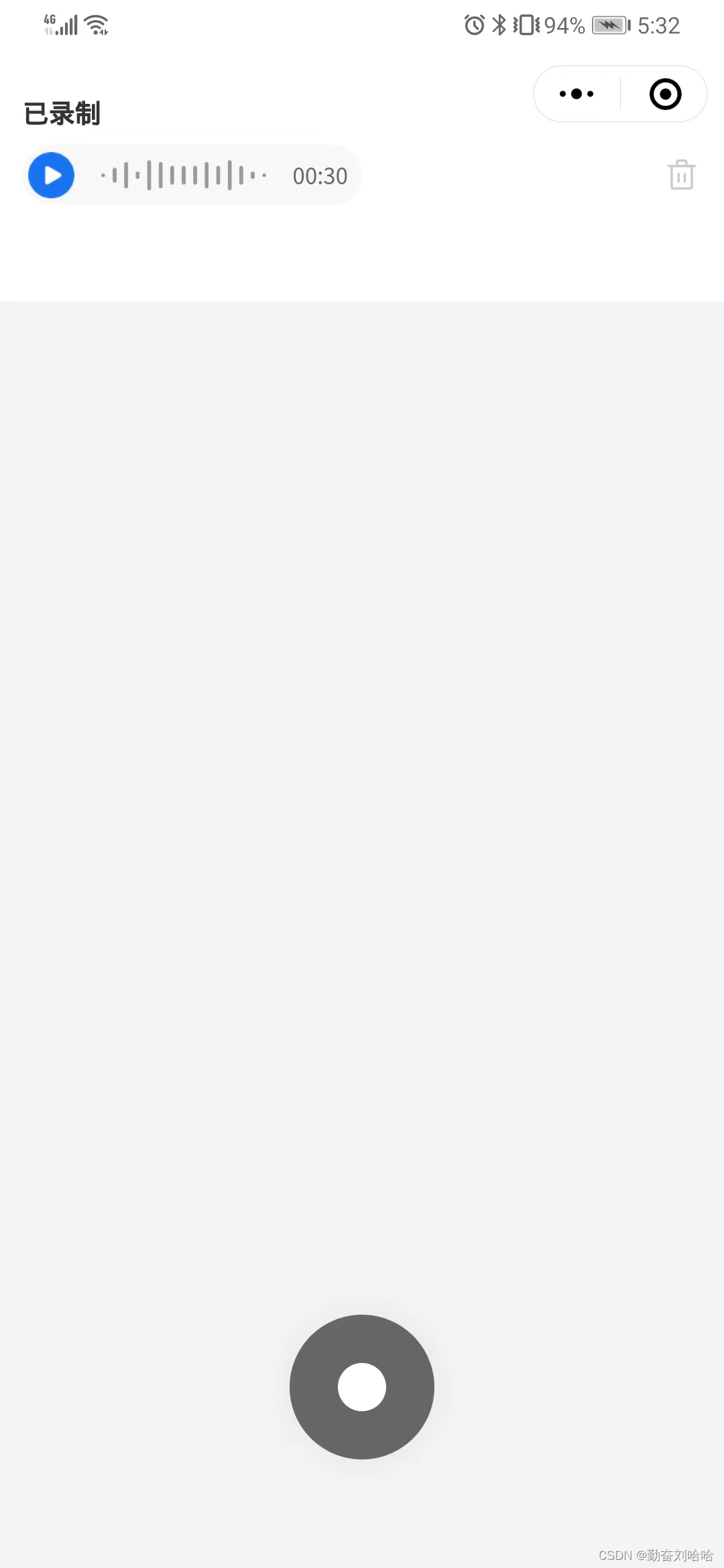
显示已上传音频文件
- 在进入页面的时候查询接口,如果有已上传的录音,显示上传音频文件,支持播放、暂停、删除功能;
录音
- 进入页面先获取录音权限状态;
- 按钮长按录音,先校验是否有录音权限,用户拒绝或者没有录音权限提示用户进入小程序设置中开启录音权限;
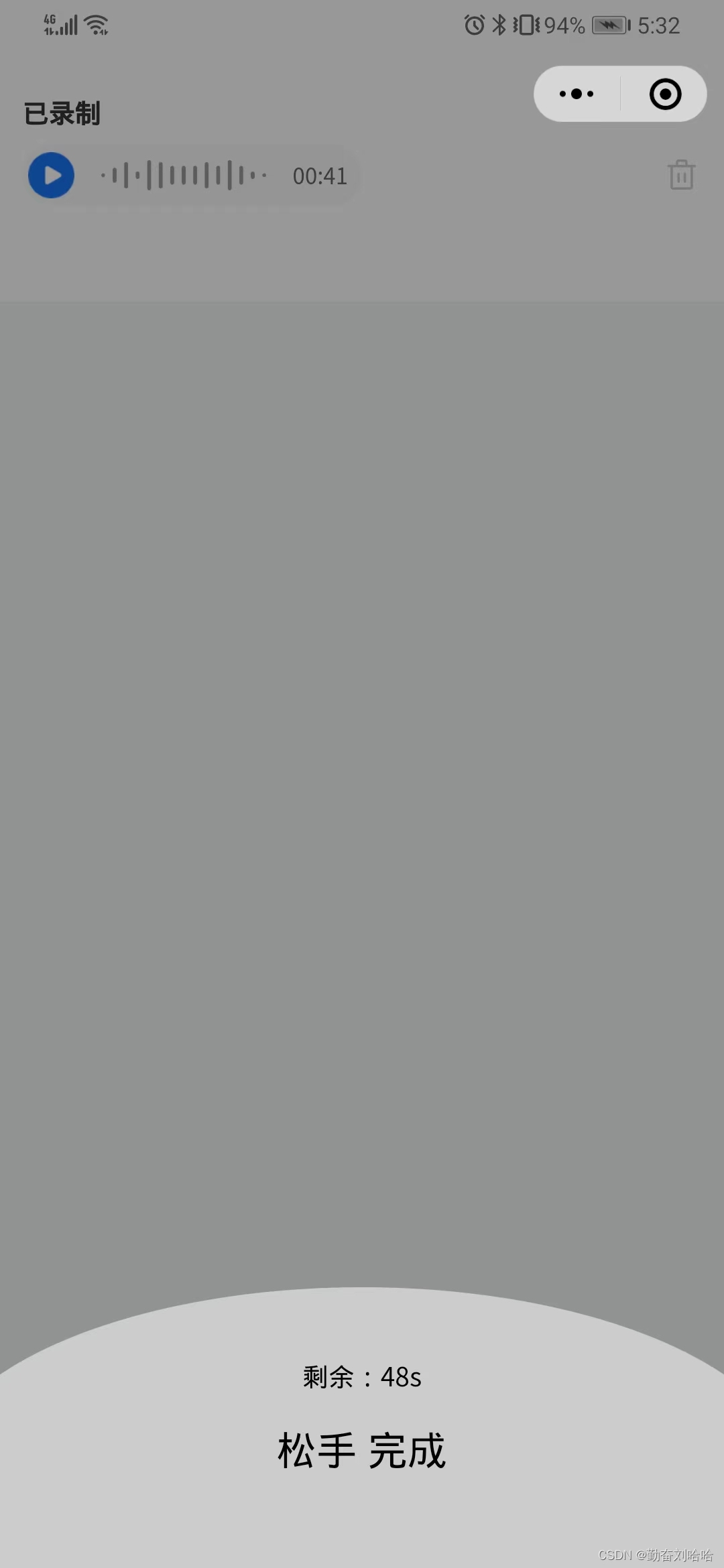
- 录音时显示录音倒计时,最多录制60秒,这个可以自己设置;
- 松开按钮录音结束,上传音频文件;
效果截图
主要代码
示例代码可以直接复制使用
    已录制


        {{ getVoiceDuration }}


      {{ '剩余:' + count + 's' }}
      松手 完成


import { ref, reactive, computed } from 'vue';
import { onLoad } from '@dcloudio/uni-app';
const recordAuth = ref(false) // 是否授权录音
// 录音
const recorderManager = uni.getRecorderManager() // 录音管理对象
let init: any = null // 录制时长计时器
let timer: any = null // 播放 录制倒计时
const count = ref(0) // 录制倒计时
const longPress = ref(1) // 1显示 按住说话 2显示 说话中
function recordingTimer(_time: any) {
  if (_time == undefined) {
    // 将计时器赋值给init
    init = setInterval(() => {
      time.value++
    }, 1000);
  } else {
    clearInterval(init)
  }
}
// 录音授权
function authorRecord() {
  uni.authorize({
    scope: 'scope.record',//这里选择scope.(录音、位置、用户信息...都可以)
    success() { // 允许授权
      console.log('已授权');
      recordAuth.value = true
    },
    fail() { // 拒绝授权
      uni.showModal({
        content: '检测到您没打开录音功能权限,是否去设置打开?',
        confirmText: "确认",
        confirmColor: '#1874f5',
        cancelText: '取消',
        success: (res) => {
          if (res.confirm) {
            uni.openSetting({ // opensetting 是调起设置页面的
						  success: (res) => {
                // 获取设置授权的状态
                const setting = res.authSetting;
                recordAuth.value = setting['scope.record'] || false
              }
            })
          } else {
            return false;
          }
        }
      })
      return false;
    }
  })
}
// 长按录音事件
function longpressBtn() {
  if(!recordAuth.value) {
    authorRecord()
    return;
  }
  longPress.value = 2;
  clearInterval(init) // 清除定时器
  countdown(60); // 倒计时
  recorderManager.onStop((res) => {
    tempFilePath.value = res.tempFilePath;
    recordingTimer(time.value);
  })
  const options = {
    duration: duration.value, // 指定录音的时长,单位 ms
    sampleRate: 16000, // 采样率
    numberOfChannels: 1, // 录音通道数
    encodeBitRate: 96000, // 编码码率
    format: 'mp3', // 音频格式,有效值 aac/mp3
    frameSize: 10, // 指定帧大小,单位 KB
  }
  recordingTimer(undefined);
  recorderManager.start(options);
  // 监听音频开始事件
  recorderManager.onStart((res) => {
    console.log(res)
  })
}
// 长按松开录音事件
function touchendBtn() {
  if(!recordAuth.value) {
    return;
  }

  longPress.value = 1;
  recorderManager.onStop((result) => {
    // 录音结束,可以先调用删除接口将旧录音删除,然后再上传最新的录音
    // 通过 uni.uploadFile 上传录音文件,filePath 传 voice.tempFilePath,指定要上传文件资源路径
    // 下面是示例,模拟上传成功之后的处理
    tempFilePath.value = "https://web-ext-storage.dcloud.net.cn/uni-app/ForElise.mp3";
    innerAudioContext.src = "https://web-ext-storage.dcloud.net.cn/uni-app/ForElise.mp3";
    time.value = 30;
    voiceAllTime.value = time.value;
  })
  recordingTimer(time.value)
  clearInterval(timer)
  recorderManager.stop();
}
// 音频
const innerAudioContext = uni.createInnerAudioContext() // audio 上下文对象
const time = ref(0) //录音时长
const duration = ref(60000) //录音最大值ms 60000/1分钟
const tempFilePath: any = ref('') //音频路径
const playStatus = ref(0) //录音播放状态 0:未播放 1:正在播放
const voiceAllTime = ref(0) //记录音频原始总时长
// 显示音频剩余秒数
const getVoiceDuration = computed(() => {
  let _t = String(time.value)
  let str = _t.length > 1 ? `00:${_t}` : `00:0${_t}`;
  return str
})
// 播放
function updateTime(val: number) {
  time.value = Number(val);
  timer = setInterval(() => {
    if (time.value >= 1) {
      time.value--
    } else {
      time.value = voiceAllTime.value
      clearInterval(timer);
    }
  }, 1000);
}
function playBtn() {
  //点击播放
  if (playStatus.value == 0) {
    playStatus.value = 1;
    innerAudioContext.play();
    updateTime(time.value); // 倒计时
  } else {
    playStatus.value = 0;
    innerAudioContext.pause()
    clearInterval(timer)
  }
  //播放结束
  innerAudioContext.onEnded(() => {
    playStatus.value = 0;
  })
}
// 删除录音
function delBtn() {
  // 调用接口删除
  // 下面是示例,删除后的重置
  time.value = 0
  tempFilePath.value = ''
  playStatus.value = 0
  time.value = voiceAllTime.value = 0
}
// 倒计时
function countdown(val: any) {
  count.value = Number(val);
  timer = setInterval(() => {
    if (count.value > 0) {
      count.value--
    } else {
      longPress.value = 1;
      clearInterval(timer);
    }
  }, 1000);
}
// 获取录音权限状态
function getRecordSetting() {
  uni.getSetting({
    success(res) {
      const setting = res.authSetting;
      recordAuth.value = setting['scope.record'] || false
    }
  })
}
// 设置录音
function setVoice() {
  // 进入页面时调用接口获取上传的路由文件路径
  // 下面是示例
  tempFilePath.value = "https://web-ext-storage.dcloud.net.cn/uni-app/ForElise.mp3";
  innerAudioContext.src = tempFilePath.value;
  time.value = 30;
  voiceAllTime.value = time.value;
}
onLoad(() => {
  setVoice()
  getRecordSetting()
})


.card {
  margin: 0 0 24rpx;
  padding: 100rpx 24rpx;
  background: #ffffff;
  .title {
    margin-bottom: 16rpx;
    color: #333333;
    font-size: 28rpx;
    font-weight: 700;
  }
  .desc {
    color: #666666;
    font-size: 24rpx;
    font-weight: 400;
  }
  .app-tags {
    .tag {
      padding: 12rpx 24rpx;
      border-radius: 28rpx;
      color: #666666;
      font-size: 24rpx;
      font-weight: 400;
      background: #f8f8f8;
    }
  }
  .player {
    padding: 8rpx 16rpx 8rpx 8rpx;
    width: 354rpx;
    height: 64rpx;
    border-radius: 40rpx;
    background: #f8f8f8;
    .icon-play {
      width: 48rpx;
      height: 48rpx;
    }
    .icon-sound {
      width: 172rpx;
      height: 32rpx;
    }
    .time {
      color: #666666;
      font-size: 24rpx;
      font-weight: 400;
    }
  }
}
.sbmit-btn {
  position: absolute;
  left: 0;
  right: 0;
  bottom: 114rpx;
  margin: auto;
  border-radius: 50%;
  width: 152rpx;
  height: 152rpx;
  background: #666666;
  box-shadow: 0 0 32rpx 0 #bababa40;
  z-index: 1;
  &::after {
    border: none;
  }
  .inner {
    position: absolute;
    top: 0;
    left: 0;
    right: 0;
    bottom: 0;
    margin: auto;
    border-radius: 50%;
    width: 52rpx;
    height: 52rpx;
    background: #ffffff;
  }
}
.prompt-layer {
  position: absolute;
  left: 0;
  top: 0;
  width: 100%;
  height: 100%;
  background: rgba(0, 0, 0, 0.4);
  z-index: 5;
  .prompt-popup {
    position: absolute;
    left: 0;
    bottom: 0;
    width: 100%;
    height: 220rpx;
    // line-height: 200rpx;
    color: #000000;
    font-size: 28rpx;
    font-weight: 400;
    text-align: center;
    &::after {
      content: '';
      position: absolute;
      left: -10%;
      bottom: -52%;
      border-radius: 50%; //顶部圆弧,底部圆弧: 0 0 50% 50%
      width: 120%;
      height: 185%;
      background: #cccccc;
      z-index: -1;
    }
  }
}
问题记录
在调用录音等这些需要授权的接口之前,一定要校验是否用户已授权
- 长按录音时,之前未校验是否已授权录音权限,一些人在使用时会出各种诡异现象,录音始终录制不成功,刚开始以为是代码逻辑问题,排查一圈之后才意识到是授权原因;
- 第一次在调用 recorderManager 对象开始录音之前,微信会弹出录音授权弹窗,如果这时拒绝授权,后面再长按录音按钮不会二次弹出,需要用户点击小程序右上角三个点进设置手动开启录音授权,在开始录音前校验是否已得到授权就解决这个问题了。
- 在进入页面的时候查询接口,如果有已上传的录音,显示上传音频文件,支持播放、暂停、删除功能;
免责声明:我们致力于保护作者版权,注重分享,被刊用文章因无法核实真实出处,未能及时与作者取得联系,或有版权异议的,请联系管理员,我们会立即处理! 部分文章是来自自研大数据AI进行生成,内容摘自(百度百科,百度知道,头条百科,中国民法典,刑法,牛津词典,新华词典,汉语词典,国家院校,科普平台)等数据,内容仅供学习参考,不准确地方联系删除处理! 图片声明:本站部分配图来自人工智能系统AI生成,觅知网授权图片,PxHere摄影无版权图库和百度,360,搜狗等多加搜索引擎自动关键词搜索配图,如有侵权的图片,请第一时间联系我们,邮箱:ciyunidc@ciyunshuju.com。本站只作为美观性配图使用,无任何非法侵犯第三方意图,一切解释权归图片著作权方,本站不承担任何责任。如有恶意碰瓷者,必当奉陪到底严惩不贷!


