
nvim(LazyVim)配置C++调试环境(nvim-dap + gdb14) 2024年

时间:2024年1月6日
环境
ubuntu23.04
nvim 0.9.4,配置基于LazyVim
关于DAP
DAP(Debug Adapter Protocol)是一种将调试抽象化的协议,和LSP(Language Server Protocol)类似,实现了DAP协议的前端可以用统一的方式与实现了相同协议的各种不同后端进行通信。比如在nvim中,我们可以使用`nvim-dap`插件来实现调试功能。
调试器的选择
不管你使用什么语言,最好都去官网看一手资料,这样是最不容易被过时的教程误导的。Debug Adapter installation · mfussenegger/nvim-dap Wiki · GitHub
在我写下这篇文章时,C/C++的debuger有四种选择
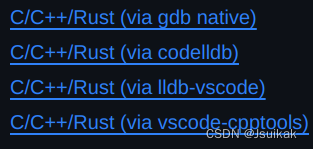
其中vscode cpptools就是VSCode中的调试工具,配置啥的应该都一样,熟悉VSCode配置的可以考虑这个
这里我用的是gdb,因为我个人比较倾向于使用原有的生态
但是gdb14才有dap的支持,我当前的ubuntu23.04的apt只有gdb13,所以要多一个编译源码的麻烦;
编译安装gdb14
官网:
https://www.sourceware.org/gdb/
这里还遇到了一个小坑
不知道为什么download会跳转到上级目录的download,结果还404

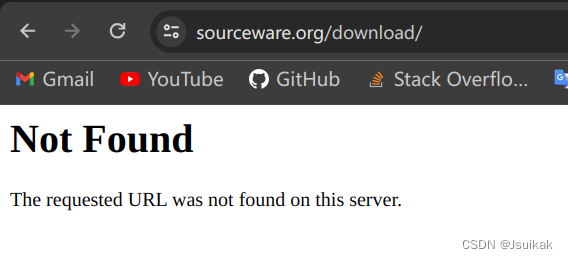
正确的网址应该是这个https://www.sourceware.org/gdb/download/
我下载了这里的gdb-14.1.tar.xz
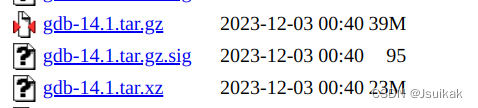
解压得到gdb-14.1的目录。
从源码编译gdb的教程网上有很多,也比较简单,我这里随便讲一下我的过程
- 在gdb14.1目录下mkdir build ; cd build
- 运行../configure [--参数] 它会根据你给的参数(比如安装路径前缀、是否生成tui版本(--enable-tui))在./下生成makefile
- 执行make,一堆输出信息,最后突然失败,找不到原因。于是尝试将标准输出重定向到临时文件。
make -j32 >tmplog
然后终端(应该是标准错误流的输出)提示makeinfo: not found。
这种情况就要安装sudo apt install texinfo
继续尝试发现还是缺少依赖,按照错误提示安装即可
我这里运行了sudo apt install libncurses-dev libgmp-dev
顺带一提,很多常见的依赖库都可以用apt install libxxx-dev的方式安装。
比如C/C++连接mysql需要,sudo apt install libmysqlclient-dev即可。它会在你的/usr/include下创建目录,你的C程序就看到他们了。
-
执行make install这个操作会改变默认的gdb,所以要考虑下你自己的需求。
-
检查gdb版本

-
可以试试gdb -i dap,gdb14才能正常运行
配置nvim-dap
~/.config/nvim/lua/plugins/dap.lua
我的配置,供参考
return {
  {
    "mfussenegger/nvim-dap",
    event = "VeryLazy",
    keys = {
      -- add a keymap to browshttps://github.com/cmu-db/bustub.gite plhttps://github.com/cmu-db/bustub.gitugin files
      -- stylua: ignore
      {
        "",
        function() require("dap").continue() end,
        desc = "launch/continue gdb",
      },
      {
        "",
        function()
          require("dap").step_over()
        end,
        desc = "单步调试",
      },
      {
        "",
        function()
          require("dap").step_into()
        end,
        desc = "步入",
      },
      {
        "",
        function()
          require("dap").step_out()
        end,
        desc = "步出",
      },
      {
        "",
        function ()
          require("dap").terminate()
        end,
        desc = "终止程序"
      }
    },
    config = function()
      local dap = require("dap")
      dap.adapters.gdb = {
        type = "executable",
        executable = {
          command = vim.fn.exepath("gdb"),
          args = { "-i", "dap" },
        },
      }
      dap.configurations.c = {
        name = "Launch file",
        type = "gdb",
        request = "launch",
        gdbpath = function()
          return "/usr/local/bin/gdb"
        end,
        cwd = "${workspaceFolder}",
      }
    end,
  },
  {
    "rcarriga/nvim-dap-ui",
    dependencies = {
      "mfussenegger/nvim-dap",
    },
    opts = function()
      local dap, dapui = require("dap"), require("dapui")
      dap.listeners.before.attach.dapui_config = function()
        dapui.open()
      end
      dap.listeners.before.launch.dapui_config = function()
        dapui.open()
      end
      dap.listeners.before.event_terminated.dapui_config = function()
        dapui.close()
      end
      dap.listeners.before.event_exited.dapui_config = function()
        dapui.close()
      end
      return {
        enabled = true, -- enable this plugin (the default)
        enabled_commands = true, -- create commands DapVirtualTextEnable, DapVirtualTextDisable, DapVirtualTextToggle, (DapVirtualTextForceRefresh for refreshing when debug adapter did not notify its termination)
        highlight_changed_variables = true, -- highlight changed values with NvimDapVirtualTextChanged, else always NvimDapVirtualText
        highlight_new_as_changed = false, -- highlight new variables in the same way as changed variables (if highlight_changed_variables)
        show_stop_reason = true, -- show stop reason when stopped for exceptions
        commented = false, -- prefix virtual text with comment string
        only_first_definition = true, -- only show virtual text at first definition (if there are multiple)
        all_references = false, -- show virtual text on all all references of the variable (not only definitions)
        filter_references_pattern = "


