
【Nginx】Nginx启动显示80端口占用问题的解决方案
温馨提示:这篇文章已超过375天没有更新,请注意相关的内容是否还可用!



目录
🌅1. 问题描述
🌊2. 解决方案
🌅1. 问题描述
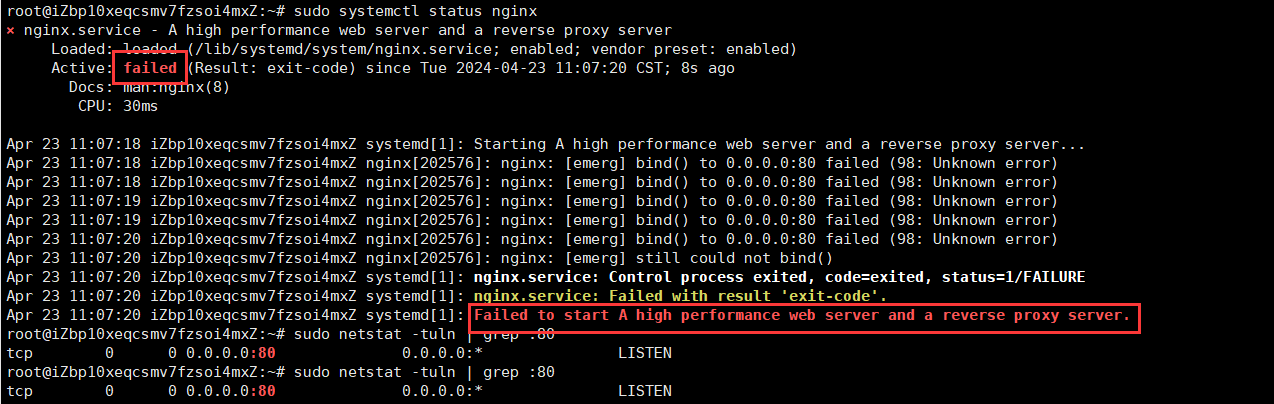
在启动nginx服务的时候显示内容如下:
sudo systemctl status nginx
问题出现原因:
根据日志显示,Nginx 服务启动失败,主要原因是无法绑定到端口 80。这通常是由于该端口已被
其他进程占用而导致的。
🌊2. 解决方案
要解决此问题,可以执行以下步骤:
确认端口 80 是否被其他进程占用。可以使用以下命令检查:
sudo netstat -tuln | grep :80
该命令会列出正在监听端口 80 的进程。如果有其他进程在使用该端口,显示如下:

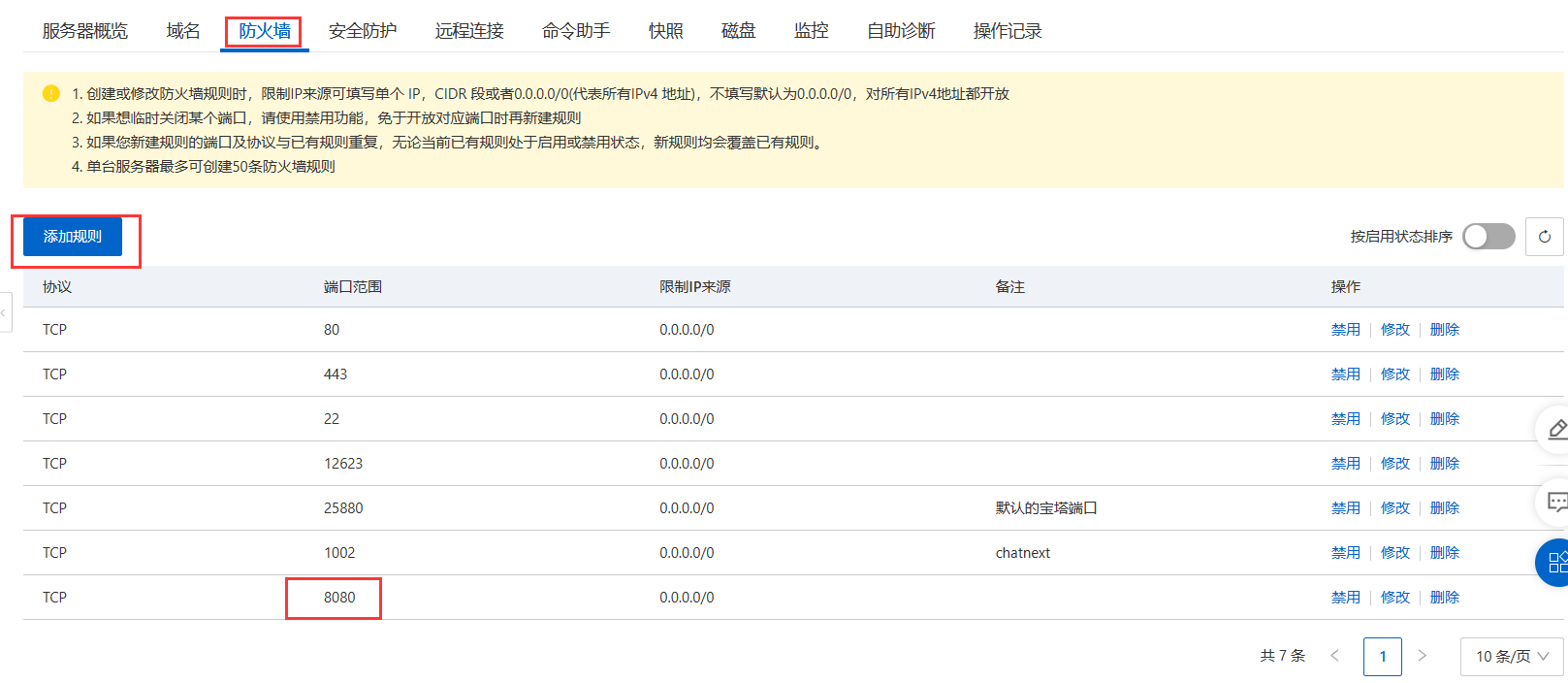
打开配置文件:可以将80端口【默认端口】修改为 8080 端口【当然也可以是其他的,不过要记得去防火墙添加规则(即添加端口)】
比如我添加的是 8080 端口,则添加规则如下(红框内容):
可以使用以下命令打开配置文件:
sudo nano /etc/nginx/sites-available/*
我的配置文件内容如下【版本不同当然配置文件不同】:
##
# You should look at the following URL's in order to grasp a solid understanding
# of Nginx configuration files in order to fully unleash the power of Nginx.
# https://www.nginx.com/resources/wiki/start/
# https://www.nginx.com/resources/wiki/start/topics/tutorials/config_pitfalls/
# https://wiki.debian.org/Nginx/DirectoryStructure
#
# In most cases, administrators will remove this file from sites-enabled/ and
# leave it as reference inside of sites-available where it will continue to be
# updated by the nginx packaging team.
#
# This file will automatically load configuration files provided by other
# applications, such as Drupal or Wordpress. These applications will be made
# available underneath a path with that package name, such as /drupal8.
#
# Please see /usr/share/doc/nginx-doc/examples/ for more detailed examples.
##
# Default server configuration
#
server {
	listen 80 default_server;
	listen [::]:80 default_server;
	# SSL configuration
	#
	# listen 443 ssl default_server;
	# listen [::]:443 ssl default_server;
	#
	# Note: You should disable gzip for SSL traffic.
	# See: https://bugs.debian.org/773332
	#
	# Read up on ssl_ciphers to ensure a secure configuration.
	# See: https://bugs.debian.org/765782
	#
	# Self signed certs generated by the ssl-cert package
	# Don't use them in a production server!
	#
	# include snippets/snakeoil.conf;
	root /var/www/html;
	# Add index.php to the list if you are using PHP
	index index.html index.htm index.nginx-debian.html;
	server_name _;
	location / {
		# First attempt to serve request as file, then
		# as directory, then fall back to displaying a 404.
		try_files $uri $uri/ =404;
	}
	# pass PHP scripts to FastCGI server
	#
	#location ~ \.php$ {
	#	include snippets/fastcgi-php.conf;
	#
	#	# With php-fpm (or other unix sockets):
	#	fastcgi_pass unix:/run/php/php7.4-fpm.sock;
	#	# With php-cgi (or other tcp sockets):
	#	fastcgi_pass 127.0.0.1:9000;
	#}
	# deny access to .htaccess files, if Apache's document root
	# concurs with nginx's one
	#
	#location ~ /\.ht {
	#	deny all;
	#}
}
# Virtual Host configuration for example.com
#
# You can move that to a different file under sites-available/ and symlink that
# to sites-enabled/ to enable it.
#
#server {
#	listen 80;
#	listen [::]:80;
#
#	server_name example.com;
#
#	root /var/www/example.com;
#	index index.html;
#
#	location / {
#		try_files $uri $uri/ =404;
#	}
#}
将里面的代码模块
server {
    listen 80 default_server;
    listen [::]:80 default_server;
修改成
server {
    listen 8080 default_server;
    listen [::]:8080 default_server;
完成修改!【如果其他地方还有 80 的修改成 8080 即可】。
启动Nginx服务
sudo systemctl start nginx
设置Nginx服务自启动:
sudo systemctl enable nginx
验证Nginx是否运行:
sudo systemctl status nginx

如果一切正常,输出应该是“Active: active (running)”或者类似的信息。

免责声明:我们致力于保护作者版权,注重分享,被刊用文章因无法核实真实出处,未能及时与作者取得联系,或有版权异议的,请联系管理员,我们会立即处理! 部分文章是来自自研大数据AI进行生成,内容摘自(百度百科,百度知道,头条百科,中国民法典,刑法,牛津词典,新华词典,汉语词典,国家院校,科普平台)等数据,内容仅供学习参考,不准确地方联系删除处理! 图片声明:本站部分配图来自人工智能系统AI生成,觅知网授权图片,PxHere摄影无版权图库和百度,360,搜狗等多加搜索引擎自动关键词搜索配图,如有侵权的图片,请第一时间联系我们,邮箱:ciyunidc@ciyunshuju.com。本站只作为美观性配图使用,无任何非法侵犯第三方意图,一切解释权归图片著作权方,本站不承担任何责任。如有恶意碰瓷者,必当奉陪到底严惩不贷!


