
JAVA实现人工智能,采用框架SpringAI
Spring AI介绍
Spring
AI是AI工程师的一个应用框架,它提供了一个友好的API和开发AI应用的抽象,旨在简化AI应用的开发工序,例如开发一款基于ChatGPT的对话应用程序。
- 项目地址:https://github.com/spring-projects-experimental/spring-ai
- 文档地址:https://docs.spring.io/spring-ai/reference/
目前该项目已经集成了OpenAI、Azure OpenAI、Hugging
Face、Ollama等API。不过,对于集成了OpenAI接口的项目,只要再搭配One-API项目,就可以调用目前主流的大语言模型了。
使用介绍
在介绍如何使用Spring AI开发一个对话接口之前,我先介绍下ChatGPT应用的开发原理。
首先,ChatGPT是OpenAI推出的一款生成式人工智能大语言模型,OpenAI为了ChatGPT能够得到广泛应用,向开发者提供了ChatGPT的使用接口,开发者只需使用OpenAI为开发者提供的Key,向OpenAI提供的接口地址发起各种形式的请求就可以使用ChatGPT。因此,开发一款ChatGPT应用并不是让你使用人工智能那套技术进行训练和开发,而是作为搬运工,通过向OpenAI提供的ChatGPT接口发起请求来获取ChatGPT响应,基于这一流程来开发的。
第一种方式采用openai
1.聊天问答
    4.0.0

        org.springframework.boot
        spring-boot-starter-parent
        3.2.4


    com.example
    ai
    0.0.1-SNAPSHOT
    ai
    ai

        17


                org.springframework.ai
                spring-ai-bom
                0.8.1-SNAPSHOT
                pom
                import


            org.springframework.boot
            spring-boot-starter


            org.springframework.boot
            spring-boot-starter-web


            org.springframework.boot
            spring-boot-starter-test
            test


            org.springframework.ai
            spring-ai-openai


            org.springframework.ai
            spring-ai-openai-spring-boot-starter


            org.springframework.ai
            spring-ai-ollama-spring-boot-starter


            spring-milestones
            Spring Milestones
            https://repo.spring.io/milestone

                false


            spring-snapshots
            Spring Snapshots
            https://repo.spring.io/snapshot

                false


                org.springframework.boot
                spring-boot-maven-plugin
application.yml
spring:
  ai:
    openai:
      api-key: sk-xxxxxxxxxxxxxxxxxxxxxxxxxxxxxxxx
      base-url: xxxxxxxxxxxxxxxxxxx
      chat:
        options:
          #model: gpt-3.5-turbo
          temperature: 0.3F
controller
/**
     * spring-ai 自动装配的,可以直接注入使用
     */
    @Resource
    private OpenAiChatClient openAiChatClient;
    /**
     * 调用OpenAI的接口
     *
     * @param msg 我们提的问题
     * @return
     */
    @RequestMapping(value = "/ai/chat")
    public String chat(@RequestParam(value = "msg") String msg) {
        String called = openAiChatClient.call(msg);
        return called;
    }
    /**
     * 调用OpenAI的接口
     *
     * @param msg 我们提的问题
     * @return
     */
    @RequestMapping(value = "/ai/chat2")
    public Object chat2(@RequestParam(value = "msg") String msg) {
        ChatResponse chatResponse = openAiChatClient.call(new Prompt(msg));
        return chatResponse.getResult().getOutput().getContent();
    }
    /**
     * 调用OpenAI的接口
     *
     * @param msg 我们提的问题
     * @return
     */
    @RequestMapping(value = "/ai/chat3")
    public Object chat3(@RequestParam(value = "msg") String msg) {
        //可选参数在配置文件中配置了,在代码中也配置了,那么以代码的配置为准,也就是代码的配置会覆盖掉配置文件中的配置
        ChatResponse chatResponse = openAiChatClient.call(new Prompt(msg, OpenAiChatOptions.builder()
                //.withModel("gpt-4-32k") //gpt的版本,32k是参数量
                .withTemperature(0.4F) //温度越高,回答得比较有创新性,但是准确率会下降,温度越低,回答的准确率会更好
                .build()));
        return chatResponse.getResult().getOutput().getContent();
    }
    /**
     * 调用OpenAI的接口
     *
     * @param msg 我们提的问题
     * @return
     */
    @RequestMapping(value = "/ai/chat4")
    public Object chat4(@RequestParam(value = "msg") String msg) {
        //可选参数在配置文件中配置了,在代码中也配置了,那么以代码的配置为准,也就是代码的配置会覆盖掉配置文件中的配置
        Flux flux = openAiChatClient.stream(new Prompt(msg, OpenAiChatOptions.builder()
                //.withModel("gpt-4-32k") //gpt的版本,32k是参数量
                .withTemperature(0.4F) //温度越高,回答得比较有创新性,但是准确率会下降,温度越低,回答的准确率会更好
                .build()));
        flux.toStream().forEach(chatResponse -> {
            System.out.println(chatResponse.getResult().getOutput().getContent());
        });
        return flux.collectList(); //数据的序列,一序列的数据,一个一个的数据返回
    }
2.图片问答
spring:
  ai:
    openai:
      api-key: ${api-key}
      base-url: ${base-url}
      image:
        options:
          model: gpt-4-dalle
          quality: hd
          n: 1
          height: 1024
          width: 1024
controller
package com.bjpowernode.controller;
import jakarta.annotation.Resource;
import org.springframework.ai.image.ImagePrompt;
import org.springframework.ai.image.ImageResponse;
import org.springframework.ai.openai.OpenAiImageClient;
import org.springframework.ai.openai.OpenAiImageOptions;
import org.springframework.web.bind.annotation.RequestMapping;
import org.springframework.web.bind.annotation.RequestParam;
import org.springframework.web.bind.annotation.RestController;
@RestController
public class ImageController {
    @Resource
    private OpenAiImageClient openAiImageClient;
    @RequestMapping("/ai/image")
    private Object image(@RequestParam(value = "msg") String msg) {
        ImageResponse imageResponse = openAiImageClient.call(new ImagePrompt(msg));
        System.out.println(imageResponse);
        String imageUrl = imageResponse.getResult().getOutput().getUrl();
        //把图片进行业务处理
        return imageResponse.getResult().getOutput();
    }
    @RequestMapping("/ai/image2")
    private Object image2(@RequestParam(value = "msg") String msg) {
        ImageResponse imageResponse = openAiImageClient.call(new ImagePrompt(msg, OpenAiImageOptions.builder()
                .withQuality("hd") //高清图像
                .withN(1)  //生成1张图片
                .withHeight(1024) //生成的图片高度
                .withWidth(1024) //生成的图片宽度
                .build()));
        System.out.println(imageResponse);
        String imageUrl = imageResponse.getResult().getOutput().getUrl();
        //把图片进行业务处理
        return imageResponse.getResult().getOutput();
    }
}
3.录音转文字
spring:
  ai:
    openai:
      api-key: ${api-key}
      base-url: ${base-url}
controller
package com.bjpowernode.controller;
import jakarta.annotation.Resource;
import org.springframework.ai.openai.OpenAiAudioTranscriptionClient;
import org.springframework.core.io.ClassPathResource;
import org.springframework.web.bind.annotation.RequestMapping;
import org.springframework.web.bind.annotation.RestController;
@RestController
public class TranscriptionController {
    @Resource
    private OpenAiAudioTranscriptionClient openAiAudioTranscriptionClient;
    @RequestMapping(value = "/ai/transcription")
    public Object transcription() {
        //org.springframework.core.io.Resource audioFile = new ClassPathResource("jfk.flac");
        org.springframework.core.io.Resource audioFile = new ClassPathResource("cat.mp3");
        String called = openAiAudioTranscriptionClient.call(audioFile);
        System.out.println(called);
        return called;
    }
}
4.文字转录音
package com.bjpowernode.controller;
import com.bjpowernode.util.FileUtils;
import jakarta.annotation.Resource;
import org.springframework.ai.openai.OpenAiAudioSpeechClient;
import org.springframework.web.bind.annotation.RequestMapping;
import org.springframework.web.bind.annotation.RestController;
@RestController
public class TTSController {
    @Resource
    private OpenAiAudioSpeechClient openAiAudioSpeechClient;
    @RequestMapping(value = "/ai/tts")
    public Object tts() {
        String text = "2023年全球汽车销量重回9000万辆大关,同比2022年增长11%。分区域看,西欧(14%)、中国(12%)两大市场均实现两位数增长。面对这样亮眼的数据,全球汽车行业却都对2024年的市场前景表示悲观,宏观数据和企业体感之前的差异并非中国独有,在汽车市场中,这是共性问题。";
        byte[] bytes = openAiAudioSpeechClient.call(text);
        FileUtils.save2File("D:\\SpringAI\\test.mp3", bytes);
        return "OK";
    }
    @RequestMapping(value = "/ai/tts2")
    public Object tts2() {
        String text = "Spring AI is an application framework for AI engineering. Its goal is to apply to the AI domain Spring ecosystem design principles such as portability and modular design and promote using POJOs as the building blocks of an application to the AI domain.";
        byte[] bytes = openAiAudioSpeechClient.call(text);
        FileUtils.save2File("D:\\SpringAI\\test2.mp3", bytes);
        return "OK";
    }
}
package com.bjpowernode.util; import java.io.*; public class FileUtils { public static boolean save2File(String fname, byte[] msg) { OutputStream fos = null; try{ File file = new File(fname); File parent = file.getParentFile(); boolean bool; if ((!parent.exists()) && (!parent.mkdirs())) { return false; } fos = new FileOutputStream(file); fos.write(msg); fos.flush(); return true; }catch (FileNotFoundException e){ return false; }catch (IOException e){ e.printStackTrace(); return false; } finally{ if (fos != null) { try{ fos.close(); }catch (IOException e) {} } } } }5.多模态AI问答
package com.bjpowernode.controller;
import jakarta.annotation.Resource;
import org.springframework.ai.chat.ChatClient;
import org.springframework.ai.chat.ChatResponse;
import org.springframework.ai.chat.messages.Media;
import org.springframework.ai.chat.messages.UserMessage;
import org.springframework.ai.chat.prompt.Prompt;
import org.springframework.ai.openai.OpenAiChatOptions;
import org.springframework.ai.openai.api.OpenAiApi;
import org.springframework.util.MimeTypeUtils;
import org.springframework.web.bind.annotation.RequestMapping;
import org.springframework.web.bind.annotation.RestController;
import java.util.List;
@RestController
public class MultiModelController {
    @Resource
    private ChatClient chatClient;
    @RequestMapping(value = "/ai/multi")
    public Object multi(String msg, String imageUrl) {
        UserMessage userMessage = new UserMessage(msg, List.of(new Media(MimeTypeUtils.IMAGE_PNG, imageUrl)));
        ChatResponse response = chatClient.call(new Prompt(userMessage, OpenAiChatOptions.builder()
                .withModel(OpenAiApi.ChatModel.GPT_4_VISION_PREVIEW.getValue())
                .build()));
        System.out.println(response.getResult().getOutput());
        return response.getResult().getOutput().getContent();
    }
}
第二种方式采用Ollama
Spring AI 不仅提供了与 OpenAI 进行API交互,同样支持与 Ollama 进行API交互。Ollama
是一个发布在GitHub上的项目,专为运行、创建和分享大型语言模型而设计,可以轻松地在本地启动和运行大型语言模型。
windows可以下载ollama,你可以用linux都行,我这里图方便
https://ollama.com/download
下载好了打开命令台 你可以自己选model
https://ollama.com/library
ollama run llama2-chinese
然后yml配置
spring:
  ai:
    ollama:
      base-url: http://127.0.0.1:11434
      chat:
        # 要跟你刚刚ollama run llama2-chinese 后面这个模块一模一样才行
        model: llama2-chinese
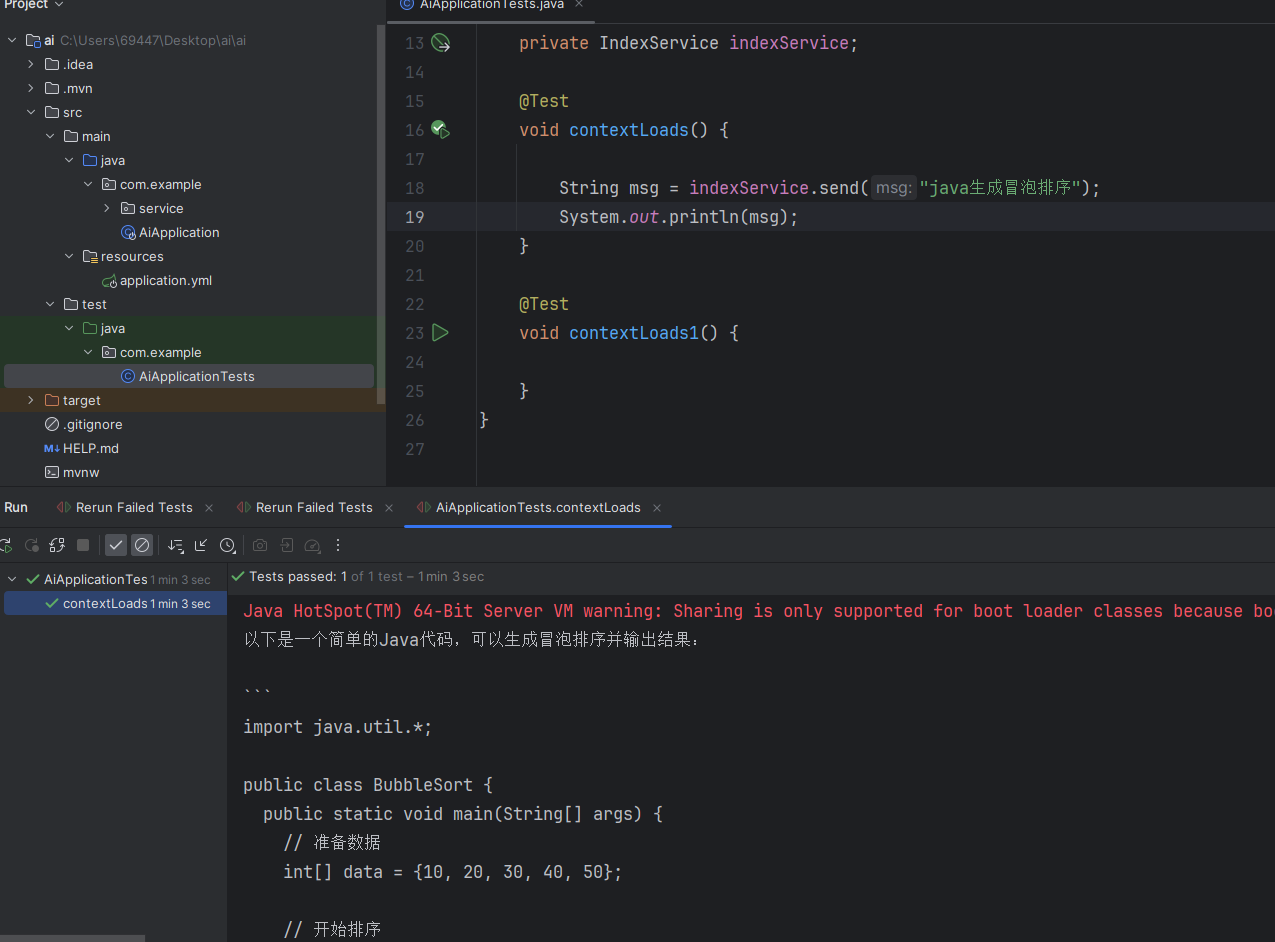
IndexServiceImpl
package com.example.service.impl;
import com.example.service.IndexService;
import org.springframework.ai.ollama.OllamaChatClient;
import org.springframework.ai.openai.OpenAiChatClient;
import org.springframework.beans.factory.annotation.Autowired;
import org.springframework.stereotype.Service;
@Service
public class IndexServiceImpl implements IndexService {
    @Autowired
    private OllamaChatClient ollamaChatClient;
    @Override
    public String send(String msg) {
     /*ChatResponse chatResponse = ollamaChatClient.call(new Prompt(msg, OllamaOptions.create()
                .withModel("qwen:0.5b-chat") //使用哪个大模型
                .withTemperature(0.4F))); //温度,温度值越高,准确率下降,温度值越低,准确率会提高
        System.out.println(chatResponse.getResult().getOutput().getContent());
        return chatResponse.getResult().getOutput().getContent();*/
//        Prompt prompt = new Prompt(new UserMessage(msg));
//        return ollamaChatClient.stream(prompt);
        return ollamaChatClient.call(msg);
    }
}
linux部署ollama
docker run -d -v /root/ollama:/root/.ollama -e OLLAMA_ORIGINS='*' -p 11434:11434 --name ollama ollama/ollama
Open WebUI
https://github.com/open-webui/open-webui
lobe-chat
https://github.com/lobehub/lobe-chat
docker run -d -p 31526:3210 -e OPENAI_API_KEY=sk-xxxx -e ACCESS_CODE=lobe66 --name lobe-chat lobehub/lobe-chat
免责声明:我们致力于保护作者版权,注重分享,被刊用文章因无法核实真实出处,未能及时与作者取得联系,或有版权异议的,请联系管理员,我们会立即处理! 部分文章是来自自研大数据AI进行生成,内容摘自(百度百科,百度知道,头条百科,中国民法典,刑法,牛津词典,新华词典,汉语词典,国家院校,科普平台)等数据,内容仅供学习参考,不准确地方联系删除处理! 图片声明:本站部分配图来自人工智能系统AI生成,觅知网授权图片,PxHere摄影无版权图库和百度,360,搜狗等多加搜索引擎自动关键词搜索配图,如有侵权的图片,请第一时间联系我们,邮箱:ciyunidc@ciyunshuju.com。本站只作为美观性配图使用,无任何非法侵犯第三方意图,一切解释权归图片著作权方,本站不承担任何责任。如有恶意碰瓷者,必当奉陪到底严惩不贷!


