
QT中基于TCP的网络通信
QT中基于TCP的网络通信
- QTcpServer
- 公共成员函数
- 信号
- QTcpSocket
- 公共成员函数
- 信号
- 通信流程
- 服务器端
- 通信流程
- 代码
- 客户端
- 通信流程
- 代码
- 多线程网络通信
- SendFileClient
- SendFileServer
使用Qt提供的类进行基于TCP的套接字通信需要用到两个类:
QTcpServer:服务器类,用于监听客户端连接以及和客户端建立连接。
QTcpSocket:通信的套接字类,客户端、服务器端都需要使用。
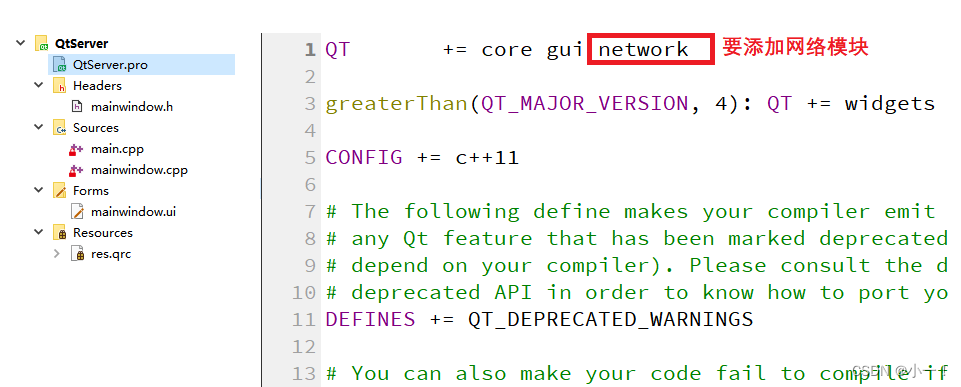
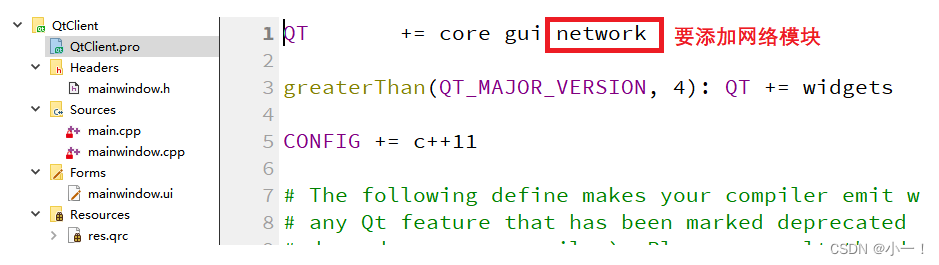
这两个套接字通信类都属于网络模块network。
QTcpServer
QTcpServer类 用于监听客户端连接以及和客户端建立连接,在使用之前先介绍一下这个类提供的一些常用API函数
公共成员函数
构造函数
QTcpServer::QTcpServer(QObject *parent = Q_NULLPTR);
给监听的套接字设置监听
bool QTcpServer::listen(const QHostAddress &address = QHostAddress::Any, quint16 port = 0);
// 判断当前对象是否在监听, 是返回true,没有监听返回false
bool QTcpServer::isListening() const;
// 如果当前对象正在监听返回监听的服务器地址信息, 否则返回 QHostAddress::Null
QHostAddress QTcpServer::serverAddress() const;
// 如果服务器正在侦听连接,则返回服务器的端口; 否则返回0
quint16 QTcpServer::serverPort() const
参数:
address:通过类QHostAddress可以封装IPv4、IPv6格式的IP地址,QHostAddress::Any表示自动绑定
port:如果指定为0表示随机绑定一个可用端口。
返回值:绑定成功返回true,失败返回false
QTcpSocket *QTcpServer::nextPendingConnection();
得到和客户端建立连接之后用于通信的QTcpSocket套接字对象,它是QTcpServer的一个子对象,当QTcpServer对象析构的时候会自动析构这个子对象,当然也可自己手动析构,建议用完之后自己手动析构这个通信的QTcpSocket对象。
bool QTcpServer::waitForNewConnection(int msec = 0, bool *timedOut = Q_NULLPTR);
阻塞等待客户端发起的连接请求,不推荐在单线程程序中使用,建议使用非阻塞方式处理新连接,即使用信号 newConnection() 。
参数:
msec:指定阻塞的最大时长,单位为毫秒(ms)
timeout:传出参数,如果操作超时timeout为true,没有超时timeout为false
信号
当接受新连接导致错误时,将发射如下信号。socketError参数描述了发生的错误相关的信息。
[signal] void QTcpServer::acceptError(QAbstractSocket::SocketError socketError);
每次有新连接可用时都会发出 newConnection() 信号。
[signal] void QTcpServer::newConnection();
QTcpSocket
QTcpSocket是一个套接字通信类,不管是客户端还是服务器端都需要使用。在Qt中发送和接收数据也属于IO操作(网络IO),先来看一下这个类的继承关系:

公共成员函数
构造函数
QTcpSocket::QTcpSocket(QObject *parent = Q_NULLPTR);
连接服务器,需要指定服务器端绑定的IP和端口信息。
[virtual] void QAbstractSocket::connectToHost(const QString &hostName, quint16 port, OpenMode openMode = ReadWrite, NetworkLayerProtocol protocol = AnyIPProtocol);
[virtual] void QAbstractSocket::connectToHost(const QHostAddress &address, quint16 port, OpenMode openMode = ReadWrite);
在Qt中不管调用读操作函数接收数据,还是调用写函数发送数据,操作的对象都是本地的由Qt框架维护的一块内存。因此,调用了发送函数数据不一定会马上被发送到网络中,调用了接收函数也不是直接从网络中接收数据,关于底层的相关操作是不需要使用者来维护的。
接收数据
// 指定可接收的最大字节数 maxSize 的数据到指针 data 指向的内存中
qint64 QIODevice::read(char *data, qint64 maxSize);
// 指定可接收的最大字节数 maxSize,返回接收的字符串
QByteArray QIODevice::read(qint64 maxSize);
// 将当前可用操作数据全部读出,通过返回值返回读出的字符串
QByteArray QIODevice::readAll();
发送数据
// 发送指针 data 指向的内存中的 maxSize 个字节的数据
qint64 QIODevice::write(const char *data, qint64 maxSize);
// 发送指针 data 指向的内存中的数据,字符串以 \0 作为结束标记
qint64 QIODevice::write(const char *data);
// 发送参数指定的字符串
qint64 QIODevice::write(const QByteArray &byteArray);
信号
在使用QTcpSocket进行套接字通信的过程中,如果该类对象发射出readyRead()信号,说明对端发送的数据达到了,之后就可以调用 read 函数接收数据了。
[signal] void QIODevice::readyRead();
调用connectToHost()函数并成功建立连接之后发出connected()信号。
[signal] void QAbstractSocket::connected();
在套接字断开连接时发出disconnected()信号。
[signal] void QAbstractSocket::disconnected();
通信流程
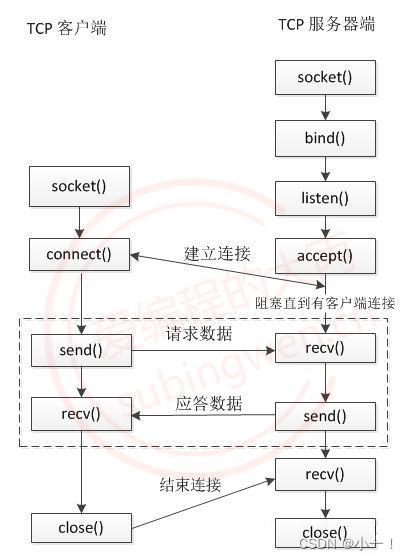
服务器端
通信流程
- 创建套接字服务器QTcpServer对象
- 通过QTcpServer对象设置监听,即:QTcpServer::listen()
- 基于QTcpServer::newConnection()信号检测是否有新的客户端连接
- 如果有新的客户端连接调用QTcpSocket
- *QTcpServer::nextPendingConnection()得到通信的套接字对象
- 使用通信的套接字对象QTcpSocket和客户端进行通信
代码
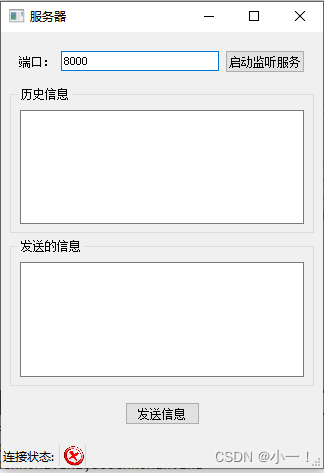
服务器端的窗口界面如下图所示:
QtServer.pro文件
mainwindow.h文件
#ifndef MAINWINDOW_H
#define MAINWINDOW_H
#include
#include
#include
#include
QT_BEGIN_NAMESPACE
namespace Ui { class MainWindow; }
QT_END_NAMESPACE
class MainWindow : public QMainWindow
{
    Q_OBJECT
public:
    MainWindow(QWidget *parent = nullptr);
    ~MainWindow();
private slots:
    void on_setListen_clicked();
    void on_sendMsg_clicked();
private:
    Ui::MainWindow *ui;
    QTcpServer* m_s;
    QTcpSocket* m_tcp;
    QLabel* m_status;
};
#endif // MAINWINDOW_H
main.cpp文件
#include "mainwindow.h"
#include
int main(int argc, char *argv[])
{
    QApplication a(argc, argv);
    MainWindow w;
    w.show();
    return a.exec();
}
mainwindow.cpp文件
#include "mainwindow.h"
#include "ui_mainwindow.h"
MainWindow::MainWindow(QWidget *parent)
    : QMainWindow(parent)
    , ui(new Ui::MainWindow)
{
    ui->setupUi(this);
    ui->port->setText("8000"); //先设置一个端口号
    setWindowTitle("服务器");
    //创建监听的服务器对象
    m_s = new QTcpServer(this); //指定父对象,不需要再去管内存的释放
    //等待客户端链接,连接上会发送一个信号newConnection
    connect(m_s,&QTcpServer::newConnection,this,[=](){
        m_tcp = m_s->nextPendingConnection(); //得到可供通讯的套接字对象
        m_status->setPixmap(QPixmap(":/connect.png").scaled(20,20)); //更改链接状态
        //检测是否可以接收数据
        connect(m_tcp,&QTcpSocket::readyRead,this,[=]()
        {
            QByteArray data = m_tcp->readAll(); //全部读出来
            ui->record->append("客户端say: " + data);  //显示在历史记录框中
        });
        //对端断开链接时会,TcpSocket会发送一个disconnect信号
        connect(m_tcp,&QTcpSocket::disconnected,this,[=]()
        {
            m_tcp->close(); //关闭套接字
            m_tcp->deleteLater(); //释放m_tcp
            m_status->setPixmap(QPixmap(":/disconnect.png").scaled(20,20)); //更改链接状态
        });
    });
    //状态栏
    m_status = new QLabel;
    //给标签设置图片
    m_status->setPixmap(QPixmap(":/disconnect.png").scaled(20,20));  //scaled设置图片大小
    //将标签设置到状态栏中
    ui->statusbar->addWidget(new QLabel("连接状态: "));
    ui->statusbar->addWidget(m_status);
}
MainWindow::~MainWindow()
{
    delete ui;
}
void MainWindow::on_setListen_clicked()
{
    unsigned short port = ui->port->text().toUShort();
    m_s->listen(QHostAddress::Any,port); //开始监听
    ui->setListen->setDisabled(true);  //监听之后设置为不可用状态
}
void MainWindow::on_sendMsg_clicked()
{
    QString msg = ui->msg->toPlainText(); //以纯文本的方式把数据读出来
    m_tcp->write(msg.toUtf8());
    ui->record->append("服务器say: " + msg);  //显示在历史记录框中
}
mainwindow.ui文件
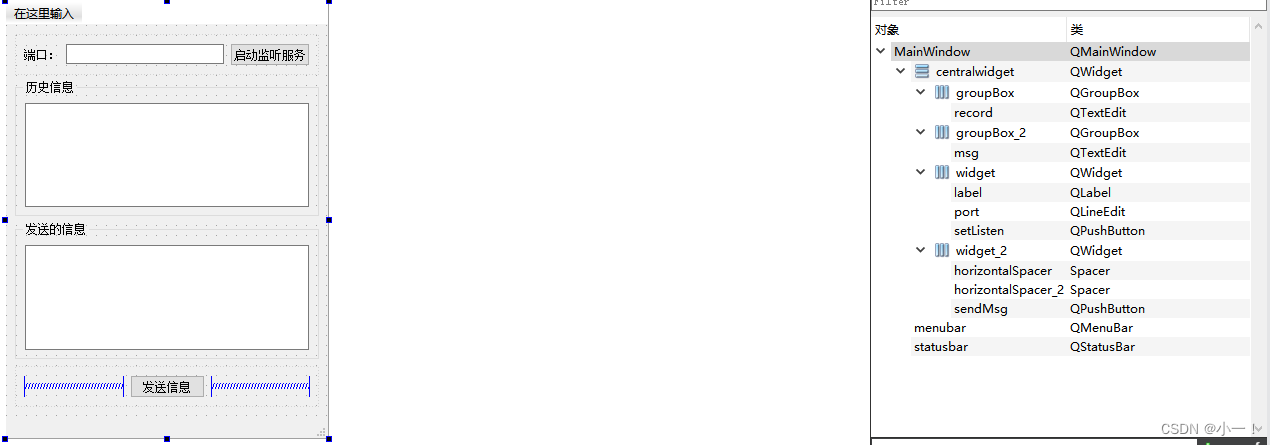
客户端
通信流程
- 创建通信的套接字类QTcpSocket对象
- 使用服务器端绑定的IP和端口连接服务器QAbstractSocket::connectToHost()
- 使用QTcpSocket对象和服务器进行通信
代码
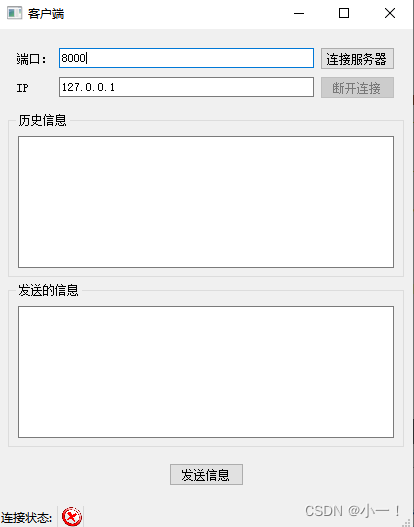
客户端的窗口界面如下图所示:
QtClient.pro文件
mainwindow.h文件
#ifndef MAINWINDOW_H
#define MAINWINDOW_H
#include
#include
#include
QT_BEGIN_NAMESPACE
namespace Ui { class MainWindow; }
QT_END_NAMESPACE
class MainWindow : public QMainWindow
{
    Q_OBJECT
public:
    MainWindow(QWidget *parent = nullptr);
    ~MainWindow();
private slots:
    void on_sendMsg_clicked();
    void on_connect_clicked();
    void on_disconnect_clicked();
private:
    Ui::MainWindow *ui;
    QTcpSocket* m_tcp;
    QLabel* m_status;
};
#endif // MAINWINDOW_H
main.cpp文件
#include "mainwindow.h"
#include
int main(int argc, char *argv[])
{
    QApplication a(argc, argv);
    MainWindow w;
    w.show();
    return a.exec();
}
mainwindow.cpp文件
#include "mainwindow.h"
#include "ui_mainwindow.h"
#include
MainWindow::MainWindow(QWidget *parent)
    : QMainWindow(parent)
    , ui(new Ui::MainWindow)
{
    ui->setupUi(this);
    ui->port->setText("8000"); //先设置一个端口号
    ui->ip->setText("127.0.0.1"); //设置本地循环ip
    setWindowTitle("客户端");
    ui->disconnect->setDisabled(true);//断开连接按钮不可用
    //创建监听的服务器对象
    m_tcp = new QTcpSocket(this); //指定父对象,不需要再去管内存的释放
    //检测是否可以接受数据 当 m_tcp 发送给出readyRead信号,就说明有信号到达了
    connect(m_tcp,&QTcpSocket::readyRead,this,[=]()
    {
        QByteArray data = m_tcp->readAll(); //全部读出来
        ui->record->append("服务器say: " + data);  //显示在历史记录框中
    });
    //对端断开链接时会,TcpSocket会发送一个disconnect信号
    connect(m_tcp,&QTcpSocket::disconnected,this,[=]()
    {
        m_tcp->close(); //关闭套接字
        //m_tcp->deleteLater(); // 指定了父对象,不需要手动释放 m_tcp
        m_status->setPixmap(QPixmap(":/disconnect.png").scaled(20,20)); //更改链接状态
        ui->record->append("服务器已经和客户端断开了连接...");
        ui->connect->setDisabled(false); //连接按钮可用
        ui->disconnect->setEnabled(false); //断开连接按钮不可用
    });
    //当 m_tcp 发送一个 connected 信号后,就说明已经连接上服务器
    connect(m_tcp,&QTcpSocket::connected,this,[=]()
    {
        m_status->setPixmap(QPixmap(":/connect.png").scaled(20,20));  //scaled设置图片大小
        ui->record->append("已经成功连接到了服务器...");
        ui->connect->setDisabled(true); //连接按钮不可用
        ui->disconnect->setEnabled(true); //断开连接按钮可用
    });
    //状态栏
    m_status = new QLabel;
    //给标签设置图片
    m_status->setPixmap(QPixmap(":/disconnect.png").scaled(20,20));  //scaled设置图片大小
    //将标签设置到状态栏中
    ui->statusbar->addWidget(new QLabel("连接状态: "));
    ui->statusbar->addWidget(m_status);
}
MainWindow::~MainWindow()
{
    delete ui;
}
void MainWindow::on_sendMsg_clicked()
{
    QString msg = ui->msg->toPlainText(); //以纯文本的方式把数据读出来
    m_tcp->write(msg.toUtf8());
    ui->record->append("客户端say: " + msg);  //显示在历史记录框中
}
void MainWindow::on_connect_clicked()
{
    QString ip = ui->ip->text();
    unsigned short port = ui->port->text().toUShort();
    m_tcp->connectToHost(QHostAddress(ip),port);
}
void MainWindow::on_disconnect_clicked()
{
    m_tcp->close();
    ui->connect->setDisabled(false);
    ui->disconnect->setEnabled(false);
}
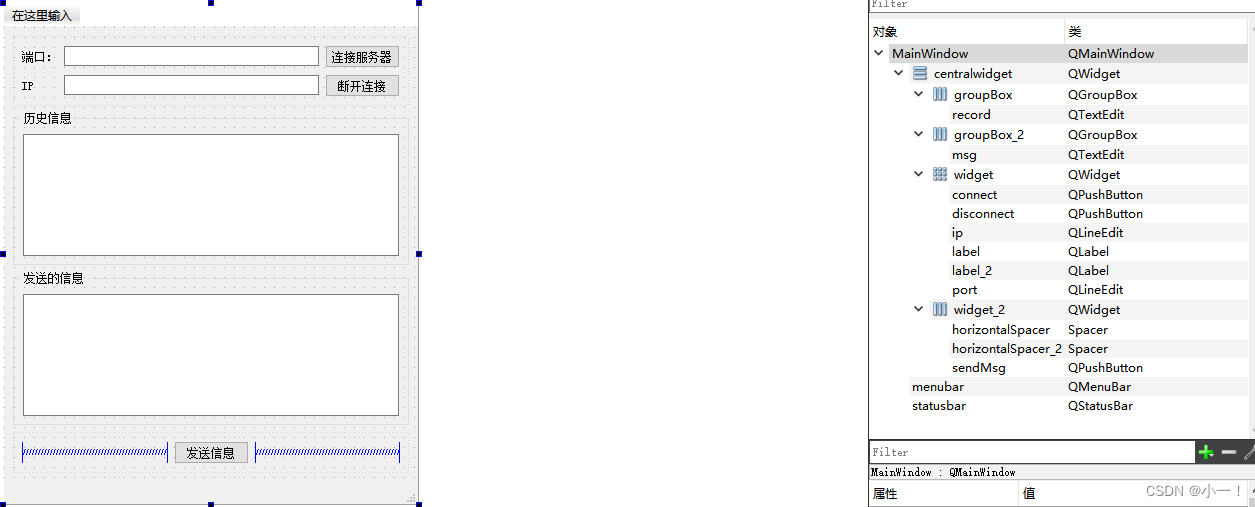
mainwindow.ui文件
多线程网络通信
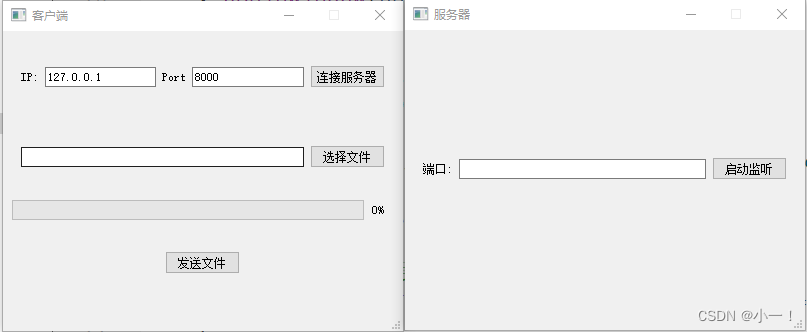
客户端通过子线程发送文件,服务器通过子线程接收文件。
通信界面
SendFileClient

mainwindow.h文件
#ifndef MAINWINDOW_H
#define MAINWINDOW_H
#include
QT_BEGIN_NAMESPACE
namespace Ui { class MainWindow; }
QT_END_NAMESPACE
class MainWindow : public QMainWindow
{
    Q_OBJECT
public:
    MainWindow(QWidget *parent = nullptr);
    ~MainWindow();
signals:
void startConnect(unsigned short,QString ip);
void sendFile(QString path);
private slots:
    void on_connectServer_clicked();
    void on_selFile_clicked();
    void on_sendFile_clicked();
private:
    Ui::MainWindow *ui;
};
#endif // MAINWINDOW_H
sendfile.h文件
#ifndef SENDFILE_H
#define SENDFILE_H
#include
#include
class SendFile : public QObject
{
    Q_OBJECT
public:
    explicit SendFile(QObject *parent = nullptr);
    //连接服务器
    void connectServer(unsigned short port,QString ip);
    //发送文件
    void sendFile(QString path);
signals:
    void connectOk();
    void gameOver();
    void CurPercent(int num);
private:
    QTcpSocket* m_tcp;
};
#endif // SENDFILE_H
main.cpp文件
#include "mainwindow.h"
#include
int main(int argc, char *argv[])
{
    QApplication a(argc, argv);
    MainWindow w;
    w.show();
    return a.exec();
}
mainwindow.cpp文件
#include "mainwindow.h"
#include "ui_mainwindow.h"
#include
#include
#include "sendfile.h"
#include
#include
MainWindow::MainWindow(QWidget *parent)
    : QMainWindow(parent)
    , ui(new Ui::MainWindow)
{
    ui->setupUi(this);
    setFixedSize(400,300);
    setWindowTitle("客户端");
    qDebug() setText("127.0.0.1");
    ui->port->setText("8000");
    ui->progressBar->setRange(0,100); //进度条设置范围
    ui->progressBar->setValue(0); //进度设置初始值
    //创建线程对象
    QThread* t = new QThread;
    //创建任务对象
    SendFile* worker = new SendFile;
    worker->moveToThread(t);  //worker对象就会在 线程 t 里面执行
    connect(this,&MainWindow::sendFile,worker,&SendFile::sendFile);
    connect(this,&MainWindow::startConnect,worker,&SendFile::connectServer);
    //处理子线程发送的信号
    connect(worker,&SendFile::connectOk,this,[=]()
    {
        QMessageBox::information(this,"连接服务器","已经成功连接了服务器");
    });
    connect(worker,&SendFile::gameOver,this,[=]()
    {
        //资源释放
        t->quit();
        t->wait();
        worker->deleteLater();
        t->deleteLater();
    });
    //接受子线程发送的数据,更新进度条
    connect(worker,&SendFile::CurPercent,ui->progressBar,&QProgressBar::setValue);
    t->start(); //启动线程
}
MainWindow::~MainWindow()
{
    delete ui;
}
void MainWindow::on_connectServer_clicked()
{
    QString ip = ui->ip->text(); //获取ip
    unsigned short port = ui->port->text().toUShort();
    emit startConnect(port,ip); //发送连接信号
}
void MainWindow::on_selFile_clicked()
{
    QString path = QFileDialog::getOpenFileName(); //获取文件路径
    if(path.isEmpty())
    {
        QMessageBox::warning(this,"打开文件","选择的文件路径不能为空!");
        return;
    }
    ui->filePath->setText(path);
}
void MainWindow::on_sendFile_clicked()
{
    emit sendFile(ui->filePath->text());
}
sendfile.cpp文件
#include "sendfile.h"
#include
#include
#include
#include
#include
SendFile::SendFile(QObject *parent) : QObject(parent)
{
}
void SendFile::connectServer(unsigned short port, QString ip)
{
    qDebug()
        m_tcp-close();
        m_tcp->deleteLater();
        //发送信号给主线程,告诉主线程服务器已经断开连接
        emit gameOver();
    });
}
void SendFile::sendFile(QString path)
{
    qDebug()
        //第一次循环的时候,要把文件大小传送过去
        static int num = 0;
        if(num==0)
        {
            m_tcp-write((char*)&fileSize, 4);
        }
        QByteArray line = file.readLine(); //一行一行读
        num += line.size();
        int percent = (num*100 / fileSize);
        emit CurPercent(percent); //更新传送文件的百分比
        m_tcp-write(line); //将数据发送给服务器
    }
}
SendFileServer

mainwindow.h文件
#ifndef MAINWINDOW_H
#define MAINWINDOW_H
#include
#include
#include "mytcpserver.h"
QT_BEGIN_NAMESPACE
namespace Ui { class MainWindow; }
QT_END_NAMESPACE
class MainWindow : public QMainWindow
{
    Q_OBJECT
public:
    MainWindow(QWidget *parent = nullptr);
    ~MainWindow();
private slots:
    void on_setListen_clicked();
private:
    Ui::MainWindow *ui;
    MyTcpServer* m_s;
};
#endif // MAINWINDOW_H
mytcpserver.h文件
#ifndef MYTCPSERVER_H
#define MYTCPSERVER_H
#include
class MyTcpServer : public QTcpServer
{
    Q_OBJECT
public:
    explicit MyTcpServer(QObject *parent = nullptr);
protected:
    virtual void incomingConnection(qintptr socketDescriptor) override;
signals:
    void newDescriptor(qintptr sock);
};
#endif // MYTCPSERVER_H
recvfile.h文件
#ifndef RECVFILE_H
#define RECVFILE_H
#include
#include
class RecvFile : public QThread
{
    Q_OBJECT
public:
    explicit RecvFile(qintptr sock,QObject *parent = nullptr);
protected:
    void run() override;
private:
    QTcpSocket* m_tcp;
signals:
    void over();
};
#endif // RECVFILE_H
main.cpp文件
#include "mainwindow.h"
#include
int main(int argc, char *argv[])
{
    QApplication a(argc, argv);
    MainWindow w;
    w.show();
    return a.exec();
}
mainwindow.cpp文件
#include "mainwindow.h"
#include "ui_mainwindow.h"
#include
#include
#include "recvfile.h"
#include
MainWindow::MainWindow(QWidget *parent)
    : QMainWindow(parent)
    , ui(new Ui::MainWindow)
{
    ui->setupUi(this);
    setFixedSize(400,300);
    setWindowTitle("服务器");
    qDebug()
       // QTcpSocket* tcp = m_s-nextPendingConnection(); //得到用于通讯的Socket对象
        //创建子线程
        RecvFile* subThread  =new RecvFile(sock);
        subThread-start(); //启动子线程
        //接收子线程信号
        connect(subThread,&RecvFile::over,this,[=]()
        {
            subThread-exit();
            subThread-wait();
            subThread->deleteLater();
            QMessageBox::information(this,"文件接收","文件接收完毕!!!");
        });
    });
}
MainWindow::~MainWindow()
{
    delete ui;
}
void MainWindow::on_setListen_clicked()
{
    unsigned short port = ui->port->text().toUShort();
    m_s->listen(QHostAddress::Any,port);
}
mytcpserver.cpp文件
#include "mytcpserver.h"
MyTcpServer::MyTcpServer(QObject *parent) : QTcpServer(parent)
{
}
//当客户端发起新的连接,就会被自动调用
void MyTcpServer::incomingConnection(qintptr socketDescriptor)
{
    //不能在子线程里面直接使用主线程定义的套接字对象,自己在子线程中定义一个
    emit newDescriptor(socketDescriptor);
}
recvfile.cpp文件
#include "recvfile.h"
#include
#include
RecvFile::RecvFile(qintptr sock,QObject *parent) : QThread(parent)
{
    m_tcp = new QTcpSocket(this);
    m_tcp->setSocketDescriptor(sock);
}
void RecvFile::run()
{

    qDebug()
        static int count = 0;
        static int total = 0;
        if(count ==0) //第一次接收,把文件大小接收过来
        {
            m_tcp-read((char*)&total,4); //接收4个字节
        }
        //读剩余的数据
        QByteArray all = m_tcp->readAll();
        count += all.size();
        file->write(all);
        //判断数据是否接收完毕
        if(count==total)
        {
            m_tcp->close();
            m_tcp->deleteLater();
            file->close();
            file->deleteLater();
            //发送信号告诉子线程数据已经接收完
            emit over();
        }
    });
    //进入事件循环
    exec(); //保证子线程不退出
}


