
解决SpringBoot启动报错 :o.s.b.d.LoggingFailureAnalysisReporter
温馨提示:这篇文章已超过387天没有更新,请注意相关的内容是否还可用!
目录
参考信息来源:
报错代码、信息如下:
报错原因
解决办法一般分两种情况
第一种情况:项目不需要连接数据库,启动时报错
第二种情况:项目需要连接数据库,启动时报错
解决方案①:在配置文件中没有添加数据库配置信息,则需要编写相应的配置
解决方案②:项目没有加载到yml或者properties文件,特别是自己的pom打包是jar的项目,需要查看自己的pom.xml文件中的packaging
解决方案③:项目使用 Profile多环境支持,但未加载到正确的配置文件
方式一:在配置文件中指定spring.profiles.active={profile}
方式二:命令行指定 --spring.profiles.active=dev
方式三:控制台指定(将项目打包后在控制台运行时调用指令)
方式四:虚拟机参数指定
解决方案④:项目使用了springcloud+nacos系列
遇到这个问题时查了许多博主的信息,此处仅为个人方面的总结(汇总但并不全面)
参考信息来源:
彻底解决Failed to configure a DataSource: ‘url‘ attribute is not specified and no embedded datasource https://blog.csdn.net/renkai721/article/details/112257894springboot项目 o.s.b.d.LoggingFailureAnalysisReporter 错误解决方法https://blog.csdn.net/weixin_39872341/article/details/105419983com.mysql.jdbc.Driver 和 com.mysql.cj.jdbc.Driver 的区别https://blog.csdn.net/a907691592/article/details/96876030
报错代码、信息如下:
Error starting ApplicationContext. To display the conditions report re-run your application with 'debug' enabled.
2023-07-02 22:02:05.181 ERROR 116952 --- [           main] o.s.b.d.LoggingFailureAnalysisReporter   :
***************************
APPLICATION FAILED TO START
***************************
Description:
Failed to configure a DataSource: 'url' attribute is not specified and no embedded datasource could be configured.
Reason: Failed to determine a suitable driver class
Action:
Consider the following:
	If you want an embedded database (H2, HSQL or Derby), please put it on the classpath.
	If you have database settings to be loaded from a particular profile you may need to activate it (no profiles are currently active).
Process finished with exit code 1
错误信息翻译:
Failed to configure a DataSource: 'url' attribute is not specified and no embedded datasource could be configured.
(配置数据源失败:“url”属性未指定,无法配置嵌入数据源)
Reason: Failed to determine a suitable driver class
(原因:无法确定合适的驱动程序类)
报错原因
在项目启动时,Spring Boot会默认加载org.springframework.boot.autoconfigure.jdbc.DataSourceAutoConfiguration 这个类,而DataSourceAutoConfiguration类使用了@Configuration注解向spring注入了dataSource bean。因为工程中没有关于dataSource相关的配置信息,当spring创建dataSource bean因缺少相关的信息就会报错。
解决办法一般分两种情况
第一种情况:项目不需要连接数据库,启动时报错
解决办法:在配置类注解@SpringBootApplication 后面加上 (exclude ={DataSourceAutoConfiguration.class}) 即可。
@SpringBootApplication(exclude = {DataSourceAutoConfiguration.class})
//@SpringBootApplication
@SpringBootApplication(exclude = {DataSourceAutoConfiguration.class}):
        这个注解的作用是:排除自动注入数据源的配置(即取消数据库的配置)。
        DataSourceAutoConfiguration.class会自动查找配置文件(application.properties或者
application.yml)中的相关数据源配置信息。
        另外,DataSourceAutoConfiguration.class默认会自动配置单数据源,如果想在项目中使用多数据源就需要排除(exlcude)它,再手动指定多数据源。
第二种情况:项目需要连接数据库,启动时报错
解决方案①:在配置文件中没有添加数据库配置信息,则需要编写相应的配置
yml配置示例:
注意,yml配置文件中在设置值时,冒号后面要加上一个空格,这是yml的基本语法。
spring:
  datasource:
    url: jdbc:mysql://localhost:3306/test?useUnicode=true&characterEncoding=UTF-8&useSSL=false
    username: root
    password: 123456
    driver-class-name: com.mysql.jdbc.Driver
properties配置示例:
spring.datasource.url=jdbc:mysql://localhost:3306/test?setUnicode=true&characterEncoding=utf8
spring.datasource.name=root
spring.datasource.password=123456
spring.datasource.driver-class-name=com.mysql.jdbc.Driver
另外,由于mysql的版本不同,相应的 ur l和 driver-class-name 设置的值也有所不同,具体参考
com.mysql.jdbc.Driver 和 com.mysql.cj.jdbc.Driver 的区别
解决方案②:项目没有加载到yml或者properties文件,特别是自己的pom打包是jar的项目,需要查看自己的pom.xml文件中的packaging
jar
如果pom中指定使用jar,系统不会自动读取到yml或者properties文件的,需要我们手动配置pom.xml。
                org.springframework.boot
                spring-boot-maven-plugin


                src/main/java

                    **/*.yml
                    **/*.properties
                    **/*.xml

                false


                src/main/resources

                    **/*.yml
                    **/*.properties
                    **/*.xml

                false


                lib

                    **/*.jar
解决方案③:项目使用 Profile多环境支持,但未加载到正确的配置文件
默认情况下,spring boot使用application.properties配置文件
解决办法:手动指定profile(4种方式)
以当前需要指定的配置文件名为 application-dev.properties 为例
方式一:在配置文件中指定spring.profiles.active={profile}
properties示例:
spring.proflies.active=dev
yml示例(yml支持多文档块方式):

方式二:命令行指定 --spring.profiles.active=dev

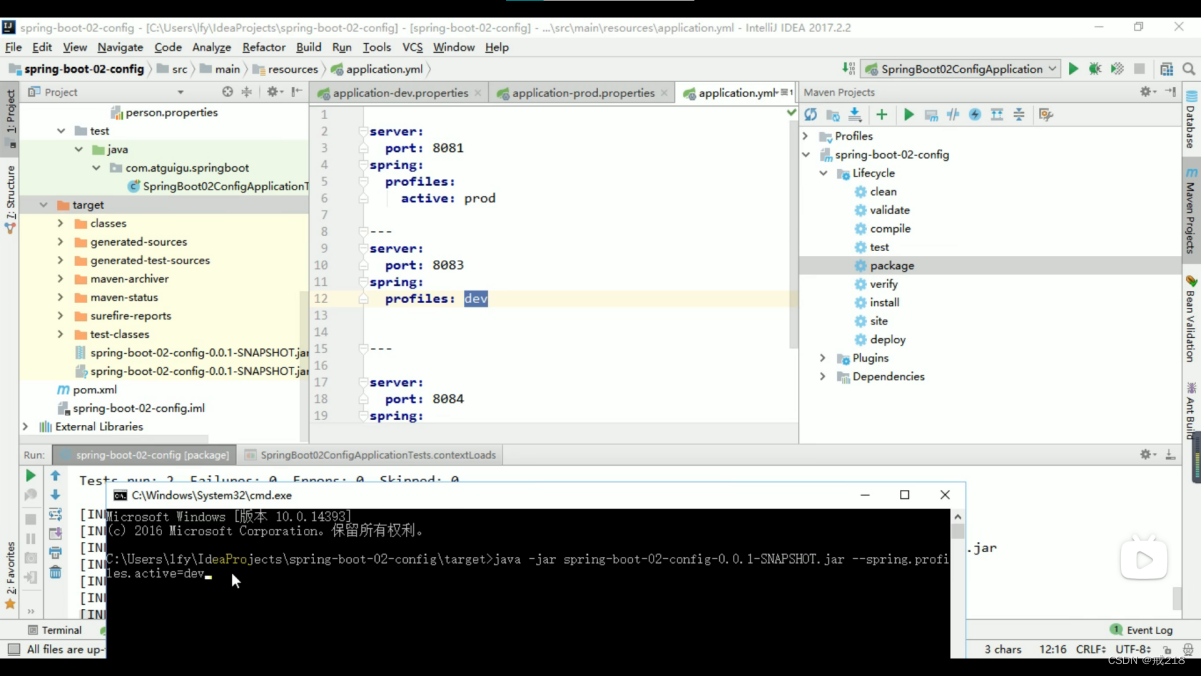
方式三:控制台指定(将项目打包后在控制台运行时调用指令)
java -jar jar包名 --spring.profiles.active=dev

方式四:虚拟机参数指定
-Dspring.profiles.active=dev

解决方案④:项目使用了springcloud+nacos系列
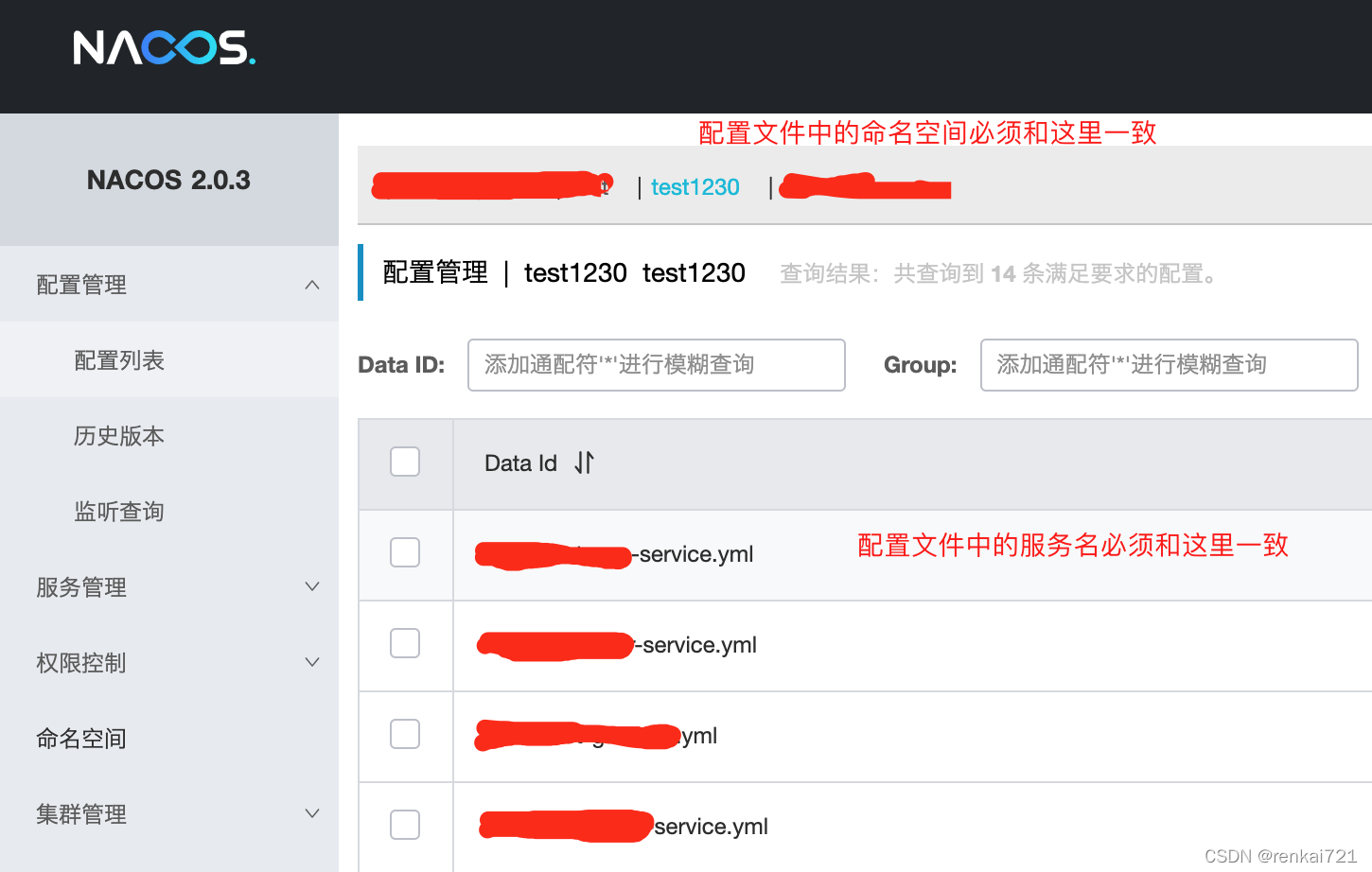
启动项目时候需要手动指定【--spring.profiles.active=test】,那么在resources文件夹下就必须要有bootstrap-test.yml或者application-test.yml文件,同时配置文件中连接的nacos地址里面也必须配置对应的命名空间,和对应服务名称的yml文件,否则也是报错。下面是配置文件的截图


当然,这只是解决一部分报错的方案,具体解决办法还需参考项目Description提供的报错信息。例如端口号被占用时也会报出o.s.b.d.LoggingFailureAnalysisReporter的错误信息,这时候就需要更改端口号,方法也很多,就比如在配置文件中指定server.port=8081(默认值8080)等。


