
ReactNative中升级IOS 17版本Crash解决
ReactNative中升级IOS 17版本Crash解决
- ReactNative中升级IOS 17版本Crash解决
- 一、问题描述
- 二、原因分析
- 三、解决方案决策
- 3.1 设置宽高为非零值
- 3.2 使用新的UIGraphicsImageRenderer替换就版本的UIGraphicsBeginImageContext
- 四、可能使用到该API的三方库
- 4.1 react-native-fast-image
- 4.2 react-native-linear-gradient
- 4.3 使用到 `UIGraphicsBeginImageContextWithOptions` 的三方库还有以下一些:
- 五、参考地址
一、问题描述
业务上用了截图相关UIGraphicsBeginImageContextWithOptions && UIGraphicsEndImageContext 会报出 Assert。
错误信息会是下面这样:
- UIGraphicsBeginImageContext() failed to allocate CGBitampContext: size={382, 0}, scale=3.000000, bitmapInfo=0x2002. Use UIGraphicsImageRenderer to avoid this assert.
或者会是这样的
- *** Assertion failure in void _UIGraphicsBeginImageContextWithOptions(CGSize, BOOL, CGFloat, BOOL)(), UIGraphics.m:410
二、原因分析
查了下 api,发现 UIGraphicsBeginImageContext 在iOS 17上已经 deprecated 了. 点击这里,看看官方文档 官方文档说明https://developer.apple.com/documentation/uikit/1623922-uigraphicsbeginimagecontext
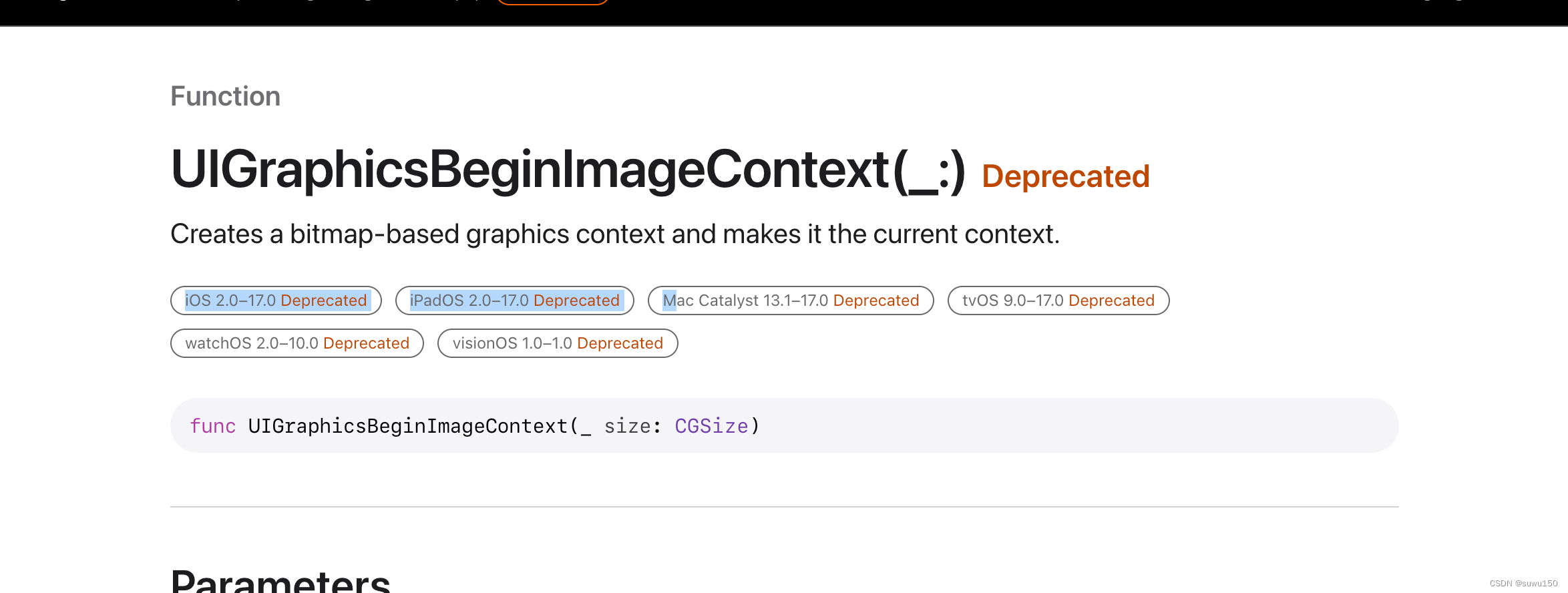
能够清楚地看到针对以下版本废弃
- iOS 2.0–17.0 Deprecated
- iPadOS 2.0–17.0 Deprecated
- Mac Catalyst 13.1–17.0 Deprecated
- tvOS 9.0–17.0 Deprecated
- watchOS 2.0–10.0 Deprecated
- visionOS 1.0–1.0 Deprecated
三、解决方案决策
3.1 设置宽高为非零值
当我们保证api 宽高不为零,则可正常使用,需要改动的地方较多,可能需要将业务中每一个设置为零属性的地方都得检查
3.2 使用新的UIGraphicsImageRenderer替换就版本的UIGraphicsBeginImageContext
改动较小,只需要改动三方库中原生内容即可,无需针对业务中涉及到的每一个元素进行校验,只需要验证部分页面展示正常即可。
四、可能使用到该API的三方库
4.1 react-native-fast-image
解决方案:react-native-fast-image 官方解决
修改node_modules文件路径: ios/FastImage/FFFastImageView.m
- (UIImage*) makeImage: (UIImage*)image withTint: (UIColor*)color {
    UIImage* newImage = [image imageWithRenderingMode: UIImageRenderingModeAlwaysTemplate];
    UIGraphicsImageRendererFormat *format = [UIGraphicsImageRendererFormat defaultFormat];
    UIGraphicsImageRenderer *renderer = [[UIGraphicsImageRenderer alloc] initWithSize:image.size format:format];
    UIImage *resultImage = [renderer imageWithActions:^(UIGraphicsImageRendererContext * _Nonnull rendererContext) {
        CGRect rect = CGRectMake(0, 0, image.size.width, image.size.height);
        [color set];
        [newImage drawInRect:rect];
    }];
    return resultImage;
}
4.2 react-native-linear-gradient
官方解决方案: react-native-linear-gradient 官方解决
按照官方解决,已经提供了新的版本包在npm仓库,此时我们可以去更新源代码或者直接更新版本:
-
下载是最新的版本
下载最新版本地址:https://github.com/react-native-linear-gradient/react-native-linear-gradient/releases/tag/v2.8.3
也可以直接去看看npm仓库。
-
直接更新源码
如果要更新源代码,则进行更新路径/node_modules/react-native-linear-gradient/ios/BVLinearGradientLayer.m 文件中 display函数。
- (void)display { [super display]; // short circuit when height or width are 0. Fixes CGContext errors throwing if (self.bounds.size.height == 0 || self.bounds.size.width == 0) { return; } BOOL hasAlpha = NO; for (NSInteger i = 0; i我项目中闪退的就是这个库出的问题,当渐变的文本有内容时,则展示是正常的,但是当文本内容不存在时,就会出现闪退,这就很诡异。
4.3 使用到 UIGraphicsBeginImageContextWithOptions 的三方库还有以下一些:
- react native本身绘画边框
- react-native本身图片处理 /node_modules/react-native/Libraries/Image/RCTImageUtils.m
- react-native-camera
- react-native-view-shot
- react-native-svg 文件包含地址: node_modules/react-native-svg/apple/RNSVGRenderable.mm
- react-native-syan-image-picker 中 TZImagePickerController
其他三方库没有列出来,可以在Xcode中进行搜索 UIGraphicsBeginImageContextWithOptions ,检查是否是有使用到,同时验证显示正常与否。如果显示有问题,则可以去三方库对应的官方Github寻求解决方案或者自行替换。
五、参考地址
Apple官方提问:https://developer.apple.com/forums/thread/733326
Apple官方提问:https://developer.apple.com/forums/thread/731385
github issue:https://github.com/react-native-linear-gradient/react-native-linear-gradient/issues/637
github: https://github.com/ibireme/YYText/issues/984
github:https://github.com/muntius/react-native-fast-image/commit/fc2b8acd97f07989e312f5cbd61d2e541fda3611
github:https://github.com/DylanVann/react-native-fast-image/issues/1002
-
- *** Assertion failure in void _UIGraphicsBeginImageContextWithOptions(CGSize, BOOL, CGFloat, BOOL)(), UIGraphics.m:410
- UIGraphicsBeginImageContext() failed to allocate CGBitampContext: size={382, 0}, scale=3.000000, bitmapInfo=0x2002. Use UIGraphicsImageRenderer to avoid this assert.


