
YOLOv8 人体姿态估计(关键点检测) python推理 && ONNX RUNTIME C++部署
温馨提示:这篇文章已超过386天没有更新,请注意相关的内容是否还可用!
目录
1、下载权重
编辑2、python 推理
3、转ONNX格式
4、ONNX RUNTIME C++ 部署
utils.h
utils.cpp
detect.h
detect.cpp
main.cpp
CmakeList.txt
1、下载权重
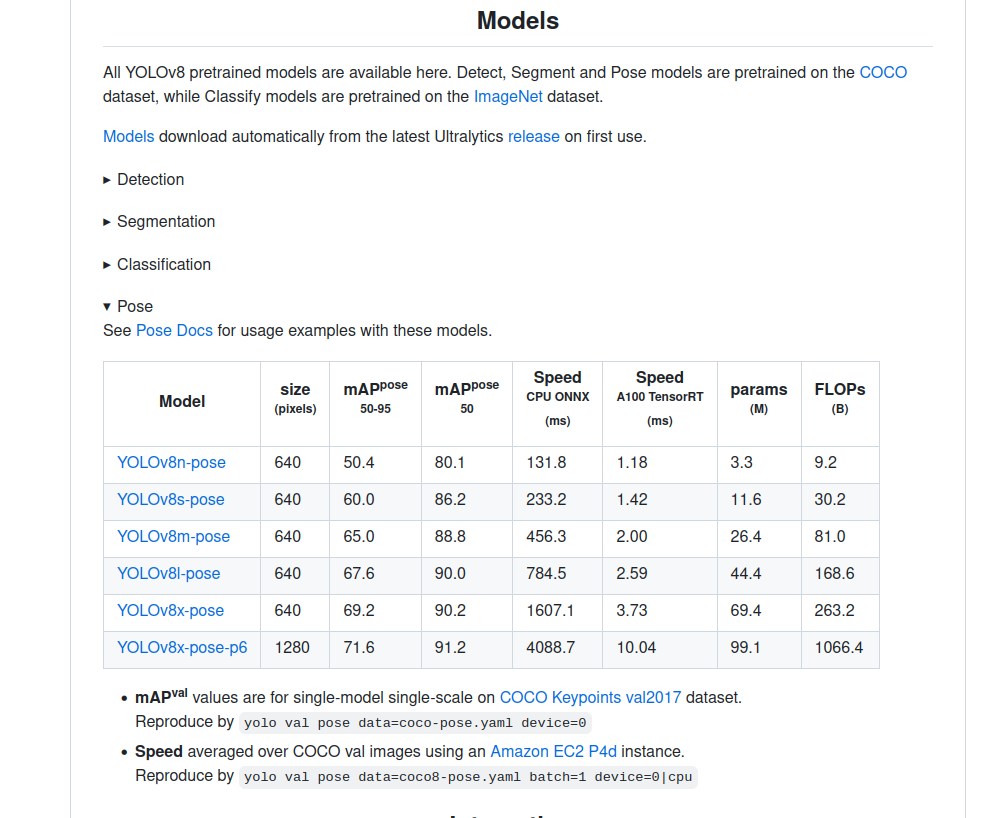
我这里之前在做实例分割的时候,项目已经下载到本地,环境也安装好了,只需要下载pose的权重就可以
2、python 推理
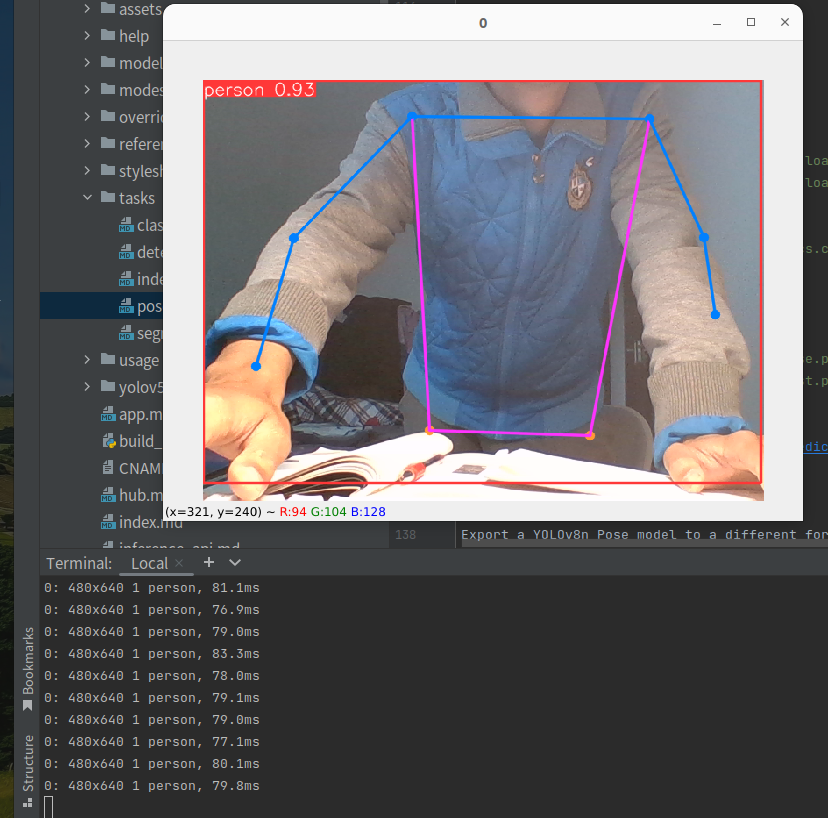
yolo task=pose mode=predict model=yolov8n-pose.pt source=0 show=true
3、转ONNX格式
yolo export model=yolov8n-pose.pt format=onnx
输出:
(yolo) jason@honor:~/PycharmProjects/pytorch_learn/yolo/ultralytics-main-yolov8$ yolo export model=yolov8n-pose.pt format=onnx
Ultralytics YOLOv8.0.94 🚀 Python-3.8.13 torch-2.0.0+cu117 CPU
YOLOv8n-pose summary (fused): 187 layers, 3289964 parameters, 0 gradients, 9.2 GFLOPs
PyTorch: starting from yolov8n-pose.pt with input shape (1, 3, 640, 640) BCHW and output shape(s) (1, 56, 8400) (6.5 MB)
ONNX: starting export with onnx 1.13.1 opset 17...
============= Diagnostic Run torch.onnx.export version 2.0.0+cu117 =============
verbose: False, log level: Level.ERROR
======================= 0 NONE 0 NOTE 0 WARNING 0 ERROR ========================
ONNX: export success ✅ 0.8s, saved as yolov8n-pose.onnx (12.9 MB)
Export complete (1.4s)
Results saved to /home/jason/PycharmProjects/pytorch_learn/yolo/ultralytics-main-yolov8
Predict:         yolo predict task=pose model=yolov8n-pose.onnx imgsz=640
Validate:        yolo val task=pose model=yolov8n-pose.onnx imgsz=640 data=/usr/src/app/ultralytics/datasets/coco-pose.yaml
Visualize:       https://netron.app
用netron查看一下: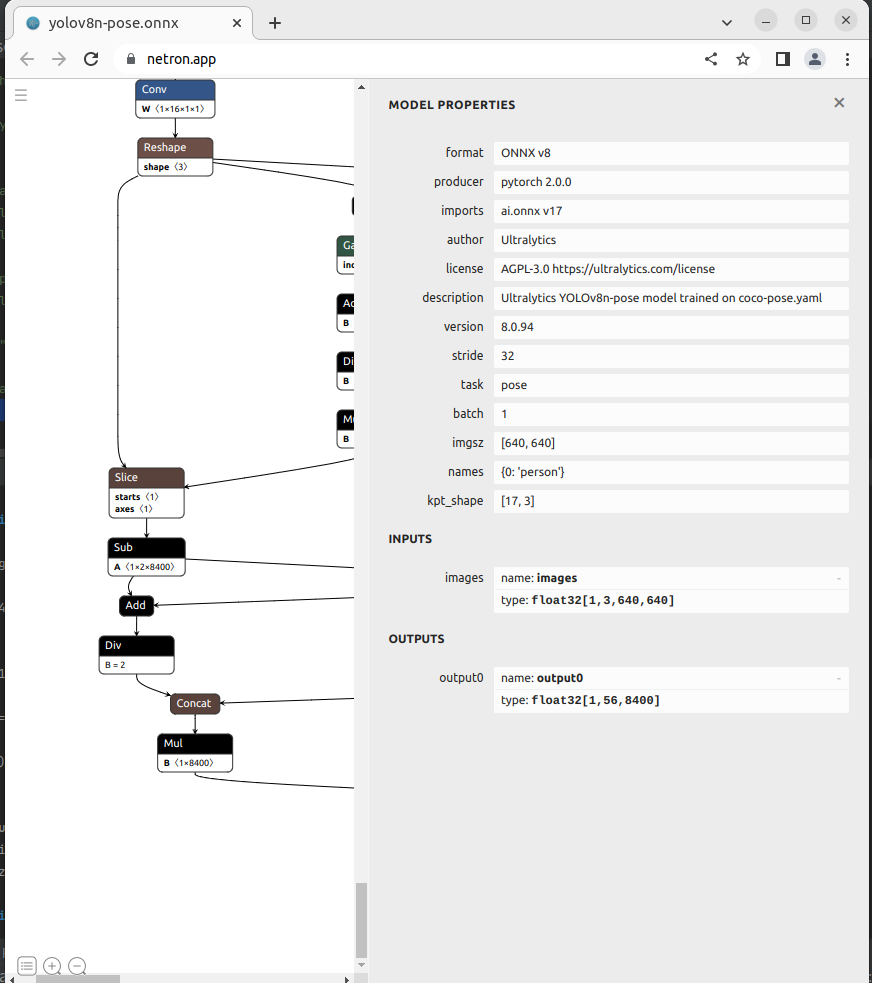
如上图所是,YOLOv8n-pose只有一个输出:
output0: float32[1,56,8400]。这里的8400,表示有8400个检测框,56为4边界框坐标信息+人这个类别预测分数,17*3关键点信息。每个关键点由x,y,v组成,v代表该点是否可见,v小于 0.5 时,表示这个关键点可能在图外,可以考虑去除掉。
COCO的annotation一共有17个关节点。
分别是:“nose”,“left_eye”, “right_eye”,“left_ear”, “right_ear”,“left_shoulder”, “right_shoulder”,“left_elbow”, “right_elbow”,“left_wrist”, “right_wrist”,“left_hip”, “right_hip”,“left_knee”, “right_knee”,“left_ankle”, “right_ankle”。示例图如下: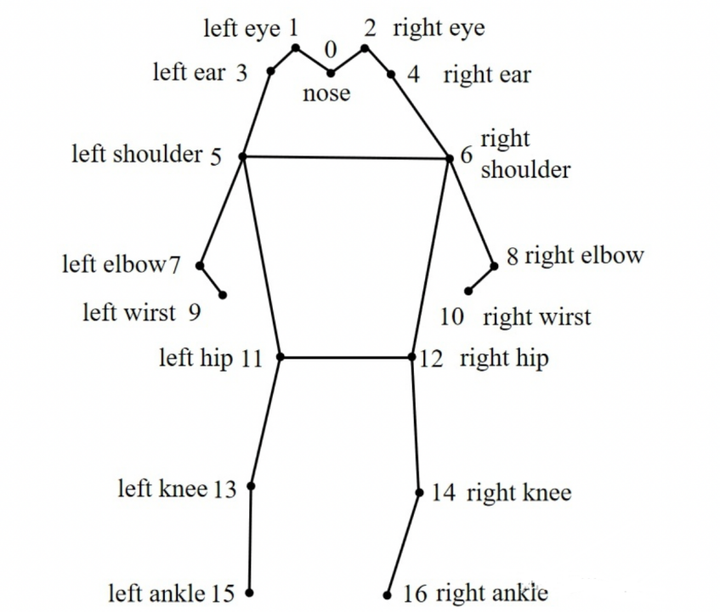
4、ONNX RUNTIME C++ 部署
第二篇参考文章的github项目,以此为参考,实现ONNX RUNTIME C++部署
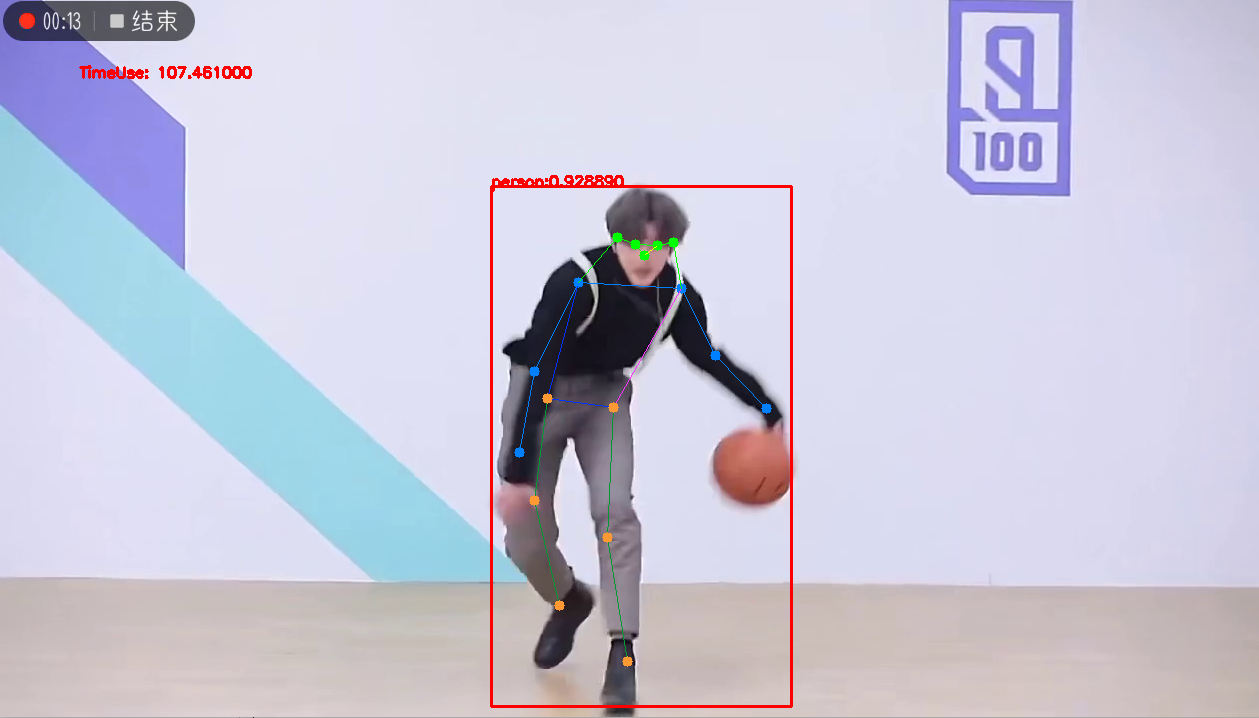
视频输入,效果如下:
utils.h
#pragma once
#include
#include

struct  OutputPose {
    cv::Rect_ box;
    int label =0;
    float confidence =0.0;
    std::vector kps;
};
void DrawPred(cv::Mat& img, std::vector& results,
              const std::vector &SKELLTON,
              const std::vector &KPS_COLORS,
              const std::vector &LIMB_COLORS);
void LetterBox(const cv::Mat& image, cv::Mat& outImage,
               cv::Vec4d& params,
               const cv::Size& newShape = cv::Size(640, 640),
               bool autoShape = false,
               bool scaleFill=false,
               bool scaleUp=true,
               int stride= 32,
               const cv::Scalar& color = cv::Scalar(114,114,114));
utils.cpp
#pragma once
#include "utils.h"
using namespace cv;
using namespace std;
void LetterBox(const cv::Mat& image, cv::Mat& outImage,
               cv::Vec4d& params,
               const cv::Size& newShape,
               bool autoShape,
               bool scaleFill,
               bool scaleUp,
               int stride,
               const cv::Scalar& color)
{
    if (false) {
        int maxLen = MAX(image.rows, image.cols);
        outImage = Mat::zeros(Size(maxLen, maxLen), CV_8UC3);
        image.copyTo(outImage(Rect(0, 0, image.cols, image.rows)));
        params[0] = 1;
        params[1] = 1;
        params[3] = 0;
        params[2] = 0;
    }
    // 取较小的缩放比例
    cv::Size shape = image.size();
    float r = std::min((float)newShape.height / (float)shape.height,
                       (float)newShape.width / (float)shape.width);
    if (!scaleUp)
        r = std::min(r, 1.0f);
    printf("原图尺寸:w:%d * h:%d, 要求尺寸:w:%d * h:%d, 即将采用的缩放比:%f\n",
           shape.width, shape.height, newShape.width, newShape.height, r);
    // 依据前面的缩放比例后,原图的尺寸
    float ratio[2]{r,r};
    int new_un_pad[2] = { (int)std::round((float)shape.width  * r), (int)std::round((float)shape.height * r)};
    printf("等比例缩放后的尺寸该为:w:%d * h:%d\n", new_un_pad[0], new_un_pad[1]);
    // 计算距离目标尺寸的padding像素数
    auto dw = (float)(newShape.width - new_un_pad[0]);
    auto dh = (float)(newShape.height - new_un_pad[1]);
    if (autoShape)
    {
        dw = (float)((int)dw % stride);
        dh = (float)((int)dh % stride);
    }
    else if (scaleFill)
    {
        dw = 0.0f;
        dh = 0.0f;
        new_un_pad[0] = newShape.width;
        new_un_pad[1] = newShape.height;
        ratio[0] = (float)newShape.width / (float)shape.width;
        ratio[1] = (float)newShape.height / (float)shape.height;
    }
    dw /= 2.0f;
    dh /= 2.0f;
    printf("填充padding: dw=%f , dh=%f\n", dw, dh);
    // 等比例缩放
    if (shape.width != new_un_pad[0] && shape.height != new_un_pad[1])
    {
        cv::resize(image, outImage, cv::Size(new_un_pad[0], new_un_pad[1]));
    }
    else{
        outImage = image.clone();
    }
    // 图像四周padding填充,至此原图与目标尺寸一致
    int top = int(std::round(dh - 0.1f));
    int bottom = int(std::round(dh + 0.1f));
    int left = int(std::round(dw - 0.1f));
    int right = int(std::round(dw + 0.1f));
    params[0] = ratio[0]; // width的缩放比例
    params[1] = ratio[1]; // height的缩放比例
    params[2] = left; // 水平方向两边的padding像素数
    params[3] = top; //垂直方向两边的padding像素数
    cv::copyMakeBorder(outImage, outImage, top, bottom, left, right, cv::BORDER_CONSTANT, color);
}
void DrawPred(cv::Mat& img, std::vector& results,
              const std::vector &SKELLTON,
              const std::vector &KPS_COLORS,
              const std::vector &LIMB_COLORS)
{
    const int num_point =17;
    for (auto &result:results){
        int  left,top,width, height;
        left = result.box.x;
        top = result.box.y;
        width = result.box.width;
        height = result.box.height;
//        printf("x: %d  y:%d  w:%d  h%d\n",(int)left, (int)top, (int)result.box.width, (int)result.box.height);
        // 框出目标
        rectangle(img, result.box,Scalar(0,0,255), 2, 8);
        // 在目标框左上角标识目标类别以及概率
        string label = "person:" + to_string(result.confidence) ;
        int baseLine;
        Size labelSize = getTextSize(label, FONT_HERSHEY_SIMPLEX, 0.5, 1, &baseLine);
        top = max(top, labelSize.height);
        putText(img, label, Point(left, top), FONT_HERSHEY_SIMPLEX, 0.5, Scalar(0,0,255), 2);
        // 连线
        auto &kps = result.kps;
//        cout 0.0f){// 不要设置为>0.5f ,>0.0f显示效果比较好
                cv::Scalar limb_color = cv::Scalar(LIMB_COLORS[k][0], LIMB_COLORS[k][1], LIMB_COLORS[k][3]);
                cv::line(img, {pos1_x, pos1_y}, {pos2_x, pos2_y}, limb_color);
            }
        // 跌倒检测
            float pt5_x = kps[5*3];
            float pt5_y = kps[5*3 + 1];
            float pt6_x = kps[6*3];
            float pt6_y = kps[6*3+1];
            float center_up_x = (pt5_x + pt6_x) /2.0f ;
            float center_up_y = (pt5_y + pt6_y) / 2.0f;
            Point center_up = Point((int)center_up_x, (int)center_up_y);
            float pt11_x = kps[11*3];
            float pt11_y = kps[11*3 + 1];
            float pt12_x = kps[12*3];
            float pt12_y = kps[12*3 + 1];
            float center_down_x = (pt11_x + pt12_x) / 2.0f;
            float center_down_y = (pt11_y + pt12_y) / 2.0f;
            Point center_down = Point((int)center_down_x, (int)center_down_y);
            float right_angle_point_x = center_down_x;
            float righ_angle_point_y = center_up_y;
            Point right_angl_point = Point((int)right_angle_point_x, (int)righ_angle_point_y);
            float a = abs(right_angle_point_x - center_up_x);
            float b = abs(center_down_y - righ_angle_point_y);
            float tan_value = a / b;
            float Pi = acos(-1);
            float angle = atan(tan_value) * 180.0f/ Pi;
            string angel_label = "angle: " + to_string(angle);
            putText(img, angel_label, Point(left, top-40), FONT_HERSHEY_SIMPLEX, 0.5, Scalar(0,0,255), 2);
            if (angle > 60.0f || center_down_y  5.0f/3.0f) // 宽高比小于0.6为站立,大于5/3为跌倒
            {
                string fall_down_label = "person fall down!!!!";
                putText(img, fall_down_label , Point(left, top-20), FONT_HERSHEY_SIMPLEX, 0.5, Scalar(0,0,255), 2);
                printf("angel:%f width/height:%f\n",angle, (double)width/ height );
            }


            cv::line(img, center_up, center_down,
                     Scalar(0,0,255), 2, 8);
            cv::line(img, center_up, right_angl_point,
                     Scalar(0,0,255), 2, 8);
            cv::line(img, right_angl_point, center_down,
                     Scalar(0,0,255), 2, 8);

        }
    }
}
detect.h
#pragma onece
#include
#include
#include
#include "utils.h"
#include
#include
class Yolov8Onnx{
private:
    template
    T VectorProduct(const std::vector& v)
    {
        return std::accumulate(v.begin(), v.end(), 1, std::multiplies());
    }
    int Preprocessing(const std::vector& SrcImgs,
                      std::vector& OutSrcImgs,
                      std::vector& params);
    const int _netWidth = 640;   //ONNX-net-input-width
    const int _netHeight = 640;  //ONNX-net-input-height
    int _batchSize = 1; //if multi-batch,set this
    bool _isDynamicShape = false;//onnx support dynamic shape
    int _anchorLength=56;// pose一个框的信息56个数
    float _classThreshold = 0.25;
    float _nmsThrehold= 0.45;
    //ONNXRUNTIME
    Ort::Env _OrtEnv = Ort::Env(OrtLoggingLevel::ORT_LOGGING_LEVEL_ERROR, "Yolov5-Seg");
    Ort::SessionOptions _OrtSessionOptions = Ort::SessionOptions();
    Ort::Session* _OrtSession = nullptr;
    Ort::MemoryInfo _OrtMemoryInfo;
    std::shared_ptr _inputName, _output_name0;
    std::vector _inputNodeNames; //输入节点名
    std::vector _outputNodeNames; // 输出节点名
    size_t _inputNodesNum = 0;        // 输入节点数
    size_t _outputNodesNum = 0;      // 输出节点数
    ONNXTensorElementDataType _inputNodeDataType;  //数据类型
    ONNXTensorElementDataType _outputNodeDataType;
    std::vector _inputTensorShape;  // 输入张量shape
    std::vector _outputTensorShape;
public:
    Yolov8Onnx():_OrtMemoryInfo(Ort::MemoryInfo::CreateCpu(OrtAllocatorType::OrtDeviceAllocator, OrtMemType::OrtMemTypeCPUOutput)) {};
    ~Yolov8Onnx() {};// delete _OrtMemoryInfo;
public:
    /** \brief Read onnx-model
    * \param[in] modelPath:onnx-model path
    * \param[in] isCuda:if true,use Ort-GPU,else run it on cpu.
    * \param[in] cudaID:if isCuda==true,run Ort-GPU on cudaID.
    * \param[in] warmUp:if isCuda==true,warm up GPU-model.
    */
    bool ReadModel(const std::string& modelPath, bool isCuda=false, int cudaId=0, bool warmUp=true);
    /** \brief  detect.
    * \param[in] srcImg:a 3-channels image.
    * \param[out] output:detection results of input image.
    */
    bool OnnxDetect(cv::Mat& srcImg, std::vector& output);
    /** \brief  detect,batch size= _batchSize
    * \param[in] srcImg:A batch of images.
    * \param[out] output:detection results of input images.
    */
    bool OnnxBatchDetect(std::vector& srcImgs, std::vector& output);
//public:
//    std::vector _className = {
//        "person", "bicycle", "car", "motorcycle", "airplane", "bus", "train", "truck", "boat", "traffic light",
//        "fire hydrant", "stop sign", "parking meter", "bench", "bird", "cat", "dog", "horse", "sheep", "cow",
//        "elephant", "bear", "zebra", "giraffe", "backpack", "umbrella", "handbag", "tie", "suitcase", "frisbee",
//        "skis", "snowboard", "sports ball", "kite", "baseball bat", "baseball glove", "skateboard", "surfboard",
//        "tennis racket", "bottle", "wine glass", "cup", "fork", "knife", "spoon", "bowl", "banana", "apple",
//        "sandwich", "orange", "broccoli", "carrot", "hot dog", "pizza", "donut", "cake", "chair", "couch",
//        "potted plant", "bed", "dining table", "toilet", "tv", "laptop", "mouse", "remote", "keyboard", "cell phone",
//        "microwave", "oven", "toaster", "sink", "refrigerator", "book", "clock", "vase", "scissors", "teddy bear",
//        "hair drier", "toothbrush"
//    };
};
detect.cpp
#include "detect.h"
using namespace std;
using namespace cv;
using namespace cv::dnn;
using namespace Ort;
bool Yolov8Onnx::ReadModel(const std::string &modelPath, bool isCuda, int cudaId, bool warmUp){
    if (_batchSize
免责声明:我们致力于保护作者版权,注重分享,被刊用文章因无法核实真实出处,未能及时与作者取得联系,或有版权异议的,请联系管理员,我们会立即处理! 部分文章是来自自研大数据AI进行生成,内容摘自(百度百科,百度知道,头条百科,中国民法典,刑法,牛津词典,新华词典,汉语词典,国家院校,科普平台)等数据,内容仅供学习参考,不准确地方联系删除处理! 图片声明:本站部分配图来自人工智能系统AI生成,觅知网授权图片,PxHere摄影无版权图库和百度,360,搜狗等多加搜索引擎自动关键词搜索配图,如有侵权的图片,请第一时间联系我们,邮箱:ciyunidc@ciyunshuju.com。本站只作为美观性配图使用,无任何非法侵犯第三方意图,一切解释权归图片著作权方,本站不承担任何责任。如有恶意碰瓷者,必当奉陪到底严惩不贷!


