
uni-app 实现凸起的 tabbar 底部导航栏
温馨提示:这篇文章已超过401天没有更新,请注意相关的内容是否还可用!
效果图
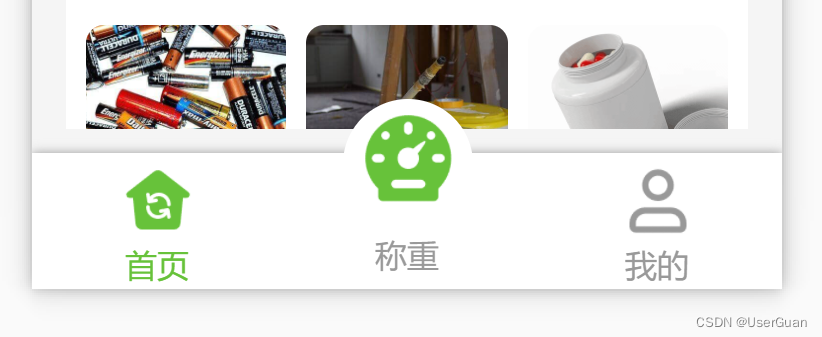
在 pages.json 中设置隐藏自带的 tabbar 导航栏
"custom": true, // 开启自定义tabBar(不填每次原来的tabbar在重新加载时都回闪现)

新建一个 custom-tabbar.vue 自定义组件页面
custom-tabbar.vue
      {{ item.text }}


export default {
  props: {
    /* 当前导航栏 */
    currPage: {
      type: Number,
      default: 0
    }
  },
  data() {
    return {
      curItem: 0, // 当前所选导航栏
      tabbarList: [
        {
          id: 0,
          pagePath: "/pages/public/index",
          iconPath: "/static/tab-bar/home.png",
          selectedIconPath: "/static/tab-bar/home-active.png",
          text: "首页",
          centerItem: false
        },
        {
          id: 1,
          pagePath: "",
          iconPath: "/static/tab-bar/bulge-active.png",
          selectedIconPath: "/static/tab-bar/bulge-active.png",
          text: "称重",
          centerItem: true
        },
        {
          id: 2,
          pagePath: "/pages/weight/my",
          iconPath: "/static/tab-bar/my.png",
          selectedIconPath: "/static/tab-bar/my-active.png",
          text: "我的",
          centerItem: false
        }
      ] // 导航栏列表
    };
  },
  mounted() {
    this.curItem = this.currPage; // 当前所选导航栏
    // #ifdef H5
    uni.hideTabBar(); // 隐藏 tabBar 导航栏
    // #endif
  },
  methods: {
    /* 导航栏切换 */
    changeItem(e) {
      // 中间凸起按钮
      if (e.id === 1) {
        // todo
        return;
      }
      uni.switchTab({ url: e.pagePath }); // 跳转到其他 tab 页面
    }
  }
};


$textDefaultColor: #999; // 文字默认颜色
$bottomBg: #fff; // 底部背景
$textSelectedColor: #67c23a; // 文字选中颜色
$centerItemBg: #fff; // 中间凸起按钮背景
.container {
  position: fixed;
  bottom: 0;
  left: 0;
  display: flex;
  align-items: center;
  width: 100%;
  height: 110rpx;
  color: $textDefaultColor;
  padding: 5rpx 0;
  background-color: $bottomBg;
  box-shadow: 0 0 10rpx #999;
}
.tabbar-item {
  display: flex;
  flex-direction: column;
  justify-content: center;
  align-items: center;
  text-align: center;
  height: 100rpx;
  .item-top {
    flex-shrink: 0;
    width: 65rpx;
    height: 65rpx;
    padding: 4rpx;
    image {
      width: 100%;
      height: 100%;
    }
  }
  .item-bottom {
    width: 100%;
    font-size: 28rpx;
  }
  .item-active {
    color: $textSelectedColor;
  }
}
.center-item {
  position: relative;
  .item-top {
    position: absolute;
    top: -55rpx;
    left: 50%;
    transform: translateX(-50%);
    width: 105rpx;
    height: 105rpx;
    background-color: $centerItemBg;
    border-radius: 50%;
  }
  .item-bottom {
    position: absolute;
    bottom: 5rpx;
  }
}
底部安全区域的适配问题可查看:uni-app 苹果手机底部安全区域的适配问题
在 main.js 中引用组件
// 注册全局组件
import customTabbar from "components/custom-tabbar.vue"
Vue.component('custom-tabbar', customTabbar)
在要用到的页面中直接调用
免责声明:我们致力于保护作者版权,注重分享,被刊用文章因无法核实真实出处,未能及时与作者取得联系,或有版权异议的,请联系管理员,我们会立即处理! 部分文章是来自自研大数据AI进行生成,内容摘自(百度百科,百度知道,头条百科,中国民法典,刑法,牛津词典,新华词典,汉语词典,国家院校,科普平台)等数据,内容仅供学习参考,不准确地方联系删除处理! 图片声明:本站部分配图来自人工智能系统AI生成,觅知网授权图片,PxHere摄影无版权图库和百度,360,搜狗等多加搜索引擎自动关键词搜索配图,如有侵权的图片,请第一时间联系我们,邮箱:ciyunidc@ciyunshuju.com。本站只作为美观性配图使用,无任何非法侵犯第三方意图,一切解释权归图片著作权方,本站不承担任何责任。如有恶意碰瓷者,必当奉陪到底严惩不贷!


