
Java 将word转为PDF的三种方式和处理在服务器上下载后乱码的格式
温馨提示:这篇文章已超过397天没有更新,请注意相关的内容是否还可用!
我这边是因为业务需要将之前导出的word文档转换为PDF文件,然后页面预览下载这样的情况。之前导出word文档又不是我做的,所以为了不影响业务,只是将最后在输出流时转换成了PDF,当时本地调用没什么问题,一切正常,后面发布测试环境使用时才发现,导出时PDF文件内容乱码了,中文没有一个显示的。
这里记录下当时遇到的问题和解决方式:
1:解决中文不显示,乱码处理情况
我这里是使用的POI进行的转换,直接将word转换成PDF,转换方式放在后面。
当时转换后的PDF长这样:
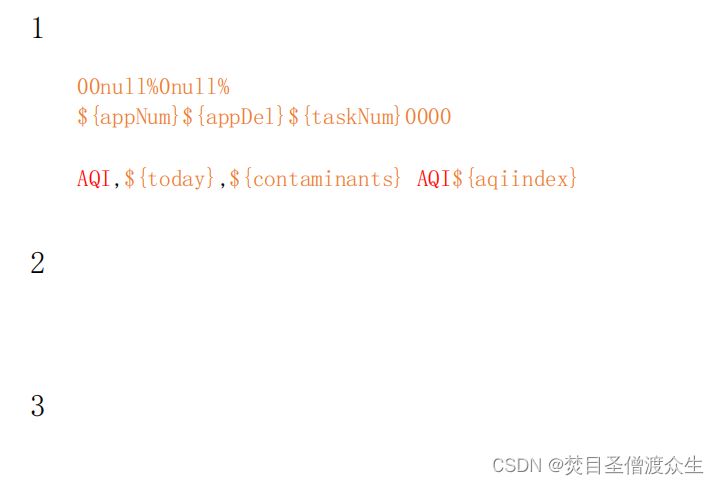
正常格式下是有很多中文说明的。下面就是处理方式:
当时就想到了是服务器上不支持中文,所以百度了一圈,果然是,然后就开始加中文字体:
Linux 服务器上字体目录是在:/user/share/fonts 下的
1:在/user/share/fonts 下创建自己的文件夹字体,我这里是my-fonts
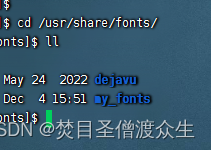
如果这里找不到的话,可以使用命令 fc-list 查看一下有没有,如果没有或者出现该命令不可用的情况,那就需要先安装基础字体:使用命令:yum -y install fontconfig ,完成之后就能看到/user/share/fonts 了
2:找到Windows中的字体,将字体上传到这个 my-fonts中
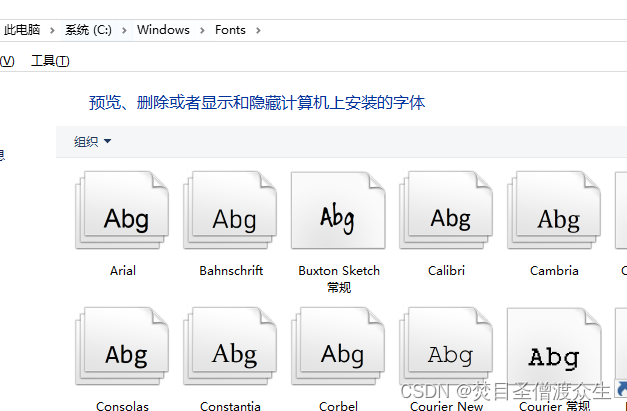
这里面有很多字体,我们需要的是中文字体,可以选择性上传,选择需要的中文字体上传,比如宋体,要和你文件模板中字体一致就行。上传到my-fonts文件夹下
3:安装
接着根据当前目录下的字体建立scale文件,
切换到my-fonts目录下执行命令:mkfontscale
若提示mkfontscale command not found,则运行yum install mkfontscale
接着建立dir文件:mkfontdir
使用命令:vi /etc/fonts/fonts.conf 修改配置文件,添加:/usr/share/fonts/my-fonts
添加后:
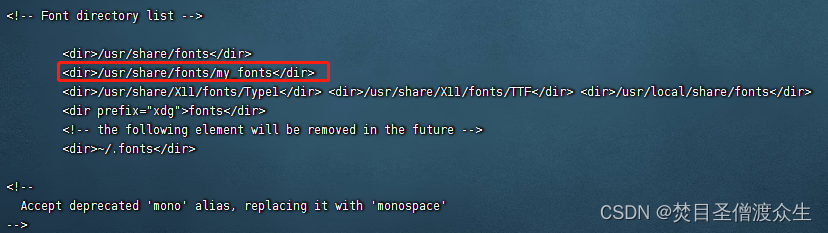
然后运行:fc-cache
fc-list #查看字体列表
4:赋予权限
chmod 777 /usr/share/fonts/my-fonts
chmod 755 /usr/share/fonts/my-fonts/*
使用命令查看: fc-list :lang=zh
2:Word转PDF实现的几种方式
1:使用POI的方式将word转换为PDF
引入依赖:
      fr.opensagres.xdocreport
      fr.opensagres.poi.xwpf.converter.pdf-gae
      2.0.1
在关闭流之前添加并修改reponse中.docx为.pdf
response.setHeader("Content-Disposition", "attachment; filename=" + java.net.URLEncoder.encode("日报-"+datetime+".pdf", "UTF-8"));
//转为PDF
PdfOptions options = PdfOptions.create();
PdfConverter.getInstance().convert(document, outStream, options);
//下面再是转word里面最后的代码,关闭流
2:使用aspose.words的Document方式将word转换为PDF
1:下载jar包:jar包下载
2:将jar包放入项目中resources目录下的lib文件夹中:
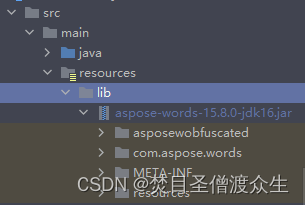
3:将jar包转为library
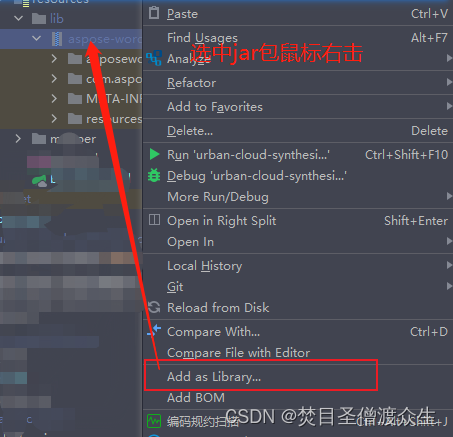
转换后就会出现上面图中箭头处的样子可以打开。
4:引入jar包依赖:
            com.aspose.words
            aspose-words
            15.8.0
            system
            ${project.basedir}/src/main/resources/lib/aspose-words-15.8.0-jdk16.jar
在打包的依赖中添加:
true
5:转换
String s = "Aspose.Total for JavaAspose.Words for JavaEnterprise20991231209912318bfe198c-7f0c-4ef8-8ff0-acc3237bf0d7sNLLKGMUdF0r8O1kKilWAGdgfs2BvJb/2Xp8p5iuDVfZXmhppo+d0Ran1P9TKdjV4ABwAgKXxJ3jcQTqE/2IRfqwnPf8itN8aFZlV3TJPYeD3yWE7IT55Gz6EijUpC7aKeoohTb4w2fpox58wWoF3SNp6sK6jDfiAUGEHYJ9pjU=";
		//去除水印
        ByteArrayInputStream is = new ByteArrayInputStream(s.getBytes());
        License license = new License();
        license.setLicense(is);
		//将XWPFDocument转换为InputStream
        ByteArrayOutputStream b = new ByteArrayOutputStream();
        //这里的document=XWPFDocument document,在下面的word转换中
        document.write(b);
        InputStream inputStream = new ByteArrayInputStream(b.toByteArray());

        //这里的Document 的引入是
        //import com.aspose.words.Document;
		//import com.aspose.words.License;
		//import com.aspose.words.SaveFormat;
        Document doc = new Document(inputStream);
        doc.save(outStream, SaveFormat.PDF);
        b.close();
        inputStream.close();
        //下面再是转word里面最后的代码,关闭流
3:使用documents4j 的方式将word转换为PDF
1:引入依赖:
            com.documents4j
            documents4j-local
            1.0.3


            com.documents4j
            documents4j-transformer-msoffice-word
            1.0.3
2:转换如下:
		//将XWPFDocument转换为InputStream
		ByteArrayOutputStream b = new ByteArrayOutputStream();
		//这里的document=XWPFDocument document,在下面的word转换中
        document.write(b);
        InputStream docxInputStream = new ByteArrayInputStream(b.toByteArray());

        //下面的引入类为:
        //import com.documents4j.api.DocumentType;
		//import com.documents4j.api.IConverter;
		//import com.documents4j.job.LocalConverter;
        IConverter converter = LocalConverter.builder().build();
        boolean execute = converter.convert(docxInputStream)
                .as(DocumentType.DOCX)
                .to(outStream)
                .as(DocumentType.PDF).schedule().get();

        b.close();
        docxInputStream.close();
3:这里之前转换word方式记录如下
1:制作word模板,将需要转换的数值写成了${变量名}。
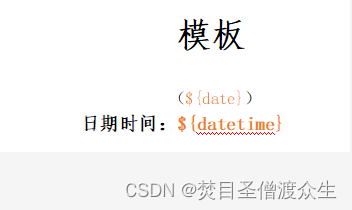
2:转换
//模板文件的地址
String filePath = "/usr/local/data/模板.docx";
//Map存储需要替换的值
Map map = new HashMap();
map.put("${date}", date);
map.put("${datetime}", datetime);
//写入
try {
            // 替换的的关键字存放到Set集合中
            Set set = map.keySet();
            // 读取模板文档
            XWPFDocument document = new XWPFDocument(new FileInputStream(filePath ));
            /**
             * 替换段落中的指定文字
             */
            // 读取文档中的段落,回车符为一个段落。
            // 同一个段落里面会被“:”等符号隔开为多个对象
            Iterator itPara = document.getParagraphsIterator();
            while (itPara.hasNext()) {
                // 获取文档中当前的段落文字信息
                XWPFParagraph paragraph = (XWPFParagraph) itPara.next();
                List run = paragraph.getRuns();
                // 遍历段落文字对象
                for (int i = 0; i
上面就是别人之前业务场景中的转换word的代码。


