
服务器停机重启后jenkins启动失败,解决办法
前几天服务器突然停机重启了,重启后发现jenkins服务停了,去启动的时候启动不了
原因:服务器停机重启后,配置的jenkins文件的jdk目录失效了,恢复成了一开始的jdk目录
解决办法:重新去/etc/init.d下的jenkins文件中配置jdk再次启动即可。
错误信息: 6085 ExecStart=/usr/bin/jenkins (code=exited, status=1/FAILURE)
[root@localhost ~]# sudo systemctl start jenkins
Job for jenkins.service failed because the control process exited with error code. See "systemctl status jenkins.service" and "journalctl -xe" for details.
[root@localhost ~]# systemctl status jenkins.service
● jenkins.service - Jenkins Continuous Integration Server
   Loaded: loaded (/usr/lib/systemd/system/jenkins.service; enabled; vendor preset: disabled)
   Active: failed (Result: start-limit) since 一 2023-10-30 09:25:16 CST; 17s ago
  Process: 6085 ExecStart=/usr/bin/jenkins (code=exited, status=1/FAILURE)
 Main PID: 6085 (code=exited, status=1/FAILURE)
10月 30 09:25:16 localhost.localdomain systemd[1]: jenkins.service: main process exited, code=exited, status=1/FAILURE
10月 30 09:25:16 localhost.localdomain systemd[1]: Failed to start Jenkins Continuous Integration Server.
10月 30 09:25:16 localhost.localdomain systemd[1]: Unit jenkins.service entered failed state.
10月 30 09:25:16 localhost.localdomain systemd[1]: jenkins.service failed.
10月 30 09:25:16 localhost.localdomain systemd[1]: jenkins.service holdoff time over, scheduling restart.
10月 30 09:25:16 localhost.localdomain systemd[1]: Stopped Jenkins Continuous Integration Server.
10月 30 09:25:16 localhost.localdomain systemd[1]: start request repeated too quickly for jenkins.service
10月 30 09:25:16 localhost.localdomain systemd[1]: Failed to start Jenkins Continuous Integration Server.
10月 30 09:25:16 localhost.localdomain systemd[1]: Unit jenkins.service entered failed state.
10月 30 09:25:16 localhost.localdomain systemd[1]: jenkins.service failed.
# 尝试启动命令
systemctl start jenkins
# 没启动起来,失败了,
解决办法 一
1、请确保服务器上有jdk
可以输入命令,查看jdk安装目录
#linux命令
which java
2、直接在配置文件配置/etc/init.d下的jenkins文件中增加现有jdk的路径:记得systemctl daemon-reload一下
vi /etc/init.d/jenkins
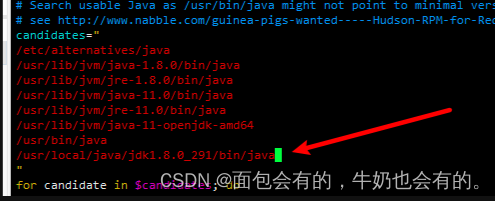
然后尝试启动命令
cd /etc/init.d
# 启动
./jenkins start
# 停止
./jenkins stop
# 状态
./jenkins status
访问jenkins端口号,启动成功。
免责声明:我们致力于保护作者版权,注重分享,被刊用文章因无法核实真实出处,未能及时与作者取得联系,或有版权异议的,请联系管理员,我们会立即处理! 部分文章是来自自研大数据AI进行生成,内容摘自(百度百科,百度知道,头条百科,中国民法典,刑法,牛津词典,新华词典,汉语词典,国家院校,科普平台)等数据,内容仅供学习参考,不准确地方联系删除处理! 图片声明:本站部分配图来自人工智能系统AI生成,觅知网授权图片,PxHere摄影无版权图库和百度,360,搜狗等多加搜索引擎自动关键词搜索配图,如有侵权的图片,请第一时间联系我们,邮箱:ciyunidc@ciyunshuju.com。本站只作为美观性配图使用,无任何非法侵犯第三方意图,一切解释权归图片著作权方,本站不承担任何责任。如有恶意碰瓷者,必当奉陪到底严惩不贷!


