
React+TS前台项目实战(二十七)-- 首页响应式构建之banner、搜索、统计模块布局
文章目录
- 前言
- 一、 效果展示
- 二、相关模块
- 1. Statistic统计模块
- 功能分析
- 代码+详细注释
- 使用方式
- 2. Search搜索模块
- 功能分析
- 代码+详细注释
- 使用方式
- 3. banner模块
- 功能分析
- 代码+详细注释
- 使用方式
- 总结
前言
前面我们已经封装了这个项目基本要用到的全局组件了,现在就开始进入页面构建以及接口对接阶段了。首先,我们先来构建首页响应式布局,接下来会讲到真实接口对接,搭配react-query实现轮询,并使用memo,useMemo,usePrevious等钩子来优化页面,避免不必要的重新渲染。
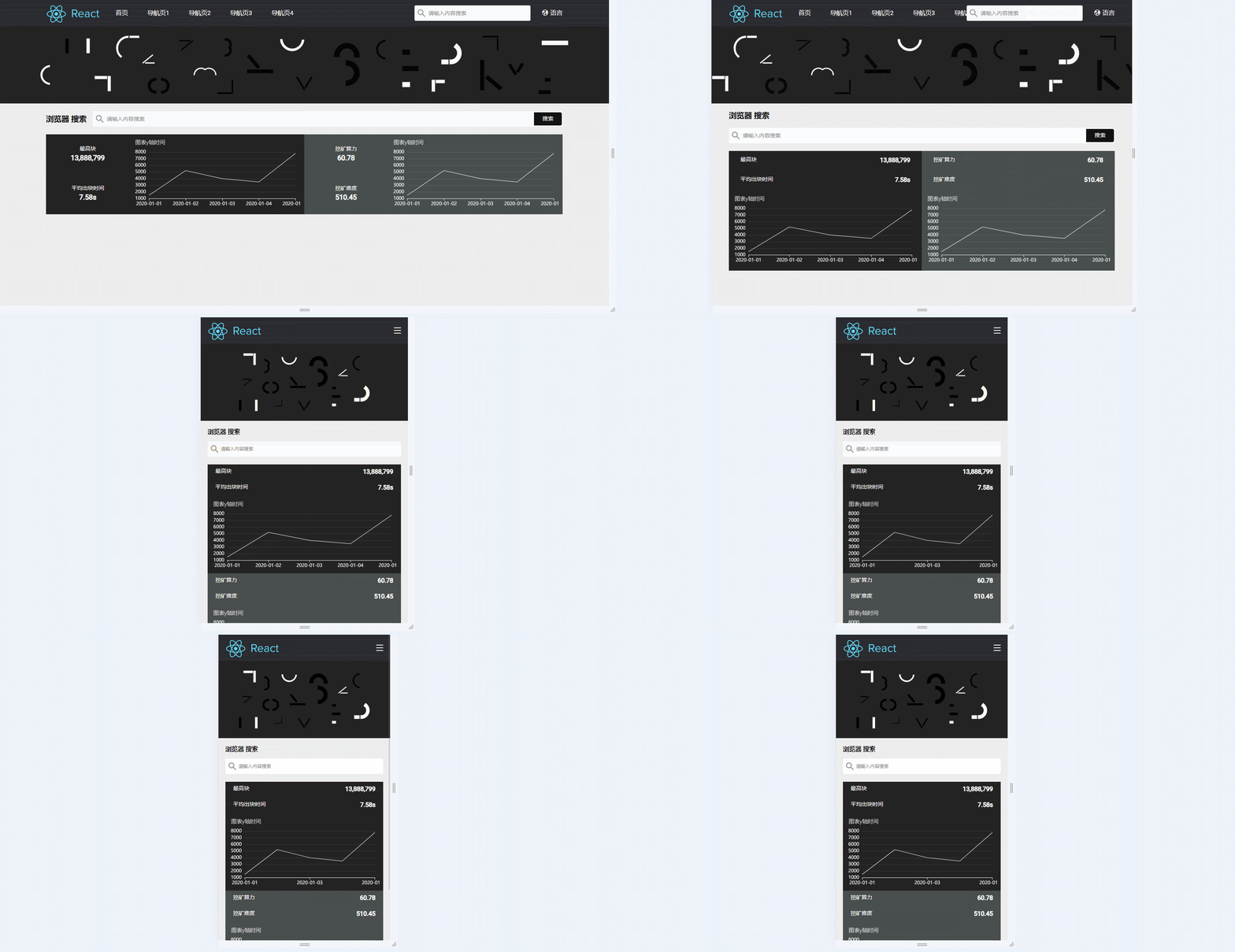
一、 效果展示
二、相关模块
1. Statistic统计模块
功能分析
该模块主要为了展示基本数据统计,以及Echart图表统计
代码+详细注释
(1) 图表统计模块抽离
// @/pages/Home/StaticBlock/HashRateEchart/index.tsx
import { memo } from "react";
import BigNumber from "bignumber.js";
import "echarts/lib/chart/line";
import "echarts/lib/component/title";
import echarts from "echarts/lib/echarts";
import { useTranslation } from "react-i18next";
import { HomeChartBlock } from "./styled";
import { ReactChartBlock } from "@/components/Echarts/common";
// 使用useOption函数生成Echarts配置对象
const useOption = () => {
  const { t } = useTranslation();
  return (data: any, useMiniStyle: boolean): echarts.EChartOption => {
    return {
      color: ["#ffffff"], // 颜色设置
      title: {
        text: "图表y轴时间", // 标题
        textAlign: "left", // 标题对齐方式
        textStyle: {
          color: "#ffffff", // 字体颜色
          fontSize: 14, // 字体大小
          fontWeight: "lighter", // 字体粗细
          fontFamily: "Lato", // 字体类型
        },
      },
      grid: {
        left: useMiniStyle ? "1%" : "2%", // 图表距离容器左边的距离
        right: "3%", // 图表距离容器右边的距离
        top: useMiniStyle ? "20%" : "15%", // 图表距离容器顶部的距离
        bottom: "2%", // 图表距离容器底部的距离
        containLabel: true, // 是否包含坐标轴的刻度标签
      },
      xAxis: [
        {
          axisLine: {
            lineStyle: {
              color: "#ffffff", // x轴颜色
              width: 1, // x轴宽度
            },
          },
          data: data.map((item: any) => item.xTime), // x轴数据
          axisLabel: {
            formatter: (value: string) => value, // x轴坐标标签格式化
          },
          boundaryGap: false, // 是否留空
        },
      ],
      yAxis: [
        {
          position: "left",
          type: "value",
          scale: true,
          axisLine: {
            lineStyle: {
              color: "#ffffff", // y轴颜色
              width: 1, // y轴宽度
            },
          },
          splitLine: {
            lineStyle: {
              color: "#ffffff", // y轴分割线颜色
              width: 0.5, // y轴分割线宽度
              opacity: 0.2, // y轴分割线透明度
            },
          },
          axisLabel: {
            formatter: (value: string) => new BigNumber(value), // y轴坐标标签格式化
          },
          boundaryGap: ["5%", "2%"], // y轴两侧留空
        },
        {
          position: "right",
          type: "value",
          axisLine: {
            lineStyle: {
              color: "#ffffff", // y轴颜色
              width: 1, // y轴宽度
            },
          },
        },
      ],
      series: [
        {
          name: t("block.hash_rate"), // 系列名称
          type: "line", // 系列类型
          yAxisIndex: 0, // y轴索引
          lineStyle: {
            color: "#ffffff", // 系列颜色
            width: 1, // 系列线条宽度
          },
          symbol: "none", // 系列标记的图形类型
          data: data.map((item: any) =>
            new BigNumber(item.yValue).toNumber()
          ), // 系列数据
        },
      ],
    };
  };
};
// HomeChartBlock组件
export default memo(() => {
  // 后期改为真实接口请求
  const echartData = [
    { xTime: "2020-01-01", yValue: "1500" },
    { xTime: "2020-01-02", yValue: "5220" },
    { xTime: "2020-01-03", yValue: "4000" },
    { xTime: "2020-01-04", yValue: "3500" },
    { xTime: "2020-01-05", yValue: "7800" },
  ];
  // 解析配置对象
  const parseOption = useOption();
  return (

      {/* 使用ReactChartBlock组件展示Echarts图表 */}
      parseOption(echartData, true)}
        notMerge
        lazyUpdate
        style={{
          height: "180px",
        }}


  );
});
--------------------------------------------------------------------------------------------------------------
// @/pages/Home/StaticBlock/HashRateEchart/styled.tsx
import styled from "styled-components";
import Link from "@/components/Link";
export const HomeChartBlock = styled(Link)`
  canvas {
    cursor: pointer;
  }
`;
export const ChartLoadingBlock = styled.div`
  height: 100%;
  display: flex;
  align-items: center;
  justify-content: center;
  .no-data {
    font-size: 18px;
  }
`;
(2)引入统计图表
// @/pages/Home/StatisticBlock/index.tsx
import { FC } from "react";
import classNames from "classnames";
import { useTranslation } from "react-i18next";
import HashRateEchart from "./HashRateEchart/index";
import { HomeStatisticBlock, HomeStatisticItem } from "./styled";
import { useStatistics } from './hook'
const StatisticBlock: FC = () => {
  // 区块链统计数据类型声明
  interface EchartsAndData {
    name: string;
    value: string;
  }
  // 使用区块链统计数据
  const useEchartsAndDataList = (): EchartsAndData[] => {
    const { t } = useTranslation();
    const statistics = useStatistics()
    return [
      {
        name: t("home.echartsAndData.name1"),
        value: t(statistics.value1),
      },
      {
        name: t("home.echartsAndData.name2"),
        value: t(statistics.value2),
      },
      {
        name: t("home.echartsAndData.name3"),
        value: t(statistics.value3),
      },
      {
        name: t("home.echartsAndData.name4"),
        value: t(statistics.value4),
      },
    ];
  };
  // 使用区块链统计数据
  const echartsAndDataList = useEchartsAndDataList();
  // 单个统计渲染组件
  const StatisticItem = ({ data }: { data: EchartsAndData }) => (

      classNames("statistic-item-left-title")}{data.name}
      classNames("statistic-item-left-value")}{data.value}

  );
  return (


        classNames("statistic-item")}
          classNames("statistic-item-left")}
            echartsAndDataList[0]}
            echartsAndDataList[1]}

          classNames("statistic-item-right")}
            {/* hash图表模拟 */}


        classNames("statistic-item")}
          classNames("statistic-item-left")}
            echartsAndDataList[2]}
            echartsAndDataList[3]}

          classNames("statistic-item-right")}
            {/* hash图表模拟 */}


  );
};
export default StatisticBlock;
--------------------------------------------------------------------------------------------------------------
// @/pages/Home/StatisticBlock/styled.tsx
import styled from "styled-components";
import variables from "@/styles/variables.module.scss";
export const HomeStatisticBlock = styled.div`
  width: 100%;
  height: 207px;
  display: flex;
  margin-bottom: 20px;
  .statistic-item {
    display: flex;
    align-items: center;
    justify-content: space-between;
    flex: 1;
    background: #232323;
    @media (max-width: ${variables.extraLargeBreakPoint}) {
      flex-direction: column;
    }
    @media (max-width: ${variables.mobileBreakPoint}) {
    }
    .statistic-item-left {
      flex: 1;
      width: 100%;
      height: 100%;
    }
    .statistic-item-right {
      flex: 2;
      width: 100%;
      height: 100%;
      padding: 10px;
      // background: linear-gradient(304deg, #6e85e0 2%, #577cdb 48%, #486ecc 99%);
      @media (max-width: ${variables.extraLargeBreakPoint}) {
      }
      @media (max-width: ${variables.mobileBreakPoint}) {
      }
    }
    &:last-child {
      background: #484e4e;
    }
  }
  @media (max-width: ${variables.extraLargeBreakPoint}) {
    height: 310px;
  }
  @media (max-width: ${variables.mobileBreakPoint}) {
    flex-direction: column;
    height: auto;
  }
`;
export const HomeStatisticItem = styled.div`
  padding: 30px;
  display: flex;
  justify-content: space-between;
  flex-direction: column;
  color: #fff;
  .statistic-item-left-title {
    font-size: 14px;
    margin-bottom: 5px;
  }
  .statistic-item-left-value {
    font-size: 18px;
    font-weight: bold;
  }
  @media (max-width: ${variables.extraLargeBreakPoint}) {
    padding: 15px 30px;
    flex-direction: row;
    margin-bottom: 0;
    .statistic-item-left-value {
      font-size: 16px;
    }
  }
  @media (max-width: ${variables.mobileBreakPoint}) {
    padding: 10px 20px;
  }
`;
使用方式
// 引入
import StatisticBlock from "./SearchBlock";
// 使用
2. Search搜索模块
功能分析
(1)引入全局封装的搜索组件,抽离成一个灵巧组件
(2)使用国际化语言
代码+详细注释
// @/pages/Home/SearchBlock/index.tsx
import { FC, memo } from "react";
import { useTranslation } from "react-i18next";
import classNames from "classnames";
import styles from "./index.module.scss";
import Search from "@/components/Search";
// SearchBlock 组件
const SearchBlock: FC = memo(() => {
  // 获取 i18n 的翻译函数
  const [t] = useTranslation();
  return (
    classNames(styles.searchBlock)}
      {/* 标题 */}
      classNames(styles.title)}{t("common.Explorer")}
      {/* 内容 */}
      classNames(styles.content)}
        {/* 搜索组件 */}


  );
});
// 导出 SearchBlock 组件
export default SearchBlock;
--------------------------------------------------------------------------------------------------------------
// @/pages/Home/SearchBlock/index.module.scss
@import "@/styles/variables.module";
.searchBlock {
  display: flex;
  align-items: center;
  margin: 20px 0;
  .title {
    display: flex;
    align-items: center;
    font-weight: 800;
    font-size: 20px;
    @media (max-width: $extraLargeBreakPoint) {
      margin-bottom: 20px;
    }
    @media (max-width: $mobileBreakPoint) {
      font-size: 16px;
      margin-bottom: 14px;
    }
  }
  .content {
    flex: 1;
    margin-left: 16px;
    @media (max-width: $extraLargeBreakPoint) {
      width: 100%;
      margin-left: 0;
    }
  }
  @media (max-width: $extraLargeBreakPoint) {
    display: block;
  }
}
使用方式
// 引入
import SearchBlock from "./SearchBlock";
// 使用
3. banner模块
功能分析
banner展示图,此处PC端和移动端采用不同的图片
代码+详细注释
// @/pages/Home/Banner/index.tsx
import classNames from "classnames";
import styles from "./index.module.scss";
export default () => classNames(styles.banner)} /;
--------------------------------------------------------------------------------------------------------------
// @/pages/Home/Banner/index.module.scss
@import "@/styles/variables.module";
$backgroundColor: #232323;
.banner {
  width: 100%;
  height: 200px;
  background: url("./assets/banner.svg") no-repeat center center / auto 100%;
  background-color: $backgroundColor;
  position: relative;
  @media (max-width: $mobileBreakPoint) {
    background-image: url("./assets/banner_phone.svg");
  }
}
使用方式
// 引入
import Banner from "./Banner";
// 使用
总结
下一篇讲【首页响应式构建之区块、交易列表布局】。关注本栏目,将实时更新。
免责声明:我们致力于保护作者版权,注重分享,被刊用文章因无法核实真实出处,未能及时与作者取得联系,或有版权异议的,请联系管理员,我们会立即处理! 部分文章是来自自研大数据AI进行生成,内容摘自(百度百科,百度知道,头条百科,中国民法典,刑法,牛津词典,新华词典,汉语词典,国家院校,科普平台)等数据,内容仅供学习参考,不准确地方联系删除处理! 图片声明:本站部分配图来自人工智能系统AI生成,觅知网授权图片,PxHere摄影无版权图库和百度,360,搜狗等多加搜索引擎自动关键词搜索配图,如有侵权的图片,请第一时间联系我们,邮箱:ciyunidc@ciyunshuju.com。本站只作为美观性配图使用,无任何非法侵犯第三方意图,一切解释权归图片著作权方,本站不承担任何责任。如有恶意碰瓷者,必当奉陪到底严惩不贷!


