
泛微 OA - 根据流程 requestid 获取流程中的附件
温馨提示:这篇文章已超过371天没有更新,请注意相关的内容是否还可用!
泛微 OA - 根据流程 requestid 获取流程中的附件
在泛微 OA 流程中,附件是通过加密上传的,如果在第三方系统想要调用 OA 系统获取 OA 附件,暂时没有很好的方法实现。但是可以在本地进行调用,得到附件 url 地址、附件 id、附件上传者等信息,拿到这些信息后,可以用过 url 地址在本地下载。
废话不多说,演示开始,封装了一个小代码:
GetDocApiByRequestId.java
此路径记得白名单加白:/test/workflow/getDocApiByRequestId
@Path("/test/workflow/getDocApiByRequestId")
public class GetDocApiByRequestId extends GetDocApiByRequestIdAction {
}
GetDocApiByRequestIdAction.java
public class GetDocApiByRequestIdAction {
Logger logger = LoggerFactory.getLogger(GetDocApiByRequestIdAction.class);
@GET
@Path("/getDoc")
@Produces(MediaType.APPLICATION_JSON)
public String doGet(@Context HttpServletRequest request) throws Exception {
String token = request.getHeader("token"); // 获取 token、appid、userid,在下文会用到
String appid = request.getHeader("appid");
String userid = request.getHeader("userid");
String requestid = request.getParameter("requestid");
Map resultMap = new HashMap(3);
if (requestid.isEmpty() || 判断requestid 是否在流程中存在,此处不再演示了) {
resultMap.put("code", "fail");
resultMap.put("data", "");
resultMap.put("msg", "requestid 错误");
return JSON.toJSONString(resultMap);
}
// 目标地址,此地址是泛微官方获取流程数据的接口,原文链接:https://e-cloudstore.com/ec/api/applist/index.html#/
String url = "http://192.168.190.5:8080/api/workflow/paService/getRequestResources?requestid=" + requestid;
HttpGet httpGet = new HttpGet(url);
// 设置类型 "application/x-www-form-urlencoded" "application/json"
httpGet.setHeader("Content-Type", "application/x-www-form-urlencoded");
httpGet.setHeader("token", token);
httpGet.setHeader("appid", appid);
httpGet.setHeader("userid", userid);
logger.info("调用 url: " + httpGet.getURI());
// httpClient实例化
CloseableHttpClient httpClient = HttpClients.createDefault();
// 执行请求并获取返回
HttpResponse response = httpClient.execute(httpGet);
HttpEntity entity = response.getEntity();
logger.info("返回状态码:" + response.getStatusLine());
// 显示结果
BufferedReader reader = new BufferedReader(new InputStreamReader(entity.getContent(), "UTF-8"));
String line = null;
StringBuffer responseSB = new StringBuffer();
while ((line = reader.readLine()) != null) {
responseSB.append(line);
}
logger.info("返回消息:" + responseSB);
ObjectMapper objectMapper = new ObjectMapper();
JsonNode jsonNode = objectMapper.readTree(responseSB.toString());
JsonNode dataNode = jsonNode.get("data");
List list = new ArrayList();
for (int i=0; i
附件信息的实体类:
DocEntity.java
@Data
@NoArgsConstructor
@AllArgsConstructor
public class DocEntity {
private String createdate; // 附件上传日期
private String createrName; // 创建人名字
private String createrid; // 用户id
private String createtime; // 上传具体时间
private String downloadUrl; // 附件 url (本次演示重点要得到的内容)
private String id; // 附件id
private String name; // 附件名字
private String type; // 附件形式
}
代码结束,打包上传服务器,postman 演示:
url:
http://192.168.190.5:8080/api/test/workflow/getDocApiByRequestId/getDoc
记得在请求头中携带 token、appid、加密后的 userid
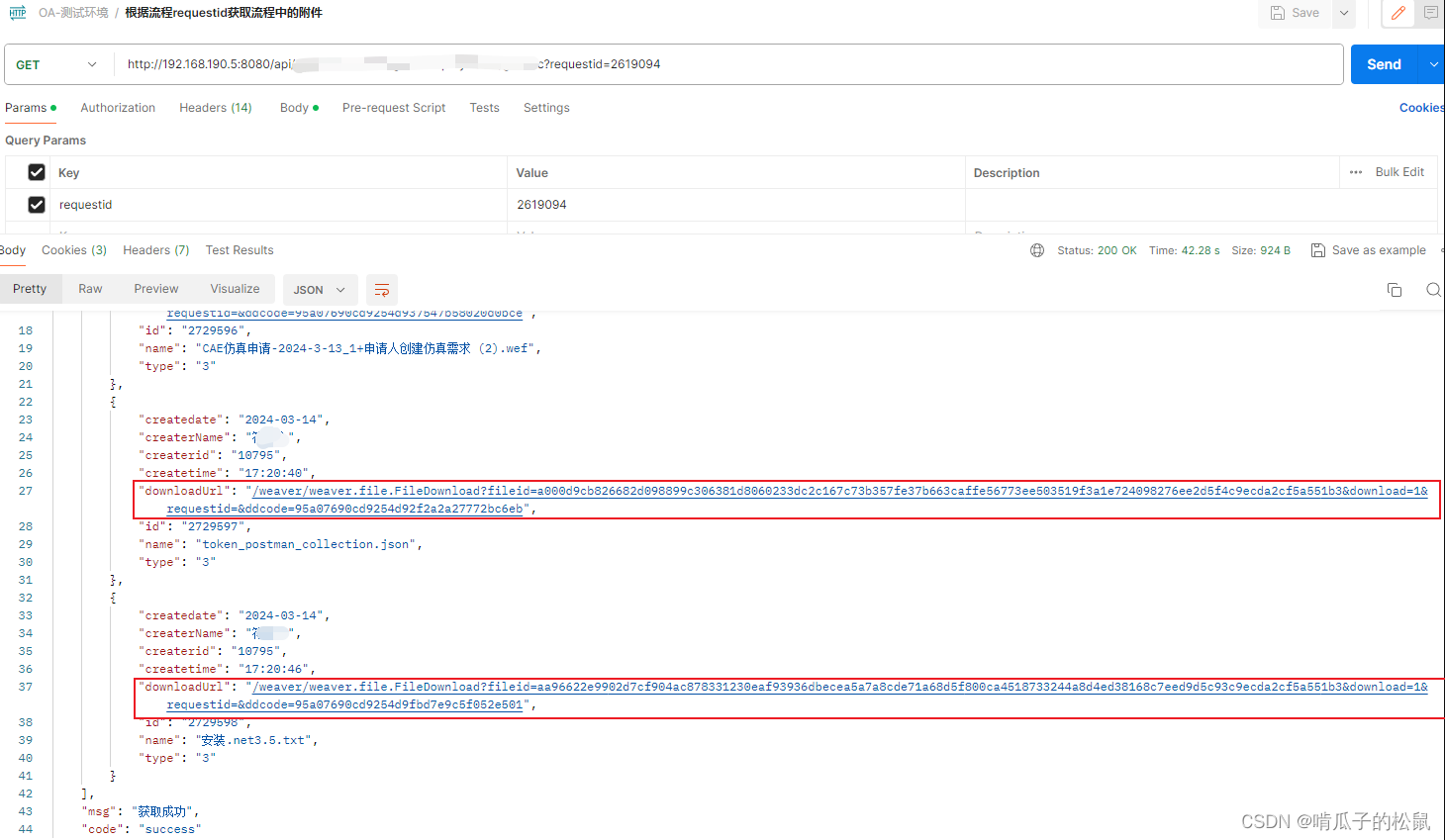
获取成功,在 url 前面拼接服务器地址就可以下载附件了。
免责声明:我们致力于保护作者版权,注重分享,被刊用文章因无法核实真实出处,未能及时与作者取得联系,或有版权异议的,请联系管理员,我们会立即处理! 部分文章是来自自研大数据AI进行生成,内容摘自(百度百科,百度知道,头条百科,中国民法典,刑法,牛津词典,新华词典,汉语词典,国家院校,科普平台)等数据,内容仅供学习参考,不准确地方联系删除处理! 图片声明:本站部分配图来自人工智能系统AI生成,觅知网授权图片,PxHere摄影无版权图库和百度,360,搜狗等多加搜索引擎自动关键词搜索配图,如有侵权的图片,请第一时间联系我们,邮箱:ciyunidc@ciyunshuju.com。本站只作为美观性配图使用,无任何非法侵犯第三方意图,一切解释权归图片著作权方,本站不承担任何责任。如有恶意碰瓷者,必当奉陪到底严惩不贷!


