
SpringBoot集成ElasticSearch(ES)
温馨提示:这篇文章已超过405天没有更新,请注意相关的内容是否还可用!
ElasticSearch环境搭建
采用docker-compose搭建,具体配置如下:
version: '3'
# 网桥es -> 方便相互通讯
networks:
  es:
services:
  elasticsearch:
    image: registry.cn-hangzhou.aliyuncs.com/zhengqing/elasticsearch:7.14.1      # 原镜像`elasticsearch:7.14.1`
    container_name: elasticsearch             # 容器名为'elasticsearch'
    restart: unless-stopped                           # 指定容器退出后的重启策略为始终重启,但是不考虑在Docker守护进程启动时就已经停止了的容器
    volumes:                                  # 数据卷挂载路径设置,将本机目录映射到容器目录
      - "./elasticsearch/data:/usr/share/elasticsearch/data"
      - "./elasticsearch/logs:/usr/share/elasticsearch/logs"
      - "./elasticsearch/config/elasticsearch.yml:/usr/share/elasticsearch/config/elasticsearch.yml"
#      - "./elasticsearch/config/jvm.options:/usr/share/elasticsearch/config/jvm.options"
      - "./elasticsearch/plugins/ik:/usr/share/elasticsearch/plugins/ik" # IK中文分词插件
    environment:                              # 设置环境变量,相当于docker run命令中的-e
      TZ: Asia/Shanghai
      LANG: en_US.UTF-8
      TAKE_FILE_OWNERSHIP: "true"  # 权限
      discovery.type: single-node
      ES_JAVA_OPTS: "-Xmx512m -Xms512m"
      #ELASTIC_PASSWORD: "123456" # elastic账号密码
    ports:
      - "9200:9200"
      - "9300:9300"
    networks:
      - es
  kibana:
    image: registry.cn-hangzhou.aliyuncs.com/zhengqing/kibana:7.14.1       # 原镜像`kibana:7.14.1`
    container_name: kibana
    restart: unless-stopped
    volumes:
      - ./elasticsearch/kibana/config/kibana.yml:/usr/share/kibana/config/kibana.yml
    ports:
      - "5601:5601"
    depends_on:
      - elasticsearch
    links:
      - elasticsearch
    networks:
      - es
部署
# 运行
docker-compose -f docker-compose-elasticsearch.yml -p elasticsearch up -d
# 运行后,给当前目录下所有文件赋予权限(读、写、执行)
#chmod -R 777 ./elasticsearch
ES访问地址:ip地址:9200 默认账号密码:elastic/123456
kibana访问地址:ip地址:5601/app/dev_tools#/console 默认账号密码:elastic/123456
设置ES密码
# 进入容器
docker exec -it elasticsearch /bin/bash
# 设置密码-随机生成密码
# elasticsearch-setup-passwords auto
# 设置密码-手动设置密码
elasticsearch-setup-passwords interactive
# 访问
curl 127.0.0.1:9200 -u elastic:123456
一、依赖
        springboot-demo
        com.et
        1.0-SNAPSHOT

    4.0.0
    elasticsearch


            org.springframework.boot
            spring-boot-starter-data-elasticsearch


            org.springframework.boot
            spring-boot-starter-web


            org.springframework.boot
            spring-boot-starter-webflux


            com.alibaba
            fastjson
            ${fastjson.version}


            org.springframework.boot
            spring-boot-starter-test
            test


            io.projectreactor
            reactor-test
            test
二、配置文件和启动类
# elasticsearch.yml 文件中的 cluster.name
spring.data.elasticsearch.cluster-name=docker-cluster
# elasticsearch 调用地址,多个使用“,”隔开
spring.data.elasticsearch.cluster-nodes=127.0.0.1:9300
#spring.data.elasticsearch.repositories.enabled=true
#spring.data.elasticsearch.username=elastic
#spring.data.elasticsearch.password=123456
#spring.data.elasticsearch.network.host=0.0.0.0
@SpringBootApplication
public class EssearchApplication {
    public static void main(String[] args) {
        SpringApplication.run(EssearchApplication.class, args);
    }
}
三、document实体类
@Ducument(indexName = "orders",type = "product")
@Mapping(mappingPath = "productIndex.json")//解决ik分词不能使用的问题
public class ProductDocument implements Serializable{

	@Id
    private String id;
    //@Field(analyzer = "ik_max_word",searchAnalyzer = "ik_max_word")
    private String productName;
    //@Field(analyzer = "ik_max_word",searchAnalyzer = "ik_max_word")
    private String productDesc;
    private Date createTime;
    private Date updateTime;
    public String getId() {
        return id;
    }
    public void setId(String id) {
        this.id = id;
    }
    public String getProductName() {
        return productName;
    }
    public void setProductName(String productName) {
        this.productName = productName;
    }
    public String getProductDesc() {
        return productDesc;
    }
    public void setProductDesc(String productDesc) {
        this.productDesc = productDesc;
    }
    public Date getCreateTime() {
        return createTime;
    }
    public void setCreateTime(Date createTime) {
        this.createTime = createTime;
    }
    public Date getUpdateTime() {
        return updateTime;
    }
    public void setUpdateTime(Date updateTime) {
        this.updateTime = updateTime;
    }
}
四、Service接口以及实现类
public interface EsSearchService extends BaseSearchService{

	//保存
	void save(ProductDocument... productDocuments);
	//删除
	void delete(String id);

	//清空索引
	void deleteAll();
	//根据id查询
	ProductDocument getById(String id);
	//查询全部
	List getAll();
}
@Service
public class EsSearchServiceImpl extends BaseSearchServiceImpl implements EsSearchService {
	private Logger log = LoggerFactory.getLogger(getClass());
	@Resource
	private ElasticsearchTemplate elasticsearchTemplate;
	@Resource
	private ProductDocumentRepository productDocumentRepository;

	@Override
    public void save(ProductDocument ... productDocuments) {
        elasticsearchTemplate.putMapping(ProductDocument.class);
        if(productDocuments.length > 0){
            /*Arrays.asList(productDocuments).parallelStream()
                    .map(productDocumentRepository::save)
                    .forEach(productDocument -> log.info("【保存数据】:{}", JSON.toJSONString(productDocument)));*/
            log.info("【保存索引】:{}",JSON.toJSONString(productDocumentRepository.saveAll(Arrays.asList(productDocuments))));
        }
    }
    @Override
    public void delete(String id) {
        productDocumentRepository.deleteById(id);
    }
    @Override
    public void deleteAll() {
        productDocumentRepository.deleteAll();
    }
    @Override
    public ProductDocument getById(String id) {
        return productDocumentRepository.findById(id).get();
    }
    @Override
    public List getAll() {
        List list = new ArrayList();
        productDocumentRepository.findAll().forEach(list::add);
        return list;
    }
}
五、repository
@Component
public interface ProductDocumentRepository extends ElasticsearchRepository {
}
productIndex.json
{
  "properties": {
    "createTime": {
      "type": "long"
    },
    "productDesc": {
      "type": "text",
      "analyzer": "ik_max_word",
      "search_analyzer": "ik_max_word"
    },
    "productName": {
      "type": "text",
      "analyzer": "ik_max_word",
      "search_analyzer": "ik_max_word"
    },
    "updateTime": {
      "type": "long"
    }
  }
}
六、测试
@RunWith(SpringRunner.class)
@SpringBootTest
public class EssearchApplicationTests {
    private Logger log = LoggerFactory.getLogger(getClass());
    @Autowired
    private EsSearchService esSearchService;
    @Test
    public void save() {
        log.info("【创建索引前的数据条数】:{}",esSearchService.getAll().size());
        ProductDocument productDocument = ProductDocumentBuilder.create()
                .addId(System.currentTimeMillis() + "01")
                .addProductName("无印良品 MUJI 基础润肤化妆水")
                .addProductDesc("无印良品 MUJI 基础润肤化妆水 高保湿型 200ml")
                .addCreateTime(new Date()).addUpdateTime(new Date())
                .builder();
        ProductDocument productDocument1 = ProductDocumentBuilder.create()
                .addId(System.currentTimeMillis() + "02")
                .addProductName("荣耀 V10 尊享版")
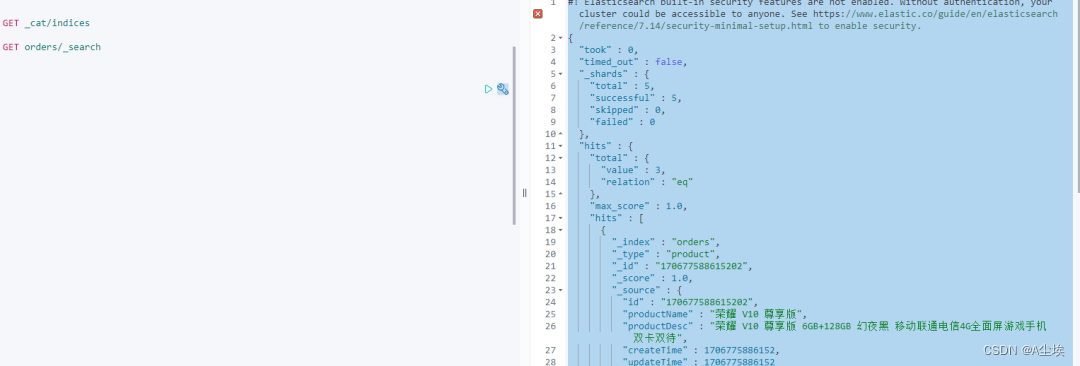
                .addProductDesc("荣耀 V10 尊享版 6GB+128GB 幻夜黑 移动联通电信4G全面屏游戏手机 双卡双待")
                .addCreateTime(new Date()).addUpdateTime(new Date())
                .builder();
        ProductDocument productDocument2 = ProductDocumentBuilder.create()
                .addId(System.currentTimeMillis() + "03")
                .addProductName("资生堂(SHISEIDO) 尿素红罐护手霜")
                .addProductDesc("日本进口 资生堂(SHISEIDO) 尿素红罐护手霜 100g/罐 男女通用 深层滋养 改善粗糙")
                .addCreateTime(new Date()).addUpdateTime(new Date())
                .builder();
        esSearchService.save(productDocument,productDocument1,productDocument2);
        log.info("【创建索引ID】:{},{},{}",productDocument.getId(),productDocument1.getId(),productDocument2.getId());
        log.info("【创建索引后的数据条数】:{}",esSearchService.getAll().size());
    }
    @Test
    public void getAll(){
        esSearchService.getAll().parallelStream()
                .map(JSON::toJSONString)
                .forEach(System.out::println);
    }
    @Test
    public void deleteAll() {
        esSearchService.deleteAll();
    }
    @Test
    public void getById() {
        log.info("【根据ID查询内容】:{}", JSON.toJSONString(esSearchService.getById("154470178213401")));
    }
    @Test
    public void query() {
        log.info("【根据关键字搜索内容】:{}", JSON.toJSONString(esSearchService.query("无印良品荣耀",ProductDocument.class)));
    }
    @Test
    public void queryHit() {
        String keyword = "联通尿素";
        String indexName = "orders";
        List searchHits = esSearchService.queryHit(keyword,indexName,"productName","productDesc");
        log.info("【根据关键字搜索内容,命中部分高亮,返回内容】:{}", JSON.toJSONString(searchHits));
        //[{"highlight":{"productDesc":"无印良品 MUJI 基础润肤化妆水 高保湿型 200ml","productName":"无印良品 MUJI 基础润肤化妆水"},"source":{"productDesc":"无印良品 MUJI 基础润肤化妆水 高保湿型 200ml","createTime":1544755966204,"updateTime":1544755966204,"id":"154475596620401","productName":"无印良品 MUJI 基础润肤化妆水"}},{"highlight":{"productDesc":"荣耀 V10 尊享版 6GB+128GB 幻夜黑 移动联通电信4G全面屏游戏手机 双卡双待","productName":"荣耀 V10 尊享版"},"source":{"productDesc":"荣耀 V10 尊享版 6GB+128GB 幻夜黑 移动联通电信4G全面屏游戏手机 双卡双待","createTime":1544755966204,"updateTime":1544755966204,"id":"154475596620402","productName":"荣耀 V10 尊享版"}}]
    }
    @Test
    public void queryHitByPage() {
        String keyword = "联通尿素";
        String indexName = "orders";
        Page searchHits = esSearchService.queryHitByPage(1,1,keyword,indexName,"productName","productDesc");
        log.info("【分页查询,根据关键字搜索内容,命中部分高亮,返回内容】:{}", JSON.toJSONString(searchHits));
        //[{"highlight":{"productDesc":"无印良品 MUJI 基础润肤化妆水 高保湿型 200ml","productName":"无印良品 MUJI 基础润肤化妆水"},"source":{"productDesc":"无印良品 MUJI 基础润肤化妆水 高保湿型 200ml","createTime":1544755966204,"updateTime":1544755966204,"id":"154475596620401","productName":"无印良品 MUJI 基础润肤化妆水"}},{"highlight":{"productDesc":"荣耀 V10 尊享版 6GB+128GB 幻夜黑 移动联通电信4G全面屏游戏手机 双卡双待","productName":"荣耀 V10 尊享版"},"source":{"productDesc":"荣耀 V10 尊享版 6GB+128GB 幻夜黑 移动联通电信4G全面屏游戏手机 双卡双待","createTime":1544755966204,"updateTime":1544755966204,"id":"154475596620402","productName":"荣耀 V10 尊享版"}}]
    }
    @Test
    public void deleteIndex() {
        log.info("【删除索引库】");
        esSearchService.deleteIndex("orders");
    }
}
免责声明:我们致力于保护作者版权,注重分享,被刊用文章因无法核实真实出处,未能及时与作者取得联系,或有版权异议的,请联系管理员,我们会立即处理! 部分文章是来自自研大数据AI进行生成,内容摘自(百度百科,百度知道,头条百科,中国民法典,刑法,牛津词典,新华词典,汉语词典,国家院校,科普平台)等数据,内容仅供学习参考,不准确地方联系删除处理! 图片声明:本站部分配图来自人工智能系统AI生成,觅知网授权图片,PxHere摄影无版权图库和百度,360,搜狗等多加搜索引擎自动关键词搜索配图,如有侵权的图片,请第一时间联系我们,邮箱:ciyunidc@ciyunshuju.com。本站只作为美观性配图使用,无任何非法侵犯第三方意图,一切解释权归图片著作权方,本站不承担任何责任。如有恶意碰瓷者,必当奉陪到底严惩不贷!


